Browser Automation Getting Started: A First Run Map
Order install, profile launch, context isolation, and evidence into one repeatable first browser automation run, without claiming a test you did not perform.
BotBrowser Team
Want the structured docs for Getting Started?
This article lives in the editorial library. For step-by-step setup, reference material, and ongoing updates, jump into the docs section.
The first automation run decides whether the rest of the project is reproducible. This hub connects the getting-started cluster and adds a bounded first-run record that names the install, the launch, the context boundary, and the evidence, starting with Playwright with profile-backed browser identity.
BotBrowser supports launching an authorized profile from a driver such as Playwright or Puppeteer and keeps browser-visible values aligned with that profile; it cannot install your driver, choose your profile for you, or certify that a third-party site will accept the session, and it does not replace the driver's own documentation.
TL;DR
- Install the browser and the driver, then prove both start before writing any automation.
- Launch with an explicit profile and record which profile file the run used.
- Give each task its own context and close it in the same run.
- Keep a short first-run record so the second run can be compared with the first.
Contents
- Map the getting-started surfaces
- Walk the getting-started cluster
- Run the first session
- Plan the first project
- Keep the run repeatable
- Fix the first failure
- Conclusion
Map the getting-started surfaces
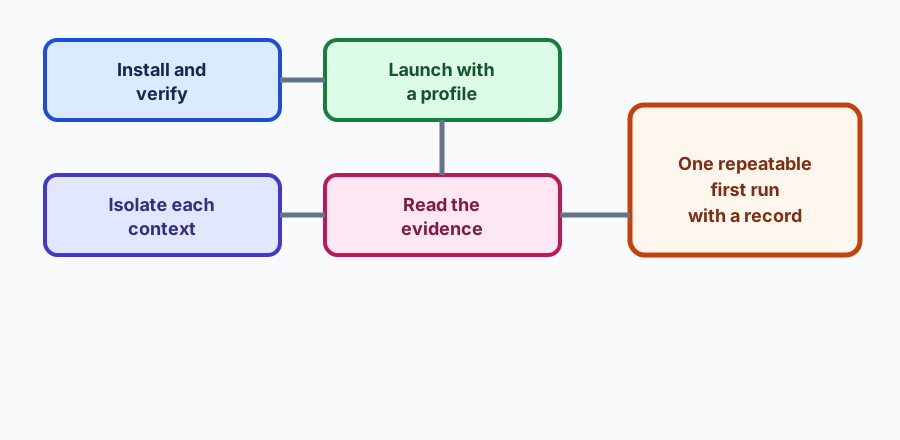
A first run has four surfaces. Install covers the browser package, the driver, and the version alignment between them. Launch covers how the process starts: which executable, which profile flag, and which headless or headed mode. Context isolation covers what each task owns: its own browser context, its own pages, and the cleanup that closes them. Evidence covers what the run leaves behind: the console output, the version strings, and the result of the owned check.
These surfaces fail in an order that makes diagnosis easy if you respect it. An install problem appears before anything launches at all. A launch problem appears as a browser that starts without the profile you declared. A context problem appears as state leaking between two tasks that should have been independent. An evidence problem appears later, when nobody can say which build produced a result.
BotBrowser's role in a first run is narrow: it loads the profile you named and keeps the browser-visible values consistent with it. Everything else, the driver version, the script structure, and the cleanup, belongs to your automation code.
Walk the getting-started cluster
- Playwright with profile-backed identity is the Playwright launch path and its pitfalls.
- Puppeteer launch and profile pitfalls covers the Puppeteer equivalent.
- Selenium browser profile integration covers Selenium session ownership.
- Browser profiles: formats and rotation explains the profile file you will pass.
- The launcher guide covers profiles, proxies, and setup.
- CLI recipes collects concrete command examples.
- Lightweight automation with the DevTools Protocol covers the framework-less path.
- Browser automation test fixtures and isolation covers what a first run should own.
- Reproducible browser bug reports covers what to record when the first run fails.
- Verifying a browser fingerprint covers a bounded check of what the page can see.
The hub owns the order and the record shape. Each linked article owns the detail of its surface and the failure it can produce.
Run the first session
Write down the inputs before the first request: the driver and its version, the browser package, the profile file, and the check you intend to run. Then run one session that exercises each surface once and record the result.
{
  "runId": "first-run-20261019-01",
  "declared": {
    "driver": "[email protected]",
    "browserPackage": "standard-linux-x64",
    "profile": "fresh-temporary.enc",
    "mode": "headless"
  },
  "observed": {
    "install": "executable-started",
    "launch": "profile-loaded",
    "context": "closed-after-task",
    "evidence": "console-and-check-recorded"
  },
  "firstFailure": null,
  "testedOn": "2026-10-19"
}
The record is data, not a report. It should be short enough to paste into a support thread and explicit enough that the same four rows can be re-run with the recorded driver and profile.
Prove the install before writing automation. Run the browser with a trivial page and confirm it starts, then run the driver's own version command. A driver that cannot start the browser produces an error that looks like a profile problem, and a browser that starts without a driver produces an error that looks like a script problem. Separating the two checks takes a minute and saves an afternoon.
Launch with an explicit profile path. A first run that relies on a default profile tests something other than your automation. Pass the profile file explicitly, then read a browser-visible value that the profile declares, such as the platform or the timezone, and record it. If the value does not match the profile, the launch is the failing surface, not the script.
Give each task its own context. An automation run that reuses one context across unrelated tasks will eventually leak cookies, storage, or permissions between them. Create a context per task, run the task, and close the context in the same function. Record whether the close happened, because a leaked context is invisible until the host runs out of memory.
Keep the first check owned and small. Use a page your team controls, with a pinned version, and assert one thing: the profile loaded, or the page rendered, or the interaction completed. A first run against a third-party site measures that site's policy as much as your setup, and its failure does not tell you which of your four surfaces is wrong.
Record the versions on both sides. The driver version and the browser package version belong in the same record as the result, because a shared setup fails at a different layer from a driver update. When the next run behaves differently, the two records show which side moved.
Handle the headless choice deliberately. A headless first run is faster to automate and easier to run in CI, and a headed run is easier to debug when the page renders differently than expected. Record the mode you used, because a mode change between runs is a different experiment, and a rendering difference in headless mode is not evidence about the headed behavior.
Clean up even when the run fails. Wrap the session so the context and the browser close on an exception as well as on success. A first run that left a browser process behind makes the second run measure the leftover state, which is how a simple setup turns into an intermittent failure.
Plan the first project
The shape of the automation project decides how much of the first run survives contact with the second. Keep three things separate from the start: the launch code that knows about the browser and the profile, the task code that knows about the page under test, and the fixture code that both share. When those three are mixed, every new task copies the launch details, and a later profile change has to be applied in a dozen places.
Put the profile path in a configuration value rather than a literal inside a script. A first run usually uses one profile, and the second run needs a different one, either to test rotation or to isolate a team; the profile formats article covers the two containers that decide which file you pass. A configuration value makes that a one-line change, and it makes the profile part of the recorded input rather than an invisible constant.
Make the browser launch a function such as createSession({ profile, headless }) that returns a session object. The session object owns the browser, the context, and a close method. The task receives the session and never sees the launch flags. This mirrors how Playwright and Puppeteer describe context ownership, and it means a task written for one driver can be adapted to another without rewriting the page logic.
Keep the fixture page versioned alongside the code. A fixture that changes without a version bump makes two runs incomparable, and the first symptom is a difference that looks like a browser regression. A version string in the fixture and in the record is enough to tell the two apart.
Choose the driver for the job, not the demo
Playwright, Puppeteer, Selenium, and a direct DevTools Protocol client all drive the same browser, and each one makes a different trade. Playwright offers a mature context API and a trace viewer, Puppeteer has a smaller surface and a long history in Chrome automation, Selenium matches a broader cross-browser standard, and a protocol client removes the framework entirely at the cost of doing the plumbing yourself.
For a first run, choose the driver your team already uses for other pages. The launch path is the part you are testing, and an unfamiliar driver adds a second unknown. The cluster links above cover the profile-backed launch for each of the main drivers, and the protocol path for a framework-less setup.
Whatever the driver, keep the profile flag in the launch options and not in a page-level script. A page-level workaround that sets a value after load tests something the browser did not provide, and it will disagree with the declared profile on the next navigation.
Decide what the first run should prove
A first run is a check with one question, and the question should be stated before the script is written. "Does the browser start with this profile" is a good first question. "Does the page render at the declared platform" is a good second. "Does the site accept the session" is a question about the site, and it belongs later, in a test you own.
Write the expected result as a value, not a feeling. For example, expect navigator.platform to report the value declared in the profile, or expect the owned fixture to return a status object with a fixed shape. A value can be compared between runs; a feeling cannot.
Record the actual result next to the expected result. A first run that simply passes is less useful than one that records what it observed, because the next comparison needs both sides. When the observed value changes after a driver update, the record shows exactly which field moved.
Keep the run repeatable
The value of a first run is that it makes the second run a comparison rather than an investigation. That only happens if the second run repeats the same declared inputs and produces the same record. Keep the run identifier, the driver version, the browser package, and the profile in the record, and re-run the same check before changing any of them.
Put the whole sequence behind one command, for example npm run first-run, which exits non-zero on failure. A setup documented as five manual steps becomes a setup nobody runs. A command that installs nothing, launches the browser with the configured profile, runs the owned check, and writes the record is a setup that can run in continuous integration and in a new teammate's checkout on the same day.
Treat the first successful run as a regression test rather than a milestone. The check that proved the setup works should keep running so that a later driver update or package change is caught by the same test that proved the original state. A first run that exists only in a chat screenshot does not protect anything.
Keep the profile and the cleanup together
The profile file and the cleanup path are two ends of the same decision. A profile that is never removed accumulates on the host, and a context that is never closed keeps its own state alive. Both problems appear as memory pressure rather than as an obvious error, and both are easy to avoid when the first run records where the profile came from and which contexts it closed.
Prefer a fresh temporary profile for the first run (profileClass: "fresh-temporary"), and record the class rather than the path if the profile contains anything sensitive. A fresh profile keeps the first run independent of earlier activity, and it makes the comparison with the second run meaningful. A long-lived profile is a legitimate later step, and it should be a deliberate one.
When the run uses a profile from a shared store, record the store and the selection rule rather than the full filename, so a reviewer can see how the profile was chosen without receiving the profile itself.
Automate the checks you have already done by hand
Once the first run is recorded, most of its rows can be automated. The install check becomes a version assertion. The launch check becomes a read of one declared value. The context check becomes a close assertion. The evidence check becomes the record file itself. Automating them does not change what they prove; it makes them cheap enough to run on every change.
Keep the automation honest about its limits. A check that the browser started does not prove that a page behaves correctly, and a check that the page rendered does not prove that a service accepted the session. Each automated row should assert one thing and report one result, so a failure points at one surface rather than at the whole setup.
Run the automated first run (npm run first-run) before merging any change to the launch code. The launch code is small and central, and a change there affects every task, so the cheapest regression test is the one that already exists.
Document the one command the team will actually type
Documentation that lists every flag a first-time user might need is less useful than one command that works. Put the command at the top, keep the explanation below it, and make sure the command in the document is the same one the automation runs. A documented command that has drifted from the code is worse than no command, because it teaches a setup nobody uses.
Include the expected output in the document, not only the command. A first-time user needs to know what success looks like, and a record file with the four rows filled in is a clearer target than a sentence saying it worked.
Revisit the command when the driver or the package changes. The first run is the most likely part of the project to go stale, because it is the part everyone sets up once and then stops looking at.
Fix the first failure
If nothing starts, check the install surface first: the executable, its permissions, and the driver's ability to reach it. If the browser starts but the profile value does not match, check the launch surface: the flag name, the file path, and the profile format. If two tasks share state, check the context surface: where the context was created and where it was closed. If the result cannot be reproduced, check the evidence surface: which versions and inputs were recorded.
Fix one surface per run and keep the record. A first run that ends with one named surface is ready to become a template for the rest of the project.
Conclusion
A repeatable first run is four records: install, launch, context, and evidence. Use this hub to order them, the cluster for the detail of each surface, and keep every conclusion limited to the driver, package, and profile that produced it.
Sources
All guides on this topic
- Browser Test Evidence and Reporting Quality
- Browser Update Regression Triage for Web Teams
- How to Write a Reproducible Browser Bug Report
- Browser Automation Accessibility Testing Guide
- Browser Automation Download and Upload Test Hygiene
- Browser Automation Network Mocking for Owned Tests
- Browser Automation Release Pinning and Updates
- Browser Automation Test Fixtures and Isolation
- WebDriver BiDi Events for Stable Browser Automation
- Playwright BrowserContext Lifecycle and Storage State
- Playwright Trace Viewer for Authorized Test Debugging
- Puppeteer BrowserContext, Page Ownership, and Cleanup
- Selenium WebDriver Waits for Stable Tests
- Selenium Browser Profile Integration and Session Ownership
- CDP Input Coalescing for Consistent Hover Interaction
- Google Translate Page Translation with BotBrowser
- BotBrowser Launcher: Profiles, Proxies, and Setup
- Browser Automation CLI Recipes: Practical Command Examples
Related Articles
Browser Deployment and Release: Operations Map
PlatformWeb Platform Surfaces: A Consistency Review Map
Getting StartedBrowser Automation CLI Recipes: Practical Command Examples
Getting StartedBotBrowser Launcher: Profiles, Proxies, and Setup
Getting StartedBrowser Automation Release Pinning and Updates
Getting StartedWebDriver BiDi Events for Stable Browser Automation
Take BotBrowser from research to production
The guides cover the model first, then move into cross-platform validation, isolated contexts, and scale-ready browser deployment.