Browser Update Regression Triage for Web Teams
Separate browser, application, profile, platform, and data changes before assigning cause or choosing a rollback.
BotBrowser Team
Want the structured docs for Getting Started?
This article lives in the editorial library. For step-by-step setup, reference material, and ongoing updates, jump into the docs section.
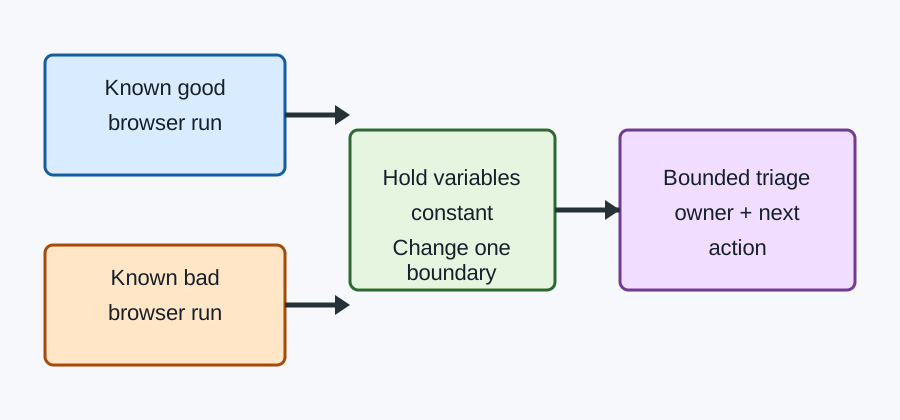
A browser update and a newly visible failure often arrive together, but correlation is not proof of browser causation. Browser Update Regression Triage gives a web team a controlled comparison: preserve the first-known-good run, reproduce the first-known-bad run, and change one boundary at a time. The result is a decision about the next owner and safe action, not a guess based on a version number. BotBrowser Team can repeat an authorized declared journey in controlled contexts; it cannot certify root cause or guarantee that a lab result matches every production environment.
Freeze the two comparison points
Record the browser build, operating system, architecture, profile state, feature flags, application commit, test data, network policy, and exact journey for both runs. “Works on the old browser” is not enough if the profile, platform, account, or server changed too. Keep a short receipt containing the visible assertion, timestamp, build identifiers, and artifact paths. Redact credentials, cookies, tokens, full page text, and customer data.
The first-known-good (FKG) is the last run that passed the same assertion under a declared setup. The first-known-bad (FKB) is the earliest reproducible failure under the next setup. If either point is inferred from memory, label it provisional. A failed run that cannot be reproduced is intermittent evidence, not an FKB.
Use one-variable fixtures
Start from a fresh context and a synthetic record. Hold the application commit, data, profile seed, viewport, locale, permissions, and network fixture constant. Change only the browser build. If the failure remains, compare a second pair that changes only the application commit; then profile, platform, and data in separate runs. Do not “fix” a mismatch by clearing every state at once: that destroys the comparison.
An authorized fixture should name its condition, expected visible result, and cleanup. For example, checkout-fkg-chrome-154 and checkout-fkb-chrome-155 are more useful than run-17. A fixture can force a deterministic error to test recovery, but it cannot prove that a live payment, identity decision, or remote write occurred.
Regression triage decision table
| Observation | Provisional owner | Next bounded action | Do not claim |
|---|---|---|---|
| Same fixture fails only on the new browser build | Browser/release | Minimize a reproducible case and attach FKG/FKB receipts | That the browser is certainly the root cause |
| Failure follows the application commit on both builds | Application | Bisect the owned change and add a compatibility test | That a browser rollback fixes the defect |
| Failure follows a profile seed, extension, or permission | Profile/configuration | Recreate the profile and compare with a clean seed | That a clean profile represents every user |
| Failure follows OS, GPU, driver, or platform | Platform | Re-run on the supported matrix and collect platform logs | That all operating systems share the result |
| Failure changes with data or timing | Data/intermittent | Isolate the record, retry in fresh contexts, and record variance | That one passing retry clears the first failure |
| Evidence conflicts or reproduction is absent | Unknown | Keep the issue open, narrow variables, and assign an owner | A rollback based on correlation alone |
Copyable comparison worksheet
Journey and assertion:
FKG: browser/build | OS/arch | app commit | profile seed | data key | result
FKB: browser/build | OS/arch | app commit | profile seed | data key | result
Changed variable:
Reproduction count (pass/fail):
Visible symptom and first failing step:
Artifacts and redaction check:
Candidate owner: browser | application | profile | platform | data | unknown
Next bounded action and stop condition:
Rollback decision: hold | approved temporary rollback | no rollback
Reviewer and timestamp:
Keep ownership and rollback bounded
A rollback is a mitigation with an expiry and an owner, not a root-cause verdict. Before using one, define the affected journey, supported versions, monitoring signal, exit condition, and a forward fix lane. Do not roll back a browser to hide an application defect, and do not ship a browser update solely because one synthetic fixture passed. Link the minimized report to the Chromium bug-reporting guidance and use MDN compatibility guidance for the supported web-platform contract.
BotBrowser capability and limitation
BotBrowser controlled contexts can repeat an authorized declared journey across browser releases while keeping browser-side state explicit. That makes FKG/FKB comparisons easier to reproduce. BotBrowser does not infer root cause, make application fixtures deterministic, or guarantee production parity. Keep the browser receipt separate from server logs, business outcomes, and platform evidence. The advanced-features documentation describes available controls; it is not a certification of any regression.
Before closing, ask whether the FKG and FKB are real, whether one variable changed, whether the owner can reproduce the symptom, and whether the next action has a stop condition. A disciplined unknown is safer than a confident but untested rollback.
Public sources
Make the comparison operational.
The comparison is most useful when it is small enough to run repeatedly and specific enough to change a release decision. Start by naming the user-visible assertion. “The page is broken” is not an assertion; “selecting Submit shows a confirmation and moves focus to the status heading” is. The assertion should be observable by a person or a deterministic test and should have a clear pass and fail state.
Next, define the journey boundary. Include the URL or owned fixture, the navigation mode, the account or synthetic seed, the action sequence, and the cleanup step. Do not include unrelated browsing history or a full profile export. A narrow journey makes it possible to compare two browser versions without accidentally changing a permission, cache, extension, or account state.
Record the exact release identifiers rather than labels such as “latest” or “old.” A browser channel, engine version, application commit, operating system image, graphics driver, profile revision, and test-data revision each have a different owner. Put those identifiers beside the visible result. If a value is unavailable, write “unknown” and keep it out of causal reasoning until it is measured.
Cold and warm runs answer different questions. A cold context tests first-load behavior, initial permissions, and empty storage. A warm context tests an established route and cached resources. Keep them as separate cells. Do not compare a cold new-browser run with a warm old-browser run and call the difference a browser regression. The same rule applies to network conditions, locale, reduced-motion settings, color scheme, and viewport.
For intermittent failures, use a bounded experiment. Choose a run count before starting, such as ten clean-context runs per cell. Record passes, failures, the first failing step, and the time window. A result such as 2/10 on the new build and 0/10 on the old build is evidence for a follow-up, not proof of causation. Repeat the same count after one controlled change. Preserve the original sample so later readers can see what changed.
A useful artifact set is deliberately boring: a text receipt, a minimized fixture, a screenshot cropped to the affected control, and a short console or network excerpt with secrets removed. Keep server-side logs in their approved channel and reference them by an access-controlled identifier. Never attach cookies, authorization headers, tokens, complete storage, or a customer profile to a public regression report. The browser comparison should remain useful even when private evidence is withheld.
When the browser appears to own the regression, test a neighboring browser release and a second platform if they are in scope. When the application appears to own it, hold the browser and profile constant and compare the application commit. When the profile or permission appears to own it, create a fresh seed and compare only that seed. When the platform appears to own it, keep the application and browser fixed and run the supported platform cell. These neighboring checks prevent a single convenient explanation from becoming policy.
The triage owner should write a short decision with four fields: what is known, what remains unknown, what action is approved, and what result closes the action. A temporary browser pin might be approved while a compatibility fix is developed, but it needs an expiry date, an owner, and a monitoring signal. A “no change” decision is also valid when the evidence is insufficient; it should state which missing fact would reopen the investigation.
Accessibility and localization deserve explicit checks in a browser regression. A release may preserve the visual layout while changing focus order, accessible names, status announcements, text wrapping, or directionality. Include keyboard and assistive-technology input when the journey depends on it. Repeat with the longest supported translation when a button, table, or error message could alter layout. Do not reduce these observations to a generic screenshot comparison.
The final regression record should link the original report, the FKG and FKB receipts, the minimized fixture, and the verified correction. Add a regression test that asserts the visible recovery path, not merely the absence of an exception. Keep the first-known-bad release even after the fix so a future update can distinguish a recurrence from a new symptom. This history is more valuable than a confident label that was never tested.
For related operational guidance, compare the browser test matrix guide with the browser release validation checklist. The matrix defines which cells to run; the checklist defines the evidence needed to call a release decision complete. Neither document replaces an application-specific fixture or permits testing against a service that the team does not own.
The same discipline applies when a failure is reported by support rather than by a test. Translate the report into a visible assertion before choosing a browser cell. Ask what the person saw, what they expected, which route was open, and whether the action was completed with a keyboard, pointer, touch input, or automation. Do not silently turn a vague report into a claim about a browser engine. A support report is a valuable starting observation, but the controlled FKG and FKB runs are what make the next action repeatable.
Keep the report readable for three audiences. The reproducer needs exact steps and cleanup. The route owner needs the first divergent assertion and the application state. The release owner needs a bounded decision, an expiry for any mitigation, and a way to verify the forward fix. Put these facts near the top and keep optional diagnostics below them. A large trace that hides the first visible difference slows triage and may expose data that was never needed.
Use a consistent naming scheme for receipts and fixtures. Include the journey, comparison role, browser family, release, platform, and a short data-seed label. For example, checkout-fkb-chrome-155-linux-seed-a explains more than artifact-4. Names are not identity: do not embed email addresses, customer numbers, authorization values, or private URLs. The seed label should point to an approved synthetic record or access-controlled reference.
When a regression crosses a service boundary, split the evidence. The browser receipt should contain browser-visible facts: status, focus, navigation, layout, download, or error text. The API owner can attach a separate server receipt with request identifiers and retention rules. A matching timestamp can connect the records without copying secrets between systems. This separation also makes it possible to publish a useful browser reproduction when the server evidence must remain private.
Do not make the candidate browser version the only experimental variable. Browser updates often coincide with dependency updates, feature-flag changes, new graphics drivers, certificate rotations, and data migrations. A release calendar can identify these neighbors, but it cannot replace a controlled run. Hold the application commit and fixture constant, then compare the browser. Hold the browser constant, then compare the application. Preserve each pair so another owner can challenge the interpretation.
If a candidate fix passes, repeat the original failure before declaring success. Use the same seed, route, input modality, locale, viewport, and run count. Verify the visible recovery and the absence of the original failure, then run a neighboring supported cell to detect a compatibility regression introduced by the fix. A passing smoke test on a different route is useful coverage, but it is not the correction evidence for the original report.
Review the public wording before closing. Say “the failure reproduced only in this declared browser and fixture” when that is what the evidence shows. Say “cause remains unknown” when application, profile, and platform comparisons have not separated. Avoid “the browser broke the page,” “fixed everywhere,” and similar absolute language unless a broader test contract genuinely supports it. Precise uncertainty protects users and gives engineers a better next experiment.
Finally, schedule the next review rather than leaving a temporary mitigation open-ended. The review can remove a browser pin, promote a compatibility test, update a supported-platform table, or close the report as an unsupported condition. Record the decision, owner, date, and evidence link. A small, dated follow-up is easier to audit than a long thread that never states what would change the decision.
What a good handoff contains.
When triage moves from a web team to a browser, platform, or application owner, send a compact handoff rather than a transcript. Include the visible assertion, the exact first failing step, the FKG and FKB identifiers, the one variable that changed, the run count, and the artifact location. State the privacy review result and identify any evidence that remains private. The receiving owner should be able to reproduce the claim without asking for a complete profile or an unrestricted network capture.
Separate observations from interpretations in the handoff. An observation says that focus stayed on a button after a successful response. An interpretation says that a browser focus change may be involved. Keeping those sentences apart makes it easier for a second owner to test a different explanation. It also prevents a plausible theory from becoming a release note before the comparison is complete.
For browser-owner escalation, include a minimized page or an owned fixture, the browser channel and exact build, and the smallest supported platform set that reproduces the result. For an application-owner escalation, include the application commit and a comparison on the same browser build. For a platform escalation, include graphics, operating-system, and driver identifiers while keeping the application and browser fixed. The handoff should name the next experiment, its stop condition, and the person who will record the result.
Do not let the handoff silently widen scope. A checkout journey does not automatically authorize testing a payment provider, an identity service, or another team’s private endpoint. Use synthetic data and an owned route wherever possible. If a third-party dependency is unavoidable, record the public contract and the permitted test boundary, and keep private responses in the approved channel. Scope control is part of a reproducible regression, not paperwork after the fact.
The release decision should be proportional to evidence. A supported journey that fails deterministically may justify a hold or an explicitly time-limited pin. A low-frequency failure may justify monitoring and a follow-up experiment. A failure that cannot be reproduced should remain an open investigation rather than an automatic rollback. Write the decision in terms of the declared journey and support matrix; avoid claiming that every site or every user is affected.
After the correction, compare the same FKG/FKB journey and the neighboring cells that motivated the mitigation. Verify the visible result, focus, navigation, accessibility announcement, and cleanup. Then update the report with the correction commit, the new run counts, and the date. Keeping this before-and-after record lets a later browser update distinguish a recurrence from a separate application or data problem.
Related Articles
Take BotBrowser from research to production
The guides cover the model first, then move into cross-platform validation, isolated contexts, and scale-ready browser deployment.