Playwright BrowserContext Lifecycle and Storage State
Design deterministic BrowserContext lifecycles, isolated storage state, and honest cleanup boundaries for authorized browser tests.
Want the structured docs for Getting Started?
This article lives in the editorial library. For step-by-step setup, reference material, and ongoing updates, jump into the docs section.
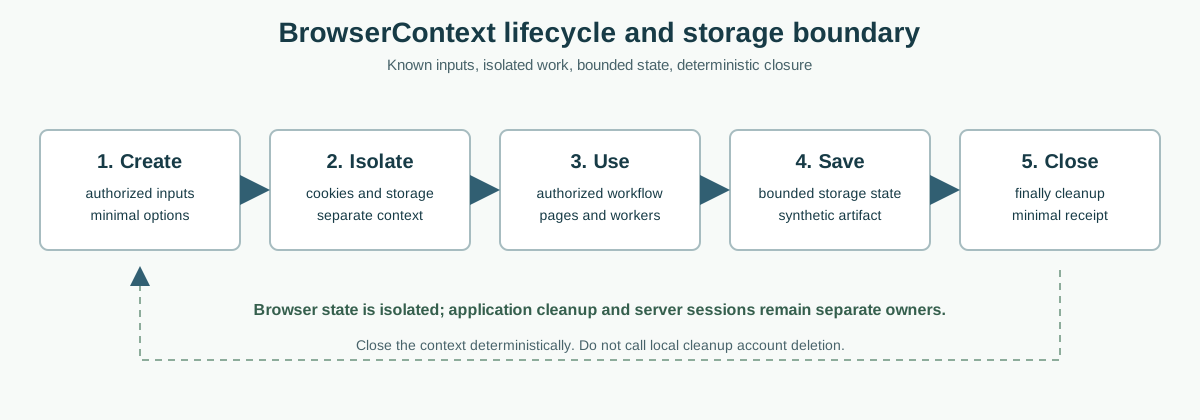
The lifecycle in one view
Playwright uses a BrowserContext as an isolated browsing environment. A context has its own cookies, local storage, session storage, permissions, and service-worker state, while several contexts can share one browser process. The useful boundary is operational: a test creates a context with known inputs, performs an authorized workflow, records a small result, and closes the context. A new context starts without accidentally inheriting the previous context's client state. This makes a context a practical unit for repeatable tests, but it does not turn a browser into a server-side account deletion system.
The Playwright BrowserContext guide describes independent contexts and their lifecycle. The authentication guide explains how an application can save and reuse authenticated storage state. These documents describe browser automation APIs, not a promise that every application store is complete, durable, or safe to copy. The BotBrowser multi-account isolation documentation describes a product boundary that complements, rather than replaces, Playwright's own lifecycle calls.
Think in three owners. Playwright owns the context object and its browser-managed state. The application owns in-memory state, cleanup code, and its interpretation of a session. The service owns server sessions, records, revocation, and retention. Calling context.close() releases the context's browser resources; it does not revoke a server token that the service still accepts, erase a database row, or remove a copy held by another device. A reliable test names all three owners before it claims cleanup.
The context lifecycle should be visible in test code. Create a context inside the smallest fixture or test scope that needs it, pass the context or page to helper functions, and close it in a finally path. Avoid a module-level context that silently survives unrelated tests. Long-lived contexts accumulate pages, workers, caches, and application state, so their apparent convenience can hide order dependence. A short lifecycle also makes a failure easier to reproduce because the starting state is explicit.
For related storage boundaries, compare the browser storage model and site-data clearing behavior before choosing a fixture reset strategy.
Creation is a contract
Creation options are part of the test contract. Set only the locale, timezone, permissions, proxy, viewport, and storage state that the authorized scenario needs. A context option is not a guarantee that the application will accept a value or that an upstream service will interpret it in a particular way. Record the intended profile and browser release, then let the application and server validate their own policy. Avoid embedding real credentials in source files, fixtures, screenshots, or trace attachments.
Isolation and authorized accounts
Two contexts created from the same browser can visit the same origin without sharing cookies or Web Storage. That separation is useful for account-switching tests, role checks, and independent checkout journeys. It is not a license to access another person's account. Use synthetic accounts or accounts explicitly authorized for testing, and make the account boundary part of the test data rather than discovering it from a target site. A clean context should be a known input, not an inference about who might be signed in.
Isolation has limits. A server can correlate requests through its own identifiers, and an application can send data to another origin. A context does not isolate external mailboxes, payment-provider records, shared test databases, or files written by the test runner. If a workflow uses an embedded origin, document that origin's session and cleanup owner separately. Browser isolation prevents accidental client-state sharing; it cannot rewrite service-side retention rules or erase data outside the context.
Parallel tests need unique ownership. Give each worker its own context and synthetic account, keep downloaded files in a worker-specific directory, and avoid a shared mutable storageState file. A test that writes a new state file while another test is reading it can create a race that looks like authentication flakiness. Prefer immutable input state and a separate output path for each worker. When a test must share a seeded state, copy it into an isolated temporary location before the context is created.
Account switching should be tested as a transition, not as a page reload. End the first application's session according to its supported sign-out path, clear account-specific client state when the application requires it, and create or use a second context with its own authorized state. Verify the next request and visible fallback rather than only checking that a login button appears. A stale service worker, in-memory store, offline queue, or second tab can otherwise keep the first account's view alive after the test says it switched.
Isolation is not deletion
Closing a context removes its browser-managed lifetime, but the service may keep audit records, sessions on other devices, or uploaded test data. Likewise, deleting a local storageState file does not delete a server session. Keep cleanup assertions scoped: assert that the context is closed, that a new context lacks the expected client state, and that the application's next request is unauthenticated when that is part of the contract. Do not describe these observations as account deletion.
Storage state as an input and output
storageState is a serialized snapshot that Playwright can use when creating a context. It commonly contains cookies and origin storage needed to start an authorized test without repeating a login ceremony. Treat the file as a credential-bearing artifact. Restrict its permissions, keep it outside public artifacts, avoid committing it, and remove or quarantine it according to the test environment's retention policy. A storage snapshot should contain only synthetic authorization approved for the test.
The snapshot is not a complete application backup. It may omit in-memory stores, service-worker caches, IndexedDB data that the application creates later, native credential providers, server sessions, or state belonging to another origin. An application can also change its schema between the time a snapshot is saved and the time it is loaded. Loading succeeds when the browser can parse the artifact; that does not prove that the server will accept the cookies or that every workflow prerequisite is present.
Use a fresh output path when saving state after a test. Do not overwrite a shared baseline while parallel workers are still using it. If a login fixture refreshes cookies, write a new artifact and publish only the minimum metadata needed to select it. A failed setup should invalidate or quarantine the candidate rather than leaving a partially written file that future tests mistake for a valid baseline. Include browser version and test-account purpose in surrounding metadata, not secret values inside logs.
Storage state should be refreshed deliberately. If a server expires a session, the test should exercise the documented sign-in setup again or fail with a clear authentication reason. Automatically retrying with an unknown account or harvesting whichever account happens to be present is unsafe and makes results uninterpretable. Keep one authorized state per scenario, validate it with a harmless authenticated request, and stop before accessing user content that the test does not need.
What a loaded state proves
After creating a context with storageState, verify only the contract you need: the expected test account is recognized, a protected route responds according to its test policy, and the application can reach its known starting page. Do not infer account existence from a cookie name, enumerate identifiers, or print token values. If the state is absent, expired, blocked, or rejected, use the approved login or recovery path and report the boundary honestly.
Pages, workers, and deterministic closure
A context can contain multiple pages, frames, service workers, and background requests. Closing the context asks Playwright to end that group, but application code may have outstanding network work or queued mutations. Before closure, stop or await test-owned actions, capture a minimal status, and ensure that a failed assertion does not skip the cleanup path. A fixture-level try/finally is usually clearer than relying on a global process exit to release every context.
Closure should be idempotent in test infrastructure. A helper may be called after a failed setup and again during teardown, so it should tolerate an already closed context and avoid hiding the original assertion. Do not catch every error and call the test successful. Preserve the first meaningful failure, add closure information as diagnostic context, and keep traces or screenshots free of credentials and personal data.
Service workers deserve an explicit boundary. A worker can serve cached responses, keep an in-memory queue, or perform work after a page closes. If the workflow depends on sign-out or account switching, test the worker's documented message or cache invalidation path before closing. A new context normally gives the next test a clean browser-managed start, but it cannot undo a server mutation that a previous worker already submitted.
Resource cleanup is part of correctness. Close pages that a test created, release downloads and file handles, stop recordings, and remove only test-owned temporary artifacts. Do not delete a shared project directory or a user's profile to make a test pass. When a context closes, retain a compact receipt containing the scenario, result, browser release, and cleanup outcome; retain raw traces only under the team's approved retention policy.
Failure and retry boundaries
Retrying a failed context can be useful when the failure is a documented transient network condition, but a retry must create a new context and use the same authorized synthetic inputs. Never retry by reusing an unknown live page or by copying whatever storage state a previous attempt produced. Separate setup failures, application assertion failures, and infrastructure failures so that a retry does not hide a real account or cleanup defect.
Observability without collection
Lifecycle evidence should describe transitions, not capture the data that caused them. A useful receipt can say that a context was created with a named synthetic scenario, that an approved state loaded, that a sign-out response was observed, and that closure completed. It does not need a cookie value, authorization header, storage key, account email, page body, or screenshot containing user content. Keep the receipt schema small enough that reviewers can understand every field and test owners can delete it on schedule.
When a state load fails, record the category that the test already knows: missing file, parse failure, rejected session, or application setup timeout. Do not broaden the probe to discover which accounts are available or to inspect a target site's private storage. The difference between a missing artifact and an expired server session is useful for maintenance, while the identity behind an unexpected session is outside the test's purpose.
Make cleanup observable in the same bounded way. A teardown result can include pages closed, context close requested, context close completed, and test-owned temporary files handled. If a close operation times out, preserve that failure and stop the scenario; do not loop indefinitely or report success because the process eventually exits. A deterministic timeout is more actionable than a best-effort claim that resources probably disappeared.
This approach also keeps privacy reviews tractable. The browser may expose many capability and storage surfaces, but a lifecycle test only needs enough information to decide whether its authorized workflow started, isolated, and ended correctly. Treat traces as sensitive artifacts, restrict access, set an expiry, and prefer a redacted summary for routine CI output. Revisit the fields whenever the scenario changes so an old debugging convenience does not become an accidental data collection policy.
BotBrowser capability and limitation
BotBrowser provides isolated BrowserContexts with separate cookies, storage, and session state for repeatable authorized workflow checks. That capability helps a team compare two known test accounts, repeat a storage-state setup, and verify that a new context does not inherit the first context's client state. The multi-account isolation documentation is the product reference for this boundary. Playwright remains responsible for creating, using, and closing contexts in the test code.
BotBrowser does not replace Playwright lifecycle management, application cleanup, server session invalidation, or secret handling. It cannot make a target site accept an expired cookie, guarantee that a service worker has deleted an application cache, erase a provider database, or recover a lost credential. It also cannot authorize access to an account. The test owner must supply synthetic or explicitly authorized inputs and must keep storage artifacts within the approved security boundary.
For a controlled review, record the browser release, context purpose, storage-state source, synthetic account label, and expected cleanup result. Create two contexts, run the same bounded workflow, close both in finally paths, and check that a newly created context begins at the documented unauthenticated or seeded state. Compare outcome records, not private response bodies. If a service-side action is part of the workflow, verify it through the service's supported test API or visible contract rather than through private database inspection.
BotBrowser profile repeatability is a test aid, not a persistence guarantee. A profile or state artifact can become stale when the browser, application schema, server policy, or account expires. Revalidate after supported release changes and rotate synthetic credentials according to the test team's policy. Keep the fallback explicit: when a state file is missing or rejected, stop at the authorized setup boundary instead of attempting account discovery or silent substitution.
A practical lifecycle checklist
Start each scenario with a named owner and a short data map. List the context, pages, workers, cookies, storage state, server session, offline queue, and temporary files. Mark each item as input, output, or disposable test data. This inventory prevents a local context.close() assertion from being confused with application deletion and makes it clear which cleanup action belongs in the fixture.
During setup, create a fresh context with the smallest required options, load only an authorized synthetic state, and verify the expected starting boundary. During the workflow, avoid logging headers, tokens, account identifiers, or full response bodies. When the scenario changes accounts, use a documented sign-out or a second context and verify the next request. When setup is absent or expired, fail closed or use the approved login fixture.
During teardown, await test-owned work, close pages and the context in a finally path, and write a minimal result. Ensure parallel workers cannot overwrite one another's state files. Quarantine malformed outputs and remove only artifacts owned by the test. A second teardown call should not obscure the first failure. Preserve enough metadata to reproduce the lifecycle without preserving credentials or user content.
After a browser or application release, rerun the lifecycle cases for fresh context isolation, storage-state loading, expired state, sign-out, account switching, worker activity, and closure after assertion failure. Consult the current Playwright lifecycle and authentication documentation before making version-specific claims. A passing run demonstrates the tested contract on the selected browser and product versions; it does not establish universal persistence, privacy, or server-deletion behavior.
The central rule is simple: create narrowly, isolate deliberately, serialize only authorized synthetic state, validate the application boundary, and close deterministically. BrowserContext is a strong unit for repeatable client-state tests when its responsibility is kept separate from application and server ownership. That separation gives failures a useful meaning and keeps documentation honest.
A fixture shape that keeps ownership visible
Keep context creation, workflow actions, assertions, and closure in visibly separate parts of the fixture. This makes it clear which code owns a browser resource and which code is asserting an application result. A named fixture can pass a page to a test while retaining the context handle for teardown. Avoid hiding creation in a helper that also silently loads an unknown state file.
Related storage behavior is covered by the browser storage model and service worker cache lifecycle guides.
The exact fixture API can vary, but the ownership order should remain recognizable:
const context = await browser.newContext({ storageState: approvedStateFile });
try {
  const page = await context.newPage();
  await runAuthorizedScenario(page);
  await assertExpectedBoundary(page);
} finally {
  await context.close();
}
The example does not imply that a storage file is always present or that a successful close deletes remote data. A real fixture should validate that the state belongs to the named synthetic scenario before creating the context, use a worker-specific output path, and preserve the first failure if teardown also reports an error. When the application owns a sign-out endpoint or a service-worker invalidation message, call that supported contract before the finally block closes the browser context. Keeping those operations in separate helpers makes it possible to test a missing state, an expired state, and a closure timeout without silently substituting a different account.
Sources
Related Articles
Take BotBrowser from research to production
The guides cover the model first, then move into cross-platform validation, isolated contexts, and scale-ready browser deployment.