Playwright Trace Viewer for Authorized Test Debugging
Use Playwright traces to diagnose authorized browser tests while controlling capture scope, sensitive contents, sharing, and retention.
Want the structured docs for Getting Started?
This article lives in the editorial library. For step-by-step setup, reference material, and ongoing updates, jump into the docs section.
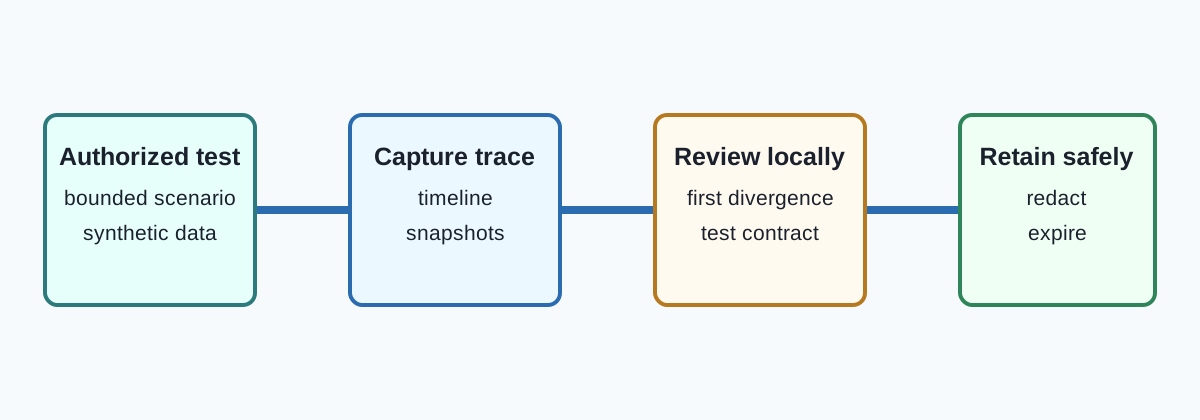
What a Playwright trace contains
Playwright tracing records a timeline for an authorized test so a maintainer can inspect what happened around a failure. Trace Viewer can show actions, network activity, console messages, screenshots, and snapshots, depending on the options used to start tracing. A trace explains the browser-side sequence observed by the test; it is not a recording of every system event and does not prove that an application or service accepted a request.
The Trace Viewer documentation describes how to open a trace and inspect its steps. The Playwright best-practices guide recommends isolated, deterministic tests and user-facing assertions. Together, they support a useful question: which authorized action, browser response, or assertion first diverged from the expected contract?
Trace files can contain sensitive material. Page snapshots may include rendered text, screenshots may show account labels, and network details may include URLs or headers. Capture only a synthetic or explicitly approved scenario. Do not attach a real user's session, payment data, authentication tokens, or unrelated pages just because a trace makes them easy to inspect.
For related isolation decisions, see the Playwright BrowserContext lifecycle and browser storage model guides. A context boundary helps prevent accidental state sharing, but it does not redact a trace after data has been captured.
Capture a bounded trace
Start tracing at the narrowest fixture or test scope that needs it. Capture a short setup and the failing interaction, then stop tracing in a finally path so an assertion failure still produces a complete artifact. A common choice is to retain the first retry's trace rather than recording every successful run. Option names and defaults can change with the Playwright version, so check the current API reference before changing a fixture.
await context.tracing.start({ screenshots: true, snapshots: true, sources: false });
try {
  await runAuthorizedScenario(page);
} finally {
  await context.tracing.stop({ path: tracePath });
}
The example records a test-owned context and writes to a worker-specific path. Create the directory before the run and prevent parallel workers from overwriting one another. Mark a missing or partial file as an infrastructure result, not a passing test. A trace should answer one bounded question, such as whether navigation completed before an assertion, rather than become a general browser recording service.
When a test retries, use a fresh context and the same authorized synthetic inputs. Do not reuse a page or storage state produced by an unknown failed attempt. Store the test name, browser release, attempt, and result category as separate metadata; keep credentials and full response bodies out of routine CI output.
Review and redact before sharing
Open traces locally or in the team's approved artifact system. Begin with the action timeline and assertion, then inspect the related request or snapshot only when it helps distinguish a test defect from an application response. A short finding such as “the expected redirect did not occur after the approved sign-in fixture” is more useful in a ticket than a copied screenshot.
Redaction must happen before external sharing. Remove or exclude traces containing tokens, cookies, personal names, payment details, private URLs, or customer content. Later deletion cannot recall an artifact someone already downloaded. If a trace cannot be safely reduced, keep it inside the restricted test workspace and share the diagnosis rather than the file.
Retention should match the debugging purpose. Keep the first failing trace long enough for its owner to reproduce the issue, then expire it under the team's artifact policy. Use access controls and an audit trail for shared locations. A trace is test evidence, not a durable account backup, and context.close() does not delete a copy already uploaded to CI storage.
A team workflow for useful evidence
Define the expected user-visible contract before reading the trace. Record the scenario, browser and Playwright versions, test result, and cleanup outcome. During review, compare the first unexpected event with application logs the team is authorized to access. If the failure is outside the browser boundary, stop there and ask the service owner for a supported diagnostic record instead of expanding the trace to inspect unrelated data.
Use deterministic, worker-specific names such as artifacts/traces/<test>-<worker>-<attempt>.zip. Publish only the minimum metadata needed to locate the artifact. A reviewer should be able to tell whether a trace is complete, which synthetic scenario it represents, and when it expires without opening its snapshots. If the trace is missing, corrupted, or captured after teardown, state that limitation explicitly.
BotBrowser can provide an isolated browser context and repeatable profile for an authorized Playwright workflow, helping a team reproduce the same bounded scenario before capturing a trace. Playwright remains responsible for tracing, fixture scope, and Trace Viewer inspection. BotBrowser cannot guarantee that a trace is free of sensitive page content, remove tokens from snapshots, or make a service-side failure observable; the test owner must choose synthetic inputs and enforce artifact access and retention. See the BotBrowser multi-account isolation documentation for the browser-side boundary.
Record the test identifier, synthetic scenario, browser release, and Playwright version.
Record the first divergent step and result category.
State whether the trace includes screenshots, snapshots, source text, or network details.
Give every worker a separate output path.
Move an archive only after tracing has stopped.
Keep credentials out of CI logs.
Create a new context for every retry.
Do not treat a later pass as proof that the first failure was harmless.
Prefer a user-visible contract to a fragile timing guess.
Enable screenshots and snapshots only when the question needs them.
Reduce capture scope when an archive is too large; do not silently truncate it.
Limit trace readers and set an expiry.
Inspect screenshots and network events for sensitive values before sharing.
Let the application owner confirm server-side behavior through supported logs.
Record operational cleanup failures.
Recheck retention rules when the application flow changes.
Reproduce locally with a clean directory and named versions.
Clean only temporary files owned by the test.
Let reviewers understand an archive's purpose without opening snapshots.
Assign one clear owner to each scenario.
Keep server evidence separate from browser evidence.
Do not retry with an unknown state file.
Record whether an archive is complete.
Do not treat a trace as an account backup.
Make cleanup safe to repeat.
Expire controlled copies on schedule.
Recheck sensitive fields after fixture changes.
The handoff record should include the test identifier, synthetic scenario, browser release, Playwright version, attempt number, first divergent step, result category, and expiry. It should say whether screenshots, snapshots, source text, or network details are present. A reviewer can decide whether the archive is needed without opening private page content. Keep account names, token values, full private URLs, and copied response bodies out of the record.
A trace is strongest when the expected contract is written before the run. Describe the intended navigation, the visible completion signal, and which team owns each boundary. The timeline can show that a click occurred, that a request was sent, and that a page changed. It cannot decide whether a service stored a record correctly unless the service exposes a supported test assertion.
Read the trace from the failing assertion backward until the first unexpected state appears. An absent heading may follow a redirect, a blocked request, a client exception, or incomplete fixture setup. The first divergence is usually more actionable than the last symptom. Record its category and timestamp without copying the entire page or request into a ticket.
Choose capture options deliberately. Screenshots and snapshots help with visual assertions but increase exposure. Source capture is useful only when source locations are part of the question. Keep video, attachments, and broad network recording out of the default fixture unless the team has documented their need, access list, and expiry.
Trace size is an operational limit as well as a privacy concern. Set an artifact limit and report an upload failure as infrastructure. Compression does not make sensitive data safe, and splitting an archive across logs complicates access control. Reduce scope or optional media instead of silently dropping the end of the timeline.
Retries should classify failures rather than hide them. A retry creates a new context with the same authorized synthetic inputs and records its attempt number. A later pass does not prove that the first failure was harmless. Compare the bounded outcomes and check for an environment or application change before changing assertions.
Parallel workers need unique paths and, where necessary, separate synthetic data. A shared filename can produce a valid archive containing another worker's steps. Use a worker identifier and move the completed archive atomically. If the move fails, report the artifact failure instead of falling back to a shared project directory.
Treat traces like credentials even when a run appears harmless. Restrict readers to owners and reviewers who need the evidence, and do not paste an archive into a broader issue or chat. A ticket can contain a redacted finding and a link to a restricted artifact whose expiry matches the incident.
Redaction is a positive selection process. Decide what the reviewer needs, then omit everything else. Replace account labels with synthetic scenario names, remove authorization headers, and describe response bodies by status or schema. Check both the archive and exported screenshots; removing a value from one view does not remove it from a network event.
After the first divergence is understood, write a narrow regression for the supported user-visible contract. Keep its data synthetic and its assertion independent of private implementation details. Expire the exploratory trace after the regression is accepted, and retain only the compact finding needed to explain the change.
Review the fixture whenever sign-in, upload, payment, or personal-data flows change. A snapshot that was harmless before a UI change may become sensitive. Reconfirm the synthetic account, option set, artifact path, and expiry policy so an old debugging convenience does not become an unplanned collection practice.
Use a clean directory and a named browser release for local reproduction. Do not ask a maintainer to open an unknown archive or sign in with a personal account. A reproducible command creates its own context, uses approved data, and leaves only the declared artifact.
When a trace suggests a flaky wait, replace the timing guess with a user-visible condition or documented network contract. Increasing a timeout can hide a stalled request and create larger archives. Keep the regression focused on the condition a user can observe.
For service-side defects, provide the application owner with a supported request identifier or fixture result, not a dump of browser data. The service record explains backend behavior while the trace remains evidence of what the client observed.
Archive cleanup should be observable. Report expired counts and skipped artifacts with missing metadata, but never include archive contents in the cleanup receipt. A failed cleanup is an operational issue requiring correction.
The review decision should remain proportional to the evidence. A trace can establish what the browser did in one authorized run, but it cannot establish that every browser release, account state, network path, or service region behaves the same way. Qualify the finding with the tested versions and environment. If a failure depends on an external provider, document the provider boundary and use its supported test mode. Do not turn a single archive into a compatibility guarantee. When a visual snapshot differs, compare the user-visible outcome and the documented accessibility expectation before updating a baseline. A changed screenshot may reflect a legitimate product change, a browser release, a locale difference, or a fixture defect. Keep the baseline synthetic and reviewable. If an artifact is retained for a longer incident, record why, who can read it, and the planned deletion date. At the end of the incident, delete or quarantine the trace and keep only the redacted conclusion needed for the regression record. This process makes the Trace Viewer a focused diagnostic tool while preserving a clear boundary between browser evidence, application ownership, and service-side data.
For a navigation failure, compare the action timeline with the page's documented readiness signal. A URL change alone may not mean that the application completed its workflow, while a visible confirmation may arrive after several background requests. Record the signal the test is authorized to assert and avoid treating an internal request as the user outcome.
For an assertion failure, inspect the snapshot that belongs to the failing step and then check whether the fixture supplied the intended synthetic state. A missing value can reflect a reset, an expired state, a blocked permission, or a legitimate product response. Keep those categories separate in the finding so a retry does not silently substitute a different account or state file.
For a network failure, record the request category and documented status rather than copying headers or bodies. Distinguish an expected cancellation from a timeout and an application error from an unavailable test dependency. The trace can guide the next authorized check, but it should not become a reason to probe unrelated origins or collect more data.
For a rendering difference, compare the user-visible requirement, locale, viewport, and browser release before changing a snapshot baseline. Accessibility text and keyboard behavior may matter even when a screenshot looks unchanged. A baseline update should name the approved product change and retain only synthetic content.
A useful trace review ends with an explicit next action. The action may be a fixture correction, an application bug report, a service-owner check, or a decision that the evidence is insufficient. Record that action beside the first divergence and close the trace access when the owner no longer needs it. Do not broaden a failed test into an exploratory collection exercise.
Keep the same scenario label across the trace, CI result, and regression issue. Consistent labels let a reviewer compare attempts without exposing account identifiers. When a synthetic account is rotated, update the label metadata and invalidate old storage state rather than reusing an artifact whose ownership is unclear.
If a trace is copied between systems, verify the destination access policy and expiry. A private artifact can become public through an issue attachment or an export link. Prefer a restricted link, and confirm that the recipient can see only the intended file and metadata.
The final finding should distinguish observed facts from hypotheses. “The redirect was not observed after the fixture completed” is an observation. “The provider rejected the account” is a hypothesis unless a supported service result confirms it. This wording keeps the browser evidence accurate and gives the application owner a precise question.
Debugging checklist
- Identify one authorized scenario and its expected assertion.
- Start tracing only for the needed fixture or first retry.
- Write each worker's trace to a private, unique path and stop it in
finally. - Inspect the timeline first; redact or restrict snapshots, URLs, and network details before sharing.
- Record the finding, versions, cleanup result, owner, and expiry without copying secrets.
Sources
Related Articles
Take BotBrowser from research to production
The guides cover the model first, then move into cross-platform validation, isolated contexts, and scale-ready browser deployment.