Browser Test Evidence and Reporting Quality
Write browser test reports that separate expected behavior, observed evidence, uncertainty, privacy boundaries, and product action.
BotBrowser Team
Want the structured docs for Getting Started?
This article lives in the editorial library. For step-by-step setup, reference material, and ongoing updates, jump into the docs section.
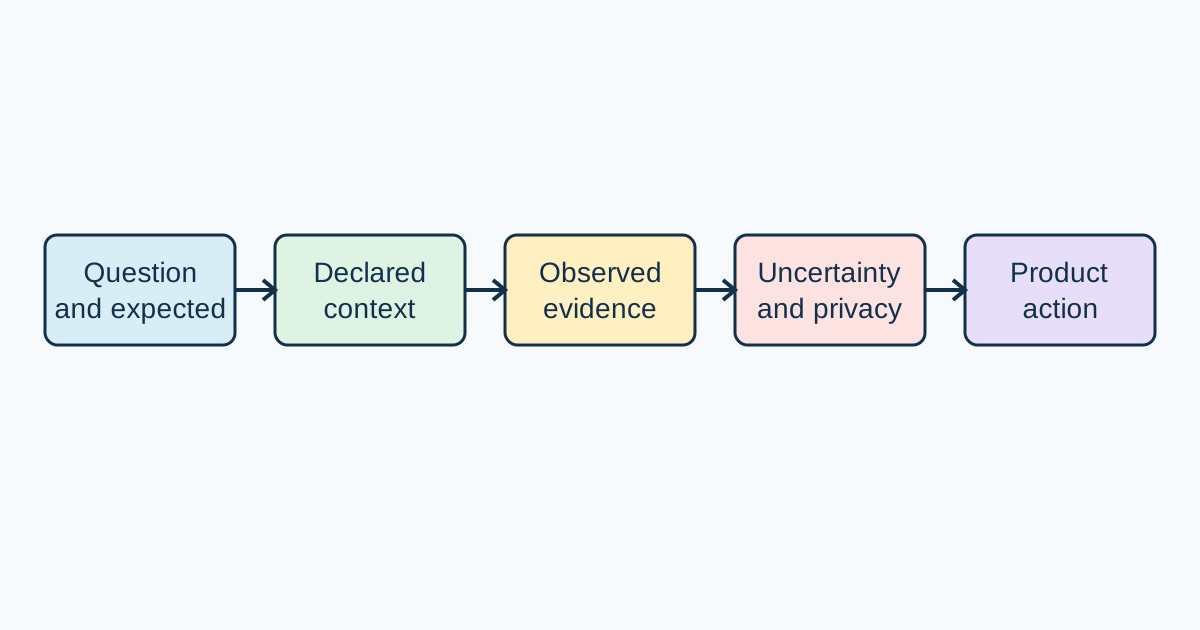
Browser test evidence is useful when another person can understand what was expected, what happened, and what decision follows. A report should describe a declared application context, not imply that one run explains every browser or user. BotBrowser can repeat an authorized observation in a declared release, profile, and route; it cannot prove universal support, privacy, security, or root cause by itself.
Start with one question
State the user-visible question before collecting evidence. “Does the owned settings page show a recovery action after a permission denial?” is narrower than “does the browser support permissions?” Write the expected result with observable nouns, then record the actual result using the same nouns. Keep one report focused on one decision so a reviewer can tell which evidence matters.
The Chromium bug-reporting guidelines emphasize clear steps, expected and actual behavior, and enough environment context to reproduce a problem. They do not require credentials, account history, or a complete browser dump. Use a controlled route and synthetic data when a public example is unnecessary.
Record proportionate context
Include only conditions that can change the result: browser family and release, platform class, application revision, route, viewport, locale, input mode, profile or permission state, and a bounded run count. Separate application, browser, and profile revisions. If several changed together, label the cause unknown instead of assigning blame. A report that says “latest browser” is not a stable baseline.
BotBrowser controlled contexts can repeat the same authorized assertion with a declared Chromium release, profile, route, viewport, and synthetic test state. This supports comparison of a named setup, not a survey of visitors or a certification of a browser. BotBrowser cannot prove the result applies to every browser, third-party site, user, or security condition; the product decision still belongs to the application owner and reviewer.
Separate observation from interpretation
| Report field | What it supports | What it does not establish |
|---|---|---|
| Public requirement | Meaning and permitted behavior | Deployment in every browser |
| Expected branch | The product contract under test | That the contract is implemented everywhere |
| Observed branch | What happened in the declared context | Root cause without comparison |
| Run count and conditions | Reproducibility or intermittence | Identity, anonymity, or universal quality |
| Product action | A bounded next step | A guarantee about third-party sites |
Use “observed after the release change; cause unknown” when that is the evidence. Do not turn a repeated value into an identity claim or an absent value into an anonymity claim. RFC 6973's privacy considerations are a reminder to minimize data and consider observers, retention, and disclosure when designing the report.
Evidence report template
Question: What user-visible behavior is being checked?
Expected: The declared success, denial, error, or fallback branch.
Actual: The branch observed, with visible result and run count.
Context: Browser release, platform, app revision, route, locale, profile, viewport.
Uncertainty: Conditions not controlled and causes not established.
Privacy boundary: Synthetic data, redactions, excluded origins and records.
Action: Enable, fall back, investigate, add a regression check, or request one fact.
Keep the first failing step and recovery action visible. Attach only the smallest redacted screenshot, console excerpt, or trace that changes reproduction. Remove credentials, cookies, authorization headers, private URLs, customer identifiers, and unrelated tabs. A private artifact can remain in an approved channel with an owner and retention limit; the public report can state that it exists without copying its contents.
Review uncertainty and follow-up
When a report cannot be reproduced, request one missing condition at a time: a fixed release, a clean fixture, a permission state, or a viewport. For intermittent behavior, record numerator, denominator, and timing window. When comparing releases, hold application, profile, route, and data constant and change one dimension. A comparison supports a boundary to investigate; it does not establish causality unless the design controls the alternatives.
The product action should say what happens next: ship, use a fallback, add a regression fixture, pause a route, or gather one bounded fact. A browser observation is evidence for that action, not the action itself. MDN's Web documentation can explain how a browser surface is exposed, while the application owner decides which branch is needed and what data is retained.
Keep the privacy boundary explicit
Browser test reports can contain signals that are unnecessary for the decision. Exclude unrelated origins, account correlation, private network observations, and full profile dumps. State “not tested” for universal behavior, third-party sites, identity inference, and security certification. This makes the report honest and lets a later reviewer design a smaller next test.
BotBrowser helps teams repeat an authorized browser assertion across declared profiles, releases, and page contexts. It does not replace public standards, application ownership, privacy review, or a root-cause investigation. See browser interaction validation and browser release validation for adjacent execution and release concerns.
Sources
- Chromium bug-reporting guidelines
- RFC 6973: Privacy Considerations
- MDN Web Docs
- BotBrowser advanced features
Recheck the public guidance, browser release, fixture scope, privacy boundary, and product decision when any of those inputs changes.
Make the report actionable.
The report owner should make the first screen answer five practical questions: what route was tested, what should the user see, what did the browser show, which conditions were fixed, and what action is requested. This layout helps an engineer reproduce the observation and helps a support writer explain a bounded outcome without repeating a speculative diagnosis. Put long traces, screenshots, and implementation history after the decision record, and keep each attachment tied to a specific sentence.
Use a stable title that names the visible symptom and route rather than a guessed cause. Record the first failing step, the visible recovery path, and the run count. If the issue is intermittent, preserve both clean and failing runs and say whether the context was cold, warm, seeded, or reset. A short “known good” comparison is valuable only when the application build, data, route, profile, and permissions stayed fixed. Otherwise call the comparison exploratory.
The report should also name the owner for the next decision. A route owner can fix copy or fallback behavior; a release owner can decide whether a supported journey ships; a privacy reviewer can decide whether a signal is needed at all. Naming the action owner prevents an evidence record from becoming a collection of observations without a decision. It also gives customer support a safe explanation: the result was observed in a declared context, the application will take a stated action, and other contexts may differ.
Keep attachments small.
Before sharing an attachment, remove cookies, authorization headers, tokens, passwords, account identifiers, private query parameters, personal text, and unrelated tabs. Crop a screenshot to the control and visible state that matter. For console output, keep only the lines around the first failure. For a network symptom, use a local fixture or a redacted request and response rather than a complete capture. For a download or upload, use a harmless synthetic file and record cleanup.
The goal is not to publish every diagnostic detail. The goal is to give the next person enough information to repeat the declared branch. If a private artifact is essential, describe its type, owner, approved location, and expiry without copying its contents into the public report. A reviewer should be able to approve the public wording without receiving secrets or customer data.
Choose the next experiment.
When evidence is incomplete, write the smallest experiment that can change the decision. Hold the application and profile constant while comparing browser releases. Hold the browser constant while comparing application builds. Hold both constant while changing a permission or policy. Keep the route and synthetic data stable. If two variables must change together, state that the result is exploratory and do not write a causal conclusion.
For a blocked journey, record the safe fallback and the user-visible limitation. For a successful journey, record what was not assessed. For a permission denial, distinguish a policy branch from an unavailable implementation only when the fixture can observe that distinction. For a timeout, state the visible timeout and the bounded window, not a broad claim about network reliability. These phrases keep the report useful while respecting uncertainty.
Review the wording.
Read the conclusion as a customer would. It should name the declared context, the observed branch, the product action, and the exclusions. Replace “the browser is broken” with the visible behavior and a controlled comparison. Replace “this is private” with the data that was excluded and the privacy question that remains. Replace “works everywhere” with the supported release and route. This vocabulary keeps public education focused on browser behavior and accountable product decisions.
The same discipline applies to accessibility and localization. Record the input mode, focused control, accessible name, status announcement, language, text direction, and viewport when they affect the outcome. Test representative translated lengths when copy changes layout, but do not publish user text or private screenshots by default. A report that preserves these boundaries is easier to review, easier to rerun after a browser update, and safer to share.
Build a durable evidence record.
A durable record makes the next review faster because it preserves the boundary between a public requirement and a local observation. Start by naming the feature surface and the user journey. Link the normative definition and the browser-facing explanation. Then record the application revision, browser release, operating environment, profile, permissions, locale, viewport, route, and synthetic data revision only when each can affect the result. This is enough context for a new run without creating a general inventory of the browser or the person using it.
Keep expected and actual behavior beside the first failing step. If a request is denied, report the visible denial and the recovery path. If a feature is unavailable, report the capability check and the fallback. If the page continues with reduced behavior, explain the user-visible limitation. These statements are more useful than a label such as “unsupported” because they tell a product owner what the user can do next. They also prevent a support response from promising that every environment will follow the same branch.
Preserve comparison hygiene.
When a browser release changes, rerun the same application revision and fixture before changing the profile. When an application revision changes, hold the browser and profile constant. When a permission or policy changes, record the old and new states and keep the route and test data fixed. A table can show the unchanged dimensions so a reader can see whether a difference belongs to the browser, the application, the policy, or the fixture. If that separation is impossible, label the result exploratory and keep the proposed cause out of the title.
For an intermittent result, use a bounded experiment. Record the number of clean and failing runs, the reset method, and the observation window. A statement such as “three failures in twenty clean-context runs after a cold navigation” gives the next owner a repeatable starting point. It does not prove a defect mechanism, but it makes the uncertainty measurable. Do not ask for a complete profile or broad capture just because the first run is inconclusive; name the one condition that would change the decision.
Connect evidence to product language.
Engineering, privacy, release, and support teams often need the same result in different words. Keep one evidence record and add a short decision line for each audience. Engineering needs the first failing assertion and the controlled comparison. Privacy needs the collected fields, exclusions, retention, and purpose. Release needs the affected journey, fallback, and owner. Support needs the visible symptom and the safe action a user can try. None of these audiences needs private credentials or a full browser dump.
BotBrowser can help maintain the same declared release, profile, route, and assertion across those comparisons. That is a capability for repeatable authorized testing. It is not evidence that a visitor is human, that a value is anonymous, that a third-party site behaves the same way, or that an application is secure. Keep those limitations in the report so a later reader cannot mistake a controlled run for a universal claim.
Close the report deliberately.
End with the action and its review trigger. Say whether the team will ship, use a fallback, add a regression check, pause the route, or gather one bounded fact. Name what would reopen the question: a browser release, application revision, policy change, route change, data migration, or new privacy requirement. A dated trigger keeps an old observation from silently becoming a current promise. It also gives a reviewer a small, concrete task instead of an invitation to collect everything.
Before sharing, read the report as a public document. Remove internal issue numbers, private conversations, customer names, credentials, tokens, and implementation details that do not change the reader's decision. Keep standards links, declared assumptions, visible outcomes, uncertainty, and the product boundary. This produces documentation that teaches a reusable browser concept while remaining honest about what the evidence can and cannot show.
Example decision record.
Consider an owned settings route that requests a permission needed for an optional enhancement. The report question is whether a denied permission produces a clear recovery link. The expected branch is a visible denial message followed by a manual path. The declared context includes the application revision, Chromium release, profile permission state, locale, viewport, and synthetic account. The observation records the denial message, the link destination, and the result of five clean runs. The uncertainty line says that another browser release and other policy settings were not tested. The privacy line says that no customer records, account identifiers, or unrelated origins were read.
The product action might be to keep the enhancement disabled and show the manual path when the permission is denied. That action is narrower than saying the browser feature is broken or that the permission is unsafe. A follow-up can compare one browser release while holding the application and profile constant. If the message differs, the team has a new bounded observation. If it does not, the original report remains useful evidence that the declared branch is stable in its declared context.
This format also helps when the result is positive. Suppose the enhancement completes in five runs. The report can say that the owned route completed the expected branch under the declared permission and release. It should still state that third-party behavior, other releases, identity inference, retention, and security certification were not assessed. A positive result is not a reason to remove the boundary; it is a reason to keep the boundary visible while the product uses the feature.
Why concise reports age better.
Browser releases, application builds, and policies change independently. A report that separates those dimensions can be revisited without rewriting its original meaning. A report that mixes them into a single “works” label becomes ambiguous as soon as one input changes. Keep the original observation dated, add a follow-up observation with its own context, and explain the product action for each. This preserves the history that a release owner needs while keeping the public lesson understandable.
Concise does not mean vague. It means that every sentence earns its place by changing reproduction, interpretation, privacy, ownership, or action. A short report with a clear route, expected branch, observed branch, run count, uncertainty, and next step is stronger than a long report filled with unscoped environment details. Readers can reuse the method for storage, media, workers, permissions, cross-origin requests, and other browser surfaces without receiving detector recipes or private operating instructions.
Related Articles
Take BotBrowser from research to production
The guides cover the model first, then move into cross-platform validation, isolated contexts, and scale-ready browser deployment.