Browser Deployment and Release: Operations Map
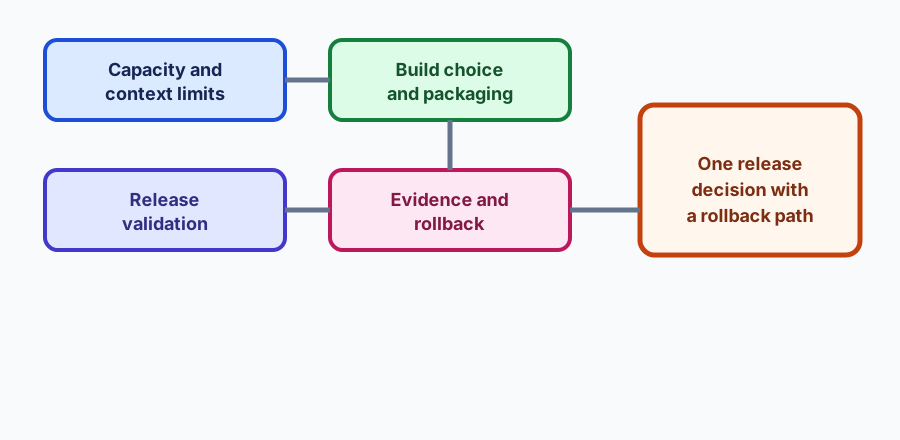
Order capacity planning, build choice, release validation, and evidence into one rollback-ready browser deployment decision, without claiming a run you did not make.
BotBrowser Team
Want the structured docs for Deployment?
This article lives in the editorial library. For step-by-step setup, reference material, and ongoing updates, jump into the docs section.
Browser deployment is a review order, not a checklist of flags. This hub connects the deployment cluster and adds a bounded release record that names the capacity decision, the build choice, the validation result, and the rollback path, starting with Browser release validation.
BotBrowser supports running an authorized profile in containers and long-lived servers and can keep browser-visible values consistent with that profile; it cannot size your infrastructure, guarantee a vendor build, or decide whether a release is acceptable for your product, and it does not replace your own capacity and rollback testing.
TL;DR
- Decide capacity from measured concurrency, not from the highest number a host happened to survive.
- Pin the browser build and the profile class in the same record as the release.
- Validate on the host class that will actually run the workload.
- Ship with a rollback path and the evidence that made the decision reviewable.
Contents
- Map the deployment surfaces
- Walk the deployment cluster
- Run one release review
- Keep a deployment record that survives an incident
- Handle the first failure
- Conclusion
Map the deployment surfaces
A browser deployment has four operational surfaces. Capacity covers how many contexts a host can carry, how memory is reclaimed, and which limits were measured rather than assumed. Build choice covers the package you install: the standard or trimmed edition, the platform target, and the driver stack behind it. Release validation covers what was checked before traffic moved: the profile loads, the pages render, and the interactions behave. Evidence and rollback covers what remains after the release: the record that explains the decision and the path back to the prior build.
Capacity also depends on the context budget described in BrowserContext capacity planning, so read both before you publish a concurrency figure.
These surfaces fail in different ways and on different clocks. A capacity limit shows up under sustained load, often hours after the first successful request. A build choice shows up as a missing library or a rendering path the container does not provide. A validation gap shows up as an interaction that worked in the lab and fails in production. A missing rollback path turns a recoverable bad release into an outage that lasts as long as the diagnosis takes.
BotBrowser's role is to keep the browser-visible identity consistent with the declared profile across those contexts. That consistency makes a difference attributable: if two containers with the same profile disagree, the deployment surface is the likely cause rather than an unmanaged variable.
Walk the deployment cluster
- Browser release validation fixes which profiles, versions, and rollback states must be checked before a release.
- Docker browser automation covers a reproducible container baseline.
- Headless browser setup on Ubuntu servers covers the server prerequisites.
- Standard or trimmed build on Linux x64 compares the two packaged editions.
- Mesa llvmpipe vs SwiftShader covers the rendering backend choice on Linux.
- Scaling browser contexts covers per-context profiles at volume.
- BrowserContext capacity planning turns memory measurements into a context budget.
- Browser container resource limits covers CPU, memory, and disk limits together.
- Browser automation performance covers the runtime cost of a workload.
- Reliable screenshot capture covers the output this kind of deployment usually produces.
The hub owns the order and the record shape. Each linked article owns the detail of its surface and the failure it can produce.
Run one release review
Write the declared inputs before you measure anything: the host class, the browser build, the profile class, the expected concurrency, and the workload you intend to run. Then record one row per surface in the same review, so a later difference has a reference point.
{
  "runId": "deploy-review-20261019-01",
  "declared": {
    "hostClass": "8 vCPU / 16 GB",
    "browserBuild": "standard-linux-x64",
    "profileClass": "fresh-temporary",
    "expectedConcurrency": 24
  },
  "observed": {
    "capacity": "24-contexts-stable-30min",
    "build": "profile-loaded-renderer-recorded",
    "validation": "owned-fixture-passed",
    "rollback": "previous-build-redeployable"
  },
  "firstFailure": null,
  "testedOn": "2026-10-19"
}
The record is data, not a report. It should be short enough to attach to an incident thread and explicit enough that the same four rows can be re-run with the recorded hostClass, browserBuild, and fixture values. Fill it in during the review, not afterwards: a record written from memory after a release tends to describe the intended configuration rather than the one the host actually ran, and the two differ more often than teams expect.
Measure capacity before you advertise it. Run the intended workload at the intended concurrency and watch the host, not just the browser. A number of contexts that survives for a minute is not a capacity figure. Record the duration, the memory curve, and the point where latency or errors began to rise. When you publish a capacity claim, publish the duration with it, because the same host will support different numbers at one minute and at one hour.
Keep the concurrency test on the production host class. A workstation with a fast disk and a warm page cache will accept more contexts than a smaller container with a network volume. A capacity figure measured on a different host class is a different experiment. If the production host class is not available in the lab, say so in the record and treat the figure as provisional until the first production window confirms it.
Pin the build in the same record as the release. The browser build and the profile class change behavior, and a release note that names only the date cannot tell a later operator which binary was running. Pin the package version, the architecture, and whether the deployment uses the standard or trimmed edition. Then, when a difference appears, the record answers the first question anyone asks.
Check the rendering backend, not only the binary. On Linux, the graphics backend decides which rendering path exists. Software rendering and a hardware-backed path produce different behavior, and a container may silently fall back to the software path. Record which backend the deployment actually used rather than which one you intended, since the intended path is often the one the container did not provide.
Validate on an owned fixture. A production page you do not control can change between the review and the release. Use a fixture with a pinned version and a small number of deterministic checks: the profile loaded, the page rendered, the interaction completed, and the output matched the expected shape. Record the expected and actual results as separate fields so a partial pass is visible.
Prove the rollback before you need it. A rollback path is a tested artifact, not a document. Redeploy the previous build on the same host class, confirm the workload still completes, and record how long the reversal took. If the previous build cannot be redeployed because the profile format, the package, or the host image changed, that is a release blocker, and it belongs in the record before the release rather than during the incident.
Separate capacity failure from workload failure. A workload that degrades slowly as concurrency rises is a capacity question. A workload that fails immediately at a concurrency the host clearly supports is a workload or configuration question. Distinguish the two before adding hosts, because more hosts do not fix a broken fixture and a smaller fixture does not fix a saturated container.
Keep the artifact small and dated. Store the record with the fixture and the release manifest (docs/blog-release-batches.json) so it can be compared with the next one. A dated record explains which inputs produced the decision, and a diff between two records shows exactly what changed. Retention should follow the product support window; the record exists to explain a release, not to accumulate indefinitely.
Choose the build and the backend deliberately
are separate decisions, and each one changes what the deployment can do. The standard edition carries the full rendering stack; the trimmed edition reduces the package and its attack surface and can be the right choice for a narrow workload. Neither is universally faster in production: throughput depends on the pages you load and the rendering path they take.
On Linux the graphics backend decides whether pages render through a software rasterizer such as llvmpipe or a hardware-backed path selected by --use-angle. Software rendering is available on hosts without a GPU, which is common in containers, and it behaves differently for WebGL, canvas, and font rendering. Record which backend the deployment used, then keep it stable across releases. A backend change between two otherwise identical builds is a rendering change, and it belongs in the release note.
Compare the two editions and the two backends on the workload you actually run, on the host class you actually deploy. A comparison reported on a workstation answers a different question. When the comparison is close, prefer the configuration with the simpler rollback path; a two-minute redeploy is worth more than a small throughput difference.
Plan the host before the first request
Most browser deployments fail on the host long before they fail in the browser. A container that starts cleanly can still run out of shared memory, exhaust file descriptors, or hit a disk quota during a screenshot burst. Reviewing those limits together is what turns a one-time success into a repeatable deployment.
Set the container memory limit from the measured working set of one context, then multiply by the concurrency you actually intend to run, then add the browser process overhead you measured on the same host class. Do not use the vendor's advertised minimum as a ceiling: it is a floor for starting, not a number that reflects your workload. A conversion workload with large buffers and a screenshot workload with many open pages will produce different numbers on the same host.
Give the browser a writable shared memory area, for example --shm-size=1g, and confirm it with df -h /dev/shm inside the container. The default /dev/shm size in many container runtimes is small, and a browser that cannot allocate enough shared memory will crash renderer processes under load rather than at startup. Size it explicitly, record the value in the release record, and re-check it when the base image changes. The same applies to temporary storage: a browser writes caches and session data, and a read-only filesystem will fail in ways that look like application bugs.
Watch file descriptors and process limits as well. Each context, each worker, and each large page can hold several descriptors, and a limit that is generous in the lab can be tight when the same container carries twice the traffic. Record the limit you set, not the default you inherited.
Keep a deployment record that survives an incident
An incident review asks four questions: what was deployed, where, with which profile, and what changed since the last good release. A record that answers all four saves the first hour of the investigation. That record does not need to be elaborate; it needs the host class, the build, the profile class, the concurrency, the fixture version, and the validation result, in one place, with a date.
Keep the record next to docs/blog-release-batches.json rather than in a chat thread. When the next release is prepared, diffing the two records shows exactly which inputs changed, and that diff is usually the fastest route to the cause of a regression. A record pasted into a ticket cannot be compared with anything, while two files can be diffed line by line.
Decide the retention window with the product owner. A record that explains a release is useful for the support window of that release, for example retentionDays: 90; keeping it forever turns the store into noise. A short note that names the release, the reason, and the removal date is enough.
A release review is also the place to decide what the deployment is allowed to claim. If the deployment runs on a shared host with a noisy neighbour, the capacity figure is a lower bound rather than a guarantee, and the record should say so next to hostClass. If the deployment uses a managed volume, the first minute of I/O is not representative. Writing those constraints into the release record keeps a later performance complaint from becoming an argument about measurement.
Treat the first production window as part of validation, not as a formality after it. Watch the same four rows you recorded in the lab: capacity, build, validation, and rollback readiness. A release that passes in the lab and degrades in the first hour is not a failed release; it is a release whose capacity row was measured for too short a duration. The corrective action is a longer measurement, not a larger host, until the curve says otherwise.
When the workload changes, re-run the review instead of extrapolating. A new page type, a larger upload, or an additional tab changes the working set and the descriptor count, and the previous capacity figure no longer describes the deployment. Extrapolation from a similar workload is how a container that carried twenty contexts last quarter fails at twelve this quarter.
Keep the deployment record and the incident record separate even when they reference the same release. The deployment record says what was intended and what was measured. The incident record says what happened and what was decided. Merging them makes a release decision look like a post-incident judgement, and it obscures the fact that the release was reviewed before the incident rather than after it.
Review the deployment after the first quiet week as well as after a failure. A deployment that stayed within its capacity row and produced no surprises deserves the same record as one that needed a rollback, because the next reviewer needs a baseline to compare against. A history made only of incidents cannot show what a normal release looks like on this host class, so keep the quiet releases in the same singleReleases list.
Handle the first failure
If the profile does not load, stop: the remaining rows describe a browser that is not running the profile you declared. If the page renders but the interaction fails, check the fixture version and the driver stack before the host. If the interaction passes and the output differs, compare the rendering backend and the profile class. If everything passes and the host still reports pressure, treat it as a capacity finding and re-measure at a lower concurrency before changing anything else.
Name the owning surface, keep the record, and change one declared input per retry. A deployment review that ends with one named failure is more useful than one that lists a dozen observations with no owner. The named failure is also what makes the next review shorter: the team knows which row to watch and which input to change first.
Conclusion
A browser deployment is reviewable when its capacity, build, validation, and rollback are recorded together. Use this hub to order the review and the cluster for surface detail, and keep every conclusion limited to the host class, the build, and the profile that produced it.
Sources
All guides on this topic
- Service Worker Updates and Client Coherence
- Browser Process Isolation and Operational Ownership
- Browser Container Resource Limits: A Practical Planning Method
- Browser Deployment Logging and Privacy Minimization
- Content Security Policy for Browser Application Owners
- BrowserContext Capacity Planning for Memory and Long-Running Sessions
- Browser Profiles for SEO Monitoring and SERP Tracking
- Chromium 151 BrowserContext Memory: Release Case Study
- Browser Interaction Validation After Browser and Profile Changes
- Browser Release Validation: Profiles, Versions, and Rollback
- Mesa llvmpipe vs SwiftShader for Chromium on Linux
- Standard or Trimmed Build on Linux x64
- Browser Fingerprint Protection for Web Data Collection
- Fingerprint Protection for E-Commerce Price Monitoring
- Scaling Browser Contexts with Per-Context Profiles
- Browser Automation Signals and Consistency in Playwright
Related Articles
Browser Container Resource Limits: A Practical Planning Method
Getting StartedBrowser Automation Getting Started: A First Run Map
PlatformWeb Platform Surfaces: A Consistency Review Map
DeploymentBrowserContext Capacity Planning for Memory and Long-Running Sessions
DeploymentScaling Browser Contexts with Per-Context Profiles
DeploymentStandard or Trimmed Build on Linux x64
Take BotBrowser from research to production
The guides cover the model first, then move into cross-platform validation, isolated contexts, and scale-ready browser deployment.