Browser Automation Download and Upload Test Hygiene
Make browser file transfers reliable with owned fixtures, explicit completion checks, isolated artifacts, and privacy-aware cleanup.
Want the structured docs for Getting Started?
This article lives in the editorial library. For step-by-step setup, reference material, and ongoing updates, jump into the docs section.
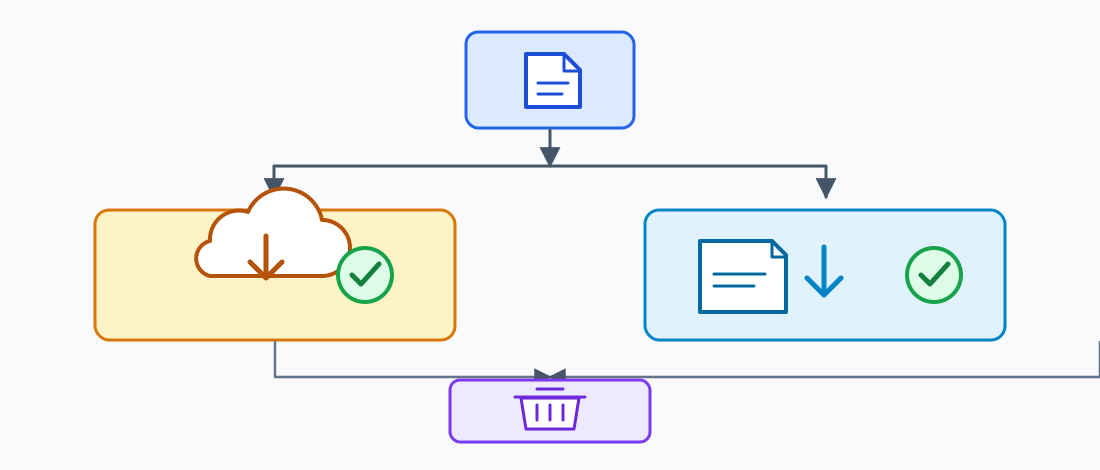
Browser automation file tests are reliable when a test owns every input and output, waits for the right completion signal, and checks the application separately from the bytes on disk. For uploads, start with a synthetic file and a known file input, confirm the selected name and validation state, then verify the application's visible acceptance result. For downloads, trigger the documented user action, wait for the browser's download event, save the artifact to a unique test-owned path, and check only the properties the scenario needs. Always clean temporary files you own; do not infer remote deletion or business completion from a local browser event.
This boundary matters because a file transfer crosses several owners. The test runner owns its fixture and local artifact path. The browser exposes user-facing selection and download behavior. The application decides whether a file is valid and accepted. A service may scan, process, store, reject, or retain it after the browser stops observing. Keeping those outcomes distinct makes a failure diagnosable without reading unrelated personal files or dumping file contents into logs. The Playwright download guide, its file upload guidance, and Selenium's file upload documentation describe framework mechanisms, not application guarantees.
Define the transfer contract
A useful test begins with the question the user would ask: did the expected document become available, or did the application accept the chosen file and complete the requested operation? Translate that into separately observable checkpoints. An upload can have a selection checkpoint, a client-side validation checkpoint, a submitted-request checkpoint, and an application confirmation checkpoint. A download can have a user action, a browser transfer event, a saved local artifact, and an application state change. Do not collapse these into one vague assertion such as “file worked.”
Write down the fixture contract before adding framework calls. It should name the synthetic input, its format and size class, the page or control that uses it, the expected result, the owning worker, the output location, and cleanup behavior on both pass and failure. It should also say what the test deliberately does not establish. A saved report cannot prove that a database transaction committed, and an upload control showing a filename cannot prove that remote processing finished. The shared fixture and isolation guide covers resource ownership more broadly.
Keep the scenario's public boundary narrow. Use an authorized test route and an approved synthetic account. Avoid browsing a real user's file picker, uploading documents found on the host, enumerating server files, or treating a filename as permission to inspect its contents. If the test needs an application-owned file, create or provision a dedicated fixture through a documented test interface and identify who removes it. Test data should be obviously synthetic, non-sensitive, and safe to retain briefly in a restricted CI workspace.
Decide what counts as success for the product, not merely for the browser. A form can display a selected filename before the server receives anything. A browser can emit a download event while the downloaded report contains an error page. Choose one or two meaningful checks: a visible completion state, an expected content type, a stable header, a known synthetic record identifier, or a digest for a deterministic fixture. Do not assert a complete file byte-for-byte when timestamps, generated IDs, or line endings are expected to vary.
Choose the API and preserve a failure fixture
Use this small matrix to choose the narrowest browser API and the result it can prove. The application assertion remains separate from the framework event.
| Test need | Playwright | Selenium/WebDriver | Evidence boundary |
|---|---|---|---|
| Assign an upload | locator.setInputFiles() or a file chooser | sendKeys() on <input type="file"> | Selection and client validation |
| Observe a download | page.waitForEvent('download') before the action | Driver-specific download handling, then an owned path | Browser transfer and bounded artifact check |
| Exercise a rejection | Synthetic fixture with one changed property | Same fixture through the file input | Field error and reusable control |
| Clean up | finally removes the attempt directory | finally removes the attempt directory | Local ownership only |
Keep one copyable failure fixture beside the test. It makes a timeout or rejection reproducible without collecting a real document:
const attemptDir = await fs.mkdtemp(path.join(os.tmpdir(), 'file-transfer-'));
try {
  await page.locator('input[type=file]').setInputFiles('fixtures/rejected-type.txt');
  await expect(page.getByRole('alert')).toContainText('file type');
} finally {
  await fs.rm(attemptDir, { recursive: true, force: true });
}
The fixture's expected result is a field-level rejection followed by a usable control. A download timeout uses the same attempt-directory pattern but must retain the first timeout as the primary failure. This focused check covers file-transfer observability; broader fixture ownership and accessibility journeys still need their own checks.
Make uploads deterministic
Prefer the framework's supported file-input API over operating-system dialog automation. WebDriver's standard upload path assigns a local path to an <input type="file">; Playwright can set input files or handle a file chooser. These approaches target the page's explicit control and avoid depending on window focus, desktop theme, dialog language, or timing in a separate native UI. They still require an authorized page and a path to a test-owned fixture. Framework APIs do not replace the application's validation or access rules, and a hidden input should only be used when it is the genuine control associated with the documented user flow.
Prepare fixtures as immutable inputs. Give each one a descriptive scenario name, controlled extension, known media type, bounded size, and content designed for the case. A valid image fixture should be a small known image, not an arbitrary workstation image renamed to .png. A rejected-file case should vary one property at a time, such as the extension or declared size, so the test can attribute the response. Keep a small set of reusable fixtures; broad collections of real documents add privacy and maintenance risk without making the assertion stronger.
Assert the selection step before submission. Confirm the expected displayed filename or file count, and where appropriate check the UI's size or type summary. Then submit through the user's ordinary action and wait for a product-level response that the application documents. This separation helps locate the defect: no selection points to the fixture or control, immediate rejection points to client validation, and a pending or failed result after submit points toward transport or application processing. A click returning successfully is not evidence that a file reached the service.
Cover validation as a contract rather than a collection of incidental error strings. Include one valid synthetic file, a file at a documented boundary, and a representative rejected file only when those cases matter to users. Check that the control remains usable after rejection, that the error is associated with the field and understandable, and that correcting the input allows a retry. Avoid depending on exact browser-generated dialog text or unspecified server messages; those can change independently of the behavior being tested.
Treat file metadata as untrusted input. Extensions and browser-reported MIME types can be absent, inaccurate, or deliberately mismatched. The application should perform its own authorization, size limits, format parsing, and content validation on the server side. Browser automation can confirm the public response to a synthetic mismatch, but it cannot certify the server's scanner, storage permissions, or file transformation pipeline. Those properties need appropriate application tests and service-side evidence.
Make downloads observable
Start the wait for a download before triggering the action that should cause it. That ordering prevents a fast event from occurring before the test subscribes. The browser event is a useful transfer boundary; the test can then save the artifact to a path it created for this attempt and inspect a minimal property. A default download folder or a fixed shared filename makes the test depend on host configuration and creates collisions under parallel execution. Use a fresh worker- and attempt-specific directory beneath an approved temporary root.
Distinguish a completed transfer from a correct document. Check the suggested filename only when naming is user-visible behavior. Check a MIME type, signature, header, or small structured field only if it answers the scenario. For a deterministic synthetic export, a cryptographic digest can make an exact comparison concise; for dynamic reports, assert stable fields and tolerate expected variance. Do not print full contents or base64 data to CI logs. If a test needs a larger semantic check, parse the file with the application's supported format library and retain only a short pass/fail receipt.
A browser's download event does not establish that the application generated the right business record or that the user is authorized to receive every field. Verify authorization and content selection at the application's documented boundary. For a report, assert the selected synthetic scope and a small set of non-sensitive fields. For a generated archive, verify the expected manifest entry rather than extracting arbitrary paths. Treat path traversal, decompression limits, and unsafe archive handling as application security concerns that need dedicated tests, not as a reason to dump downloaded data during a routine UI run.
Do not make test success depend on a host's default download preference, desktop shell, or a user's real Downloads folder. Browser frameworks often manage downloads in temporary browser-owned storage until a test saves them; lifecycle details vary by framework and version. Use the relevant public API and check its documented retention boundary. Copy the artifact only when the test owns the destination, then close the page or context through its normal lifecycle and remove the copied test artifact in a finally path.
Isolate artifacts and parallel workers
Every worker needs a private artifact namespace. Include a stable scenario label, worker identity, and attempt number in the directory, while avoiding account names, email addresses, or other personal identifiers. Keep the path structure predictable enough for CI collection, but ensure two workers can never write the same file. A unique path prevents accidental overwrite; it does not provide access control. Configure CI permissions and retention separately, and upload only the artifacts needed for debugging.
Treat fixture files as read-only source material. Copy them to a per-test workspace when a scenario must mutate or rename a file. Never let one worker overwrite a shared fixture while another is reading it. For generated downloads, use atomic naming or a new directory per attempt and make the test fail clearly if the expected artifact is missing. A test must not silently accept a previous attempt's file just because its name matches.
Parallel browser contexts separate browser-managed cookies and storage, but do not isolate the host filesystem or an application's server-side records. A fresh context does not prevent two tests from requesting the same export job, using one shared upload record, or racing to remove a fixture from a service. Give each worker separate synthetic data or use a documented reset endpoint with an explicit owner. Serialize only the shared mutation that truly requires serialization; adding a delay is not a reliable lock.
Limit artifacts according to their sensitivity. A downloaded invoice, diagnostic bundle, or user-generated image may contain private content even when created during a test. Prefer synthetic, low-information fixtures, restrict access to raw artifacts, choose a short expiry, and keep ordinary logs to scenario ID, file category, size class, outcome, and cleanup state. A screenshot can expose more than a short receipt, so capture it only when an approved synthetic page needs visual diagnosis. Redaction reduces exposure but does not turn an unauthorized capture into an acceptable one.
Clean up and retry safely
Cleanup should follow ownership. The test that creates a temporary directory removes it; the context owner closes the context; the application or service owner deletes a remote object through its supported interface. Do not assume that context closure erases a copied download, cancels a server job, or removes an uploaded record. Put local cleanup in finally so assertion failures and timeouts reach the same path. If cleanup itself fails, report that alongside the original failure instead of masking the assertion or returning a misleading pass.
Make cleanup idempotent. A timeout can happen after a file is written but before the test records success, and a safety hook may try to close an already closed context. Check the test-owned path and resource state, clean only what this attempt created, and record an incomplete cleanup if the operation cannot be confirmed. Never scan a broad host directory and remove files based only on a matching name or extension. The cleanup boundary should be narrower than the artifact root wherever possible.
A retry is a new attempt with a new private output directory. Before replaying an upload or requesting a new export, determine whether the action is read-only, idempotent, or safely queryable by a scenario identifier. The first request may have reached the service even if the browser timed out before showing a response. Check an application status endpoint or a visible existing result where the product provides one; otherwise report an uncertain outcome and let the test owner decide whether retry is safe. Do not convert an ambiguous remote mutation into an automatic duplicate.
Preserve the first failure as the primary result. If a download timed out and local cleanup then fails, the receipt should identify the transfer timeout and the additional cleanup problem. Include framework and browser versions, scenario label, action boundary, expected signal, artifact-presence boolean, and cleanup state. Exclude cookies, authorization headers, full page text, raw file bytes, and personal filenames. This evidence is enough to route the issue without making the test report a second data store.
Review the application boundary
Upload success has several meanings: the browser selected a file, the application accepted the request, asynchronous processing completed, and the stored object became available to later users. Pick the meaning that corresponds to the user scenario and assert it at the correct boundary. A “queued” message can prove acceptance into a queue, not completion of antivirus scanning. A green toast can prove a response was rendered, not that the object can be downloaded later. When persistence matters, use a documented follow-up view or application API designed for test evidence.
Download success also has separate layers. A link may be present but point to the wrong scope; the browser may complete a transfer that contains an access-denied page; the file may be saved while the server records an error. Combine a user-visible action with a bounded artifact check and, when necessary, a separate authorized application assertion. Do not use browser network inspection to collect unrelated requests or infer hidden account data. Limit instrumentation to the request or outcome needed for the test contract.
Keep end-to-end checks proportional. Most filename, MIME parsing, size boundary, and server validation cases are faster and more precise as component or API tests. Reserve browser tests for behavior the user experiences: selecting a file, seeing accessible validation, initiating a download, and receiving clear completion or failure feedback. A smaller browser suite is easier to diagnose and less likely to retain sensitive artifacts. The trace debugging guide explains how to keep optional diagnostics bounded.
On a browser or framework upgrade, rerun cases that exercise file selection, cancellation, a valid upload, a rejected upload, a completed download, parallel artifact names, and failure cleanup. Compare the user-visible outcome and documented API behavior, not incidental timing or temporary internal paths. Record the browser/framework version with the test result. If an API changes, update the fixture and its ownership contract; do not add a broad wait or retry simply to make the previous expectation pass.
BotBrowser capability and limitation
BotBrowser can provide isolated BrowserContexts with separate browser-managed session state for repeatable, authorized checks of synthetic upload and download workflows. A team can start a known scenario without reusing another context's cookies or storage, then compare the page's file-selection, validation, and completion behavior for that scenario. This is useful when the test question concerns an authenticated workflow boundary and the starting browser state must be controlled. BotBrowser does not control the operating-system download destination, validate a site's server-side file processing, replace framework event handling or safe temporary-file management, or guarantee remote file deletion. See BotBrowser multi-account isolation alongside the documented Playwright download lifecycle.
BrowserContext isolation does not own a host directory or determine whether a site's backend accepted, scanned, stored, or deleted a file. The test runner must use synthetic approved files, choose private temporary paths, check application-level results, restrict retained artifacts, and invoke the service's supported cleanup where required. A clean context is evidence about browser-managed state only.
For an operational receipt, record the browser release, framework, scenario label, synthetic input category, output-path ownership, expected signal, observed result, and cleanup status. Keep raw files out of routine logs and retain them only when an approved diagnosis needs them. State whether the test observed selection, browser transfer, application acceptance, or later availability; these are separate facts. When a service-side result matters, use a documented application signal rather than claiming that the browser event proved it.
Sources
Related Articles
Take BotBrowser from research to production
The guides cover the model first, then move into cross-platform validation, isolated contexts, and scale-ready browser deployment.