Browser Automation Test Fixtures and Isolation
Design browser automation fixtures with clear ownership, isolated state, safe parallel workers, and deterministic cleanup.
Want the structured docs for Getting Started?
This article lives in the editorial library. For step-by-step setup, reference material, and ongoing updates, jump into the docs section.
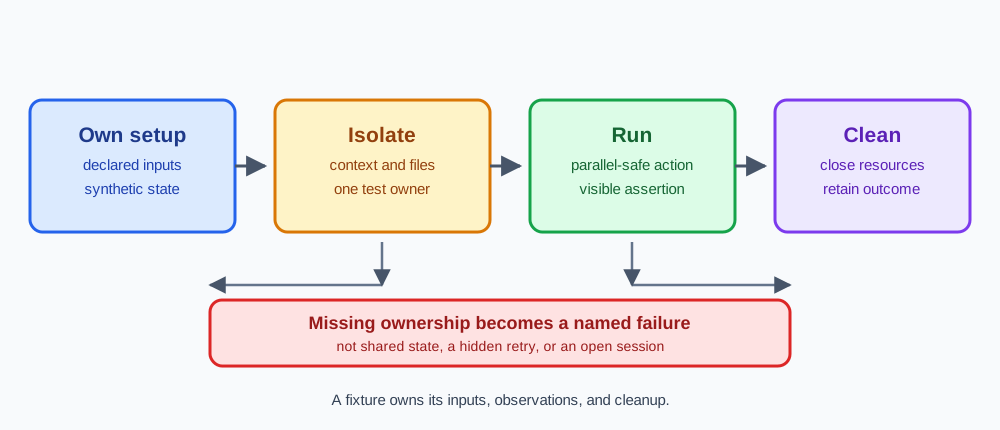
Reliable browser automation starts with a fixture that owns a small, declared set of resources. A fixture may create a browser context, a page, a temporary directory, and synthetic application state. It should also say who closes each resource and which result remains when an assertion fails. This contract is more useful than a large suite-level setup because a reader can trace one test without guessing what another test left behind.
The central rule is simple: each test receives known inputs, observes a bounded user-facing outcome, and releases what it created. Playwright describes this model through test fixtures, while Selenium's test practices discuss independent tests and controlled data. For browser context details, see the Playwright lifecycle guide and keep the fixture boundary separate from server-side account ownership.
Write the fixture contract before the test
A useful fixture contract names its inputs, outputs, and owner. Inputs can include a browser launch choice, a context option set, an approved synthetic account, a seeded record, and a worker-specific output directory. Outputs should be small: a result category, a visible assertion, and a cleanup receipt. The owner is the code that can close or delete the resource. If an application owns a remote record, the browser fixture cannot promise to delete it.
Keep setup close to the scope that needs it. A test-scoped context is appropriate when state must start clean for every case. A worker-scoped browser can reduce launch cost when each worker still creates its own context and files. A suite-wide page is rarely a good default because cookies, service workers, event listeners, and in-memory state can survive longer than the test that created them. The chosen scope should be visible in the fixture name and documentation.
Separate browser ownership from application ownership. The fixture can open a page and perform an approved sign-in flow, but the application decides how a session ends and the service decides how a server record is retained. Closing a context releases browser-managed state. It does not revoke a session on another device, undo a message sent by the application, or remove a database row. State the boundary in the test result instead of treating local closure as remote deletion.
Make the contract reviewable without reading private artifacts. Record the scenario label, browser release, fixture scope, synthetic input label, and cleanup result. Do not put cookies, tokens, full response bodies, or personal page text in routine logs. A maintainer should be able to decide whether the test reached its contract from the result metadata and a user-visible assertion, not from a copy of the entire session.
Choose a scope that prevents accidental sharing
Browser automation has several possible scopes: process, browser, context, page, worker, and test. They are not interchangeable. A browser process may host multiple contexts. A context groups pages and browser-managed storage. A page represents one tab. A worker runs a set of tests. A test is the smallest unit that should be able to explain its own setup and teardown. Draw these relationships in code by passing the context or page explicitly rather than asking a helper to find a global page.
Use a fresh context when the scenario depends on cookies, local storage, permissions, service workers, or a clean origin state. Context isolation prevents browser-managed state from leaking between known test accounts, but it is not an operating-system sandbox. The application can still write to shared services, and the runner can still share environment variables or files. Give those external resources an owner and a cleanup policy as well.
Storage snapshots are inputs with a lifecycle, not universal backups. A Playwright storageState file can carry cookies and origin storage, yet it may not include in-memory state, a later-created database, a service-worker queue, native credentials, or a server session. Treat the file as sensitive and synthetic. Copy a read-only baseline to a test-owned path when a worker needs to refresh it, and mark a partial output unusable rather than letting another test load it.
The same principle applies to Selenium profiles and driver sessions. A profile directory, driver connection, and browser binary form one compatibility input. Give each active session an owned profile path and close the driver through its normal lifecycle. The Selenium profile integration guide provides a related ownership model. A profile helps reproduce declared settings, but it cannot determine whether the application accepted a request or whether a service removed a record.
Build state that is safe to run in parallel
Parallel workers fail in surprising ways when they share mutable state. Common examples include one storageState path, one download directory, one seeded account, or one screenshot name. A file can contain valid bytes from the wrong worker, making the failure look like an application problem. Assign each worker a stable scenario label and a private directory beneath an approved artifact root. The label is metadata, not an account identifier.
Use a read-only baseline and write new state beside it. A login fixture can load the baseline, refresh an approved synthetic session, and save the result with the worker and attempt in its name. A failed refresh should be quarantined or marked invalid. Never replace a baseline while another context may be reading it. Atomic moves help with incomplete files, but they do not replace ownership or access controls.
Parallelism also affects test data. If two workers update the same record, a clean browser context cannot prevent a race in the service. Prefer independent synthetic records, an application-supported reset operation, or a read-only scenario. When a shared record is required, serialize the specific mutation and document the owner. Do not solve a data race by adding a delay or by retrying an operation whose first attempt may already have succeeded.
Workers should keep their browser observations bounded. Capture the URL category, visible status, and a short error name when needed. A worker does not need to collect every network event to prove that a button became usable. If a trace or screenshot is authorized, write it to a worker-specific path and apply the same retention rules as the test data. An artifact that has the right filename but the wrong worker's content is a failed fixture result.
Make teardown deterministic and repeatable
Teardown is part of correctness. Put cleanup in a finally path that runs after a pass, assertion failure, timeout, or setup error. Close pages that have an earlier lifecycle, then close the context that owns the remaining pages. A shared browser owner can close the browser after all context owners finish. If the fixture launched the browser, it may own the final close. If it connected to a shared service, it may own only the disconnect. The deployment contract decides which operation is valid.
Preserve the first error when cleanup also fails. Store the workflow error, attempt cleanup, then report the cleanup error as additional evidence. Throwing only the close error hides the assertion that caused the test to enter teardown. Swallowing the close error creates a green-looking result with a leaked session. A small aggregate result can say “assertion failed, context close failed” without embedding page content.
Close test-owned downloads, recordings, file handles, and temporary directories according to their own APIs. Context closure does not delete a file already copied to a shared artifact store, and browser closure does not cancel a server mutation already sent by a worker. Application sign-out or cancellation should happen while the page is available when the application contract requires it. Still attempt browser cleanup when that application operation fails.
Cleanup should tolerate a second call. A timeout may leave a page partially initialized, and a runner may invoke a safety hook after the fixture already closed its context. Check whether a handle is usable, then close it if ownership remains. Report an incomplete cleanup as infrastructure evidence. Do not search for another context or page and close it merely because its name looks similar.
Coordinate retries with isolation and evidence
A retry is a new test attempt, not a continuation of an unknown page. First decide whether the failed action was read-only and whether the application has a supported idempotency or status check. If a retry is allowed, close the old context, create a new context with the same approved synthetic inputs, and record the attempt number. A later pass does not prove that the first attempt was harmless.
Classify setup, application, assertion, and infrastructure failures separately. A missing state file is a fixture problem. A rejected synthetic request is an application or service result. A driver disconnect is an infrastructure result. A timeout waiting for a visible heading identifies a missing browser observation, but it does not explain why a service chose a response. Keep the categories in the receipt so the next owner knows which boundary to inspect.
Diagnostics should name a condition rather than dump a session. Include the scenario, browser and framework versions, current URL category, expected landmark, and cleanup status. A screenshot or trace can be useful for an approved synthetic page, but it may contain secrets or user content. Capture only what answers the question, restrict access, and expire the artifact according to the team's policy. Deleting a local copy later cannot recall a copy already shared.
Exercise the failure path deliberately with a synthetic page or supported test response that withholds one readiness signal. The expected result is a bounded failure naming that signal, followed by a cleanup receipt. This check validates the fixture itself. It should not require probing unrelated origins, inspecting private accounts, or expanding the collection scope until a test happens to pass.
Review isolation at the application boundary
Browser isolation is valuable because it gives a test a known client-side starting point. It does not make two server sessions independent, guarantee that a service accepted a cookie, or control application cleanup code. Verify the boundary that belongs to the test: a new context lacks the expected local state, a protected route follows the documented contract, and a sign-out produces the expected next request. Ask the service owner for server evidence when the browser cannot observe the required fact.
Test account switching as a state transition. Use the supported sign-out path, clear only the client data that the application documents, and create the next context with its own approved state. Check a visible account heading or access result rather than relying on a login button that may be present in both states. A second tab, worker, offline queue, or service worker can retain an old view even after one page appears signed out.
Keep the fixture independent of challenge solving, account discovery, or private signal collection. An authorized test needs a known account, a declared route, and an observable result. If a dependency is unavailable, record that category and stop at the approved boundary. A browser runner can show what the client observed, while only the application and service contracts can establish remote effects.
After a browser or application update, repeat the isolation cases that matter: clean context, state loading, expired state, account switch, worker activity, parallel file output, and failure teardown. Compare outcomes at the user-visible boundary and retain the tested versions. Do not treat an unchanged screenshot or a fast run as proof that every external service behaves the same way.
BotBrowser capability and limitation
BotBrowser provides isolated BrowserContexts with separate cookies, storage, and session state, which can give an authorized fixture a repeatable starting point for comparing known synthetic workflows. The BotBrowser multi-account isolation documentation describes that browser-side boundary. In a test fixture, the capability is useful for checking that one context does not inherit client-side state from another and for repeating a bounded account-switch scenario.
BotBrowser does not replace Playwright or Selenium lifecycle management, application cleanup, server session invalidation, or secret handling. It cannot guarantee that an expired cookie is accepted, remove a service-worker queue, delete a provider record, or decide whether a remote mutation should be retried. The fixture owner still creates and closes contexts, provides approved synthetic inputs, controls artifact retention, and asks the application or service owner for evidence outside the browser boundary.
Use the capability as one declared input, not as a result claim. Record the browser release, context purpose, state source, worker label, expected cleanup, and observed outcome. Keep the limitation next to that record so a reader does not mistake a clean local context for proof of remote deletion. This separation also makes a failed test easier to route: browser state belongs to the fixture owner, visible behavior belongs to the application owner, and server records belong to the service owner.
A practical review asks four questions. Did each test receive its own mutable state? Could a worker overwrite another worker's files or data? Does every failure reach the same cleanup path? Does the result state what was not observed? A fixture that answers these questions is easier to maintain across frameworks and browser releases because its assumptions are explicit and its evidence stays proportional to the scenario.
When a test uses a prepared service response, keep ownership of its inputs and outputs visible. The simulator belongs to the scenario, uses synthetic data, and resets with the context. A prepared response does not prove that the real service stores the same data.
The artifact directory has an owner too. A worker may write its result, while CI decides who can read it and when it expires. Keep the short receipt separate from a more sensitive screenshot or trace so a review does not open unnecessary content.
A fixture correction should change the cause, not only hide the symptom. If two cases accidentally share a record, separate them or define the shared operation. If cleanup fails, retain that failure in the output and let the runner owner address it.
Before merging a fixture change, run one clean-context case, one expired-state case, and one forced teardown failure with the same receipt format. Compare the worker label, resource scope, visible assertion, and cleanup status across those runs. This small matrix catches accidental reuse of a profile or artifact path without requiring a broad end-to-end sweep. Keep scenario inputs synthetic, publish only the short receipt, and route any server-side discrepancy to the application owner with its documented request identifier.
Scenario documentation should match the code that runs. Recheck scope when the browser, framework, state schema, or service changes. A short, current contract prevents a future fixture from reusing a temporary path as a shared resource.
BotBrowser can provide a consistent browser configuration for each test context; data that the application keeps in its own services still belongs to the application owner for cleanup.
Sources
Related Articles
Take BotBrowser from research to production
The guides cover the model first, then move into cross-platform validation, isolated contexts, and scale-ready browser deployment.