Google Translate Page Translation with BotBrowser
Enable browser page translation with your own Google Cloud key while keeping privacy, profile consistency, and cost controls explicit.
BotBrowser Team
Want the structured docs for Getting Started?
This article lives in the editorial library. For step-by-step setup, reference material, and ongoing updates, jump into the docs section.
BotBrowser can pass a customer-managed GOOGLE_API_KEY to its browser process for page translation, but it cannot supply billing, quota, access permission, or approval to send page content to Google Cloud.
TL;DR
- Use a customer-owned Google Cloud project, restricted key, and approved route.
- Set
GOOGLE_API_KEYbefore the browser starts and retain the selected profile and user-data policy. - Verify a safe page, then record the release, profile, languages, route, and outcome without page content.
Contents
- What page translation enables
- Prepare a Google Cloud project you control
- Start BotBrowser with the key in the browser process
- Keep profile behavior consistent
- Verify the result and troubleshoot in order
- Protect data, control cost, and assign owners
- Practical conclusion
BotBrowser supports built-in Google Translate page translation when the browser process receives your GOOGLE_API_KEY; it does not supply a shared key, guarantee Google Cloud availability, or decide whether page text may be sent to that service.
Reading a web page in another language should be a normal browser task. It should also be a deliberate one. Page translation sends page text to an external translation service, consumes a cloud quota, and depends on the browser session that starts the request. BotBrowser supports this workflow when you provide and manage your own Google Cloud Translation API key.
The useful promise is simple: open a page, choose the browser's normal translation command, and review the translated result. The responsible promise is equally important: you decide which project pays for the requests, which traffic can use the key, which profiles carry the workflow, and which content is acceptable to send for translation.
What page translation enables
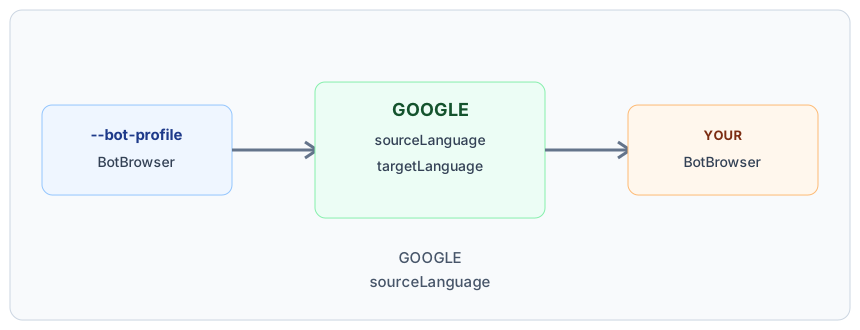
The decision record should identify GOOGLE_API_KEY, sourceLanguage, and targetLanguage without retaining the key value.
The browser can request a translation for a page whose main text is not in the selected target language. The translated text is then rendered in the current page session. This is useful for support work, research, localization review, content operations, and authorized quality checks. For how applications read the browser's language setting, see Navigator Language and Application Localization.
Translation is a browser capability with an external dependency. A page may expose translation-related browser behavior while the full service is unavailable. Those are different outcomes. A capability check can show that the browser understands the feature; it cannot prove that a cloud request will succeed. A usable result also needs a valid customer key, an enabled service, billing, available quota, permitted traffic, a working route, and a source page that the service can process.
This distinction helps teams describe failures accurately. If the browser does not offer a translation command, inspect the page language and browser settings. If the command appears but the result does not arrive, inspect the customer project, key restrictions, quota, proxy, and network. Do not treat an unsuccessful request as a translated page, and do not treat a visible browser capability as proof of external service access.
Prepare a Google Cloud project you control
Prepare these items before the first production session:
- A BotBrowser release and a profile that match the intended workflow.
- A Google Cloud project owned or administered by your organization.
- The Cloud Translation API enabled in that project.
- A billing account linked to the project, according to Google's current service requirements.
- A quota policy that reflects the pages and users you expect to translate.
- An API key restricted to the Cloud Translation API and to the application environment that needs it.
- A network route that allows the browser to reach the required Google services.
Use a separate project for testing when you need clear spending and access boundaries. A dedicated project also makes it easier to remove a test key without disturbing another workload. Keep the selected profile, user-data policy, proxy policy, and launch method documented as one deployment unit. Translation behavior is easier to reproduce when those choices do not change between runs.
Open Google Cloud Console and create or select a project for page translation. Enable the Cloud Translation API, connect the project to billing, and review the current Cloud Translation pricing and quota guidance before setting your limits. Create an API key under APIs & Services and Credentials. Restrict the key to the Cloud Translation API. Add an application restriction that matches the place where the browser runs. An IP restriction can fit a stable server egress. Other deployment shapes may require a different restriction. Choose the narrowest restriction that works for the real browser route, then test it from that route.
Do not paste a real key into an article, issue, source file, profile, screenshot, terminal recording, committed environment file, or shared log. The examples use placeholders intentionally. Store the real secret in the deployment secret store or provide it interactively to the process that launches BotBrowser. Rotate or revoke the key in Google Cloud if it is exposed.
The key belongs to your project and your operating policy. BotBrowser does not provide a shared translation key. That separation gives you control over billing, quota, access review, retention decisions, and incident response. It also means that Google Cloud service availability and account configuration remain part of your responsibility.
Start BotBrowser with the key in the browser process
The environment variable must be present when the BotBrowser process starts. Set it in the same environment that launches the browser, then use your normal profile and user-data arguments:
GOOGLE_API_KEY='YOUR_API_KEY' \
chromium-browser \
  --bot-profile='/absolute/path/to/profile.enc' \
  --user-data-dir='/absolute/path/to/user-data' \
  about:blank
The placeholder is not a usable credential. Replace it only in your protected local or deployment environment. Restart BotBrowser after changing the variable. Changing an outer HTTP client, a page script, or a later child process does not establish the browser process configuration required for this workflow.
On macOS or Linux, export the variable in the shell that starts the browser:
export GOOGLE_API_KEY='YOUR_API_KEY'
chromium-browser \
  --bot-profile='/absolute/path/to/profile.enc' \
  --user-data-dir='/absolute/path/to/user-data'
On Windows PowerShell, set the process environment before launch:
$env:GOOGLE_API_KEY = 'YOUR_API_KEY'
& 'C:\path\to\chromium.exe' `
  '--bot-profile=C:\path\to\profile.enc' `
  '--user-data-dir=C:\path\to\user-data'
For Playwright or Puppeteer, the process that launches the browser owns the environment. Pass the protected value through that launch boundary and keep the profile arguments on the browser. Never place the key in page JavaScript or expose it to site code. Do not commit a real .env file. A deployment secret store or interactive shell is safer than a repository copy. For other launch options, see BotBrowser Launcher: Profiles, Proxies, and Setup. For driving a profile from Selenium, see Selenium Browser Profile Integration and Session Ownership.
Keep profile behavior consistent
Keep the profilePackage, userDataPolicy, and routePolicy fixed for one translation review.
Translation is not a reason to mix browser identities or state policies. Load the intended profile before navigation and keep its user-data directory policy clear. The Profile Management guide covers choosing and launching a matching profile. A persistent directory preserves the normal session history that your workflow expects. A fresh directory is appropriate when the test requires a new relationship with the site. Do not reuse one persistent directory for unrelated identities or teams.
The selected profile, browser release, host environment, and network route should describe one coherent session. If a profile is intended for one browser family or platform context, keep those choices aligned during the translation check. Inconsistent launch inputs can make a result difficult to reproduce and can expose unexpected browser state to the page. To keep the route consistent, see Proxy, DNS, and WebRTC Consistency for a Coherent Browser Identity.
Multi-profile workflows need the same discipline. Assign the matching profile before a session begins and keep identity-bearing settings stable for its lifetime. Use the Per-Context Fingerprint documentation for the current profile setup sequence. Translation should operate inside an already-defined session, not become a reason to change it after navigation. Profile formats, rotation, and common failures are covered in BotBrowser Profiles: Formats, Rotation, and Common Failures.
This consistency protects more than a successful translation. It keeps the page-facing browser family, language preferences, stored state, and route policy understandable to the operator. A profile is a control for browser behavior and continuity. It is not permission to access content, and it does not override the website's access rules.
Verify the result and troubleshoot in order
Record browserVersion, profilePackage, sourceLanguage, targetLanguage, and translationOutcome for the approved run.
Run the check with the same release, profile, proxy, launch method, and target language used by the deployment:
- Confirm that the browser process was restarted after the key was configured.
- Use an approved page whose main text is not in the target language.
- Use the browser's normal page-translation command from the menu or context menu.
- Confirm that the page text visibly changes and that the result is readable.
- Review the Google Cloud project for expected request usage.
- Record the profile policy, route policy, source language, target language, and outcome without recording page content or secrets.
Test both a page that should translate and a page that should remain unchanged. This separates a working service from a mistaken assumption about automatic translation. If the page contains forms, account information, private support records, or user-generated text, use a safe representative page unless your data policy explicitly approves sending that content to the translation service.
A browser capability check alone does not prove that the external service is available. A result shown in one environment does not prove that another proxy, quota, profile, or billing account will behave the same way. Keep the acceptance record tied to the environment that actually matters.
Translation is unavailable. Confirm that the key was set before the browser process started, the browser was restarted, the Cloud Translation API is enabled, and the project has the required billing configuration. Then check whether the page language and target language make translation applicable.
Permission is denied. Review the key's API restriction and application restriction. Confirm that the request leaves through the route allowed by that restriction. Check that the selected project is the one carrying the key and billing account.
Quota or rate limits appear. Review current usage, daily limits, and per-minute limits in Google Cloud. Set limits that prevent accidental spend while leaving enough capacity for the planned workflow. A quota error is an operating signal, not a reason to copy a key from another project.
Requests fail through a proxy. Confirm the proxy is configured at the browser level and permits the Google services required by translation. Proxy Configuration describes browser-level routing. Compare a controlled test route with the deployment route. Keep the proxy decision separate from profile identity so each change has a clear owner.
The key may be exposed. Revoke or rotate it immediately in Google Cloud, remove it from any distribution channel where it appeared, and update the protected launch environment. Do not continue testing with a credential whose access boundary is uncertain.
The result is inconsistent between runs. Compare browser release, profile, user-data directory, target language, proxy, host, billing project, quota, and launch timing. Change one variable at a time. A repeatable record is more useful than a long collection of screenshots containing private page data.
Protect data, control cost, and assign owners
Page translation sends the text needed by the external service to Google's service. That can include visible headings, paragraphs, labels, and other text selected by the browser's translation flow. It may include information that your organization considers personal, confidential, regulated, or commercially sensitive. Review your data-handling requirements before using translation on a page.
Use approved test pages for routine checks. Exclude secrets, account recovery material, payment details, private customer records, health information, and confidential business text unless your policy and contractual review explicitly allow the transfer. Translation can improve access to information, but it should not silently widen the set of systems that receive that information.
Make the decision visible to the people operating the browser. Document which project receives requests, who can change the key, how quota alerts are handled, and how exposed credentials are rotated. Use least privilege in the cloud project and keep logs focused on operational metadata. Avoid copying page text into support tickets when a short outcome such as translation succeeded or quota denied is sufficient.
Privacy and consistency reinforce each other. A stable profile and route make it easier to know what data leaves the session and where failures occur. A clear data policy makes it easier to decide when translation is appropriate. Neither one replaces the other. Profile controls do not make sensitive text safe by themselves, and a private route does not make every external translation request acceptable. For a broader view of privacy-first workflow design, read Privacy by Design for Browser Workflows.
Google Cloud controls translation pricing and quotas. Set a budget alert, review usage regularly, and define a maximum request volume for each workflow. A page with repeated or unusually long text can consume more characters than a short support page. Retries can also increase usage when a route or quota is already failing.
Use a dedicated project or service boundary when multiple teams need different budgets. Give each owner a clear quota and escalation path. Keep development checks small and intentional. Production readiness means more than a successful first request: it includes a known cost ceiling, a route that can reach the service, a key that can be rotated, and a clear response to quota or billing failure.
Treat availability as conditional. Google Cloud, the network route, the selected profile, the source page, and the browser session all contribute to the result. If any dependency is unavailable, preserve the original page and report the translation result as unavailable. Do not mark a page as translated merely because the translation command was visible.
Before enabling the workflow:
- Choose an approved data-handling policy and safe verification page.
- Create or select a customer-owned Google Cloud project.
- Enable the Cloud Translation API, billing, quota limits, and alerts.
- Restrict the key to the required API and application route.
- Store the key outside source control, profiles, screenshots, and shared logs.
- Select a matching BotBrowser profile, release, user-data policy, and proxy.
During a run:
- Start BotBrowser with the key already present in its environment.
- Use the browser's normal translation command.
- Confirm the visible page result and preserve the original content when translation is unavailable.
- Watch for permission, quota, billing, and network errors.
- Record operational metadata without copying private text or the credential.
After a run:
- Check expected usage in the Google Cloud project.
- Review the translated result for the intended language and page state.
- Rotate the key when exposure is suspected or access ownership changes.
- Revisit quota and privacy decisions when the workflow, profile, or audience changes.
The first successful translation is only the beginning of an operating pattern. If several people or scheduled jobs use the feature, give the workflow a clear owner. That owner should know which cloud project receives requests, which profile is approved, which route is expected, and what to do when the service is unavailable. The person who manages browser profiles does not automatically need permission to change cloud billing, and the person who manages the cloud project does not automatically need access to page content. Separate responsibilities make review easier.
Keep development, staging, and production decisions distinct. A test project can have a smaller quota and a safe sample page. A production project can have a different budget, alert destination, and key restriction. Do not assume that a key that works from a laptop will work from a server route, or that a profile prepared for one release is the right profile for every browser release. Record the combination that passed the user-visible check.
Recurring sessions should also have a state policy. Decide whether a session keeps its user-data directory, starts with a fresh directory, or follows a documented rotation schedule. This choice affects more than cookies. Language preferences, site decisions, and other browser state can change the page experience and the interpretation of a later check. A fresh session is not automatically safer, and a persistent session is not automatically wrong. The important part is that the choice is intentional and compatible with the data policy.
When a translation request fails, keep the original page available and give the operator a useful status. Distinguish an unavailable service from an untranslated page, a page that does not need translation, and a page that the data policy excludes. These outcomes lead to different next steps. A service outage may need retry or escalation. An excluded page needs a policy decision. A page already in the target language needs no cloud request. Clear states reduce unnecessary retries and avoid spending quota while someone is diagnosing the wrong problem.
Review the workflow when any boundary changes: a new browser release, a new profile family, a new host, a new proxy, a changed cloud project, a changed audience, or a changed data classification. Run the same safe verification page, compare the visible result, and inspect expected usage. Keep only the operational evidence needed to make the next decision. This protects privacy while making consistency measurable.
BotBrowser reads a customer-supplied GOOGLE_API_KEY from the browser-process environment at launch, so your team can run translation under its own Google Cloud project, quota, and billing policy together with the selected profile and proxy. Key restrictions, billing, quota, service availability, the network route, and the source page remain outside BotBrowser's control; the workflow also requires your own data-handling review.
Practical conclusion
Treat translation as a customer-owned cloud integration: load the approved profile, set GOOGLE_API_KEY before launch, restrict the key and route, and keep a minimal operational record for a safe verification page. The browser can request translation; it cannot decide whether the source content is permitted to leave your environment.
Public sources
This article is part of the guide: Browser Automation Getting Started: A First Run Map
Related Articles
navigator.languages: Pick the Right Locale From Browser Language Hints
Getting StartedBotBrowser Profiles: Formats, Rotation, and Common Failures
Getting StartedBrowser Automation Getting Started: A First Run Map
Getting StartedPuppeteer + BotBrowser: Launch and Profile Pitfalls
Getting StartedPuppeteer BrowserContext, Page Ownership, and Cleanup
Getting StartedSelenium Browser Profile Integration and Session Ownership
Take BotBrowser from research to production
The guides cover the model first, then move into cross-platform validation, isolated contexts, and scale-ready browser deployment.