Puppeteer BrowserContext, Page Ownership, and Cleanup
Learn who owns Puppeteer browsers, contexts, pages, popups, timeouts, and cleanup so authorized tests finish without leaking resources.
Want the structured docs for Getting Started?
This article lives in the editorial library. For step-by-step setup, reference material, and ongoing updates, jump into the docs section.
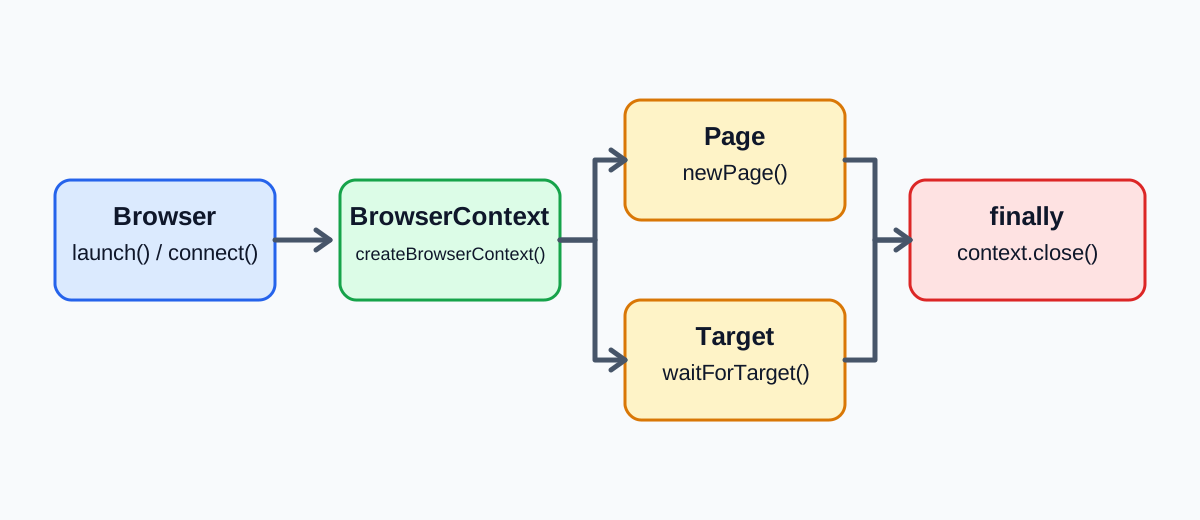
Browser, BrowserContext, and Page have different owners
The short answer is that a Puppeteer Browser owns the connection to a browser process, a BrowserContext owns an isolated group of browser targets and browser-managed data, and a Page represents one tab or page target inside a context. Test code owns the Puppeteer handles it creates. It must close them at the same scope where it acquired them, unless a higher-level fixture explicitly owns that cleanup. This ownership model makes failures understandable: a page failure belongs to one workflow, a context failure affects that isolated session, and a browser failure affects every context using the same process.
Puppeteer's Browser.createBrowserContext() creates a context that does not share cookies or cache with other browser contexts. context.newPage() creates a page in that context. By contrast, browser.newPage() creates a page in the default browser context. That distinction is easy to miss because both calls return a Page, but only the first call makes the context owner visible in the code. A test that requires per-scenario isolation should create a non-default context deliberately and create its pages from that context.
The default context has a special lifetime. browser.defaultBrowserContext() returns it, but Puppeteer documents that the default context cannot be closed. It ends when the browser ends. A context returned by createBrowserContext() can be closed independently, and closing it closes all associated pages. This is why the default context is convenient for a short script but a poor implicit fixture boundary for a shared test process. One test cannot reliably tear it down while allowing unrelated tests to continue.
The relationship is a resource tree, not merely an object graph. A browser can contain several contexts. A context can contain several pages and other targets, including workers. browser.pages() spans pages in all contexts, while context.pages() limits the inventory to one context. Broad browser-level discovery can therefore pick up a page created by another test. Helpers should accept a Page or BrowserContext explicitly instead of searching the entire browser for whichever page currently matches a URL.
Isolation also has a defined limit. Separate contexts prevent accidental sharing of browser-managed cookies and cache, but they are not separate operating-system sandboxes and they do not create separate service accounts. An application can still write to an external database, send mail, create a payment-provider record, or keep a server session after its page disappears. The browser context owns the client-side browsing environment. The application and service still own their supported sign-out, rollback, and data-retention behavior.
There is no need to invent a generic "storage state" object to explain this lifecycle. Puppeteer exposes specific operations such as context cookies, pages, permissions, and targets. Other stores have their own origin and API behavior. A cookie export is not a complete capture of local storage, IndexedDB, Cache Storage, service workers, in-memory JavaScript, or remote session state. For those boundaries, see the browser storage model and keep each store's owner explicit.
Create a context and keep its cleanup in the same scope
The most reliable fixture shape is acquisition followed immediately by a try block and a cleanup path that always runs. Do not create the context in one module, pass only its page through several layers, and hope a global shutdown hook discovers the missing owner later. The code that creates the context should retain the context handle even if the scenario normally works only with a page.
This example gives one authorized scenario one context and one page. It also preserves both a workflow error and a cleanup error. The first error remains the reason the test failed; the second remains visible instead of silently replacing or hiding it.
import type { Browser } from 'puppeteer';

async function runCheckoutCheck(browser: Browser) {
  const context = await browser.createBrowserContext();
  let workflowFailed = false;
  let workflowError: unknown;

  try {
    const page = await context.newPage();
    page.setDefaultTimeout(10_000);
    page.setDefaultNavigationTimeout(20_000);

    await page.goto('https://example.test/checkout', {
      waitUntil: 'domcontentloaded',
    });
    await page.locator('[data-test="cart-total"]').wait();
  } catch (error) {
    workflowFailed = true;
    workflowError = error;
  }

  let cleanupFailed = false;
  let cleanupError: unknown;
  try {
    await context.close();
  } catch (error) {
    cleanupFailed = true;
    cleanupError = error;
  }

  if (workflowFailed && cleanupFailed) {
    throw new AggregateError([workflowError, cleanupError], 'Workflow and BrowserContext cleanup both failed');
  }
  if (workflowFailed) throw workflowError;
  if (cleanupFailed) throw cleanupError;
}
Creating the context before entering the main workflow is acceptable here because a rejected createBrowserContext() promise means there is no returned context handle to close. If setup has several acquisition steps, register each resource as soon as it succeeds. A page, download stream, temporary directory, or recording can fail after the context exists but before the scenario starts. Cleanup must work with partial setup instead of assuming every variable was initialized.
You do not normally need to close every page before closing its context. BrowserContext.close() closes the context and all associated pages. Explicit page.close() calls are useful when a page has a shorter lifetime than the context, when a test wants to assert that a popup closes, or when a long scenario must release a page early. They should not become a substitute for closing the context that owns the group.
Application teardown belongs before browser teardown when the application contract requires it. For example, a synthetic checkout may need a supported cancellation call, or a test account may need the application's normal sign-out action. Perform that operation while the page and context still work, then close browser resources. If application teardown fails, still attempt context cleanup and report both outcomes. Never delete shared files or unrelated service records simply because a browser close did not finish cleanly.
Keep the fixture's output smaller than the resources it manages. A useful result records the scenario name, browser release, context creation result, page result, and cleanup result. It does not need cookie values, authorization headers, full HTML, or personal data. Screenshots and traces can also contain credentials or user content, so collect them only for the authorized test and retain them under the team's normal artifact policy.
Treat pages and popups as context-owned resources
A Page always belongs to a browser context. page.browserContext() lets code verify that relationship, but passing the correct owner is better than discovering it after a failure. A helper that opens a report should receive the scenario's page or context. It should not call browser.newPage() unless placing the new page in the default context is intentional. Otherwise a helper can cross the isolation boundary without any obvious error.
Popups introduce a second ownership problem: the new page is created by browser behavior rather than by a direct context.newPage() call. The popup still belongs to a context, but the test must observe it before the user action can create it. Waiting after the click is a race. A fast popup can appear before the listener or target predicate exists, leaving the test to wait for an event that already happened.
Puppeteer offers a page popup event and context-level target discovery. A context-scoped target wait is useful when the browser is shared because it cannot accidentally select a target from another context. Register the promise first, trigger the action second, and await the already registered promise third.
const popupTargetPromise = context.waitForTarget(target => target.opener() === page.target(), { timeout: 10_000 });

const [popupTarget] = await Promise.all([popupTargetPromise, page.locator('[data-test="open-receipt"]').click()]);
const popup = await popupTarget.page();
if (!popup) {
  throw new Error('The opened target was not a page');
}

await popup.locator('[data-test="receipt-number"]').wait();
await popup.close();
The opener predicate matters. Waiting for the next target of type page is not enough in a busy context because an unrelated background action may create another page first. target.opener() === page.target() ties the result to the page that performed the action. If the application deliberately reuses an existing tab instead of opening a popup, use the corresponding navigation or content condition instead of forcing the workflow into a popup assumption.
Navigation has the same ordering rule. When a click is expected to navigate, create the page.waitForNavigation() promise before the click and await both operations together. When a click updates the page without navigation, wait for a specific visible or response condition instead. A generic delay does not establish that the intended transition occurred, and networkidle is not a universal application-ready signal for pages that keep analytics, streaming, or background requests open.
Popup cleanup follows the context tree. Closing the popup releases that page while preserving the parent page and context. Closing the context releases both. Closing only the opener does not express a guarantee that every page it opened has also ended, so teardown should rely on the context boundary when the complete scenario is over. Before a mid-scenario assertion, context.pages() can provide a bounded inventory for a count or ownership check without searching other contexts.
Workers and downloads require similar discipline even though they are not all represented as Page objects. A worker may continue application activity after a page transition, and a download may outlive the click that started it. Await test-owned work that must complete, cancel it through a supported API when cancellation is part of the scenario, and then close the owning context. Context closure releases browser resources, but it cannot undo a remote mutation that a worker already submitted or a file the test runner already moved elsewhere.
Make timeouts describe a failed expectation, not cleanup
A timeout is an observation boundary. It says how long the test will wait for a particular condition; it does not prove that the browser stopped the underlying application work. When waitForSelector, a locator wait, navigation, or waitForTarget times out, the context may still be open and the page may still be executing. Cleanup therefore belongs after timeout handling just as it does after an assertion failure.
Puppeteer separates general and navigation defaults. page.setDefaultTimeout(ms) supplies the default maximum for methods that use the page timeout setting. page.setDefaultNavigationTimeout(ms) controls navigation methods and takes priority for those operations. An explicit method option is clearest when one action legitimately needs a different deadline. Choose values from the test environment and the expected user-visible transition, not from a promise that every site will finish within one universal number.
Timeouts should identify the condition they guard. A popup target wait should say that no popup from the expected opener appeared. A selector wait should name the application state that did not become visible. A navigation timeout should distinguish a missing navigation from an HTTP response that arrived with an unexpected status. Replacing all of these with one outer test timeout produces a single vague failure and makes cleanup compete with the same exhausted deadline.
Allow a separate teardown budget at the test-runner level. The Puppeteer context.close() and browser.close() methods do not take the same per-action timeout options as page waits. A runner can impose an outer deadline, but a Promise.race() only stops waiting; it does not cancel the losing close promise or prove the browser resources disappeared. If a harness reports a close deadline, it must mark cleanup as incomplete and hand process termination to the component that actually owns the browser process.
Do not swallow Puppeteer's TimeoutError and continue on an unknown page. A timed-out action may have partially succeeded. Retrying a purchase, form submission, or destructive service operation in the same page can duplicate the effect. First classify whether the failed condition was read-only and retryable. For a retryable infrastructure case, close the old context, create a new context with the same authorized synthetic inputs, and run a fresh attempt. For an application-side uncertainty, use the application's supported idempotency or status contract before retrying.
Cleanup errors also need their own category. A page close error, context close error, and browser disconnect are not equivalent to an application assertion. Report the original workflow error first and attach cleanup errors, as the fixture example does with AggregateError. This preserves evidence that a selector timed out while also showing that teardown was incomplete. A finally block that throws a new close error without retaining the original exception makes the test harder to diagnose.
Avoid an unbounded process-exit hook as the primary cleanup mechanism. Exit hooks are useful as a last diagnostic boundary, but asynchronous work may not complete in every termination mode. Per-test and per-fixture teardown provides deterministic ownership while the event loop and connection are healthy. A suite-level owner should then close the shared browser after all context owners have finished, using its own bounded shutdown policy.
Choose close or disconnect according to process ownership
page.close(), context.close(), browser.close(), and browser.disconnect() have intentionally different effects. Choosing among them is not a style preference. It is a process-ownership decision.
| Operation | What it ends | What remains |
|---|---|---|
page.close() | One page | Its context, sibling pages, and browser |
context.close() | A non-default context and all associated pages | Other contexts and the browser |
browser.close() | The browser and all associated pages | The Node.js test process and its non-browser resources |
browser.disconnect() | Puppeteer's connection to the browser | The browser process and its pages continue running |
Page.close() does not run beforeunload hooks by default. With runBeforeUnload: true, it runs those hooks, and Puppeteer does not wait for the page to actually close. Use that behavior only when the handler is part of the scenario being tested. Teardown should not rely on an application's unload handler to perform remote rollback, and a resolved close call in that mode is not proof that either local or remote cleanup finished.
Browser.close() closes the browser and all associated pages. It is normally the right final action when the fixture owns a browser it launched. Context owners should close their contexts first so a failure can be attributed to the correct scenario, then the suite-level browser owner closes the process-wide resource. Calling only browser.close() at the end can release resources, but it hides which test leaked a context or page during the run.
Browser.disconnect() disconnects Puppeteer while leaving the browser process running. It is appropriate when another component owns a long-lived browser and the current client owns only its connection. It is not cleanup for pages, contexts, cookies, downloads, or server sessions. After disconnecting, this client cannot continue managing those objects through the disconnected Browser handle. The process owner must retain a separate control path and an explicit shutdown policy.
Whether the code used puppeteer.launch() or puppeteer.connect() is a useful ownership clue, but the deployment contract is decisive. A process launched by a worker usually belongs to that worker. A process reached through a browser WebSocket endpoint often belongs to a service. Code should not close a shared service merely because the API permits it, and it should not disconnect from a self-owned browser and then claim the process was released.
Closure does not erase external effects. context.close() removes that live context and its pages; it does not revoke a token already copied elsewhere, cancel an order, remove a test account, or clear a test runner's downloaded file. If a workflow must clear site data while keeping a context alive, use the precise browser or application mechanism and verify its documented scope. The site-data clearing guide explains why client data removal and account cleanup are separate claims.
Verify teardown with observable checks
Run small checks against the browser version and fixture shape that you actually use. The following observations came from a local, activated page in stock Chrome 154 with Puppeteer 24.40.0; they give acceptance conditions for a test, not universal timing guarantees or BotBrowser validation.
| Check | Minimal action | Observe before proceeding | Do not infer |
|---|---|---|---|
| Default-page close | Add a beforeunload handler, then call page.close() without runBeforeUnload | No dialog is observed and page.isClosed() is true | That every close path will show an unload dialog |
| Unload-enabled close | Activate the local page, call page.close({ runBeforeUnload: true }), and accept the dialog | The close promise can resolve while page.isClosed() is false; wait for the closed condition after accepting the dialog | That a fixed delay guarantees closure or remote cleanup |
| Owned-context isolation | Set different synthetic cookies and local-storage values in two contexts at the same origin | Each context reads only its own value | That separate contexts isolate server accounts or operating-system resources |
| Context close and disconnect | Close an owned context, then disconnect a client that uses a browser endpoint | Its page is closed while the browser remains connected after context close; after disconnect, reconnect through the endpoint before using browser handles | That disconnect() terminates the browser process or cleans remote state |
Repeat these checks after a browser or Puppeteer upgrade and wait for an observable closed state rather than a timer. They describe one bounded local case, not an external-site result, a profile test, or a guarantee about application cleanup.
Apply the model to BotBrowser without expanding the claim
When Puppeteer drives a BotBrowser Chromium process, Puppeteer's standard Browser, BrowserContext, Target, and Page APIs still define the automation resource tree. The verified BotBrowser-specific fit is narrower: its multi-account isolation documentation describes separate context storage and sessions, plus context-specific profile controls for the documented entitlement. Those controls are assigned before pages are created because a renderer reads its context configuration at startup. BotBrowser does not replace context.close(), page cleanup, application teardown, server-session invalidation, or secret handling. It cannot make browser.disconnect() terminate a process, turn a page timeout into cancellation, undo a remote request, or guarantee that an unload handler completed. Puppeteer and the test fixture still own automation cleanup; the application and service still own their supported remote cleanup.
That order reinforces the ownership rule. Create the context, apply any documented and entitled context configuration through the supported integration, and only then create pages in that context. Keep one authorized synthetic identity per context. A base browser profile is not permission to silently reuse another context's account, and a context-specific profile is not a serialized Puppeteer snapshot of every web storage mechanism.
Availability also belongs in the contract. The BotBrowser documentation lists prerequisites for full per-context fingerprint support, including the applicable enterprise entitlement. A team should verify its installed build, profile compatibility, and entitlement before relying on context-specific controls. The safe fallback is not to claim that unsupported flags took effect. Fail setup before creating the page, or run a scenario that uses only the capabilities actually available in that environment.
For a bounded validation, record only the browser release, named synthetic scenario, context creation result, number of expected pages, and cleanup outcome. Confirm that two test contexts do not share the known cookie or cache input used by the test. Then close each context through its owning fixture and close or disconnect the browser according to the process contract. This verifies the selected setup; it does not establish that remote accounts are unlinkable or that a service deleted its own data.
Use the following review sequence before treating a lifecycle test as complete:
- Name the owner of the browser process and decide whether the final action is
close()ordisconnect(). - Create a non-default context for each isolated scenario and create pages from that context.
- Register popup, target, or navigation waits before the action that can satisfy them.
- Give action waits explicit meanings and preserve the first failure while cleanup runs.
- Verify application cleanup separately, then close the context and report any incomplete teardown.
This sequence also makes browser upgrades easier to review. The API calls are visible, the context boundary is explicit, and a leaked popup cannot hide behind process-wide shutdown. For service-worker-specific state, use the service worker lifecycle guide rather than treating a page close as a cache or remote-data guarantee.
Sources
Related Articles
Take BotBrowser from research to production
The guides cover the model first, then move into cross-platform validation, isolated contexts, and scale-ready browser deployment.