Selenium WebDriver Waits for Stable Tests
Choose Selenium waits from observable browser contracts so authorized tests remain readable, diagnosable, and stable across ordinary timing changes.
Want the structured docs for Getting Started?
This article lives in the editorial library. For step-by-step setup, reference material, and ongoing updates, jump into the docs section.
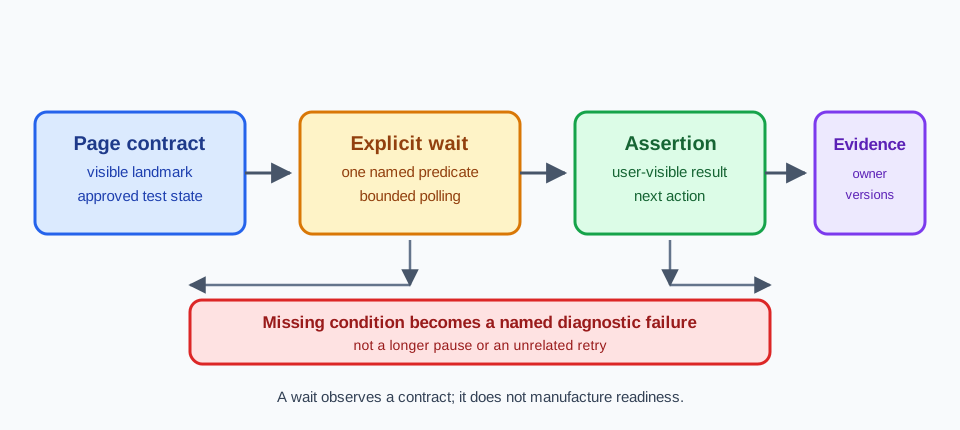
Why a wait is a contract, not a pause
Selenium tests become difficult to trust when a wait is treated as a pause inserted between two commands. A pause says only that time passed. It does not say that a document finished navigating, that a button became usable, or that an application accepted the action. A useful wait names the state the test is allowed to observe and the consequence when that state does not arrive. This distinction makes a test readable to a maintainer who was not present when the page was built. It also keeps a slow but healthy run separate from a page that never reached its expected state.
The browser has several asynchronous boundaries in one user journey. The driver may receive a navigation command before the document has its final content. A JavaScript event handler may enable a control after data arrives. A new window may exist before its title or form is ready. A frame can be attached while its application is still rendering. Each boundary needs its own observation. Reusing one long timeout for all of them hides which contract failed and encourages the next edit to add more time instead of clarifying the state.
Start by writing the user-visible outcome in ordinary language. For example, an authorized checkout test might require a confirmation heading, a status region that says the order was accepted, and a link that a user can follow. Those are stronger contracts than a guessed delay after clicking Submit. The test can still record a URL or a response category as supporting evidence, but the primary wait should describe what the user can see or operate. The Selenium WebDriver documentation provides the protocol boundary; the application owner supplies the page-level contract.
Match each wait to its browser boundary
An explicit wait is most useful when its predicate has one responsibility. visibility_of_element_located answers whether an element can be seen, while element_to_be_clickable combines visibility and enabled state. Neither predicate proves that a server-side update is complete. If a button can be clicked before a result is rendered, wait for the result after the click and keep the click assertion separate. This sequence gives a failure a location: the control was not usable, or the expected result did not appear.
Prefer a condition that observes a stable property over a condition that happens to be true during a short transition. A class name used only for animation can flicker. A disabled attribute may be removed before validation errors are displayed. A status element with a documented role and text is usually a better signal. When the application has a supported readiness attribute, make that attribute part of the page contract and keep its meaning documented for both the test owner and the UI owner.
The Selenium waits guide distinguishes implicit, explicit, and fluent waiting. Keep implicit waiting policy simple, because it changes how many element lookups behave and can make an explicit condition harder to reason about. Use explicit waits at the boundary that needs them, and give each one a name that explains the expected state. A timeout should be long enough for the approved environment and short enough to return a useful failure while the run still has context.
Make locators describe the intended state
Locator quality determines whether a wait is meaningful. A locator tied to a visible label, an accessible role, or a stable test identifier communicates why the element matters. A locator based on a generated class or a position in a table often survives only until a harmless layout change. When a locator matches several nodes, the wait can succeed on the wrong node and leave the later assertion to fail with an unhelpful message. Fail early when the page contract requires one owner for a control.
Separate finding an element from asserting its state. Locate the submit control, wait until it is enabled, click it, then wait for the confirmation region. If a form can show an inline error, wait for that error in a negative-path test instead of allowing a generic page timeout to decide the result. Use a small helper for a repeated predicate, but keep the helper's name tied to the application contract. A helper called wait_for_ready_page is vague; wait_for_order_confirmation tells the next reader what completion means.
The locator and the assertion should use the same semantic surface where practical. If the user sees a heading, assert the heading text or accessible name rather than an implementation-only data value. If the user receives a download, wait for the driver-supported download event or a documented completion signal and verify the file boundary separately. Do not turn a locator into a data collector. Capture only the metadata needed to explain the test result, and leave private page content under the application's approved access rules.
Keep navigation, frames, and windows explicit
Navigation commands have more than one meaningful completion point. A document may reach the requested URL while a client application is still loading its primary view. Conversely, a page can display the required heading while a background request continues for unrelated recommendations. Choose the completion point that belongs to the user journey. Wait for the document state or a visible landmark, then make a separate assertion for the application result. This avoids coupling every test to a network detail that the user cannot observe.
Frames and windows need ownership decisions before they need longer timeouts. After an authorized action opens a new window, wait for the additional handle, switch to it, and wait for its own landmark. When a frame is inserted dynamically, wait for the frame to be available before switching, then wait inside the frame for its content. Return to the original context deliberately. A failure to switch or a stale reference is a lifecycle problem, not evidence that the page needs a larger global timeout.
The test should also describe what happens when the boundary is not reached. A popup may be blocked, a frame may be unavailable, or a navigation may be redirected to a supported sign-in route. Record the observed category and finish through the test's approved fallback. Avoid retrying a click automatically when the first attempt may have succeeded. A retry that creates a new driver session can be useful when policy permits it, but it must use declared synthetic state and record that the result came from a new attempt.
Replace timing guesses with diagnostic evidence
When a wait times out, the exception should answer which contract was missing. Include the locator or state name, the current URL, the browser and driver versions, and the test attempt. A screenshot or page source can help an owner inspect a synthetic test page, but capture should follow the team's artifact and privacy rules. Do not attach a complete authenticated session merely because the driver can serialize it. A concise failure record is safer and more actionable than a large archive whose relevant state is unclear.
Classify intermittent failures before changing a timeout. A stale element may indicate that the application replaced a node after a render, while an element-not-interactable result may indicate an overlay or focus rule. A timeout waiting for text can indicate a failed service dependency, a rejected input, or a genuine regression. Compare the first unexpected state with supported application logs when the test owner is authorized to access them. Selenium shows what the browser observed; it does not establish why a server made its decision.
Use a bounded polling interval and a clear end condition, but do not publish a magic number as a universal recipe. The right values depend on the approved environment, page contract, and service budget. When a page becomes slower, first check whether the condition is still the correct user-visible signal. Increasing a wait can hide a broken readiness event and lengthen every failing run. A change to the condition should name the application behavior that changed and include a regression for the new contract.
Give profiles and drivers clear ownership
The driver, browser binary, profile directory, and test fixture form one compatibility unit. Record those inputs with the result so a maintainer can distinguish an application regression from a changed browser or driver. Give each active session an owned profile location, avoid reusing an unknown directory, and close the driver through the normal WebDriver lifecycle. Cleanup should be safe to repeat and should report a failure rather than silently leaving a session that a later test might inherit.
BotBrowser supports ChromeDriver compatibility and Selenium Grid integration for authorized workflows, which can provide a repeatable profile input when a team reviews its own browser journey. That capability does not guarantee compatibility with every driver, Grid release, browser version, or launch configuration. It also does not replace Selenium's wait policy, the application's readiness contract, server-side assertions, or the team's profile cleanup. The Selenium profile integration guide discusses ownership, storage boundaries, and launch records in more detail.
Cross-host checks should compare an agreed outcome, not demand identical incidental timing. A profile can help reproduce language, timezone, or storage inputs, while the operating system, driver release, graphics path, and network can still affect when a condition arrives. Record the tested combination and recheck it when one of those inputs changes. The browser release validation guide and browser interaction validation guide provide adjacent practices for separating environment evidence from application assertions.
Turn wait decisions into maintainable tests
A stable journey test can be read as a chain of contracts: start from declared synthetic state, locate a user-facing control, wait for its usable state, perform one action, and wait for the next visible outcome. Keep navigation, popup, frame, and cleanup boundaries as named steps. When a step fails, preserve the first missing contract and stop rather than cascading into unrelated commands. This makes a failure useful to the person who owns the page and to the person who owns the test runner.
Review waits when the UI changes, not only when a build fails. A renamed accessible label, a new loading state, or a server response that moves from a page transition to an inline status all change the contract. Update the locator, predicate, assertion, and failure message together. Keep negative paths explicit so a rejected input or denied permission reaches a documented user-facing state. Do not make a test pass by accepting any text, any URL, or any element that happens to appear first.
Before merging a wait change, run the journey with a clean, owned profile and the recorded browser and driver combination. Confirm that the test closes the driver on success and failure, that its artifacts contain only approved synthetic data, and that a missing service dependency is reported as an environment or application category rather than a passing result. Stable tests are not tests that never fail. They are tests whose failures identify a boundary, preserve the user's contract, and give the owner a precise next check.
One practical way to make that chain reviewable is to give every wait a small state table in the test design. List the starting context, the action that may change it, the observable condition that ends the wait, and the evidence kept if the condition is absent. For a sign-in journey, the rows might be an empty session, a submitted form, a visible account heading, and a bounded failure record. For a shopping flow, they might be a synthetic cart, a payment handoff, an order status region, and a receipt identifier with no secret values. The table is not a second test implementation. It is a compact agreement between the page owner and the test owner about what is observable and who diagnoses a mismatch.
The table also clarifies stability boundaries around asynchronous work. A wait for a spinner to disappear can be useful only when the page contract says that disappearance means the next control is safe. Otherwise, the test should wait for the result that the user needs. A network request finishing is similarly an implementation event, not automatically a user outcome. If a supported application hook exposes a request result, pair it with a visible assertion so the test can distinguish a successful response that rendered incorrectly from a response that never arrived. Keep the polling function side-effect free: it should inspect state, not click again, submit another form, or mutate storage while Selenium is deciding whether to continue.
Use a deliberately small timeout budget for each boundary and report the elapsed budget in the failure artifact. Separate budgets make a 2-second locator wait, a 15-second application render wait, and a 30-second remote handoff visibly different. They also prevent a global timeout from masking a sequence in which every step is slightly late. When a test runs in a slower approved environment, adjust the budget at the environment configuration layer and retain the contract name in the output. Never let a retry silently turn one user action into two; if the policy permits a retry, create a new owned session, mark it as a retry, and compare the first and second observations.
Finally, rehearse the failure path with a synthetic fixture that withholds one readiness signal. The expected result is a bounded timeout naming that signal, not a hang and not a green test that skips its assertion. This rehearsal validates the diagnostic surface before a production-like dependency becomes unavailable. It also gives reviewers confidence that screenshots, HTML fragments, and driver logs are collected only where the project allows them. A wait policy earns trust when its success condition is visible, its failure condition is specific, and its cleanup leaves no session or profile for the next test to inherit. Keep the review record close to the test case. A short note can state which readiness signal is owned by the page team, which timeout is owned by the runner, and which artifact is retained after a failure. This avoids turning an incident into a debate about who should change a number. It also makes the next maintenance pass faster when a component moves from a full navigation to an inline update. The test remains coupled to the user journey, while the record explains the operational boundary around it.
When several conditions can legitimately complete a journey, express the alternatives explicitly instead of accepting the first arbitrary element. For example, a supported account flow might end at a dashboard heading or at a documented access-denied region. Wait for the union of those named outcomes, classify which one appeared, and assert the corresponding result. This is more honest than waiting for a broad container whose presence says nothing about whether the journey succeeded. Keep each alternative bounded by the same session, data, and privacy rules.
Stable waiting is therefore a design discipline shared by application, test, and infrastructure owners. The page publishes a small set of observable milestones; the test chooses one milestone per transition; the runner records versions and budgets; and the review artifact preserves the first missing signal. That division lets teams improve rendering or service latency without rewriting every test around a new delay. It also prevents a browser capability from being mistaken for a business outcome: WebDriver can observe and act, but only the application contract can say what completion means.
Sources
Related Articles
Take BotBrowser from research to production
The guides cover the model first, then move into cross-platform validation, isolated contexts, and scale-ready browser deployment.