Speech Synthesis Voices and Accessible Browser Playback
Use browser speech synthesis as an optional, user-controlled enhancement while keeping readable text, keyboard access, and reliable fallbacks.
Want the structured docs for Platform?
This article lives in the editorial library. For step-by-step setup, reference material, and ongoing updates, jump into the docs section.
Browser speech synthesis can read a page aloud without requiring an application to ship an audio file for every sentence. That is useful for reading support, language practice, short notifications, and hands-busy workflows. It is an enhancement, however, not a replacement for readable content or for the browser and assistive technology controls a person already uses.
For related work, see accessible input validation, localization with browser language preferences, and media preference controls. Those topics help when speech is one part of a broader accessible interface.
What SpeechSynthesis is for
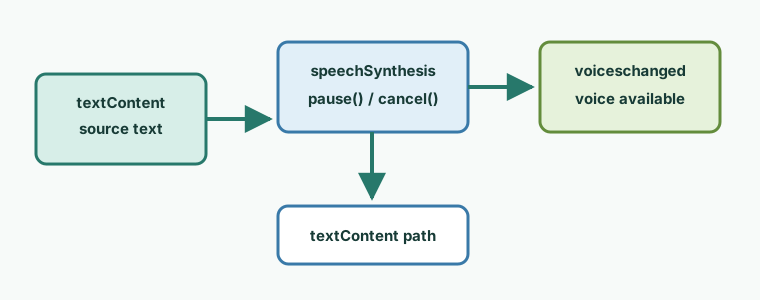
The Web Speech API exposes a SpeechSynthesis controller and SpeechSynthesisUtterance objects. An application puts text in an utterance, optionally selects a voice and language, and asks the controller to speak it. The browser and operating system provide the actual speech service. The page can observe lifecycle events such as start, pause, resume, and end, and can offer cancellation when the user no longer wants output.
This model works well for a clearly bounded piece of text. A “Read this section” button can create one utterance from the section's current text. A language-learning exercise can read a phrase after the learner requests it. A status message can be spoken when the person has opted into audible notifications. In each case, speech follows a visible action and has an obvious relationship to content the person can inspect.
Speech should not be the only way to discover information. Keep the source text in the document, use semantic headings and controls, and make status changes visible. A screen reader user may prefer their assistive technology's reading commands; a person in a quiet place may need text only; another person may need both. A page that removes text after starting speech creates a poor experience and makes a failed voice service look like lost content.
The W3C Web Speech API specification defines the API model and events. MDN's SpeechSynthesis documentation describes the browser-facing interface and related objects. Both are useful references, but neither promises that every browser exposes the same voices or the same timing. Treat support as a capability to test, not as a guaranteed media service.
Voice availability is variable
speechSynthesis.getVoices() returns voices that the current browser makes available. The result can be empty at first, and a later voiceschanged event can indicate that the list is ready or has changed. Some environments load voices quickly; others load them only after the speech service is initialized. An application should tolerate an empty or delayed result without blocking the text workflow.
Availability also varies with the operating system, browser, installed language support, user settings, network state, and the implementation used by an embedded web view. A voice name, language tag, pronunciation, or local-versus-remote behavior can differ between two otherwise similar devices. A voice that exists during development may be absent after a browser update or when a user changes a language pack. Do not present a hard-coded inventory as a promise.
Voice choice is a user-facing preference, not an identity signal. Offer a short list of usable choices after the browser reports them, label each choice with a human-readable language and name, and allow the default to work. Avoid collecting or transmitting the full list. There is no product need to turn optional speech into a census of a user's installed voice services. If a product stores a selected preference, store the user's choice for that product and explain the purpose; do not infer a person, device, or location from availability.
The lang on an utterance is a hint about the language of the text. It does not create a missing voice, translate words, or guarantee pronunciation. If no voice matches exactly, a browser may choose a related voice or use its default. Applications should use language-aware text and provide a visible language choice when pronunciation matters. A locale negotiation result can guide the initial selection, but the person must be able to change it.
When voices arrive asynchronously, keep the control stable. Show a loading state in the voice menu, keep “Read” disabled only when there is no usable speech path, and never hide the text while waiting. If the list changes while a menu is open, preserve the selected value when it remains valid and otherwise return to the default with a short explanation. Do not require a page reload to recover from a late voice event.
Put the user in control of playback
Speech must start after a clear user action, such as activating a labeled “Read aloud” button. A page should not unexpectedly speak on load or begin a long paragraph because a pointer merely passed over it. A user who has not requested audio should be able to browse silently, and a user who did request it should know which content is being read.
Expose pause, resume, cancel, and replay behavior where the utterance is long enough for interruption to matter. A single toggle can be appropriate for pause and resume, but its accessible name and state must change. A separate “Stop reading” button is often clearer because cancellation has a different result from pausing. Replay should create a fresh utterance from current text rather than assuming an old object can be resumed after every failure.
Use native buttons and a real select or listbox for voice choice. Give each control an accessible name, visible focus, and a state that can be understood without sound. When speech starts or ends, expose a concise status such as “Reading section” or “Reading stopped.” A polite live region can announce that state, but it should not repeat the entire paragraph or compete with the speech output. Keep announcements short and avoid rapid updates for every word.
Keyboard users need the same commands. The read button must be reachable in normal tab order; Enter or Space should activate it; Escape can be offered as a documented cancellation command when it does not conflict with a surrounding dialog. A voice menu must be operable without a pointer. Focus should remain on a predictable control after pause, cancellation, or an unavailable-voice message. Do not move focus to a hidden audio status element just to make an announcement.
Respect the distinction between browser speech and a person's screen reader. The application should not attempt to detect, silence, or compete with assistive technology. Give the person a preference to disable application speech, keep the control visible when speech is disabled, and make text available in the normal reading order. If an announcement is important, present it visually and expose it through appropriate semantics as well.
Make failure and interruption ordinary
Speech can fail because the API is unavailable, no voice is ready, the selected voice disappears, the browser cancels an utterance, or the operating system's service reports an error. A failure should leave the source text and controls usable. Show a short, actionable message such as “Speech is unavailable; the text remains available to read.” Do not imply that the user caused the failure.
Treat onend, onerror, and cancellation as terminal paths that clear the active state exactly once. A component may be removed while speech is in progress, or a new request may arrive before an earlier utterance ends. Keep a small state model for idle, loading, speaking, paused, stopped, and failed. Before starting a new utterance, cancel or settle the old one, clear stale status, and associate events with the current request. This prevents an old end event from changing the label for a newer reading.
Long content should be split into sensible sections rather than one uninterruptible stream. A section heading can identify the current unit, and the user can replay just that unit. Splitting does not guarantee identical timing across browsers, so avoid promises such as “the next word will always be announced in exactly this interval.” The useful contract is that the person can start, pause, stop, and continue with readable content.
Respect navigation and visibility changes. If the person changes route, closes a panel, or explicitly cancels, stop speech and clear any live status. If the page is backgrounded, browser behavior may vary; do not assume it will continue indefinitely. When returning, offer the same text and an explicit replay action instead of silently restarting. A notification should not keep a hidden page speaking.
Do not use speech as a timing channel or as a test for whether a particular installed service exists. Product tests should assert observable outcomes: a requested action changes the control state, cancellation stops the current request, and text remains available. Test with voices absent, delayed, replaced, and unable to pronounce the selected language. These cases describe compatibility and recovery without building a voice inventory.
Privacy boundaries and respectful defaults
The speech API's purpose is output. A page can choose text, a voice preference, and playback controls, but it does not need to identify the person or enumerate every voice. Keep text processing local when possible. If a product sends text to a separate speech provider, say so clearly, obtain the choice required by that product, and explain retention and account consequences. Browser-provided speech and an external service are different data paths.
Voice names and language support can reveal details about a device configuration, but this article's implementation boundary is simple: do not collect a voice inventory or use it to infer identity. A menu only needs the choices necessary for the current task. Remove diagnostic logging that serializes the complete list, and avoid sending voiceURI, local-service flags, or timing observations to analytics. If a support report needs a failure reason, record a coarse event such as “speech unavailable” rather than a device census.
Give the user a clear off switch. A preference such as “Enable read-aloud controls” should be separate from browser accessibility settings and should not alter the page's text. Respect a saved choice without making it irreversible, and provide a visible way to reset it. If speech is enabled for a workflow, do not quietly enable it for unrelated pages or notifications.
A practical acceptance checklist
Test the same task with a keyboard, a pointer, and a screen reader or other assistive technology in the supported environments. Start speech only after activation, verify that the current section is identifiable, pause and resume it, cancel it, and replay it. Confirm that focus stays visible and that a short status is announced without repeating the content.
Repeat the task with an empty voice list, a delayed voiceschanged event, a selected voice removed, an unsupported language, and an emitted error. In every case, the readable text must remain present, the controls must explain the next action, and a non-speech path must complete the task. Also test interruption by navigation, component removal, a second read request, and an explicit stop. There should be no stale “speaking” state and no duplicate completion message.
Check localization with real translated text rather than only changing a label. Use the document language and an utterance language that match the selected content where possible, but let users override the voice. Verify that translated labels, status messages, and the alternative text for the visual all read naturally. Test long words, right-to-left content where supported, and languages for which no voice is installed. The fallback must be understandable even when pronunciation is not.
Finally, review the privacy boundary. Check logs and analytics records for voice arrays and voice identifiers. Confirm that an optional external speech request is separate from the local text view, and make the choice visible. A successful implementation makes speech useful without making it necessary: the person controls when it starts, how it ends, which available option it uses, and how to continue when it cannot speak. Keep a short support note for the browser version and the visible failure message, rather than retaining a detailed machine description. Document who can change the voice preference, how it is reset, and which text remains available when the service is unavailable. These small decisions make the feature understandable to support staff as well as to end users.
Speech settings should also survive ordinary changes in context. A person may resize the window, rotate a phone, switch an input device, or move from a quiet room to a shared space. Keep the read button in the same logical location, preserve the selected language when it remains valid, and do not assume that headphones or a particular output device are present. If the product includes a reading queue, let the user remove an item and show which item is current; do not continue a queue after its owning panel has been closed. A bounded queue is easier to stop and explain than a hidden background service.
Content authors should decide what is suitable for speech. Tables, code samples, decorative punctuation, and rapidly changing counters may need a text summary or a dedicated sentence instead of a literal dump. The user-facing control can read the meaningful result while leaving the complete detail in the page. This is an editorial decision, not a reason to inspect a person's voice environment. Keep the same wording available to people who read visually, and make any shortened spoken label clear in the control's accessible name.
When a voice is selected, remember that pronunciation is an approximation. Names, abbreviations, dates, and symbols may be spoken differently by different engines. Provide a written version and, where accuracy is essential, a pronunciation hint or an audio recording that has been reviewed for that language. Do not claim that selecting a language tag guarantees a particular accent. Let users change the option and report a problem without requiring them to describe every voice installed on their device.
Use a visible progress indication only when it helps the person understand a long operation. Speech timing is not a reliable progress meter because engines can pause, compress, or pronounce text at different rates. A simple current-section label and a stop command are usually more useful than a countdown. The interface should remain responsive while audio is being produced, and controls should not shift position when a status message appears.
When content updates while it is being read, choose a deliberate policy. Stop and offer replay for a changed section, or finish the old text and clearly identify the version being spoken. Never silently continue with content that the person can no longer see. This rule is especially important for prices, alerts, forms, and live status messages. The written update remains the authoritative record.
Manual review can compare the spoken sentence with the visible sentence and confirm the fallback immediately. This keeps support decisions concrete.
Keep the final fallback visible.
Public sources
Related Articles
Take BotBrowser from research to production
The guides cover the model first, then move into cross-platform validation, isolated contexts, and scale-ready browser deployment.