CSS Highlight API Custom Paint and Accessibility
Use CSS Highlight API custom highlights with accessible text, bounded ranges, selection fallbacks, and a paint contract that does not hide meaning.
BotBrowser Team
Want the structured docs for Platform?
This article lives in the editorial library. For step-by-step setup, reference material, and ongoing updates, jump into the docs section.
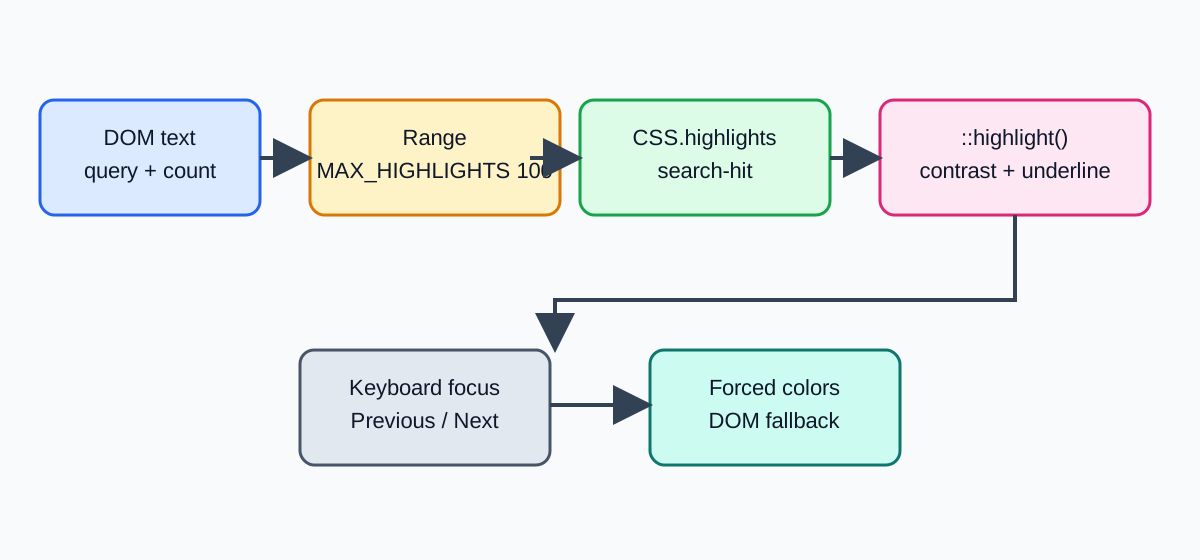
The CSS Highlight API can style search matches, annotations, and selections without changing the DOM, but a highlight is presentation rather than meaning. BotBrowser can replay a page-owned highlight fixture and inspect visible fallback states; it cannot certify assistive-technology speech, a user's reading intent, or a browser's complete paint implementation. Keep the contract narrow: expose text in the DOM, register bounded ranges, paint a distinguishable layer, and retain a keyboard and semantic fallback.
TL;DR
CSS.highlights.set('search-hit', new Highlight(range))styles aRange; it does not add text, labels, or accessible semantics.- A custom highlight pseudo-element such as
::highlight(search-hit)should use a contrast-safe color pair and never be the only cue. - Keep the source text and an announced result count in the DOM; test keyboard focus, selection, forced colors, zoom, and reduced motion separately.
- Rebuild ranges after content changes, cap the number and length of ranges, and remove stale entries with
CSS.highlights.delete(name). - BotBrowser can check the page-owned state and fallback, but this article records source-based guidance rather than a BotBrowser run.
Contents
- Keep meaning in the DOM
- Register bounded ranges
- Paint a visible, accessible layer
- Handle selection, focus, and fallback
- Classify outcomes with a decision table
- BotBrowser capability and limitation
- Practical conclusion
Keep meaning in the DOM
The highlight API changes how existing text is painted. A Range points at nodes that already exist, so a screen reader, copy operation, text search, and no-CSS rendering still need the same source content. Put the result count in an aria-live="polite" region, keep the query in a labelled input, and expose an ordinary list or paragraph for annotations. Do not encode a warning only as a yellow background or a custom paint effect.
The API is separate from the Selection API. A user selection can be visible through ::selection; a named custom highlight is an application-owned Highlight object. Give each state a stable name such as search-hit or current-hit, and remove it when the query is empty. The name is a CSS hook, not a label that assistive technology will announce.
For a related visual identity boundary, CSS color management and display accessibility explains how to separate a browser-visible style result from a capability claim. For keyboard interaction, Keyboard Layout API locale and privacy shows why a visual label must not become an inference about the person using it. The browser compatibility review for web components adds a support-matrix method for separating feature detection from user-facing guarantees.
Register bounded ranges
Create ranges from the rendered text nodes, not from an untrusted HTML string. A simple fixture can walk text nodes, find a case-folded query, and call range.setStart() and range.setEnd() for each match. Cap both MAX_HIGHLIGHTS and MAX_MATCH_CHARS; a page should remain responsive when a query matches thousands of words.
const MAX_HIGHLIGHTS = 100;
const MAX_MATCH_CHARS = 120;

function showMatches(root, query) {
  CSS.highlights.delete('search-hit');
  if (!query || !window.Highlight) return 0;
  const ranges = [];
  for (const node of root.querySelectorAll('[data-search-text]')) {
    const text = node.textContent || '';
    let offset = 0;
    while (offset < text.length && ranges.length < MAX_HIGHLIGHTS) {
      const start = text.toLocaleLowerCase().indexOf(query.toLocaleLowerCase(), offset);
      if (start < 0) break;
      if (query.length <= MAX_MATCH_CHARS) {
        const range = new Range();
        range.setStart(node.firstChild, start);
        range.setEnd(node.firstChild, start + query.length);
        ranges.push(range);
      }
      offset = start + Math.max(query.length, 1);
    }
  }
  CSS.highlights.set('search-hit', new Highlight(...ranges));
  return ranges.length;
}
The exact fixture depends on text-node boundaries; production code must handle nested nodes and an empty firstChild safely. Recompute after rendering, localization, filtering, or virtual-list recycling. A range that points at removed content is stale state, not a reason to keep an old highlight object alive.
Paint a visible, accessible layer
Use the ::highlight(search-hit) pseudo-element for the named layer and keep the declarations small. CSS Highlight API styling is intentionally restricted compared with ordinary elements; the browser may ignore unsupported properties. Choose a foreground and background that meet your product's contrast target, then add a non-color cue such as an outline, icon, or result count in the surrounding UI.
::highlight(search-hit) {
  color: #111827;
  background-color: #fde68a;
  text-decoration: underline 0.12em solid #92400e;
}

@media (forced-colors: active) {
  ::highlight(search-hit) {
    color: CanvasText;
    background-color: Highlight;
    text-decoration: underline;
  }
}
Do not assume a custom highlight paints identically in every engine or embedded context. Feature-detect CSS.highlights, Highlight, and the selector you rely on, then show the fallback class or inline marker when any prerequisite is absent. A browser-visible paint result is not proof that a screen reader will announce “match” or that a high-contrast mode preserves your chosen colors.
Handle selection, focus, and fallback
Search should move focus to a real result control, not to a painted range. Provide Previous and Next buttons with an accessible name, preserve the query in the input, and scroll the selected result into view without trapping keyboard focus. If the user selects text, do not overwrite ::selection with the search highlight; the two layers express different states.
When highlights are unsupported, add a temporary mark element or a CSS class around a trusted text node, and expose the same count and navigation. Remove that fallback before applying a new query so nested wrappers do not accumulate. For read-only annotations, an adjacent note with aria-describedby is safer than relying on a color patch that disappears in print or forced-colors mode.
Check zoom at 200%, text spacing, keyboard-only navigation, prefers-reduced-motion, and a screen reader. A highlight should not obscure focus outlines, clip descenders, or create an animation that flashes for every result. If the query is empty or no match exists, clear the named highlight and announce “0 results” in the live region.
Classify outcomes with a decision table
| Observed stage | What it establishes | Safe next action |
|---|---|---|
CSS.highlights or Highlight absent | Named highlights cannot start in this context | Use semantic mark or plain text and keep navigation usable |
| API present, query empty | There is no range to paint | Delete search-hit, announce the cleared state, and retain focus |
| Ranges created, paint visible | The page applied one browser-visible style layer | Verify contrast, focus, forced colors, and accessible result text |
| Content or locale changed | Existing offsets may be stale | Rebuild ranges from current text nodes and discard the old object |
| Match count exceeds 100 | The fixture hit its bounded workload | Show a capped result state and offer narrower search, not unbounded work |
| Forced colors or print differs | Presentation changed by user agent or medium | Keep the DOM result and a non-color cue as the source of meaning |
Each row describes an observable page condition, not a universal support promise. Record the browser-visible state, query length, range count, and fallback branch; do not record the full document or infer a user's reading behavior.
BotBrowser capability and limitation
BotBrowser can replay an authorized page-owned fixture that registers Highlight ranges, applies ::highlight() CSS, updates the live result count, and exercises the unsupported or forced-colors fallback where the controlled browser exposes it. This topic was written from the W3C and MDN sources below; no BotBrowser run is claimed here. A browser check cannot certify screen-reader output, a physical display's color perception, or the user's interpretation of a highlight.
{
  "api": "CSS.highlights",
  "highlightName": "search-hit",
  "rangeCount": 3,
  "maxHighlights": 100,
  "domResultText": "3 matches",
  "assistiveTechnologySpeech": "not-asserted"
}
Repeat the fixture after a browser release, localization change, virtual-list implementation, or contrast-token update. Compare the first visible divergence and keep the DOM fallback in the acceptance record.
A practical review sequence
Start with the semantic path before checking pixels. Submit a query with search-hit disabled and confirm that the result count, headings, and text remain understandable. Then enable the custom highlight and compare the same range at 100%, 200%, and 400% zoom. This order catches a common regression: a visually polished layer can conceal that the result list is no longer reachable by keyboard.
Next, change one variable at a time. Replace the text with a translated string, recycle the containing list item, and toggle forced-colors: active. A correct implementation deletes the old Highlight, creates ranges against the new text node, and leaves the live count intact. A stale implementation keeps an offset into the previous node, so the paint disappears or lands on unrelated text. Record that first divergence rather than treating the final screenshot as a browser verdict.
Keep the accessibility state explicit in application data. A useful record contains query, rangeCount, fallback, focusTarget, contrastMode, and domResultText; it does not contain a serialized document or a screen recording of a person's reading. The record can drive a support test and a release comparison while respecting the boundary between browser-visible paint and assistive-technology output.
When a product uses annotations instead of search, give each annotation a stable reference in the DOM and expose its explanation beside the text. A named highlight can then draw attention to the reference while aria-describedby supplies the explanation. Removing an annotation must remove both the range and its description. This prevents a copied paragraph from retaining a visual cue whose explanatory text was deleted elsewhere.
Finally, review printing, high contrast, dark mode, and reduced motion as separate states. The custom layer may be omitted by a print user agent, remapped by forced colors, or recolored by a theme token. The acceptance condition is not “the yellow remains”; it is “the reader can still locate, understand, and navigate the result.”
Compatibility and failure diagnosis
Feature detection must cover the objects that the fixture actually uses. Check window.CSS, CSS.highlights, window.Highlight, window.Range, and the ability to construct a range from the current text node before registering a named highlight. A browser can expose one part of the API while rejecting a range that crosses nodes or ignoring a declaration in ::highlight(). Treat those outcomes separately in the support record: api-missing, range-invalid, paint-ignored, and fallback-active describe different repairs.
When a match count is zero, inspect the text-node walk before changing colors. A localized string may have composed characters, a different case-folding result, or markup that splits one visible sentence across several nodes. Normalize the query for comparison, but keep the original query for the input and live announcement. Never concatenate untrusted HTML to make a single node. If a range throws during setStart() or setEnd(), discard that candidate, rebuild from a safe node boundary, and keep the result count honest.
The CSS selector is another independent checkpoint. CSS.highlights.set() can succeed while a browser ignores ::highlight(search-hit) declarations that are not supported for highlights. Use a visible fallback class only after the named layer has been cleared, and test the class with the same keyboard and forced-colors checks. A screenshot that shows a colored rectangle proves only that one paint path was visible; it does not prove that the named range, DOM text, focus target, and announcement refer to the same match.
For release comparison, keep a small fixture matrix with rows for supported API, empty query, one match, multiple matches, stale node, forced colors, print, and unsupported API. Record the browser version, locale, query length, range count, fallback branch, and first visible difference. Do not turn the matrix into a device identifier or retain full page text. If the same row changes after a browser update, compare the DOM result and focus path before treating a paint difference as a product regression.
The matrix should also separate lifecycle ownership from visual outcome. The application owns query parsing, range creation, range deletion, and the live result count. The user agent owns the final painting of the highlight pseudo-element and may apply forced-colors or print rules. A test that reports “yellow background missing” is incomplete until it says whether the range existed, whether CSS.highlights contained search-hit, whether the fallback was active, and whether the DOM result remained navigable.
A useful bounded record can be represented as rows rather than a screenshot:
| Checkpoint | Record | Do not infer |
|---|---|---|
| API detection | CSS.highlights=true, Highlight=true, selector path available | A screen reader will announce the paint |
| Range lifecycle | rangeCount=3, query length, source node count | The text belongs to one person or account |
| Fallback | fallback=mark or fallback=plain-text, reason | The browser has a broken accessibility stack |
| Focus path | focusTarget=result-2, keyboard order preserved | The user intended to read a particular match |
| Color mode | normal, forced colors, print, or dark theme | The physical display renders the same colors |
| Cleanup | old highlight deleted after query or locale change | Remote application state was deleted |
Keep the record short enough to compare across releases. If an application needs detailed diagnostics, store a non-content fixture identifier and retain raw page content only in a controlled test system with an explicit deletion date. The browser-visible API is useful for progressive enhancement, but it is not a license to collect a persistent reading profile.
Treat range ownership as a lifecycle contract. A Highlight keeps references to its Range objects, so delete the named entry before replacing the node tree and create fresh ranges after the render commit. Do not reuse a range across separate text nodes: Range.setStart() and Range.setEnd() address one boundary point at a time, and a cross-node range can include text that was never intended to be searchable. If the fixture runs inside a shadow tree, query and walk that tree explicitly; document-level selectors do not automatically cross a shadow boundary. These details make cleanup, localization, and virtualized rendering deterministic without changing the accessible source text.
Cross-engine comparison should use the same DOM fixture and the same query, then compare four outputs: range count, DOM result text, focus order, and paint state. Do not compare screenshots alone; font metrics, zoom, and color transforms can change pixels without changing the application result. If one engine lacks named highlights, the expected result is a usable semantic fallback, not a forced claim of parity. That distinction keeps a compatibility report actionable and prevents an accessibility regression from being hidden behind a successful paint assertion.
The same boundary applies to performance. Measuring a range walk tells you how long that fixture took on one document; it does not reveal a user's device, network, or reading speed. Keep the query and match limits explicit, stop walking once the cap is reached, and expose a narrower-search option when the cap is hit. If content is virtualized, let the list announce which result is active while the renderer owns only the currently mounted nodes. This makes cleanup deterministic when rows unmount and avoids retaining ranges that point to discarded text. It also keeps retry behavior bounded when a search result changes during rendering.
For a component contract, expose the current result and fallback branch as ordinary application state. A button can announce result-2 while the highlight layer remains optional, and a route change can clear CSS.highlights before unmounting its text container. This separation lets automated checks verify navigation and cleanup even when the browser ignores a paint declaration or a print medium removes the custom layer.
Sources
- CSS Custom Highlight API specification
- MDN: CSS Custom Highlight API
- MDN: ::highlight()
- BotBrowser advanced features
Practical conclusion
Use CSS Highlight API custom paint to emphasize text that already has semantic meaning. Bound and rebuild ranges, keep result status and navigation in the DOM, and provide a contrast-safe non-color fallback. Treat BotBrowser output as page-owned browser evidence, not proof of assistive-technology speech or a user's interpretation.
This article is part of the guide: Web Platform Surfaces: A Consistency Review Map
Related Articles
CSS Color Management and Display Accessibility
PlatformMedia Query Preferences: Respect User Choices in Web Interfaces
PlatformView Transitions API: State and Navigation
PlatformBrowser Compatibility Review for Web Components
PlatformSpeech Synthesis Voices and Accessible Browser Playback
PlatformPopover API: Focus, Light-Dismiss, and Accessible Fallbacks
Take BotBrowser from research to production
The guides cover the model first, then move into cross-platform validation, isolated contexts, and scale-ready browser deployment.