Service Worker Cache Lifecycle and Privacy
How service worker registration, install, activate and update stages decide who owns each cache, and how to version, clean up and clear caches on sign-out.
Want the structured docs for Identity?
This article lives in the editorial library. For step-by-step setup, reference material, and ongoing updates, jump into the docs section.
Why a service worker cache needs an owner
A service worker lets a site answer network requests from a local store, usually Cache Storage. That is useful for offline pages and fast repeat visits. It also means a response can outlive the page, the visit and sometimes the account that caused it to be stored. The Service Workers specification describes the worker and its lifecycle, and the CacheStorage reference on MDN describes the named caches the worker or the page can open.
Cache Storage belongs to the origin, not to a particular worker version. A cache created by an old worker stays in place after a new worker takes over, and nothing removes it unless application code deletes it, the browser evicts data under storage pressure, or the user or a Clear-Site-Data response clears site data. Eviction timing differs between browsers and releases, so treat it as a safety net rather than a cleanup plan.
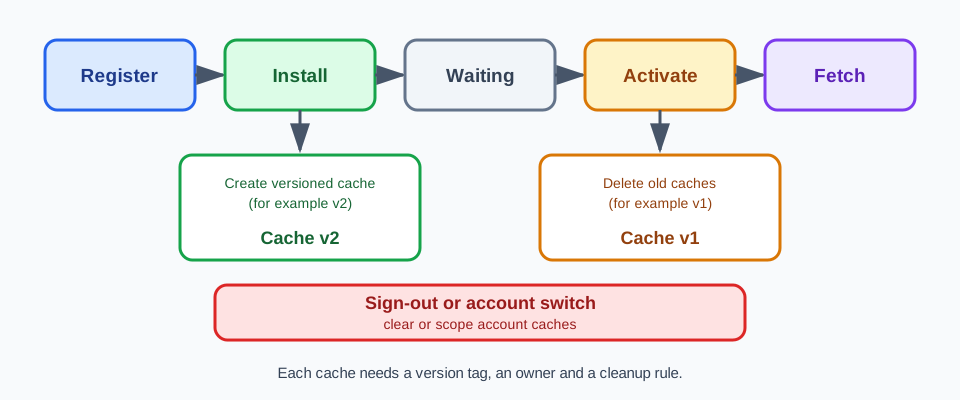
The practical question is therefore ownership. For each cache, a team should be able to say which worker version created it, which release is allowed to delete it, and which user session or account its contents belong to. A cache with no named owner is a cache that nobody will clear.
Consider a shared tablet at a service desk. Staff sign in, open a dashboard and sign out at the end of a shift. If the worker stored account-specific API responses while they worked, the next person to open the dashboard can find those responses in the browser's storage even though the interface shows a signed-out state. Nothing about that failure appears on screen, which is why it is easy to miss. The same pattern appears on family computers, kiosks and any browser profile used by more than one account over time.
Cache Storage is also only one place where a site keeps state. The browser's HTTP cache, cookies, localStorage, IndexedDB and service worker registrations are separate stores with separate cleanup paths. Clearing one of them does not clear the others. When a review asks what remains after a sign-out, it should list each store the application uses and check them one by one, rather than concluding from a single empty list that the device is clean.
Staleness and privacy share a cause. A cache that is never cleaned can serve an outdated script after a fix, and it can serve an outdated account view after a sign-out. In both cases the user sees content that the server would no longer return. Treating cleanup as part of the release, instead of a later task, addresses both risks with the same rule and the same review.
The lifecycle stages
A page asks the browser to register a worker for a scope. The browser downloads the script and runs the install stage. A worker that was installed while an older worker still controls open pages moves to a waiting state until those pages are gone or the application chooses to skip waiting. Then the activate stage runs, and from that point the worker handles fetch events for the pages it controls. The web.dev lifecycle guide walks through these stages with examples.
Updates follow from the script itself. When the browser sees that the worker script differs from the installed one, it installs the new version next to the old one instead of replacing it in place. How often the browser checks for a changed script depends on navigation, functional events and the browser's own policy, so a deployment should not assume that each user receives the new worker at a predictable moment.
This is why a new worker can be installed yet not live. A reviewer who sees the new script on the server cannot conclude that it is serving pages. The worker is either active, waiting, or replaced, and the check should read that state instead of assuming it. See the Using Service Workers guide for the events involved.
Two calls change the waiting behavior and deserve a deliberate decision. Skipping the waiting stage makes a new worker activate immediately, and claiming clients lets it take control of pages that were opened before it. Both can be right for a small fix, but they also mean an open page that loaded old scripts may start receiving responses from a cache prepared for the new release. If the old page and the new cache are not compatible, the user sees broken behavior that no single release contains. Record whether the application skips waiting and what that does to open pages.
Registration scope matters as well. A worker only controls pages inside its scope, and pages of the same origin share access to the same cache entries. A cache filled by one worker can therefore be read by pages that the worker does not control, which is one more reason to name each cache and its owner.
The fetch stage is where the worker decides what to serve. Static assets that change only with a release suit a cache-first approach, because the version tag already controls freshness. Personalized pages and API responses usually suit a network-first approach, and some should never be stored. Writing the strategy per request category, instead of one rule for the whole site, makes the later cleanup rule simpler, because each category maps to a cache with a known owner and a known lifetime.
A deployed update can be observed rather than guessed. The developer tools list the registered worker, its script address and whether a newer version is waiting. After a release, load the application in a fresh context, read that panel, and note the state in the release record. If a waiting worker is reported, decide whether to wait for pages to close, to prompt the user to reload, or to skip waiting, and write the decision down.
Versioned caches and activation cleanup
Give each cache a name that carries a version tag, for example one prefix for the application shell and a release tag after it. Create the new versioned cache and fill it during the install stage, because that is when the new worker prepares its own assets while the old worker keeps serving pages from the old cache.
Separate caches by purpose, not only by version. A cache for application shell files, a cache for images and a cache for account data have different lifetimes. The shell cache is replaced at each release, the image cache may be trimmed by age or count, and the account cache ends with the session. Keeping them in different named caches lets the cleanup rule treat each one correctly, and it lets a reviewer answer which cache holds what without opening individual entries.
Delete the old caches during the activate stage. Activation is the first moment when the old worker is no longer needed, so removing its cache earlier can break pages that are still running. A typical rule lists the cache names, keeps the names that match the current release and deletes the rest. Write that rule down so a review can test it.
Be careful about which names the cleanup rule may delete. Cache Storage is shared by the whole origin, so a list of cache names can include caches created by other code on the same origin, such as an older worker for a different feature. Restrict deletion to names that start with your own prefix. Also remember that a failed request while filling the new cache during install can stop the new worker from installing at all, which leaves the old worker and its cache in place. Check the worker state after a release instead of assuming the install finished.
Cache Storage does not apply HTTP freshness rules on its own. An entry stays until code deletes it, which is why a stale response can keep appearing after a server fix. Keep the version tag in the cache name, put changing content under a new name and let the activate rule remove the previous one.
Do not use a worker to intercept, rewrite or keep data beyond what the page needs to work. The goal of this lifecycle is smaller and more predictable storage, not a hidden layer that retains responses nobody can see. Keep cleanup visible to the people who operate the site.
Keep the cleanup code small and tested. A routine that lists names, filters by prefix and deletes old versions is short enough to read in a review. Run it against a context that already holds several old versions, because a routine tested only on a fresh install never meets the case it exists for. During testing, print the names it removes to the developer console so the result can be compared with the cache list afterward.
Sign-out, account switches and Clear-Site-Data
Some responses are specific to a signed-in user. A cache that holds them is not a harmless offline asset: after a sign-out or an account switch on a shared device, the next user can see what the previous account stored. Prefer not to cache authenticated or account-specific responses. If a feature needs them offline, scope the cache to the account and delete it when the session ends.
The order of sign-out steps matters. End the server session first, then delete the account caches, then clear any state the page keeps in memory. If the application has several tabs open, tell the other tabs that the account has changed, for example with a broadcast message, so a tab that stays open does not keep rendering the previous account's cached data. Test the sequence with two tabs open, because a single-tab test hides this case.
On sign-out, the application can delete the account caches in page code and tell the worker to drop any in-memory state. The Clear-Site-Data specification also defines a response header whose directives can ask the browser to clear cached or stored data for the origin, and the storage directive covers the origin's script-accessible storage and unregisters its service workers; the spec does not list Cache Storage by name. Directive support and exact coverage vary by browser, so confirm the result in each browser your users run instead of relying on the header name.
Server headers help, but they do not replace worker logic. A response marked as not to be stored tells shared and private caches how to behave, yet Cache Storage leaves that decision to the worker code, which chooses whether to put a response into a cache. Make the worker check what it is about to store, and keep account-specific responses out of long-lived caches by default. A short, explicit list of cacheable paths is easier to review than a long list of exceptions.
An account switch deserves the same attention as a sign-out, because the browser profile stays the same while the user changes. Clear or scope the caches from the first account before the second one loads, and then read the cache list to confirm. Reading the list is a stronger signal than trusting that the cleanup code ran.
People who share a device deserve a visible way to clear stored data. If the application keeps account data offline, provide a clear control at sign-out or in the settings that removes it, and say in plain words what will be removed. Users of shared devices cannot inspect Cache Storage themselves, so the application is the only place where this choice can be offered.
Keep this boundary clear for users too. A visible sign-out that quietly leaves account responses on the device is a privacy defect, even if no tracker is involved. For related background on how browsers separate state, see storage partitioning and privacy and cookie management.
Testing cache behavior per context
BotBrowser supports giving each BrowserContext its own storage and session state, and service workers created in a context inherit that context's fingerprint, so a team can test a worker's cache lifecycle separately for each identity. BotBrowser does not write, version or purge an application's service worker caches, and it cannot make a stale or leaking cache design safe; cache naming, activation cleanup and sign-out clearing remain application responsibilities.
Context isolation is useful because the same site can then be loaded in two contexts with different accounts, and each context shows its own registration and its own cache list. If the second context shows entries created by the first, the application has a scoping problem, not a browser problem. The multi-account isolation documentation describes the per-context storage model, and multi-account browser isolation explains how teams plan it.
A practical test uses two contexts. In the first context, sign in as one account, load the application, let the worker install and open a few pages. Record the registration state and the cache names. In the second context, sign in as a different account and record the same details. The two lists should not share account-specific entries. Then sign out in the first context and read its cache list again. Finally, confirm that the second context still has its own entries, so the cleanup in one context did not reach into the other.
Keep the record small and repeatable. Note the browser release, the context name, the worker script version, the cache list before and after the update, the cache list after sign-out, and the worker state. Do not paste response bodies, tokens or customer data into the record. A short list of cache names with pass or fail results is enough for a release review, and it lets the next person repeat the same check after the next deployment.
Run the same lifecycle review in each context that matters to the product, and record the result per context. Do not reuse one context's pass for another.
Run the cache lifecycle checks
Run these checks in the browser developer tools or with a short script, and record pass or fail for each cache.
- Name the lifecycle stages the worker uses (register, install, waiting, activate, fetch). Pass if versioned caches are created in the install handler and deleted in the activate handler. Fail if cleanup runs at install.
- List each cache name with its version tag and owner. Pass if each name maps to one worker release and one data category. Fail for any name nobody can explain.
- Write the activation cleanup rule and the sign-out rule. Pass if both name what is kept and what is deleted.
- After the new worker activates, list the caches again. Pass if no old-version cache remains. Fail if an old name is still present. While the worker is waiting, record the old cache as pending instead.
- Check the worker state after the update. Pass if the new worker is active or is reported as waiting. Fail if the review assumed it was live without reading the state.
- Find caches that hold authenticated or account-specific responses. Pass if they are scoped to the account and gone after sign-out or an account switch. Fail if they are treated as ordinary offline assets.
- Repeat checks 1 to 6 in each browser context and record a separate result for each.
Sources
Related Articles
Take BotBrowser from research to production
The guides cover the model first, then move into cross-platform validation, isolated contexts, and scale-ready browser deployment.