Browser Feature Support Is Not Feature Quality
Why a browser API being present is only the start of a reliable, accessible, privacy-aware user journey.
BotBrowser Team
Documentation
Want the structured docs for Platform?
This article lives in the editorial library. For step-by-step setup, reference material, and ongoing updates, jump into the docs section.
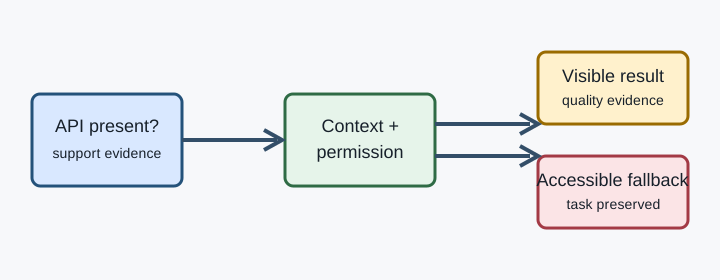
Three evidence layers Read the MDN Browser Compatibility Data entry and its notes, flags, secure-context requirements, and partial-support caveats. The MDN Web API contract and relevant WHATWG/W3C specification explain semantics. A runtime check answers what this page can try now. None of these layers identifies a person or proves that an application operation completed. For every optional API, record: required context, capability check, permission outcome, exception or rejection, visible success signal, visible failure signal, and fallback owner. A method on navigator is only “available to try”. Completion belongs to an observable UI or an owned application acknowledgement.
Quality decision table
| Observation | Decision | Quality check |
|---|---|---|
| Method and context are present | Try once after user intent | Keep progress and cancellation visible |
| Method is absent or blocked | Use the equivalent fallback | Preserve entered data and keyboard access |
| Permission is denied | Explain and offer the fallback | Do not reprompt in a loop |
| Call rejects or times out | Classify the bounded failure | Do not relabel a service failure as missing support |
| Browser call resolves | Verify the application result | Confirm only what the user can observe |
A deterministic failure fixture Use a synthetic page to exercise missing, denied, rejected, and delayed states. Stub only the owned API and assert the control a user sees:
async function shareWithFallback() {
  const host = document.createElement('div');
  host.innerHTML = '<p id="status" role="status"></p><button id="fallback" hidden>Copy link</button>';
  document.body.append(host);
  const status = host.querySelector('#status');
  const fallback = host.querySelector('#fallback');
  if (typeof navigator.share !== 'function') {
    fallback.hidden = false;
    status.textContent = 'Use the available alternative';
    host.remove();
    return 'missing';
  }
  try {
    await navigator.share({ title: 'Synthetic item', url: '/fixture' });
    status.textContent = 'Request accepted; verify the visible result';
    return 'accepted';
  } catch (error) {
    fallback.hidden = false;
    status.textContent = error?.name === 'NotAllowedError' ? 'Sharing was cancelled' : 'Use the available alternative';
    return 'fallback';
  } finally {
    console.assert(status.textContent.length > 0 && (!fallback.hidden || status.textContent.includes('accepted')));
    host.remove();
  }
}
``` The fixture proves branch behavior and cleanup. It does not prove universal browser support, account state, network reachability, or a business transaction. Keep timeout and retry limits explicit, and never collect unrelated browser properties to force the primary branch.

## Progressive enhancement is quality work Design the core task without the optional API: a copyable URL, ordinary file input, typed value, or keyboard-operable control may be the most reliable path. Preserve drafts when changing paths. Move focus to the new status, label the fallback, and explain a lower-fidelity or slower result. Recheck compatibility data after browser, permission, origin, or policy changes, and keep a small ledger of source revision, declared context, observed state, visible result, and next review date.

## BotBrowser capability and limitation BotBrowser can provide controlled browser contexts for authorized compatibility journeys and repeatable synthetic checks. An isolated context helps compare the same owned page across declared releases without sharing mutable session storage. Record the page, release, context assumptions, fixture version, and user-visible result. BotBrowser does not guarantee that an API exists on every origin, grant permission, make an insecure context secure, control operating-system policy, or replace application accessibility and fallback design. A passing synthetic journey does not prove that a server record, account action, or business transaction succeeded. Use BotBrowser evidence alongside MDN/specification evidence and application-level assertions, never as a universal support claim. For related examples, see [WebDriver BiDi events](/en/blog/webdriver-bidi-events-and-browser-automation) and [Credential Management sign-in](/en/blog/credential-management-api-and-sign-in-experience). Keep browser observations, permission outcomes, and server outcomes separate; that boundary is what turns “supported” into a quality decision.

## Operational checklist Start with the task, not the browser label. Write the user action, minimum acceptable result, and data that must survive a change of path. A support table helps choose test releases, but the task definition decides whether a fallback is good enough. Read compatibility records as conditions, record their source and revision, and keep the ledger free of profiles, accounts, credentials, locations, and unrelated device inventory.

Separate detection from invocation. A side-effect-free check answers whether a call is reasonable to try; it does not justify a prompt before user intent or predict the result. Record unavailable, available, denied, failed, accepted, and completed as different states. Completion requires a user-visible or application-owned acknowledgement, not only a resolved browser promise.

Use fixtures that fail on purpose. Remove a method, deny a permission, and delay a response. Reset the fixture, limit retries, clean up in `finally`, and assert status text, focus, fallback visibility, and entered-value preservation. Do not collect unrelated navigator fields or call a production account from a synthetic test.

Check secure context, embedding policy, accessibility, and privacy separately. Permission-gated features can depend on HTTPS, user activation, iframe policy, keyboard access, and focus recovery. Keep only normalized state, source revision, declared context, visible message, and next action. A controlled context supports repeatability; it does not justify identity inference.

Review a fixed journey across supported releases with stable synthetic input. Record the visible result, fallback action, and next review date. Classify browser, context, permission, application, and service failures separately so a support matrix does not become an unsupported-browser claim.

**Designing a useful support contract.** Name the user action, primary capability, minimum fallback, and success boundary before choosing a browser matrix. A picker opening is not the same as a file being represented in a form; a resolved copy request is not the same as a visible announcement. Keep one ledger row per feature and meaningful condition, with source, release set, fixture, expected states, fallback owner, and review date. Distinguish compatibility from suitability: permission prompts, embedded frames, cancelled input, and assistive-technology output can make a correctly implemented API unsuitable for a task.

**Permission and policy states.** Permission is a user and policy boundary, not a browser-version attribute. It can be denied for an origin, revoked after page load, or blocked by embedding policy. Model those outcomes explicitly, preserve drafts, and offer a bounded alternative without reopening a cancelled prompt. Test transitions as well as initial states so a late browser result cannot overwrite a newer fallback choice.

**Measuring visible outcomes without surveillance.** Count bounded states for an owned test cohort and record the declared release and context. Do not retain a full navigator dump, font list, renderer string, account identifier, location, or user input. Accessibility checks can record that status became available and focus moved to the fallback without retaining spoken text or screenshots with private content.

**Release review and incident triage.** Compare a candidate release with the previous supported release using the same synthetic input and context. Classify missing method, changed context, permission result, browser rejection, application failure, and service timeout separately before changing the support matrix. Record source revision, release, context, state, safe error name, visible result, fallback, and application acknowledgement. Review the ledger when origins, frames, policies, or accessibility requirements change. The browser label is only one input to a quality decision. A feature can be present in a release and still be unavailable to a page because the page is not secure, the document is embedded, the user has not acted, or a policy has denied the request. Conversely, a feature can be absent while the product remains fully usable through an ordinary control. Start every review with the task and write the smallest success statement that a support person can verify. For a share action, the statement might be that the user can hand a link to another person or copy it without losing the draft. For a file action, it might be that the selected file is represented in the form, removable, and announced to assistive technology. A green compatibility cell cannot choose between these outcomes. The task owner must define which result matters and which alternatives are acceptable. Compatibility evidence is strongest when each observation has a declared boundary. Record the release under test, operating context, origin, embedding mode, permission state, input, expected visible result, actual visible result, and next action. A runtime check belongs to the browser boundary. A DOM status belongs to the page boundary. A server acknowledgement belongs to the application or service boundary. These are related but different observations. If the browser resolves a clipboard request, record that the browser accepted the request; do not label the task completed until the page confirms that the user can paste or sees an equivalent result. If a server call times out after the browser event, report a service timeout and keep the fallback available. Separating boundaries makes a support matrix useful without turning it into a claim about every layer of the product. Progressive enhancement should be designed as a set of explicit state transitions. The primary path can be available, denied, rejected, delayed, or completed. The fallback should be reachable from each state that a user can encounter, including a cancelled permission prompt and a late response after the user chose another control. Preserve entered values, return focus to a meaningful element, and expose a status message that assistive technology can announce. A retry should have a reason and a limit; repeating a denied request until a test turns green is not recovery. When a lower-fidelity path is selected, explain the practical difference in user language. A copied link instead of a system share sheet, or a typed value instead of a picker, can still be a successful product result when the contract says so. Public documentation helps define what to test, but it does not replace the product fixture. Read compatibility notes for version ranges, flags, secure contexts, permissions, and partial support. Read the relevant specification for semantics and failure rules. Then construct a small owned page that exercises the task with synthetic input. Keep the fixture deterministic, reset it between states, and assert the status, focus, fallback, and cleanup. Run the same fixture across the releases the product actually supports and compare one variable at a time. When results differ, classify the difference before updating documentation: it may be a browser change, context change, permission decision, application regression, or service issue. The classification determines who owns the next action and prevents a convenient but inaccurate unsupported-browser label. Privacy and accessibility are part of quality evidence rather than optional annotations. A compatibility review rarely needs a complete browser inventory, account identifier, location, font list, or rendering dump. Store normalized state, declared release, context, source revision, visible result, and next action instead. A screen-reader check can record that a status was announced and focus moved; it need not retain private text. A keyboard check can record reachability and cancellation; it need not serialize the page. A controlled BotBrowser context can repeat the declared journey and keep mutable session state separated, but it cannot grant permissions, change origin policy, or certify that a production account or service completed the task. Combine its bounded observation with specification evidence and application assertions, and keep the final decision no broader than the evidence. When a support entry changes, update the source revision, fixture expectation, fallback copy, and owner together. Keep a short review date so a later browser or policy release does not silently invalidate the decision. If a feature becomes reliable in one context but not another, split the rows instead of averaging them into a single score. If a fallback is removed, verify that the primary path has an equivalent visible and accessible result in every declared context. This discipline turns a compatibility table into a living quality contract: readers can see what was observed, what remains unknown, and what action is safe for the next release.

For teams maintaining several browser releases, make the comparison worksheet part of the feature's normal change process. Begin with a small matrix whose rows are the declared contexts and whose columns are the state vocabulary, visible outcome, fallback, and owner. A row should be specific enough that another person can run it without guessing which page, origin, user action, or permission state was intended. Keep one synthetic input per task and record whether it was preserved when the primary path was unavailable. The matrix should include at least one expected success, one ordinary absence, one denied permission, one delayed response, and one application acknowledgement that arrives after the browser event. These cases are more useful than a single green or red compatibility label because they explain what the person will experience. When a browser release changes, rerun the same rows before rewriting product copy. If only the visible wording changes, update the expected message and accessibility assertion. If the state transition changes, ask whether the specification, context policy, application code, or service dependency changed. Do not hide that distinction inside a single quality score.

Use a review note that a support engineer can read in under a minute. Include the feature name, public source URL and revision, declared releases, origin and embedding assumptions, permission state, fixture identifier, observed state, visible result, fallback action, and the responsible owner. Mark unknown values as unknown rather than filling them with a guess. A missing server acknowledgement is not evidence that the browser rejected the request, and a permission denial is not evidence that the API is absent. Keep the note free of credentials, account identifiers, full navigation history, and raw device inventories. This makes the record safer to retain and easier to compare after a release. It also gives product writers a precise boundary: they can describe what the application tested without implying that every device, origin, or assistive technology has the same result.

The same method applies when the feature is exposed through a framework or a wrapper. A framework may normalize an exception, defer a call until a user event, or provide its own fallback. Test the boundary that the user actually crosses, then retain a smaller browser-level check to explain whether the wrapper received a usable capability. If a wrapper hides a permission prompt, document where the user can cancel and how focus returns. If it converts a timeout into a generic error, preserve the more useful state in the test fixture or application log. A support table can say that a browser implements an API, while a framework release or application policy still determines whether the user can complete the task. Treat those layers as separate evidence and assign an owner to each one.

Quality also includes maintenance cost. A fallback that works but loses a draft, requires an unexplained extra step, or cannot be operated from the keyboard is not equivalent simply because it avoids an exception. Record the additional action, time, data loss risk, and accessibility difference when selecting an alternative. Prefer a simple fallback that is visible and reversible over a clever path that depends on an undocumented policy. When the primary feature becomes stable, keep a small fallback test until the product has evidence that the older context is no longer supported. This avoids turning a compatibility improvement into a regression for users on a slower connection, a managed device, or an assistive technology path.

## Sources

- [MDN Browser Compatibility Data](https://github.com/mdn/browser-compat-data)
- [MDN Web APIs](https://developer.mozilla.org/en-US/docs/Web/API)
- [BotBrowser multi-account isolation](https://botbrowser.io/docs/identity/multi-account-isolation/)
#Browser APIs#Compatibility#Feature Quality#Progressive Enhancement
Related Articles
Take BotBrowser from research to production
The guides cover the model first, then move into cross-platform validation, isolated contexts, and scale-ready browser deployment.