Web Share API and User-Initiated Sharing
Design Web Share actions around user activation, variable targets, clear failures, and accessible fallbacks.
Want the structured docs for Platform?
This article lives in the editorial library. For step-by-step setup, reference material, and ongoing updates, jump into the docs section.
The Web Share API lets a page ask the browser to hand user-selected share data to a sharing surface provided by the operating system or browser. It is a user-mediated handoff, not a guarantee that a recipient exists or that a transfer will finish. A reliable design starts with a visible Share control, validates the data, and keeps a copy-link or download path beside it.
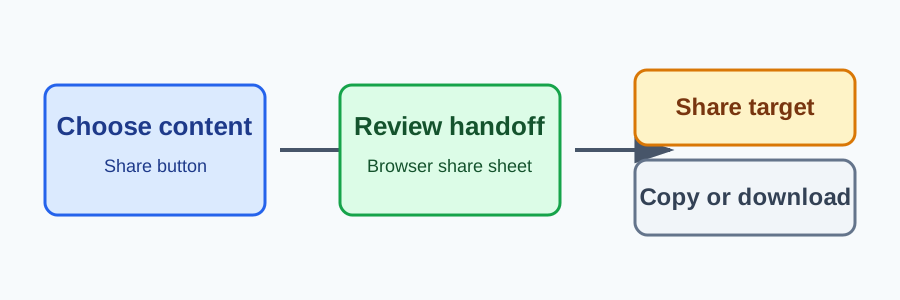
The W3C Web Share specification defines the sharing model and its security requirements. MDN's Web Share API guide, navigator.share(), and navigator.canShare() describe the browser-facing methods and compatibility notes. These documents describe conditional capabilities; they do not promise one target, prompt, or result on every platform.
Start with a deliberate action
Place sharing behind a button with a clear accessible name. Calling navigator.share() during page load, on hover, or after an unrelated timer is the wrong interaction model: browsers may require transient user activation, and a person should understand what will happen before a system share sheet opens. Keep the current heading, URL, and task state visible while the handoff is pending.
Feature-detect the method and keep the button usable when it is absent. A secure context is required, and browser policy or the current browsing context can still make the operation unavailable. Treat a missing method as an ordinary product state, not as an error that warrants a second hidden attempt.
async function sharePage(button) {
  const data = { title: document.title, text: 'Read this page', url: location.href };
  if (!navigator.share) return showFallback();
  if (navigator.canShare && !navigator.canShare(data)) return showFallback();
  button.disabled = true;
  try {
    await navigator.share(data);
    showStatus('Share sheet closed');
  } catch (error) {
    if (error?.name !== 'AbortError') showStatus('Sharing is unavailable');
    showFallback();
  } finally {
    button.disabled = false;
  }
}
The example keeps the data small and checks support before calling. The share promise can reject when a person cancels, when the proposed data is invalid, or when the browser cannot complete the handoff. Cancellation is not a failed page task; do not replace the document or erase a draft. A status message can confirm that no share occurred while leaving the same control available.
Validate what leaves the page
Share data can contain a title, text, URL, and, where supported, files. Build the proposed data from the current user-visible context. Avoid adding account identifiers, private notes, access tokens, or hidden metadata merely because a field accepts text. canShare() can check whether a proposed set of data is shareable, but it is not a promise that a target will accept it or that a file will be delivered.
Keep the page's authorization boundary separate from the share action. A URL should require the same access checks as an ordinary navigation, and a private document should not be turned into a public link by default. If a user chooses to share a generated export, show its scope and destination-independent contents before invoking the browser handoff. Do not log raw text, URLs with secrets, or file contents to analytics just because sharing was attempted.
Make the fallback first-class
The fallback should preserve the same intent: copy a deliberately chosen URL, download an export, or expose a normal link in the document. Give each action a visible label and keyboard path. For copy, report success and failure without assuming clipboard access. For a download, identify the file and its format. If the page has no safe shareable representation, explain that and keep the primary task available.
Do not hide the fallback until a share request fails. A person may prefer copying a link, may be using a browser without Web Share, or may cancel the system sheet. A compact menu can group the choices, but it must remain discoverable and should not move focus unexpectedly when the share promise settles. Preserve form data, scroll position, and the current route.
Test user outcomes
Test an explicit click, keyboard activation, cancellation, rejected share data, missing navigator.share, unavailable canShare, and a secure-context boundary. Verify that the document remains readable, the fallback is reachable, and a second attempt does not create duplicate status messages. Include long titles, localized text, right-to-left content, and files that the product is allowed to share.
Record an outcome such as shared, cancelled, or fallback-used, not the share data itself. Keep diagnostic data short-lived and avoid using share availability as an account, device, or location signal. Browser support and target behavior can change; update compatibility guidance from current standards and MDN notes rather than promising identical sheets.
Practical checklist
- Start only from a visible, user-initiated control in a secure context.
- Validate the title, text, URL, and any files before handing them to the browser.
- Treat cancellation and rejection as recoverable states; preserve the current task.
- Keep copy-link, download, or normal-link alternatives accessible at all times.
- Measure outcomes without retaining private share data.
Explain the handoff before it starts
A system share sheet can look different from the page that opened it. A short label such as “Share this article” tells a person what will be offered before the browser leaves the page context. If the button includes an icon, keep the accessible name in text and expose the same action to keyboard and assistive technology users. Do not imply that pressing the button publishes anything automatically. The person still chooses a destination, account, or cancellation inside the browser or operating system surface.
For a generated report, show the report name and the kind of link that will be offered. For a product page, share the canonical URL rather than a temporary route or a URL containing a session token. For a form, keep the draft in place and make it clear that sharing is separate from submitting. A confirmation is useful when the action creates a new public representation, but it should not be used to hide the browser's own cancellation state.
Related reading: browser permission boundaries and privacy-aware browser workflows.
Choose stable representations
The same visible page can have several possible links: a localized route, a filtered view, a signed download, or a private workspace URL. Decide which representation is safe to share before constructing the data. A canonical article URL may be appropriate for general content, while a private record should use an access-controlled route or a local download. If a link expires, state that limitation before the handoff and provide another way to keep the information.
Avoid putting transient UI state in a URL simply because it is easy to serialize. A search query may be useful when it does not disclose private terms; a selected account or internal identifier may not be. Use the smallest representation that preserves the user's intent. This is a product decision that remains valid when Web Share is unavailable, because the same URL can be copied or opened normally.
Files deserve the same care. Name a file so the recipient can understand it, keep its format accessible, and avoid sharing a temporary file that disappears before the receiving application reads it. Browser support for files can vary, so a text or link alternative should remain available. Do not silently convert a private document into a publicly reachable URL to make a file share work.
Design for cancellation and interruption
Closing a share sheet is a normal end state. The page should return to the same heading, focus location, and scroll position. If the person pressed Share while editing, the draft and validation messages must remain. A status message can say “Nothing was shared” when that distinction helps, but avoid a disruptive dialog that requires another dismissal.
The browser may reject a request before a share sheet appears, or a target application may stop accepting the data. Use a concise message that describes the next available action: copy the link, download the file, or try again. Do not retry automatically. A second attempt should be a new activation by the person, so that transient user activation and their intent remain aligned.
Network state is not a reliable indication of sharing success. The browser may hand data to a local application without a page request, while a target may later need its own network connection. Do not show a server-side “delivered” status when the page only knows that a handoff was requested. Use terms such as “share sheet opened” or “share cancelled” only when the browser result supports them.
Keep controls understandable at every size
A narrow viewport may wrap a share control into an overflow menu. Preserve its label, focus ring, and reading order. If an icon-only button is necessary, provide a tooltip and an accessible name, but prefer icon plus text for a primary action. A menu must not place copy and download alternatives behind a hidden hover state. Test with zoom, larger text, high contrast, and a screen reader.
After the share promise settles, return focus to the initiating control unless the person deliberately moved elsewhere. Announce a useful status in a live region, and avoid announcing raw URLs or file names that could expose private information in a shared environment. If the page changes language, translate action labels and status messages together; do not leave an English fallback that changes the meaning of cancellation.
Separate local use from optional transfer
Many products can create a local preview before offering a share action. Keep preview, copy, download, and browser handoff as distinct choices. A person may want to save a file locally without sending it to another application. The interface should explain which step leaves the current page and which step remains local.
When a share operation uses a generated object, release temporary resources after the task ends and preserve a way to recreate the representation. Do not retain a private document indefinitely only because a share button was rendered. If generation fails, expose the original content and an ordinary link rather than a blank share state.
Services that receive a shared URL should enforce authorization on every request. A URL copied through Web Share is no more trusted than one pasted into the address bar. Treat referrer and query values as untrusted input, avoid embedding secrets, and keep access decisions independent from whether the page reported that a share sheet opened. This boundary protects both Web Share users and people who use the fallback path.
Review changes with an outcome matrix
For each supported browser family, test the same outcomes: the control is visible, the browser opens its handoff after an explicit action, cancellation returns to the task, invalid data reaches the fallback, and a missing API does not remove essential content. Add cases for an embedded document, a page opened without a top-level browsing context, and a policy that blocks the feature. The exact sheet layout is a browser surface; the product contract is the task that remains possible.
Test localization with long translated titles, non-Latin scripts, bidirectional text, and locale-specific punctuation. A title that fits in English may wrap or truncate elsewhere. Preserve the document language and ensure that copy and download alternatives use the same localized representation as the share action. Do not use a browser's locale as a reason to select a recipient or infer a person's location.
Automated tests can stub navigator.share to resolve, reject with AbortError, or reject with another error. The stub should verify that calls happen only from the intended event handler and that no sensitive data is sent to a logging helper. Browser tests should also run with the method removed, with canShare absent, and with a rejected promise. Assertions should focus on the visible fallback and preserved task state, not on a particular vendor sheet.
Document a small, durable contract
The contract for a share control can be short: the person chooses to start it; the browser may or may not offer a target; cancellation is safe; and a copy, download, or normal-link fallback remains available. Keep this language in product documentation and translated interfaces. Avoid compatibility tables that suggest every browser has the same destination list or prompt wording.
When support changes, review the W3C specification and current MDN notes, then rerun the outcome matrix. A browser may add file support, change an activation rule, or reject a context that previously worked. Those changes should update the feature detection and fallback tests, not weaken the requirement for a clear user action. Retain only the product decision needed for the current task, and remove temporary diagnostic fields after an investigation.
An accessible fallback is part of the feature. The page should still let a person copy a safe URL, download a permitted representation, or navigate to a normal link when the share surface is absent, blocked, cancelled, or unavailable. That behavior is useful on every browser and gives the product a stable contract even as operating systems and share targets evolve.
Account for embedded and offline contexts
An embedded component may have less control over its top-level context than a full page. Keep the share action scoped to the content that the component is authorized to expose, and let the host decide whether a normal link or download is the appropriate fallback. Do not assume that an iframe can open the same system surface as a top-level document. Feature detection and a visible alternative make the component useful in both settings.
Offline and intermittent connections do not change the need for a user action. A local article can still offer a copyable URL, while a generated export may need to wait for a file to finish. Show whether the representation is ready, keep the current content readable, and avoid presenting a disabled control with no explanation. If a download is pending, provide a retry or cancel action and preserve the original task.
Sharing can also sit beside other actions such as print, save, or invite. Give each action a distinct label and explain material differences. “Copy link” keeps the current page local; “Share” opens a browser-managed handoff; “Invite” may create an account relationship and therefore needs its own confirmation and authorization. Grouping these actions visually is fine, but their permissions and outcomes should not be conflated.
Review the text shown immediately before a handoff. It should identify the object, the scope of the link, and any meaningful expiry or access rule. Do not overload a browser sheet with application-specific instructions that the receiving target cannot understand. A short page-level explanation and a stable fallback are easier to translate and test than a promise about how another application will render the content.
The result should feel ordinary when sharing is unavailable: the person can continue reading, editing, or downloading without losing context. That continuity is the important behavior to preserve across browsers, devices, languages, and changing share targets.
It also keeps support practical: a failed handoff points to a known action, while successful sharing remains an explicit choice rather than an invisible side effect.
Sources
Related Articles
Take BotBrowser from research to production
The guides cover the model first, then move into cross-platform validation, isolated contexts, and scale-ready browser deployment.