Navigator Language and Application Localization
Use browser language preferences as a useful localization hint without treating them as identity, location, or a replacement for explicit user choice.
Want the structured docs for Platform?
This article lives in the editorial library. For step-by-step setup, reference material, and ongoing updates, jump into the docs section.
Browser language preferences can help an application choose a first translation, but they are only a hint. navigator.language reports the browser's primary language preference, while navigator.languages exposes an ordered list when the browser provides one. Neither value proves where a person lives, which country they belong to, or which language they want for every task. A careful application negotiates a supported locale, explains the choice, keeps an explicit language control, and preserves a usable fallback when a resource is missing.
What the Navigator language values mean
The Navigator interface exposes language information selected by the user or browser configuration. The MDN Navigator.language reference describes the primary language tag. The WHATWG definition of navigator.languages describes an ordered preference list used by web applications and related language negotiation. A tag such as fr-CA communicates a language and regional preference for content; it does not establish a physical location.
The values can be absent, contain only one entry, or change when a person changes browser settings. Some browsers expose a broad language such as es while a person may prefer a regional variant such as es-MX. Treat the values as input to a selection process, not as a permanent user profile. Read them when a page needs to select resources, and avoid retaining detailed lists when the application only needs the selected locale.
Language preference also differs from document language. An HTML document can declare its content language with lang, and an individual element can override it. Screen readers and other assistive technology use those declarations to choose pronunciation and parsing rules. A page that chooses Spanish resources must still set the document language and update it when the visible language changes. Localization is therefore a content and accessibility decision, not merely a JavaScript property lookup.
Negotiate supported locales safely
Start with a finite list of locales the application actually supports. Normalize tags with the platform's internationalization facilities, compare the most specific supported tag first, then apply a documented parent-language fallback. For example, an application supporting en, fr, and fr-CA can choose fr-CA for that exact request, fr for another French regional request, and en when no French resource exists. Do not silently invent a translation by treating an unrelated region as equivalent.
The W3C Internationalization material explains why language tags, script, and region subtags carry distinct meaning. A matching algorithm should preserve that distinction. A Chinese request may include a script or region preference that matters to typography and terminology; a Serbian request may require a script choice; Portuguese variants can have different vocabulary. If the application does not have the requested variant, say which fallback is in use and make another language available in the selector.
A simple negotiation order is:
- an explicit application choice already saved for this person;
- the first supported value from
navigator.languages; navigator.languagewhen the list is unavailable;- a stable product default selected for the service.
The order keeps an intentional choice ahead of a later browser change. It also works when privacy settings or an embedded web view provide less information than a full browser. The default should be a complete experience, not a page that exposes untranslated keys or blocks the user until a locale is selected.
Keep explicit choice in control of the experience
Automatic selection is useful on a first visit, but it should never trap a person in a language they cannot read. Provide a visible language selector with translated names, a clear current value, and keyboard access. Store the selected locale in the application account or an appropriately scoped local setting only after the person chooses it. On later visits, restore that choice before consulting a changed browser preference. A person using a shared device should be able to change the language without changing another person's account settings.
Explain whether the selector changes the current page, the account, or future visits. If the choice requires a new resource bundle, retain the current content while it loads and announce the completed change. Do not discard form data, a draft, or a pending transaction during a locale switch. If a translated resource fails to load, keep the last readable locale and offer retry or another language. A failure message should itself be understandable in the current language.
Do not infer consent from a language preference. A French preference does not authorize promotional messages in French, an English preference does not authorize a particular data use, and a regional tag does not establish legal jurisdiction. Consent, account settings, and service eligibility need their own explicit controls. Language negotiation changes presentation; it does not change the policy that governs the feature.
Load resources without breaking content
Keep translation resources versioned and validate that every key needed by a route exists in the selected bundle. During a transition, show the source-language or previously loaded string rather than a raw key. Mark incomplete translations in development and release checks so missing entries are fixed before users encounter them. Avoid concatenating sentences from independent translated fragments: grammatical order and plural rules differ across languages.
Use the locale as a presentation input for dates, numbers, lists, and relative time, preferably through the Intl APIs. The locale does not change the meaning of stored timestamps or amounts. Store canonical data, then format it for the selected locale at the point of display. Keep units and currency explicit, and avoid using a language tag to guess a user's tax country, address, or payment method. The related Intl locale formatting guide covers portable date and number presentation.
Language selection should also cover metadata and navigation. Update the document lang, page title, descriptions, alternate links, and direction when a locale changes. For right-to-left languages, apply direction to the document and test mixed numbers, code, and punctuation. Localized URLs should resolve to the same content intent and provide a visible route back to another language. A missing translation should not redirect a valid localized URL to an unrelated homepage.
Test preference, fallback, and accessibility paths
Test with an empty preference list, an unsupported region, a script-specific tag, and a browser that exposes only navigator.language. Verify that the application reaches its complete default experience in every case. Change the browser preference after an explicit application choice and confirm that the saved choice remains in control. Clear that choice and confirm that the next negotiation is predictable and documented.
Test resource loading on a slow connection, an interrupted request, and a stale cache. The page should preserve user input, provide progress information that is not color-only, and expose a recoverable retry. Exercise keyboard navigation through the selector, verify focus after a locale change, and check that screen readers receive the updated lang and translated labels. Test long translated strings, plural forms, dates, decimal separators, and text expansion at zoom levels used by real users.
Do not use visual equality as the only localization test. Compare meaning, required actions, safety warnings, and limitations across locales. A translation that omits a fallback condition can turn a conditional browser behavior into an unconditional promise. Review messages about unavailable languages, data handling, and user choice with the same care as feature labels. Keep a small fixture set representing each supported locale, and run it when resource keys or negotiation rules change.
Privacy and boundary decisions
Language preferences can contribute to a recognizable browser configuration when combined with many other values. An application that only needs a locale should use the minimum value needed for the current selection and avoid sending the full ordered list to analytics. Do not combine language tags with account identifiers to infer nationality, residence, or a sensitive attribute. A language setting is not a reliable proxy for any of those facts.
If the application offers a remote translation or service fallback, distinguish that network path from local resource loading. Tell the person which service receives text, what retention applies, and what explicit action starts the transfer. A missing local translation must not silently upload private content. The choice of a locale may be automatic; a choice to share content is not.
Document the public support boundary: which locales are complete, which use a parent-language fallback, and which features remain in the default language. Keep the fallback accessible and usable. Review changes when browser behavior, resource packaging, or account synchronization changes, because a new persistence path can alter who controls the language setting. Treat language negotiation as part of the product contract. Name the supported locales in help content, release notes, and support replies so a person can tell whether a missing phrase is an expected boundary or a defect. A list of locale codes alone is not enough for a reader; use familiar language names and explain regional variants when they change terminology, number formats, or text direction. When a new translation is partial, keep the previous complete locale available and label the partial path before selecting it automatically.
Resource selection should be deterministic for a given set of inputs. Record the explicit choice, supported-locale list, and resource revision in a test fixture, but do not store a full browser preference list in ordinary user analytics. Determinism makes a support report actionable without turning a language hint into a long-lived identifier. If a server participates in negotiation, treat its response as a presentation decision and validate it against the same supported list used by the client. Reject unknown locale values and fall back to a known resource rather than loading arbitrary paths.
Consider how language selection interacts with authentication, error recovery, and offline use. A sign-in error should remain understandable if the selected bundle has not loaded. An offline page should use a cached complete locale and state when a newly requested translation cannot be fetched. A checkout or account-recovery flow should not switch language halfway through because a preference list changed. Keep the transaction state independent from translated labels, and preserve a way to return to the previous language without restarting the task.
Server-rendered and client-rendered routes need the same policy. A server can use an accepted language hint to choose the first response, but the client must still honor a saved explicit choice and update metadata after hydration. Avoid a flash of a different language that moves focus or changes the meaning of a control. When a cookie or account setting stores the choice, document its scope and retention and provide a way to clear it. A browser preference should remain a fallback input, not a hidden override for an account-level decision.
Language quality includes more than translated words. Review headings, labels, validation messages, notifications, email templates, alternate text, and generated documents. Check that a translated label still identifies the same control and that a warning keeps its conditions and limitations. Preserve placeholders, links, and markup safely; translators should not need to edit an untrusted value. For pluralized messages, use locale-aware rules instead of assuming that every language has singular and plural forms arranged like English.
When a locale is not available, offer a clear next action: choose another language, continue in the default, or retry the resource. Do not present a blank screen or silently substitute a language that changes a legal or safety message. If a legal notice is required in a particular jurisdiction, obtain the applicable policy from the responsible system rather than guessing from navigator.language. Language presentation and jurisdictional eligibility are separate inputs and should be tested separately.
Review the negotiation path whenever browser privacy controls, embedded web-view behavior, or internationalization data changes. Some environments may expose a reduced list, and users may intentionally set a generic language. The application should remain useful under that reduction. A privacy-respecting design can make a good choice with one coarse value, then ask the person directly when the distinction matters. That approach serves accessibility and avoids collecting more preference detail than the feature needs.
For date and number presentation, keep the locale decision separate from stored data as described in portable Intl formatting. For broader browser privacy tradeoffs, see everyday browser privacy choices.
The same boundary applies to notifications, generated files, and support records. A translated button should trigger the same operation as its counterpart in another language, and a localized error should preserve the condition that caused it. Keep stable identifiers in data and translate only the reader-facing label. When a person changes language, update labels and explanatory text without changing the object being edited, the selected account, or the permissions already granted. For shared workspaces, decide whether language follows the individual account or the workspace and explain that scope. For exported documents, include the document language and preserve numbers, units, and dates in a form that another system can parse. These details prevent a presentation preference from silently changing business data.
Provide a language choice at the point where it matters. A help article can offer a language menu without changing an account setting, while an account page can explain that its choice follows the signed-in person across devices. Keep those scopes distinct in labels and confirmation text. If a translated resource is unavailable, show the default language and a short explanation instead of hiding the feature. A person should be able to finish the task, understand what happened, and return later when the preferred resource is ready. This approach also gives support teams a stable description of the behavior: preference selected, supported resource used, fallback shown, or resource request failed. Those outcome categories are more useful than collecting every browser preference value.
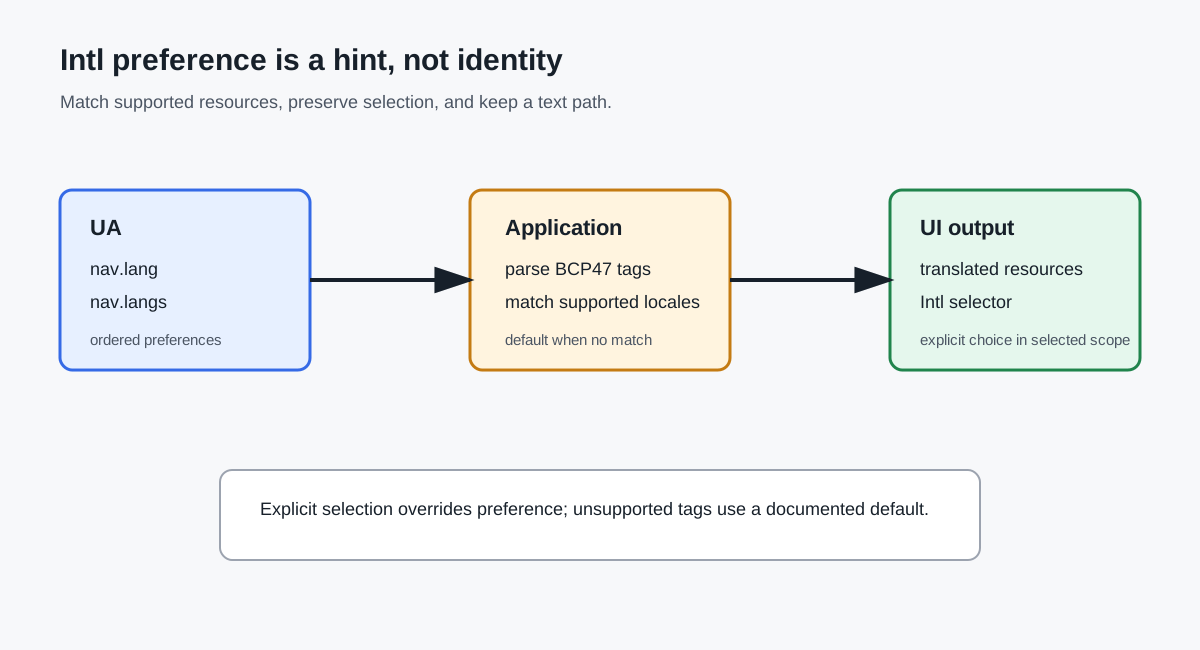
Keep the choice understandable in every supported locale, and tell people how to return to the default language. A predictable scope, complete fallback, and preserved task state make localization a reliable interface decision rather than an opaque browser guess. This remains true on mobile and desktop.
The same guidance applies across mobile and desktop browsers.
Claim-to-source map
- MDN
Navigator.languagedefines the primary language value and its browser-facing limits. - WHATWG
Navigator.languagesdefines the ordered language preference list used for negotiation. - W3C Internationalization supports the distinction between language, script, and region subtags and the need for locale-aware content.
- MDN
Navigatordocuments the browser-facing interface; application identity, location, and consent remain separate product decisions.
Public sources
Related Articles
Take BotBrowser from research to production
The guides cover the model first, then move into cross-platform validation, isolated contexts, and scale-ready browser deployment.