Media Session API Controls and User Intent
Use Media Session metadata, action handlers, playback state, and accessible fallbacks without treating platform controls as proof of user intent.
BotBrowser Team
Want the structured docs for Platform?
This article lives in the editorial library. For step-by-step setup, reference material, and ongoing updates, jump into the docs section.
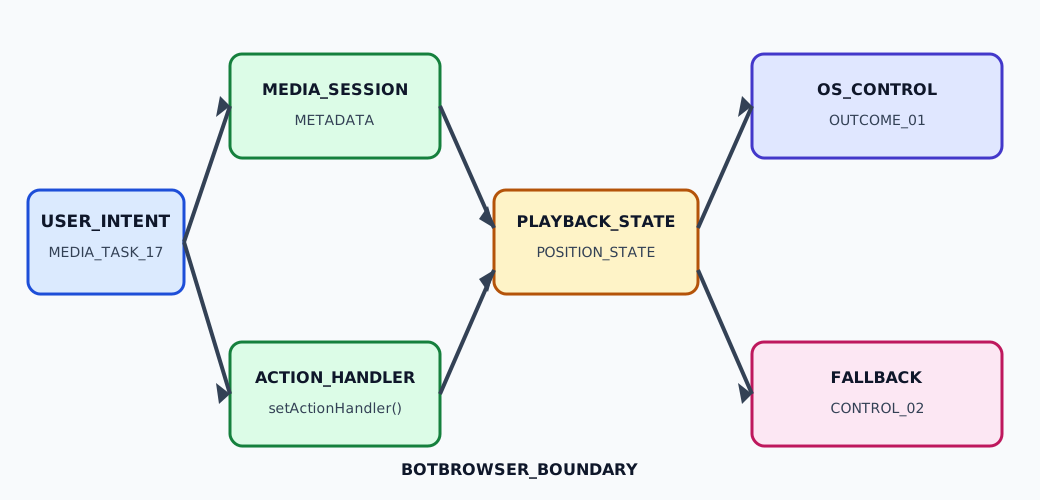
The Media Session API lets a page describe active media and receive browser-mediated controls such as play, pause, seek, and track changes. Those controls are useful signals about an interaction, but they are not proof that a person authorized playback, saw a lock-screen card, or accepted a remote transaction. BotBrowser can replay an authorized synthetic fixture and inspect page-owned states; it cannot manufacture a headset key, guarantee an operating-system media notification, or decide a listener's intent. Media Session API controls, playback state, position state, and fallbacks belong to one declared media task.
The W3C Media Session specification defines the metadata, action-handler, playback-state, and position-state surfaces. MDN's Media Session API reference describes the browser-facing objects, while the Chrome Media Session guide demonstrates integration patterns. They describe an interface contract, not a promise that every platform exposes the same controls or that an action represents a verified human decision.
TL;DR
- Start a media session only for a page-owned task that the interface has made visible to the person.
- Treat
navigator.mediaSession.metadata,playbackState, action handlers, and position state as separate fields with separate owners. - Register only actions the media element can complete, remove stale handlers when the task ends, and keep in-page buttons available as the normal fallback.
- Validate
duration,position, andplaybackRatebefore callingsetPositionState(); a browser callback does not certify clock accuracy or buffering health. - Record redacted outcomes such as
pause-requestedorunsupported, never listener identity, raw artwork URLs, or private account data.
Contents
- Define the media task and metadata
- Register action handlers around intent
- Keep playback and position state truthful
- Tear down controls and preserve fallbacks
- Record a privacy-minimized fixture
- Read outcomes without overclaiming
- Practical conclusion
Define The Media Task And Metadata
Create a media session for a concrete page-owned task: playing a podcast episode, previewing a training clip, or listening to an approved playlist. The task should have a visible title, a play or pause control, and a clear way to stop or change it before the page writes metadata. A page-load script that assigns an album and artwork without an active player can make a platform surface appear to describe activity that the person never requested.
Use navigator.mediaSession.metadata as presentation data, not as an identity record. A MediaMetadata object can contain title, artist, album, albumArtist, and artwork; choose the smallest set that helps a person identify the current item. Do not put account email addresses, signed URLs, access tokens, or hidden experiment labels in those fields. Artwork URLs are also page data: use a stable approved asset or omit artwork when its origin, retention, or dimensions are not appropriate for a system surface.
Keep ownership explicit. The component that owns the media element should own the current track, metadata revision, and mediaSession.playbackState. A queue manager may propose the next item, but it should not overwrite metadata for a track that the player has not accepted. A late network response must be ignored when trackId no longer matches the active task. This prevents a background recommendation from appearing as the current listening choice.
The Web Audio API workflow guide covers graph construction, microphone permission, and local analysis. Media Session is a different layer: it describes a page-owned playback task and receives platform actions. Link the two only when a Web Audio graph has a user-visible player; do not imply that a Media Session action grants microphone access or reveals audio input.
Define a small state vocabulary before adding handlers: idle, intent-recorded, metadata-set, playing, paused, ended, action-rejected, unsupported, and stale. playing means the page's media element reports that playback started; it does not mean a speaker produced sound or that a person listened. action-rejected means the page declined or could not complete the requested operation. These meanings make a support record useful without collecting the media content.
Register Action Handlers Around Intent
setActionHandler() connects browser-mediated commands to page-owned functions. Common action names include play, pause, seekbackward, seekforward, previoustrack, and nexttrack; availability varies by browser and platform. Register an action only when the current player has a safe implementation. A handler for nexttrack that silently advances a paid queue, changes an account, or starts an unrequested download has a larger product effect than the button label suggests.
Use a fresh handler set for each active media task. When a track changes, the callback should verify the current trackId before mutating the element. When the task ends, remove handlers with navigator.mediaSession.setActionHandler(action, null) where the API accepts that operation, clear metadata, and set playbackState to none. Do not leave a previous episode's seek callback attached to a new element.
The callback is an intent request, not an authorization result. A person may press a headset pause button, a browser may replay a command during a focus transition, or a platform may omit an action entirely. The page should call media.pause() or media.play() according to its own policy, catch rejected promises, and update the visible control only after the element reports the resulting state. Do not mark a track as playing merely because the handler ran. This matches the Clipboard API user-intent guide: a browser-mediated request is not permission to infer an unseen action.
This fixture keeps the handler contract small and inspectable:
const task = { fixtureId: 'media-17', trackId: 'episode-04', state: 'intent-recorded' };
const media = document.querySelector('#player');

function record(next) {
  task.state = next;
  document.querySelector('#status').textContent = next;
}

media.addEventListener('playing', () => {
  navigator.mediaSession.playbackState = 'playing';
  record('play-complete');
});
media.addEventListener('pause', () => {
  navigator.mediaSession.playbackState = 'paused';
  record('pause-complete');
});
media.addEventListener('error', () => record('play-rejected'));
navigator.mediaSession.metadata = new MediaMetadata({ title: 'Episode 04', artist: 'Fixture', album: 'Bounded test' });
navigator.mediaSession.setActionHandler('play', async () => {
  try {
    await media.play();
  } catch {
    record('play-rejected');
  }
});
navigator.mediaSession.setActionHandler('pause', () => {
  media.pause();
});
The fixture uses synthetic media-17 and episode-04 values. It does not send audio, an account identifier, or a platform command outside the page. A real player should add seekbackward and seekforward only after clamping the requested offset and confirming that the current media element can seek. If the action is unsupported, leave the in-page control enabled and record unsupported rather than installing a handler that always fails.
Keep Playback And Position State Truthful
navigator.mediaSession.playbackState accepts none, paused, or playing. Update it from the media element's actual events: set playing after a successful play() and playing event, set paused after pause, and use none when no active media task remains. A rejected play() promise should never become playing, even if the platform sent a play action. This distinction keeps a system surface from claiming activity that the page did not start.
Position state is another bounded report. Call setPositionState({ duration, position, playbackRate }) only when duration is finite and greater than 0, position is between 0 and duration, and playbackRate is finite and greater than 0. Reset or skip the call for a live stream with no finite duration. The API can help a platform render a seek position; it does not verify that a network buffer is full, that a clock is synchronized, or that a user heard every frame.
Keep updates at meaningful transitions rather than on every animation frame. A timeupdate event, a seek completion, and a track change are usually enough for a bounded fixture. Use a monotonic positionRevision so a delayed update cannot overwrite a newer track. If the player changes speed, record the new playbackRate as an input to the state update, not as evidence that a person chose that speed.
The choice table below keeps browser observations separate from product outcomes:
| Browser or platform observation | Page-owned state | Safe product response |
|---|---|---|
mediaSession is absent | unsupported | Keep ordinary play, pause, seek, and track buttons visible. |
play action arrives and media.play() resolves | play-complete | Set playbackState: 'playing' and announce the current item. |
play action arrives but the promise rejects | play-rejected | Keep the player paused and expose the same visible retry control. |
pause action arrives after the track ended | stale | Do not start the next item automatically; keep the ended state. |
| Position inputs fail validation | position-skipped | Continue playback and omit the position update until the next valid sample. |
The table deliberately avoids claiming that an operating system displayed a button or that a listener acted. The Web Share API permission-boundaries article uses a similar separation for share requests: a browser-mediated callback reports an API branch, not recipient consent or delivery. Media controls should use the same conservative vocabulary.
Tear Down Controls And Preserve Fallbacks
Media controls are temporary. On ended, route change, sign-out, or explicit stop, pause the element, clear metadata, set playbackState to none, remove handlers, and release references to artwork and queue state. Teardown should be idempotent: calling it twice must not register a new handler, advance a queue, or report a second completion. Keep an ownerRevision so a callback from an old component cannot update a new route.
The in-page player is the primary fallback, not an afterthought. Provide labelled buttons for play, pause, previous, next, and a seek range where those actions are meaningful. Keep the buttons keyboard-operable and expose a live status such as paused, playing, ended, or play-rejected. A platform control may be unavailable in a browser, embedded frame, desktop shell, or assistive-technology path; the page must remain complete without it.
Do not use a media-session action to skip a consent dialog, autoplay policy, paywall, or account check. A handler can request media.play(), but the browser can reject it and the application can still require a visible confirmation. If the product requires an explicit “Start preview” action, record intent-recorded on that click and only then install metadata and handlers. The OS control can continue the task after that point, but it cannot create the initial authorization.
When a route changes while play() or a seek promise is pending, mark the old attempt stale, detach its callbacks, and prevent a late resolution from changing the new route. If the user presses pause while a play request is pending, let the current owner decide whether to cancel, await, or ignore the request; do not let two components race over playbackState. This ownership rule matters more than the label of the action.
Record A Privacy-Minimized Fixture
A useful review record answers which branch the page took. It does not need track names, artwork bytes, account identifiers, or raw exception messages. Allowlist fixtureId, action, state, positionState, fallback, browserVersion, and context. Keep positionState as valid, skipped, or not-applicable rather than retaining a second-by-second timeline. Delete or aggregate rows after the release comparison window.
Run the same fixture with the API available, with navigator.mediaSession absent, with a rejected play() promise, and with teardown during a pending action. Keep fixtureRevision: 3, viewport: '1280x800', and a declared context such as top-level or embedded. The comparison asks which field changed. It does not claim that every headset, lock screen, browser shell, or operating system will expose the same control.
{
  "fixtureId": "media-17",
  "action": "pause",
  "state": "pause-complete",
  "positionState": "valid",
  "fallback": "in-page-controls",
  "browserVersion": "156.0",
  "fixtureRevision": 3
}
The JSON excludes title, artist, artwork, account data, and the complete media URL. A redacted record can show that pause handling worked without becoming a listening history. If support needs to locate a failed branch, request fixtureId and state; do not ask for a screenshot of a private lock screen or a full browser profile.
Read Outcomes Without Overclaiming
BotBrowser can replay this declared fixture in an authorized browser context, inspect the visible status, compare handler registration, and preserve a profile and viewport input for a controlled review. It cannot create a physical headset event, press an operating-system media key, force a lock-screen card, guarantee a platform notification, or prove that someone listened. A controlled replay is evidence about the fixture and setup, not about every device.
Stop at the first meaningful divergence. If mediaSession is absent, verify the fallback and record unsupported. If an action arrives but the visible state does not change, inspect the media element promise and owner revision. If playbackState says playing while the element is paused, fix event ownership before collecting more browser signals. If only the platform surface differs, report that the page state is unchanged and keep the limitation explicit.
The media task also deserves a privacy review. Metadata can be visible outside the page, and a sequence of titles can reveal a person's interests even when no account identifier is present. Use generic or user-approved labels for sensitive previews, avoid artwork that embeds private text, and retain only the fields needed for the declared interaction. Do not combine Media Session state with fonts, device lists, or permission results to score a person or device.
For a release handoff, include the fixture revision, the first changed field, and the next safe action. “Media controls work” is too broad to diagnose a missing API, a rejected play promise, a stale callback, or a platform surface difference. A useful note says action: pause, state: pause-complete, fallback: in-page-controls, and fixtureRevision: 3. That bounded note lets support repeat one owned interaction without requesting a listening history.
Lifecycle ownership should be explicit at every boundary. The player owns the media element and its event listeners; the session adapter owns metadata, action handlers, and the last validated position sample; the view owns labels, focus, and the in-page fallback. A queue service may suggest a track, but only the player can promote it to the active task. This prevents a delayed recommendation from replacing metadata after a route change. It also gives support a narrow diagnosis path: compare trackId, ownerRevision, positionRevision, and the visible status before inspecting a platform surface.
Seek actions need the same discipline as play and pause. Clamp a requested offset to the media duration, reject a non-finite delta, and wait for the media element to report the resulting time before writing a new position state. For live media, omit position state when duration is unknown rather than inventing a duration. When a browser sends an action that the player cannot complete, retain the ordinary button and announce the rejected state. A platform callback is a request entering the page; it is never a substitute for consent, entitlement, or proof of listening.
Metadata updates need an ordering guard too. Assign a new MediaMetadata object only after the player accepts the next track, and clear the previous object during teardown. Keep a monotonically increasing metadataRevision beside trackId; a callback carrying an older revision must not replace the title or artwork now visible in the player. This guard matters when a playlist fetch, route transition, and hardware action finish in a different order. A support fixture can record the accepted revision without retaining title, artist, or artwork bytes.
Sources
- Media Session, W3C
- Media Session API, MDN
MediaSession.setActionHandler(), MDNMediaSession.setPositionState(), MDN- Media Session, Chrome for Developers
- BotBrowser automation consistency
Practical conclusion
Tie Media Session metadata and controls to a visible, page-owned media task. Register only handlers the player can complete, update playbackState and setPositionState() from validated media events, remove handlers during teardown, and keep accessible in-page controls available in every branch. Record bounded outcomes instead of listening history. BotBrowser can repeat the synthetic interaction and inspect page state, while user intent, platform presentation, and actual listening remain outside the browser fixture's proof.
This article is part of the guide: Web Platform Surfaces: A Consistency Review Map
Related Articles
Clipboard API: Respect User Intent Before Reading
PlatformSpeech Synthesis Voices and Accessible Browser Playback
PlatformWeb Share API: Permission Boundaries and Safe Fallbacks
PlatformWindow Management API: Multi-Screen Boundaries
PlatformScreen Capture API: User Control and Privacy Boundaries
PlatformWebHID Device Permission and Privacy Boundaries
Take BotBrowser from research to production
The guides cover the model first, then move into cross-platform validation, isolated contexts, and scale-ready browser deployment.