Puppeteer Python Alternative: What Changes
Port one Puppeteer task to maintained Python with explicit waits, interception, evaluation and browser-context cleanup.
BotBrowser Team
Want the structured docs for Getting Started?
This article lives in the editorial library. For step-by-step setup, reference material, and ongoing updates, jump into the docs section.
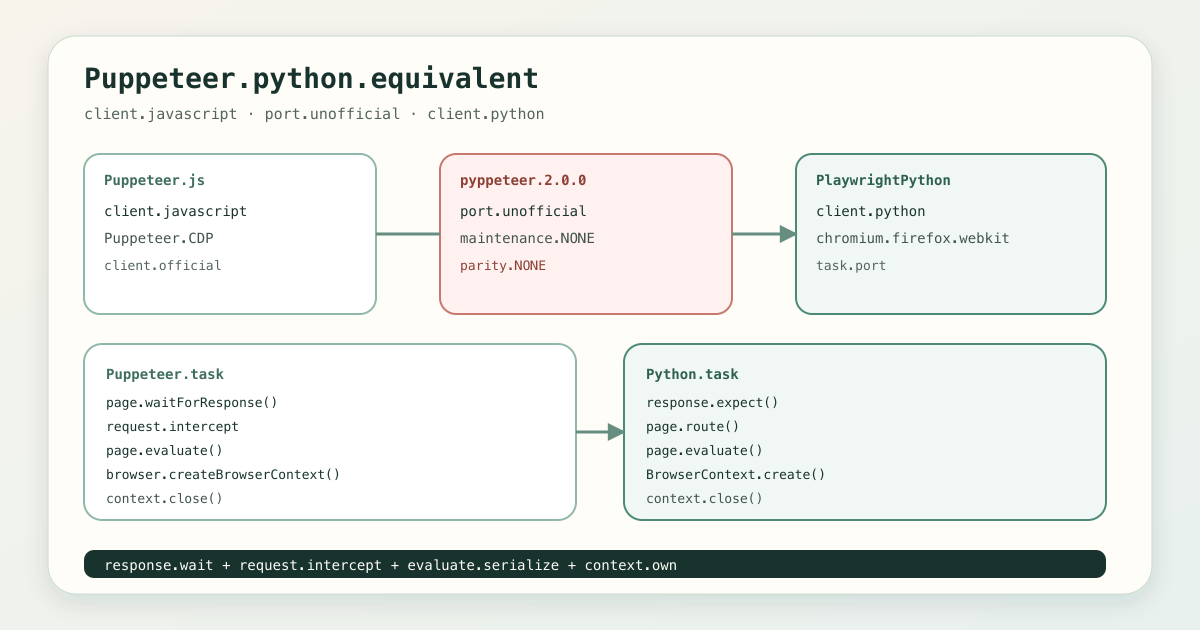
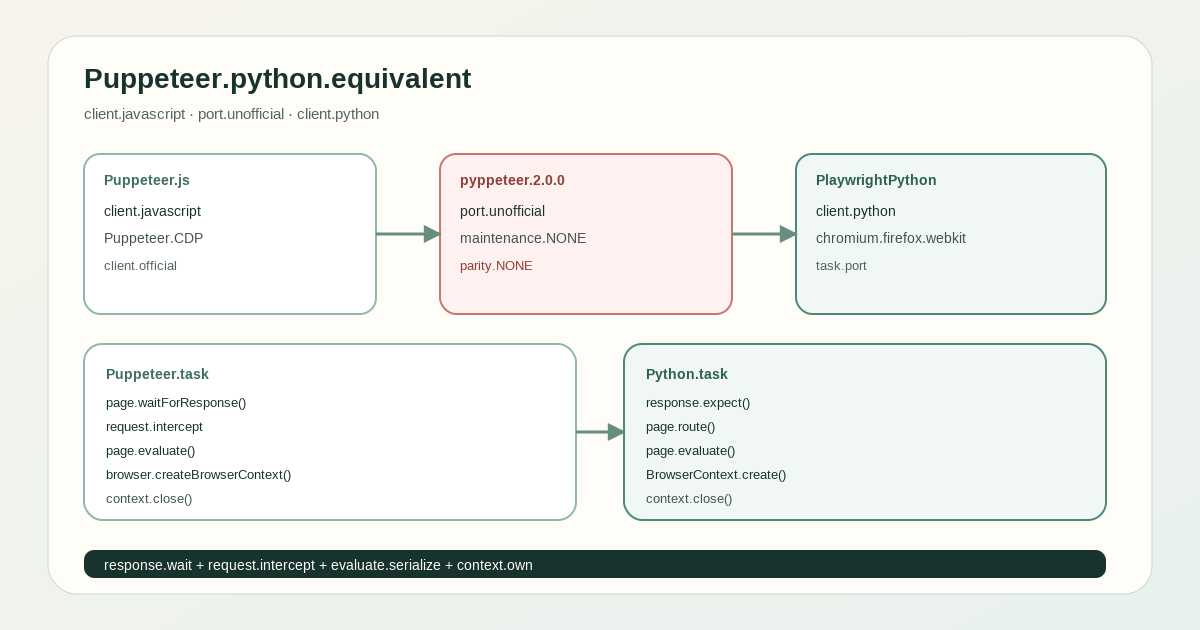
Puppeteer is a JavaScript library, not an official Python package. pyppeteer is an unofficial port whose PyPI page marks the project unmaintained and recommends playwright-python. A Python migration therefore needs maintained APIs and an observable task contract, not method-name substitution. BotBrowser can make the launched Chromium executable and profile explicit. It cannot supply a Python Puppeteer API, translate a script automatically or promise behavioral parity.
The owned example submits a form, intercepts one local stylesheet request, evaluates a small page function and closes its browser context. The JavaScript and Python versions must produce the same four observable results.
TL;DR
- Puppeteer's official documentation describes a JavaScript library;
pyppeteeris an unofficial port and its PyPI page calls the repository unmaintained. - Playwright for Python is maintained but is not a drop-in Puppeteer API.
- Port four boundaries: response subscription, request interception, page evaluation and context ownership.
- Register the response wait before the action; complete every intercepted request; pass evaluation inputs explicitly; close the context you created.
- Keep client choice separate from BotBrowser's executable and profile declaration.
Contents
- Choose a maintained client
- Port the response wait
- Port request interception
- Port page evaluation
- Port context ownership
- Check one task end to end
- Practical conclusion
Choose a maintained client
The Puppeteer introduction identifies Puppeteer as a JavaScript library controlling Chrome or Firefox through CDP or WebDriver BiDi. That is the official client surface.
The pyppeteer PyPI page identifies an unofficial Python port. Its opening notice says the repository is unmaintained and recommends playwright-python. Version 2.0.0 was uploaded in February 2024 and the package metadata declares Python 3.8 through 3.x. A package existing on PyPI is not evidence of current API parity.
The Playwright for Python introduction documents a maintained Python client for Chromium, Firefox and WebKit. It is a general browser-automation library, but its locator, context, routing, waiting and evaluation APIs remain Playwright contracts.
Both BotBrowser Puppeteer setup and Playwright setup document explicit executable and profile launch inputs. Those inputs can stay stable while the client changes. A launch record and a client migration record answer different questions.
Use the Puppeteer browser setup for launch and option scopes. Use the Playwright Python setup for a broader Python collection pattern. Neither article makes one client a drop-in replacement for the other.
Inventory every client-owned object before writing the Python version. The page, context, browser process and event subscription need explicit owners. Then find helpers that hide those objects. A helper named clickAndWait may combine a response subscription, a navigation wait and a retry loop; porting only its click loses two behaviors. A helper that opens a page, applies headers and installs a route hides three separate contracts.
Language differences affect the surface of a port. JavaScript accepts object literals in option parameters; Python often uses keyword arguments or dictionaries. JavaScript method names may not be valid Python identifiers, which is why some Python APIs use names such as continue_(). That rename is mechanical only when the rest of the method contract is equivalent. Check the pinned documentation for options, return values and lifecycle.
Pin both clients during the comparison. Save the JavaScript package version and Python package version in separate fields. Record the browser executable and profile reference beside them. If one client upgrades while the other stays fixed, the result describes a new client/browser combination. Start a new comparison after either version changes, and do not attribute a browser difference to the language migration.
Port the response wait
The fixture has a Save button that sends POST /api/save and then displays Saved revision 7. The wait must exist before the click, identify the intended response and check the HTTP result separately from the page label.
Puppeteer documents Page.waitForResponse() with a URL or predicate. Save the promise before clicking so the subscription is active:
const responsePromise = page.waitForResponse(response => {
  const request = response.request();
  return new URL(response.url()).pathname === '/api/save' && request.method() === 'POST';
});
await page.getByRole('button', { name: 'Save' }).click();
const response = await responsePromise;
if (response.status() !== 201) throw new Error(`save status ${response.status()}`);
if ((await response.json()).revision !== 7) throw new Error('save JSON rejected');
await page.getByText('Saved revision 7').waitFor();
Playwright for Python documents page.expect_response() as a context manager. The action occurs inside the context while the response subscription is active:
from urllib.parse import urlparse

with page.expect_response(
    lambda response: urlparse(response.url).path == "/api/save"
    and response.request.method == "POST"
) as response_info:
    page.get_by_role("button", name="Save").click()

response = response_info.value
if response.status != 201:
    raise RuntimeError(f"save status {response.status}")
if response.json().get("revision") != 7:
    raise RuntimeError("save JSON rejected")
page.get_by_text("Saved revision 7").wait_for()
The method names differ, but the order does not. Subscribe before the action, select one response, check status and response JSON, then verify the visible result.
Do not replace this with a fixed delay. A delayed page can look complete before the response arrives. The Playwright response-wait diagnosis explains a late subscription and a same-path wrong match.
The predicate needs the same identity fields in both clients. The fixture checks pathname and method because a GET and a POST can share /api/save. If the application sends several POSTs to that path, add a request body field, a header or a server-issued operation identifier. A predicate that accepts the first match can select an earlier background write.
A timeout proves the observer did not match the intended response; it does not prove the server rejected the action. Record whether the click completed, whether any request reached the owned server and whether the UI changed. Those facts lead to different repairs. A larger timeout does not repair a predicate that filters out the correct response.
The response body is another boundary. Read JSON only after the client has matched the response, and validate the fields the application consumes. A successful HTTP status can carry an application error object. A rendered success label can appear before server acknowledgement. Keep response status, response JSON and visible state as separate checks.
Port request interception
The fixture fetches /assets/owned.css. Puppeteer documents Page.setRequestInterception(): once interception is enabled, every matching request must be continued, responded to, aborted or completed from cache.
await page.setRequestInterception(true);
page.on('request', request => {
  if (new URL(request.url()).pathname === '/assets/owned.css') {
    return request.respond({
      status: 200,
      contentType: 'text/css',
      body: 'body { color: rgb(12, 34, 56); }',
    });
  }
  return request.continue();
});
Playwright for Python documents page.route() with explicit continue_(), fulfill() and abort() outcomes:
from urllib.parse import urlparse

def handle_route(route):
    if urlparse(route.request.url).path == "/assets/owned.css":
        route.fulfill(
            status=200,
            content_type="text/css",
            body="body { color: rgb(12, 34, 56); }",
        )
    else:
        route.continue_()

page.route("**/*", handle_route)
page.goto("http://127.0.0.1:4173/form")
The trailing underscore in continue_() is a Python syntax requirement. The semantic responsibility is unchanged: complete the request.
Scope interception to the owned fixture. A broad route can alter authentication, media or third-party resources. The network mocking guide for owned tests covers deterministic interception boundaries.
Route order matters when multiple handlers can match. Record whether the fixture request was fulfilled, continued or aborted. A fulfilled response should identify status, content type and body. A continued request should reach the owned server, which can log the expected path. An unhandled request that remains stalled is a failed interception test even while the browser process stays open.
Service workers and popup pages can move requests outside the handler you expected. Playwright's page route documentation warns that service-worker requests are not intercepted by a page route and recommends blocking service workers for request-interception tests when appropriate. Puppeteer has its own service-worker behavior. Preserve the fixture's isolation policy instead of assuming every request passes through the same handler.
Remove or close the route when the task ends. A route left installed on a reused page can affect the next navigation. A context closed with an active handler may report teardown errors. Keep route installation and removal in one scope, and preserve the first failure if cleanup also fails.
Port page evaluation
The fixture passes an application label into the page and reads a JSON-safe result. Puppeteer documents Page.evaluate() as evaluating a function in the page context.
const input = { prefix: 'owned' };
const result = await page.evaluate(
  data => ({
    title: document.title,
    label: `${data.prefix}:${document.querySelector('[data-app-status]').dataset.appStatus}`,
  }),
  input
);
Playwright for Python documents page.evaluate() with an explicit argument channel. Python variables are not captured inside the page automatically:
input_data = {"prefix": "owned"}
result = page.evaluate(
    """data => ({
      title: document.title,
      label: `${data.prefix}:${document.querySelector('[data-app-status]').dataset.appStatus}`
    })""",
    input_data,
)
The returned value must cross the environment boundary as serializable data. A live DOM node or JSHandle is not the same object as a business record. Use the client's handle API when a handle is genuinely required, and dispose of it deliberately.
The Playwright locator documentation distinguishes a lazy locator from a saved handle. The application must still validate the meaning and format of the returned value.
A page function can throw. A syntax error in the function string, a missing DOM property and an application exception are different failures. Catch at the outer fixture boundary, record the stage and fail the run. A fallback that returns an empty object hides the difference between a missing label and an evaluation that never executed.
The fixture should also record whether the page closed before evaluation returned, because that error belongs to resource ownership rather than to the JavaScript expression itself.
Promises add another ordering rule. Puppeteer waits for a returned promise before Page.evaluate() resolves. A Python evaluation must use the same completion contract. If a page function starts an asynchronous request, return a promise for the required final state, not one that represents only request start.
Avoid returning browser objects through a plain value channel. A serialized result should contain strings, numbers, booleans, arrays and plain objects. If the task needs a live node, use a handle API with an explicit lifetime. If it needs application state, expose a narrow JSON-safe function that reads only the required fields.
Port context ownership
The fixture creates one context, opens one page and closes the context after checking the result.
Puppeteer documents Browser.createBrowserContext() as creating a context that does not share cookies or cache with other contexts. Its BrowserContext owns pages from context.newPage(), and context.close() closes the context and its pages.
const context = await browser.createBrowserContext();
try {
  const page = await context.newPage();
  await runOwnedTask(page);
} finally {
  await context.close();
}
Playwright for Python documents browser.new_context() and BrowserContext with the same ownership shape:
context = browser.new_context()
try:
    page = context.new_page()
    run_owned_task(page)
finally:
    context.close()
Closing a page is not closing a context. A new context isolates browser-managed storage; it does not create a new executable, public IP, account or authorization.
The Playwright context lifecycle guide and Puppeteer context ownership guide explain cleanup and storage boundaries. The fixed-engine Playwright versus Puppeteer comparison keeps the same porting stages visible when both JavaScript clients run on one Chromium binary and profile.
Choose synchronous or asynchronous Python deliberately. Playwright for Python provides sync and async APIs with different caller models. The sync API fits a small linear fixture; the async API fits an existing asyncio service. Do not mix objects from one API with the event loop of the other. A task already running under asyncio should await page actions, response contexts and context closure.
Persistent and non-persistent contexts need separate records. A persistent context uses a user-data directory that can survive a process restart. A non-persistent context begins without that directory. A Python constructor may expose this setting through a different method or option than Puppeteer. Preserve the intended policy, and do not share one writable directory between concurrent browser processes.
Cleanup must survive a failed response or evaluation. Put page and context cleanup in finally, preserve the first meaningful failure and close the browser only at its outer owner. A context close can fail if a page or route is still active. That error is diagnostic evidence, not permission to erase the original failure.
Check one task end to end
The expected values below are a constructed contract, not captured output:
| Stage | Puppeteer | Python | Expected observation |
|---|---|---|---|
| Response | waitForResponse() | expect_response() | POST /api/save, status 201, revision 7 |
| Interception | setRequestInterception() + respond() | route() + fulfill() | owned CSS fulfilled; other requests continued |
| Evaluation | evaluate(fn, input) | evaluate(fn, input) | title and application label are serializable |
| Context | createBrowserContext() + close() | new_context() + close() | one page created from context; context closed |
Record the client package version, browser executable, profile reference, response URL and status, route outcome, evaluation value and context-close event. A matching result proves those four boundaries for the fixture. It does not prove universal API parity or third-party site behavior.
BotBrowser documents an explicit browser executable and profile, but does not own the client's promises, route handlers, page evaluation or context cleanup.
Write an input manifest before either run. It should name the fixture revision, owned origin, browser executable, profile reference, JavaScript package version and Python package version. Use separate output directories and a unique run identifier. A stale result from an earlier run must not be accepted as current evidence.
Classify the first failure by owner. A response wait that times out belongs first to subscription or response selection. A stalled route belongs to interception completion. A missing evaluation field belongs to page state or serialization. A teardown failure belongs to context ownership.
The port is complete for this fixture only when all four stages have evidence. A browser process that starts, a page that loads and a script that exits without an exception are not enough. Record the response, route outcome, serialized value and close event. Then record the residual limitation: a third-party page, a different browser build or an unsupported event may require a new design rather than a renamed method.
FAQ
Is pyppeteer the official Python Puppeteer?
No. Its PyPI page calls it an unofficial port and marks the repository unmaintained. The same page recommends playwright-python.
Can a Puppeteer script be copied directly into Python?
No. Method names, option shapes, subscriptions, page creation and evaluation arguments can differ. Port each observable boundary and test it.
Does a Playwright context create a new identity?
No. It isolates browser-managed storage within one browser process. It does not change the public network endpoint, account or authorization.
What proves a port is complete?
A matching response, a completed interception, a serialized evaluation result and an explicitly closed context. Also record the client and browser versions.
Sources
- Puppeteer: What is Puppeteer?
- pyppeteer on PyPI
- Playwright for Python introduction
- Playwright Python: Page
- Playwright Python: Browser
- Playwright Python: BrowserContext
- Playwright Python: Evaluating JavaScript
- Playwright Python: Locators
- Puppeteer: Page.waitForResponse
- Puppeteer: Page.setRequestInterception
- Puppeteer: Page.evaluate
- Puppeteer: Browser.createBrowserContext
- Puppeteer: BrowserContext
- BotBrowser Puppeteer setup
- BotBrowser Playwright setup
Practical conclusion
Use maintained Playwright for Python when a Python task needs browser automation. Treat pyppeteer as an unofficial, unmaintained port. Preserve the response wait, interception decision, evaluation serialization and context ownership, then verify those observable results on an owned page. BotBrowser can declare the browser and profile; it cannot make the clients interchangeable.
This article is part of the guide: Browser Automation Getting Started: A First Run Map
Related Articles
Playwright vs. Puppeteer for Scraping: Client API Differences
Getting StartedPython Async Playwright: Event Loops and Blocking Calls
Getting StartedPuppeteer BrowserContext, Page Ownership, and Cleanup
Getting StartedScraping with Puppeteer: Options and Observable Differences
Getting StartedPlaywright Init Scripts and Fingerprint Order
Getting StartedPlaywright executablePath: Which Browser Actually Runs
Run the same check in BotBrowser
Load a profile, keep the signals you just read about consistent inside the browser, and confirm the result on your own machine before a rollout.