Python Async Playwright: Event Loops and Blocking Calls
Diagnose an async Playwright run that stalls. Compare cooperative waits, blocking calls and thread offloading, then define browser and cleanup ownership.
BotBrowser Team
Want the structured docs for Getting Started?
This article lives in the editorial library. For step-by-step setup, reference material, and ongoing updates, jump into the docs section.
A Python async Playwright script can contain await throughout its browser code and still stall every task on its event-loop thread. A synchronous helper called between browser operations can occupy that thread while other tasks wait. Start with the loop's ability to schedule work, rather than assuming the browser needs more contexts or a longer navigation timeout.
BotBrowser documents browser/profile integration with automation frameworks and browser resource planning. Those controls do not make Python helpers asynchronous, make Playwright objects thread-safe or guarantee that a destination is ready. Python owns coroutine scheduling; the framework owns its API objects; the application owns admission and resource cleanup. Loading a browser profile does not change these ownership rules.
TL;DR
- A standalone single-thread example can have one top-level
asyncio.run(). Python does not impose one event loop per process. - Direct blocking work delays other tasks on that loop thread. Creating more tasks does not create more loop threads.
- Compare an independent heartbeat with task completion before changing browser concurrency.
- Use
asyncio.to_thread()for suitable blocking I/O helpers, not as permission to move Playwright objects between threads. - Keep browser/context acquisition and closure with a declared owner. Preserve work failures separately from cleanup failures.
Contents
- Assign the event loop an owner
- Distinguish blocking from waiting
- Read the three-lane scheduling trace
- Apply the diagnosis to Playwright
- Close resources without losing the failure
- Practical conclusion
Assign the event loop an owner
The Python runners documentation describes asyncio.run() as a top-level runner that manages an event loop. It cannot be called while another event loop is running in the same thread. That is a thread-local restriction, not a rule that a process can contain only one loop. Other threads and other execution arrangements require their own explicit ownership decisions.
For a standalone command-line script, put the asynchronous entry point behind one top-level runner. Create the async Playwright instance and its browser resources inside the lifetime controlled by that entry point. The Playwright Python library guide demonstrates this async form. Do not create a framework object under one loop and casually reuse it after that loop has finished. Browser-use integration covers the launch configuration that this loop must keep alive; it does not remove synchronous work from the loop thread.
An interactive environment or an asynchronous application framework may already own the loop. In that case, call and await an async function through that environment's supported integration rather than nesting another runner. The fact that a command-line example ends with asyncio.run(main()) does not make that line suitable inside every coroutine, notebook cell or server request handler.
Keep three separate ownership records: who runs the loop, who created the browser and who created each context. An application attached to a browser it does not own should not assume authority to shut down the entire process. A context created for one task has a narrower lifetime. Browser fixture isolation already explains resource ownership and failure cleanup; the scheduling question is whether those owners get a chance to execute their work.
The task count is another independent decision. A collection of coroutines is not inherently a browser-worker pool. Tasks may share one browser, own separate contexts or perform no browser work at all. A scheduling demonstration can therefore diagnose a stalled loop without establishing the number of browser contexts a host can support. Preserve that distinction when moving a small script into a larger service.
Distinguish blocking from waiting
The asyncio development guide describes cooperative scheduling: while one task executes on the loop thread, other tasks on that thread do not run. A task that waits on an asynchronous operation can let the loop schedule other work. Merely placing a synchronous function call inside async def does not change how that function executes.
Three useful diagnostic categories are a synchronous delay such as time.sleep(), a synchronous I/O helper called directly, and CPU-heavy Python work that does not yield. These are categories to inspect, not three universal forbidden functions. A helper's name or return type does not establish its behavior. Read its implementation or documentation and check whether it occupies the loop thread while it waits or computes.
An asynchronous delay such as await asyncio.sleep() suspends the current task instead of deliberately sleeping that thread. That does not mean every occurrence of await guarantees a scheduling turn: an awaited operation may already be complete. A loop that repeatedly processes immediately available work can still need a deliberate fairness decision. Count what actually ran rather than treating the presence of an await token as a responsiveness test.
For suitable blocking I/O, Python's asyncio.to_thread() runs a function in another thread and returns an awaitable result. Under the usual GIL-enabled Python runtime, it is generally an I/O offloading tool, not a universal solution for CPU-heavy Python computation. Native extensions and different runtime configurations can change CPU execution behavior; those cases need their own evidence.
Keep framework objects out of that repair unless their documented threading contract permits it. The Playwright library guide states that its API is not thread-safe. Moving a synchronous file-reading helper to a thread is different from sending a page or context method to a thread that did not create its framework instance. The former can remove a blocking dependency; the latter changes object ownership.
Read the three-lane scheduling trace
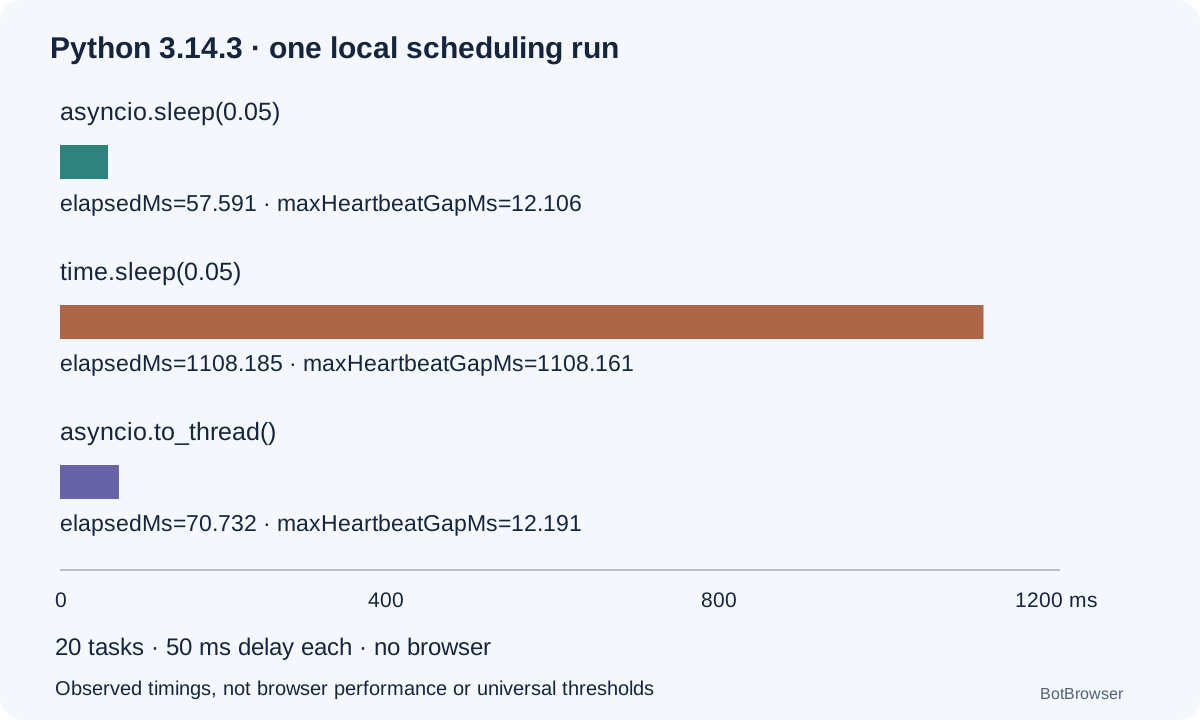
An original standard-library probe ran locally with Python 3.14.3 on Darwin arm64. Each lane scheduled 20 tasks together, with a synthetic 50 millisecond delay per task. A heartbeat on the same loop requested a sample every 10 milliseconds. The threaded lane used an explicitly configured executor with 20 threads. The three lanes ran sequentially in one command-line process so they did not deliberately compete with one another.
No browser, network request, proxy, profile or destination was involved. The probe measures synthetic scheduling behavior, not Playwright throughput, site latency or BotBrowser performance. Its source is docs/evidence/async-python-browser-automation-lifecycle-probe-20261113.py, and the actual output is retained in the matching JSON record. The numbers below describe that one run; they are not acceptance thresholds for another machine.
| Lane and operation | Tasks completed | Elapsed time in milliseconds | Maximum heartbeat gap in milliseconds |
|---|---|---|---|
cooperative: await asyncio.sleep(0.05) | 20 | 57.591 | 12.106 |
blocking: time.sleep(0.05) | 20 | 1108.185 | 1108.161 |
threaded: await asyncio.to_thread(time.sleep, 0.05) | 20 | 70.732 | 12.191 |
The direct blocking lane delayed the heartbeat for almost its entire measured duration. All tasks still completed, which is why completion count alone would miss the scheduling problem. The cooperative and threaded lanes kept receiving heartbeat samples during their waits. Their different elapsed times are observations from this host, not proof that either mechanism is always faster.
The essential difference can be reproduced without a browser:
import asyncio
import time

async def cooperative():
    await asyncio.sleep(0.05)

async def blocking():
    time.sleep(0.05)

async def threaded():
    await asyncio.to_thread(time.sleep, 0.05)
Each function represents the same requested delay but gives the loop different opportunities to execute other tasks. In the committed probe, the heartbeat starts before the task set, completions are recorded with time.perf_counter(), and the final heartbeat is awaited during shutdown. Elapsed time therefore includes that final heartbeat drain; it is not just the delay of the last completed task.
The command was python3 docs/evidence/async-python-browser-automation-lifecycle-probe-20261113.py --pool 20 --output docs/evidence/async-python-browser-automation-lifecycle-probe-20261113.json. Here --pool names the number of tasks per lane and the executor limit. It does not launch 20 browsers. The probe asserts that every scheduled task completes, but deliberately does not assert a universal timing ratio or maximum acceptable heartbeat gap.
Host load, timer granularity, thread startup and the rest of the application can affect the measurements. A heartbeat gap identifies a period when that loop did not resume the observer on schedule; it does not by itself identify which function caused the delay. Pair it with a narrow code change or controlled comparison. The Python development guidance also describes debug support for slow callbacks, which can supply more specific evidence.
Apply the diagnosis to Playwright
First identify whether the browser operation was dispatched at all. If a heartbeat and unrelated tasks stop while a synchronous helper executes before navigation, increasing the navigation timeout treats a later stage. The page cannot finish an operation that the Python client has not yet requested. Record the time before the helper, after it returns and around the awaited browser call, without treating those timestamps as interchangeable.
If the loop remains responsive while one navigation waits, investigate that operation's own conditions: response, timeout, page readiness or destination behavior. A healthy heartbeat does not prove the browser is healthy, and a loaded document does not prove the application result is ready. The scheduling trace separates an application-thread stall from a browser wait; it does not replace the layered diagnosis of a blocked scraper.
| Observation | What it establishes | Next bounded check |
|---|---|---|
| Heartbeat and unrelated tasks pause during a direct helper call | The observer was delayed on this loop | Replace only that helper with a supported async or offloaded I/O form |
| Heartbeat continues but a page operation waits | This observer is still being scheduled | Inspect the specific operation and its readiness/timeout contract |
| More tasks are created but progress still arrives in one blocked interval | Task creation did not remove the occupied loop thread | Inspect synchronous work before adding browser resources |
| A threaded helper improves responsiveness but a page call then fails | Scheduling and framework ownership are separate properties | Check whether framework objects crossed thread or loop boundaries |
A useful repair keeps the async Playwright API on its owning loop and offloads only the blocking helper with suitable inputs and return values. For example, a file-reading helper can return bytes or text to the loop; the loop can then decide what browser action to perform. Passing a page object to the helper is not necessary for that design. Do not convert an I/O repair into an unsupported threading arrangement.
Admission remains necessary after the stall is removed. A responsive loop can schedule enough browser work to exceed memory, connection or destination traffic constraints. Browser context capacity planning owns that resource budget, and rate limiting owns shared traffic admission. Neither task count nor heartbeat responsiveness proves that a higher browser concurrency is sustainable or authorized.
The BotBrowser automation consistency reference describes the browser/profile side of integration, while performance optimization covers browser resource planning. Neither supplies a Python event-loop scheduler or makes arbitrary synchronous libraries nonblocking. Preserve the Python version, framework version, browser configuration reference and selected helper implementation as separate inputs when explaining a changed run.
Close resources without losing the failure
Scheduling ownership should last long enough for resource owners to finish cleanup. The Playwright Browser API recommends explicitly closing contexts created by the application before closing the browser. The BrowserContext API defines context closure. These are resource operations to await, not synchronous substitutes that should be sent to an arbitrary thread.
Keep a small lifecycle receipt beside the task outcome. It should identify the loop owner, browser owner, context owner, whether work completed, and whether each required close operation was attempted and completed. This is a proposed application record, not an additional Playwright or BotBrowser API. A missing close result is unknown; it is not evidence that the resource disappeared successfully.
| Receipt field | Meaning |
|---|---|
loopOwner | Entry point or host framework that keeps this loop alive |
browserOwner | Creator responsible for browser shutdown, or an external owner |
contextOwner | Task or fixture responsible for this context |
workError | Original work failure, retained independently |
contextClose | Not required, not attempted, attempted or completed under the declared policy |
browserClose | The owning browser's separate closure state |
cleanupError | Cleanup failure, without replacing the original failure |
If work raises an exception and cleanup also fails, preserve both outcomes. A successful close does not turn failed work into success, and a cleanup error must not erase the first failure. Fixture failure handling already owns the full cleanup policy. The Python-specific requirement is that the loop and framework lifetime remain available until the owner's applicable cleanup path has been awaited.
Cancellation needs the same declared ownership. Stopping the caller from waiting is not proof that a blocking function offloaded to a thread has stopped running. A file operation or helper may have its own lifetime after the awaiting coroutine is cancelled. The asyncio task documentation and the helper's own contract should determine what completion or cancellation evidence is possible. Do not close resources that the helper still legitimately uses merely because its caller returned early.
Playwright has an additional cancellation boundary. Its Python library documentation says that cancelling an asyncio task executing a Playwright call is unsupported and has undefined behavior. When an operation must outlive its caller, the documented approach is a separate task protected with asyncio.shield(). Keep an explicit owner for that operation and await its outcome before closing resources it needs. Shielding is not evidence that the operation finished or that its loop can be shut down immediately.
For a stalled script, first preserve the stage and ownership record, then make one narrow scheduling repair. Re-run the same workload contract and compare the observer timeline separately from browser results. This prevents an apparent responsiveness improvement from hiding a changed account, context, readiness condition or cleanup policy. It also leaves a useful next owner when the scheduler is responsive but the application outcome still fails.
FAQ
Does async Python allow only one loop per process?
No. The relevant asyncio.run() restriction concerns another running loop in the same thread. The standalone example chooses one top-level runner; it does not define every process architecture.
Can every synchronous Playwright call be wrapped in a thread?
Not safely by assumption. Playwright documents its API as not thread-safe. Offload a suitable independent I/O helper, or use an explicitly supported framework ownership arrangement, rather than moving existing page objects across threads.
Does a small heartbeat gap mean more browsers will fit?
No. It measures this observer's scheduling, not browser memory, destination allowance or useful page throughput. Keep those acceptance checks separate.
Sources
- Python asyncio runners
- Developing with asyncio
- Python asyncio.to_thread
- Playwright Python library
- Playwright Browser.close
- Playwright BrowserContext.close
- BotBrowser automation consistency
- BotBrowser performance optimization
Practical conclusion
Check whether the loop can schedule an independent observer before changing browser capacity. Keep a top-level loop owner, remove suitable blocking I/O from that thread, and leave framework objects within their documented ownership boundary. Then compare browser outcomes and cleanup receipts separately from the scheduling improvement.
This article is part of the guide: Browser Automation Getting Started: A First Run Map
Related Articles
Microtasks and Timers: The Order Your Code Actually Runs
Getting StartedPuppeteer BrowserContext, Page Ownership, and Cleanup
IdentityCookie Store API: Async Cookies, Change Events, and Privacy Boundaries
Getting StartedHeadless Browser for AI Agents: Launch and Tool Boundaries
Getting StartedBrowser Automation Test Fixtures and Isolation
Getting StartedPlaywright BrowserContext Lifecycle and Storage State
Run the same check in BotBrowser
Load a profile, keep the signals you just read about consistent inside the browser, and confirm the result on your own machine before a rollout.