Scraping with Playwright: Browser and Profile Setup
Configure Playwright for an authorized list-to-detail scraping run. Separate browser profiles, cookies and extraction errors, then save a useful JSON result.
BotBrowser Team
Want the structured docs for Getting Started?
This article lives in the editorial library. For step-by-step setup, reference material, and ongoing updates, jump into the docs section.
Scraping with Playwright involves two different kinds of correctness: the browser must open the intended environment, and the extraction must return the intended records. A successful chromium.launch() establishes neither the meaning of a price nor permission to collect it. BotBrowser supports a profile-backed Chromium launch through Playwright's executablePath and args; it does not supply a site's selectors, authorize access, or guarantee that a server will serve a page. For an application you own or are authorized to inspect, a bounded list-to-detail run makes the browser configuration and the extraction result separately diagnosable.
TL;DR
- Set
executablePathexplicitly and pass--bot-profileas one argument. A BotBrowser identity profile is separate from Playwright's cookies and local storage. - Keep list and detail navigation inside one
BrowserContextwhen they belong to the same authorized session. A new context has isolated storage, but is not a new network identity. - Check the navigation status, final origin and required selectors before accepting a record. An HTTP 200 page can still be a login screen.
- Store records and diagnostics separately. Treat saved authentication state as a credential, not as a debugging attachment.
Contents
- Configure the browser before collecting records
- Extract one list and its detail pages
- Choose what survives the next run
- Save a result that distinguishes data from failure
- Diagnose the layer that actually failed
- Practical conclusion
For an owned catalogue extraction with response status and row-schema checks, the Puppeteer scraping option comparison separates launch inputs from page observations and keeps a new isolated context's storage explicit.
Configure the browser before collecting records
The Playwright BrowserType reference documents executablePath as the way to launch an executable other than the bundled browser. It also warns that a custom executable is not guaranteed to work with the installed Playwright version. Pin the playwright-core package in your lockfile, record the actual browser version, and validate compatibility when either component changes. Downloading Playwright's bundled Chromium does not update the custom executable named by your configuration.
Use absolute paths for both the binary and the profile. In a container, those paths must exist inside the container, not just on the machine that assembled the job. Check execute permission for the binary and read permission for the profile before opening a browser. An absent environment variable should cause an immediate configuration error rather than a launch with an unintended default. The direct Playwright launch guide covers installation; the additional concern in a scraping job is preserving enough configuration information to explain a bad result later.
The BotBrowser profile reference requires the binary and profile package to use the same major version. It describes CLI options as overrides of profile configuration, not as extra independent identities. Do not combine a profile with an unrelated userAgent, timezone, language list or device descriptor merely because a generic scraping example contains one. If a particular viewport is part of the application requirement, record that explicit override. Otherwise viewport: null opts out of Playwright's fixed viewport emulation; it does not assert a particular screen size or make every layout identical.
Three prerequisites remain outside browser configuration: authorization for the target, a supported execution environment, and an extraction schema. The example below deliberately uses an owned catalogue rather than a public marketplace. Its small scope is one list page and at most two detail pages, so it can check a selector contract without becoming an unbounded crawler. It makes no claim about compatibility with a named third-party protection service.
Install playwright-core in a separate example project and save the script as collect.mjs. Supply BOTBROWSER_EXEC_PATH, BOT_PROFILE_PATH and OWNED_CATALOG_ORIGIN through your job configuration. The origin must be HTTP or HTTPS and belong to the fixture you control. The script is an illustrative implementation derived from the documented APIs, not a published BotBrowser execution record.
The fixture leaves Playwright's default automation instrumentation unchanged. It does not test or claim any automation-signal outcome.
Extract one list and its detail pages
The fixture's /catalog page contains links with data-testid="item-link". Each detail page contains exactly one data-testid="item-name" element and one data-testid="item-price" element; the price element also carries a data-currency attribute. For example, a list anchor may point to /items/a1, while its detail price is <span data-testid="item-price" data-currency="USD">12.50</span>. The values are fixture inputs, not observed output. A site with different markup needs a different selector contract.
import { chromium } from 'playwright-core';
import { access, writeFile } from 'node:fs/promises';
import { constants } from 'node:fs';
import { isAbsolute } from 'node:path';

const executablePath = process.env.BOTBROWSER_EXEC_PATH;
const profilePath = process.env.BOT_PROFILE_PATH;
const origin = new URL(process.env.OWNED_CATALOG_ORIGIN);
if (!['http:', 'https:'].includes(origin.protocol)) {
  throw new Error('Fixture origin must use HTTP or HTTPS');
}
if (origin.username || origin.password || origin.search || origin.hash || origin.pathname !== '/') {
  throw new Error('Supply an origin without credentials, path, query or fragment');
}
const safeUrl = value => {
  const url = new URL(value);
  return url.origin + url.pathname;
};
for (const value of [executablePath, profilePath]) {
  if (!value || !isAbsolute(value)) throw new Error('Absolute paths required');
}
await access(executablePath, constants.X_OK);
await access(profilePath, constants.R_OK);

const browser = await chromium.launch({
  executablePath,
  headless: true,
  args: [`--bot-profile=${profilePath}`],
});
const records = [];
const diagnostics = [];
try {
  const context = await browser.newContext({ viewport: null });
  context.setDefaultTimeout(10000);
  const page = await context.newPage();
  async function open(url) {
    const response = await page.goto(url, {
      waitUntil: 'domcontentloaded',
      timeout: 30000,
    });
    const status = response?.status() ?? null;
    const finalUrl = new URL(page.url());
    diagnostics.push({ url: safeUrl(url), finalUrl: safeUrl(finalUrl), status });
    if (status === null || status < 200 || status >= 300) {
      throw new Error(`Unaccepted navigation status: ${status}`);
    }
    if (finalUrl.origin !== origin.origin) {
      throw new Error('Navigation left the fixture origin');
    }
  }
  await open(new URL('/catalog', origin).href);
  const links = page.getByTestId('item-link');
  await page.waitForFunction(() => document.querySelectorAll('[data-testid="item-link"]').length === 2);
  const hrefs = await links.evaluateAll(nodes => nodes.map(node => node.getAttribute('href')));
  const urls = [...new Set(hrefs.filter(Boolean).map(href => new URL(href, page.url()).href))].filter(
    url => new URL(url).origin === origin.origin
  );
  if (urls.length !== 2) throw new Error('Fixture requires two same-origin detail links');
  for (const url of urls) {
    await open(url);
    const name = page.getByTestId('item-name');
    const price = page.getByTestId('item-price');
    await name.waitFor({ state: 'visible' });
    await price.waitFor({ state: 'visible' });
    if ((await name.count()) !== 1 || (await price.count()) !== 1) {
      throw new Error('Detail selector is not unique');
    }
    const label = (await name.innerText()).trim();
    const amount = (await price.innerText()).trim();
    const currency = await price.getAttribute('data-currency');
    if (!label || !/^\d+\.\d{2}$/.test(amount) || !/^[A-Z]{3}$/.test(currency ?? '')) {
      throw new Error('Detail record does not match the fixture schema');
    }
    if (new URL(page.url()).origin !== origin.origin) {
      throw new Error('Detail origin changed during extraction');
    }
    records.push({ url: safeUrl(page.url()), name: label, amount, currency });
  }
  await writeFile(
    'catalog-result.json',
    JSON.stringify(
      {
        browserVersion: browser.version(),
        collectedAt: new Date().toISOString(),
        records,
        diagnostics,
      },
      null,
      2
    ),
    { flag: 'wx', mode: 0o600 }
  );
  await context.close();
} finally {
  await browser.close();
}
The Playwright locator documentation distinguishes a locator from a saved DOM element. A locator resolves against the page when used, which is helpful when an application replaces nodes during rendering. It does not know which business record is correct. The script therefore waits for fixture elements, requires uniqueness, validates the text format, and only then appends a record. Waiting for domcontentloaded establishes a navigation milestone; it does not establish that an asynchronous catalogue has finished loading.
The list contract also needs a completion signal. This fixture explicitly expects two links, so the script waits for that count and rejects fewer than two distinct same-origin detail URLs. A real application with incremental results should expose an owned completion marker or a stable API response that your application team defines. Do not assume evaluateAll() waits for the final number of matches. Otherwise a run may return one valid record from a list that eventually contains twenty, with no timeout to reveal the omission.
Same-origin filtering bounds the links selected from the list. The final-origin check rejects a redirect before extraction, and the acceptance check rejects an origin change while reading details; those requests have already happened. These checks are not a network firewall: a page can load images, scripts and frames from other hosts. If the execution environment requires strict egress restrictions, enforce them in the infrastructure as well. An origin check in application code cannot retroactively prevent a request already sent during navigation.
The amount stays a string because this fixture defines a decimal text format. A production price can involve a decimal comma, thousands separators, tax labels, subscription intervals or a currency symbol shared by multiple currencies. parseFloat() is not a substitute for that schema. Establish the permitted format per source and reject ambiguous records rather than silently converting the first numeric prefix into a price.
Choose what survives the next run
Browser profiles, browser storage and job results solve different problems. The Playwright context lifecycle analysis explains the storage boundary in more depth: contexts can isolate cookies and other browsing state within one browser process. They do not allocate a new public IP, create a different account or establish that a server cannot relate two requests. The same profile settings can appear in two contexts even though their cookie jars are separate.
| Component | What it carries | What it does not establish |
|---|---|---|
--bot-profile | Browser configuration supplied by the profile package | An authenticated site session |
BrowserContext | Isolated browsing state for the context lifetime | A new proxy address or permission to collect data |
storageState | Supported saved cookies and origin storage | Every transient state item in a running tab |
userDataDir | A persistent browser data directory | A safe directory for simultaneous browser writers |
| Result JSON | Extracted records and selected diagnostics | The credentials required to repeat a session |
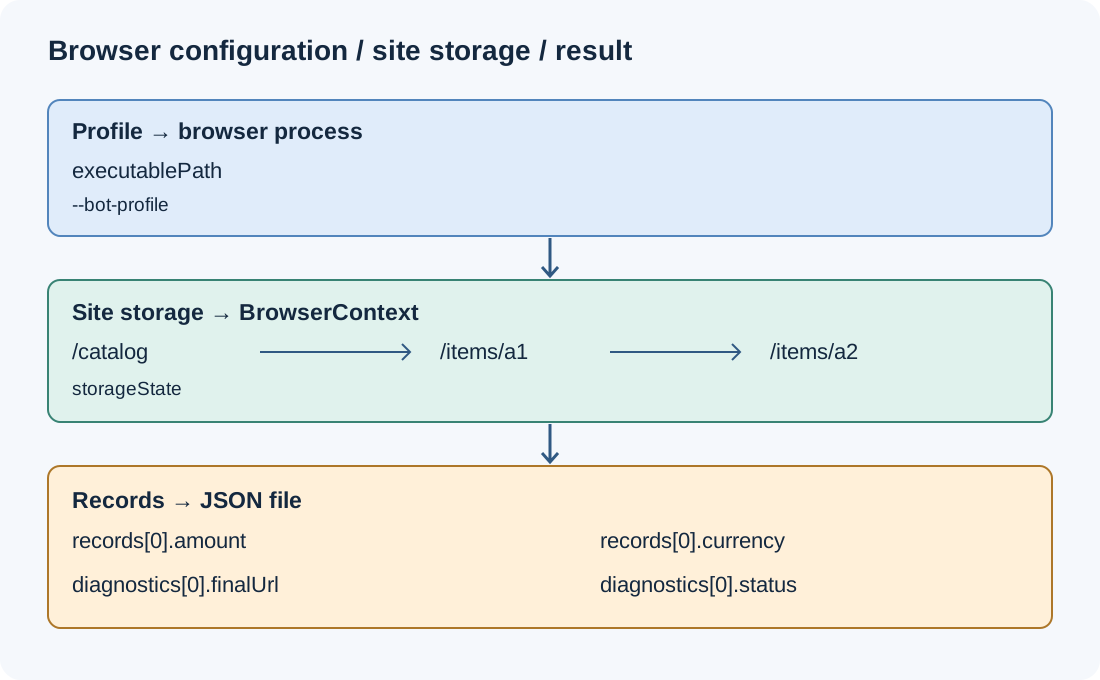
For a single list-to-detail task, reuse one context and one page. This preserves the context's cookies between navigations, while keeping the example's scope easy to inspect. Creating a fresh context for every detail URL can lose a legitimate session that the list page established. Conversely, sharing a context between unrelated authorized accounts can mix their browsing state. Decide the account/session boundary before deciding how many pages to open.
For independent runs, the default non-persistent context is a clean storage boundary, and closing it discards its browsing data. To resume an authorized login, Playwright supports saving and loading storageState. Its authentication documentation warns that saved state can contain credentials usable to impersonate the account. Keep those files outside version control and ordinary result exports. Give them restricted access, a retention limit and an explicit account association.
Not every storage mechanism is included automatically. Current Playwright documentation describes optional IndexedDB capture with indexedDB: true; check support in your pinned version. Session storage requires separate application-specific handling rather than an assumption that the standard snapshot includes it. A restored cookie can also be expired or invalidated server-side. A storage file loading successfully proves parsing, not a still-valid authenticated session.
Persistent contexts are another option when a complete browser data directory is intentionally part of the workload. launchPersistentContext() returns a context and uses userDataDir; that directory is distinct from the .enc configuration passed with --bot-profile. Do not point multiple browser instances at one writable directory. Allocate one directory per independently running owner, and follow the browser's normal locking rules rather than treating lock errors as a reason to force another process into it.
Save a result that distinguishes data from failure
The example writes a result only after every selected detail page passes validation. A failure after the first detail therefore does not masquerade as a complete two-item batch. Its flag: 'wx' also refuses to overwrite an existing result file. In an actual scheduler, use a unique run directory and a run identifier rather than relying on one shared filename; keep successful runs, partial runs and failed attempts distinguishable in the manifest.
The timestamp is the collection time, not the time the product last changed. browserVersion is the version returned by the connected browser, not proof of the executable's filesystem identity. A browser can expose profile-managed values to page JavaScript, so navigator.userAgent alone cannot authenticate which binary the host launched. For job diagnostics, retain the resolved executable path, package-lock revision and profile digest in restricted job metadata, separately from public catalogue output.
Record the requested URL and final URL because a redirect can explain a schema failure. A product link can redirect to a consent screen, login page or discontinued-item page while still returning HTTP 200. The selector and record checks are therefore part of acceptance, not merely defensive programming. A successful HTTP response and a valid record answer different questions; both need their own status in a pipeline that later retries failures.
The broader browser layer for web scraping concerns the environment a target can observe. That environment does not determine whether a selector still identifies a price. A layout redesign, missing permission and a browser launch error can all produce an empty result, but changing profile values would not repair the first two. Keep the extraction error and the browser-environment evidence in separate fields so a retry policy can select the relevant response.
Do not include full request headers, cookies or unredacted authenticated URLs in shared evidence by default. The script rejects credentials in the configured origin and removes query strings and fragments from saved URLs. A path can still contain a secret, so use this fixture only with public catalogue paths and review fields before sharing. Redact secrets from the shared copy while retaining approved restricted evidence sufficient to identify the authorized job.
Diagnose the layer that actually failed
| Observation | First check | Appropriate response |
|---|---|---|
| No browser process starts | Absolute path, executable permission, dependency availability | Repair the installation or job mount |
| Browser starts but context creation fails | Pinned Playwright and custom-browser compatibility | Reproduce against the documented version combination |
| Navigation returns 401 or 403 | Authorization and the server's response | Stop collection and resolve access with the owner |
| Navigation returns 429 | Service limit and Retry-After, when present | Pause according to the service policy |
| HTTP 200 but required elements are absent | Final URL, login state, fixture completion marker | Classify the page before changing selectors |
| Record has an invalid price | Source schema and locale formatting | Reject the record; do not guess a conversion |
| Next run is signed out | Context policy and storage expiration | Restore only approved state or authenticate normally |
An error table is useful only if the run preserves the discriminating observation. For navigation errors, retain the URL category, response status when available, and the actual exception type. For selector errors, retain which schema field failed and whether the expected application route was reached. A blanket catch that writes an empty array erases that distinction, making a blocked request indistinguishable from an empty catalogue.
Do not add blind retries around the entire script. A timeout can reflect a slow authorized application, but an authorization rejection needs a different decision. A malformed decimal price will not become correct after ten identical navigations. Separate retryable transport failures from access decisions and deterministic schema errors; apply the site's published limits and your own collection agreement. BotBrowser does not decide whether retrying a particular target is appropriate.
The example intentionally has no proxy rotation, parallel crawl or challenge-handling branch. Those features would change the session and traffic contract, and are unnecessary to establish that one configured browser can extract one owned catalogue. Increase scope only after defining account ownership, permitted request volume, result completeness and recovery behavior. A first run returning two correct records is a schema check, not evidence that a large crawl is safe or reliable.
FAQ
Is playwright-core enough to choose BotBrowser?
Only when the launch explicitly supplies the intended executablePath. The package provides the automation API; it does not discover a BotBrowser installation or select an .enc file for you. Supplying the profile argument to a different browser also does not turn that browser into BotBrowser. Fail on missing paths before launch, and retain the installed package version when investigating compatibility.
Does a new context make two scraping runs unrelated?
No. It separates browsing storage, while the server can still observe the network endpoint, account, request pattern and browser-visible properties. A context boundary is an application isolation tool, not an anonymity guarantee. Use distinct contexts to prevent accidental state mixing, and do not treat their creation as authorization to exceed a site's collection limits.
Should the script wait for networkidle instead of a selector?
A quiet network is not the business condition being collected. A page can finish its important data while continuing analytics or polling, or become quiet while showing an error screen. Choose the application's own completion signal and then validate the required fields. For the bounded fixture, attached list links and visible unique detail elements are explicit prerequisites; a different application needs its own completion contract.
Sources
- Playwright: BrowserType
- Playwright: Browser contexts
- Playwright: Locators
- Playwright: Authentication and saved state
- BotBrowser: Playwright integration
- BotBrowser: Profile configuration
Practical conclusion
For scraping with Playwright, first select an explicit executable and compatible profile, then keep the authorized session in one context for the list and its details. Accept a result only when navigation, origin and record-schema checks all succeed. Saving cookies, supplying a browser profile and exporting catalogue records remain separate decisions with different security and retention requirements.
The bounded starting point is an owned catalogue with two detail links and the documented selector schema. Adapt that schema to the application before increasing traffic, and preserve an explicit failure instead of returning an apparently successful empty dataset.
This article is part of the guide: Browser Automation Getting Started: A First Run Map
Related Articles
Scraping with Puppeteer: Options and Observable Differences
Getting StartedPuppeteer + BotBrowser: Launch and Profile Pitfalls
Getting StartedSelenium Scraping: Capabilities and Records
DeploymentPlaywright MCP Setup for a Custom Chromium Build
Getting StartedPlaywright BrowserContext Lifecycle and Storage State
Getting StartedPlaywright with Profile-Backed Browser Identity
Run the same check in BotBrowser
Load a profile, keep the signals you just read about consistent inside the browser, and confirm the result on your own machine before a rollout.