Scraping with Puppeteer: Options and Observable Differences
Map Puppeteer launch, viewport, storage, and headless options to page-visible observations in an owned scraping fixture.
BotBrowser Team
Want the structured docs for Getting Started?
This article lives in the editorial library. For step-by-step setup, reference material, and ongoing updates, jump into the docs section.
BotBrowser documents a profile-backed Puppeteer launch using puppeteer-core, executablePath, defaultViewport, and --bot-profile; it does not guarantee a third-party response or detector result.
TL;DR
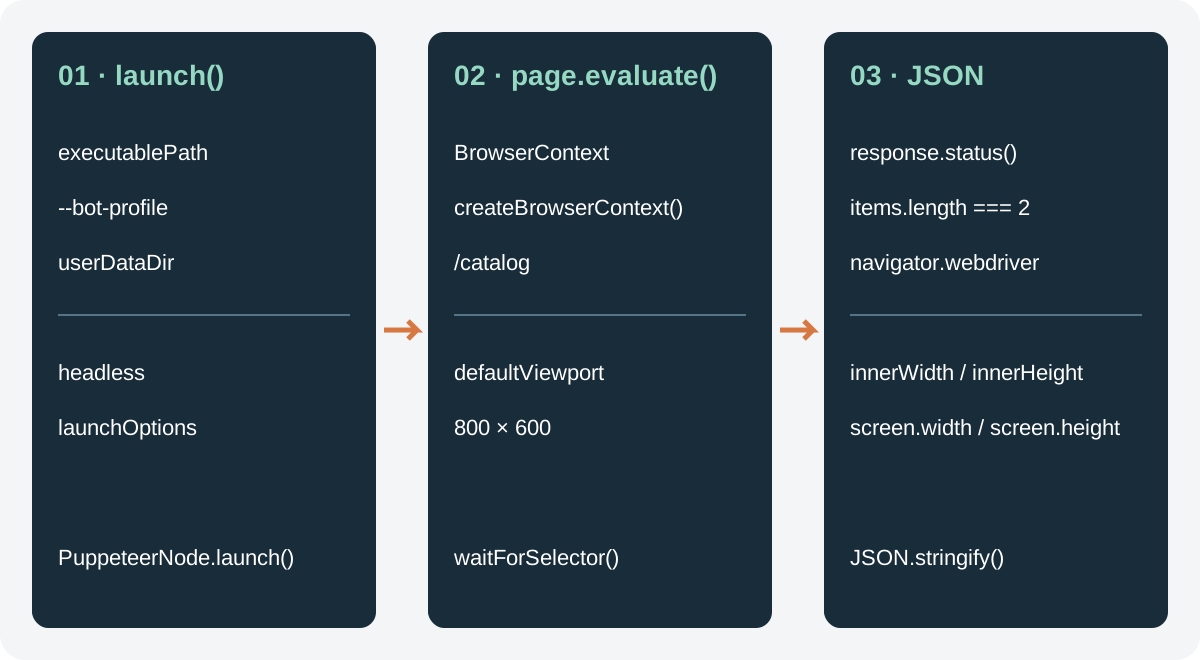
Puppeteer scraping settings operate at different scopes. executablePath, headless, and userDataDir affect the launched browser process; defaultViewport affects page emulation; BrowserContext controls browser-managed storage inside that process. A page can read consequences such as viewport dimensions or navigator.webdriver, but none of those observations is a detector verdict, identity proof, or authorization decision.
Use one catalogue that you own, keep the browser binary and profile fixed, change one option, and save the final URL, viewport values, navigator.webdriver, accepted record count, and diagnostics. This produces a falsifiable comparison without claiming that one mode is more accepted or more private.
Contents
- Process launch options
- Page and context scope
- A bounded one-variable diff
- Observation scope and limits
- Failure boundaries
- Practical conclusion
Process launch options
The Puppeteer launch integration covers package installation and the initial profile-backed connection; the option comparison below assumes that integration is already configured.
executablePath selects which executable starts. A path that exists does not prove the expected build loaded, that a profile was accepted, or that a target site responds. Keep the path, package version, executable version, and launch arguments in the run record so a later comparison can identify a changed process input.
The headless option has three documented descriptions: true uses Chrome's current headless mode, 'shell' uses the separate chrome-headless-shell, and false uses a headed browser. Those modes can differ in process behavior, rendering, and available UI surfaces. They are execution choices, not labels for trust, acceptance, or access. A fixture reports page output; it cannot turn that output into a server decision.
userDataDir is a process-level directory for persistent browser data. It is not a BotBrowser .enc profile and is not the same object as a BrowserContext. Give concurrent processes distinct writable directories. Reusing a directory may preserve cookies and local storage, but it also lets two runs share state, so the reuse must be explicit.
BotBrowser's Puppeteer setup documents puppeteer-core, Chrome mode, executablePath, defaultViewport: null, and --bot-profile. The profile configuration reference describes profile values, but neither document promises a third-party verdict or target response.
Page and context scope
Puppeteer applies an 800 by 600 default viewport through page options. defaultViewport: null removes that Puppeteer emulation default; it does not prove operating-system screen size, window-manager state, or a physical display. Record window.innerWidth, window.innerHeight, screen.width, and screen.height instead of inferring them from the option name.
A BrowserContext separates browser-managed session data such as cookies and storage from another context in the same launched process. It does not select another executable, create a public IP, grant collection permission, or establish a new identity. Context id and storage policy belong beside process inputs, not inside a result as proof of access.
The read-only navigator.webdriver boolean is one page-visible observable. MDN describes conditions under which automation-controlled Chrome exposes it. Recording true or false can help explain a fixture difference. A detector can use many signals, while a server can use data a page never receives. The Puppeteer and Playwright patch-boundary analysis separates a changed JavaScript property from browser behavior that a patch does not control.
Keep installation configuration separate from runtime options. Puppeteer configuration files control downloads and cache directories; puppeteer-core ignores those configuration files. A cache change can alter which binary is installed, but it is not a page-level viewport or storage observation. Record the resolved executable and package versions instead of attributing an install-time setting to a page result.
Run record fields
Start a record before launch. Store a run id, package version, resolved executable, executable version string, profile argument name without secret bytes, headless value, viewport input, fixture revision, and owned origin. These fields establish whether two JSON files describe comparable runs. Do not copy cookies, access tokens, profile bytes, or authenticated query strings into the record.
Option-to-observable table
| Input | Scope | Observations and diagnostics to record | What the value cannot establish |
|---|---|---|---|
executablePath | browser process | version and supported APIs | that the requested binary loaded or a server accepts it |
headless | browser process | viewport, rendering, selected properties | trust, authorization, or a detector verdict |
defaultViewport | page emulation | innerWidth, innerHeight, screen values | physical monitor dimensions |
userDataDir | persistent state | cookies and storage available to the run | a profile, public IP, or account ownership |
BrowserContext | context storage | context-local cookies and storage isolation | a new binary, network identity, or permission |
navigator.webdriver | page field | the read-only boolean exposed to the page | a complete fingerprint or server decision |
Fixture acceptance checklist
Before comparing runs, verify the origin. It must be an HTTP or HTTPS origin owned by the project, end in /, and contain no credentials, query, or fragment. The list route must remain on that origin after navigation. Every row must contain exactly one name and price element, and the price must match the fixture's declared decimal format. Reject duplicate rows, cross-origin links, missing currency, and unexpected paths.
Reproducibility and cleanup
Use a new RUN_USER_DATA_DIR for each independent comparison unless persistent state is the variable under study. Keep the profile input fixed and copy only permitted fixture data into the run directory. Set a bounded navigation timeout and record whether it happened before or after a response. A timeout is a transport or readiness observation, not proof that a target rejected the browser.
Input manifest
Write a small manifest beside each run record. It should name the Puppeteer package version, the lockfile digest, the resolved executable version, the launch mode, the viewport input, the context policy, the fixture revision, and the run start time. A path alone is insufficient: an executable can be replaced in place, and a directory can retain state from an earlier process. The manifest gives the comparison a stable set of inputs without copying profile contents or account data.
Keep option values typed. Store headless as true, false, or 'shell', store defaultViewport as null or an object with numeric width and height, and store userDataDir as a redacted run identifier rather than an absolute private path. If a value is inherited from an environment variable, record the resolved value and the variable name. Do not treat an omitted option as equivalent to an explicit default until the Puppeteer version has been recorded.
Navigation and response record
Record the requested URL, the final URL, the redirect count, the response status, and the time spent waiting for domcontentloaded. These values answer different questions. A final URL on the same origin can still represent an application error page. A 200 response can still fail the catalogue schema. A timeout before the first response differs from a timeout while a script is loading. Store those states separately so an A/B comparison does not collapse transport, navigation, and data failures into one label.
The fixture should expose a deterministic readiness signal. A fixed two-row catalogue is easier to compare than a page whose list grows while the script is reading it. If the page uses a loading marker, wait for that marker and then validate the row count. Do not use a quiet network period as proof that the application is complete: analytics, polling, and service workers can continue after the rows are ready, while an error page can be quiet immediately.
Data validation record
Validate each row before writing output. Require exactly one name element, one price element, and one three-letter currency value. Keep the raw text only in a protected local diagnostic if the fixture needs it; the shared record can store a redacted digest and the validation result. A record containing two accepted rows and a record containing zero rows are different outcomes. Neither outcome says whether another route or another service would accept the same browser.
When a value is malformed, identify the field and rule that failed. For example, price-format, currency-code, duplicate-item, and missing-name are more useful than schema=false. Include the selector revision and the fixture digest, because a markup change can create a new failure while the browser inputs remain byte-for-byte identical. This keeps the A/B comparison focused on the one option that was intentionally changed.
Diff procedure
Create a normalized diff after both records exist. Sort item ids by their fixture key, normalize URL trailing slashes, and compare numeric dimensions as numbers rather than strings. Keep a separate list for fields that were not observed. The following hypothetical record illustrates a format; its dimensions are not measured results:
{
  "changedOption": "defaultViewport",
  "before": { "innerWidth": 800, "innerHeight": 600 },
  "after": { "innerWidth": 1280, "innerHeight": 720 },
  "same": ["origin", "itemCount", "currency"],
  "changed": ["innerWidth", "innerHeight"],
  "notObserved": ["screenX"],
  "interpretation": "The fixture read a different emulated viewport."
}
The interpretation should name the observation and its scope. It should not add a conclusion about a person, a detector, a profile owner, or a target's policy. If the records contain different executable versions or fixture revisions, mark the diff not-comparable before looking at page fields. A comparison with two changed inputs is a new experiment, not a continuation of the first one.
Persistent state comparisons
To study persistent state, make it the only variable. Run A with a fresh directory, close the browser, run B with the same directory, and record which cookies or storage keys the owned fixture reports. Never publish cookie values or tokens. A third run with a fresh directory can confirm whether the observed value depends on persistence, but it still cannot establish account ownership or authorization.
Context isolation is a separate comparison. Create two contexts in one process, load the same owned origin, and record whether each context sees the fixture's marker. Then close both contexts and repeat with a new process if process reuse is part of the question. The comparison belongs to the fixture's storage behavior. It does not imply that a context changes the browser binary, network path, or server decision.
Version and rollback notes
Pin the Puppeteer package and executable for a comparison window. If a version changes, begin a new pair of records even when the launch options are identical. A browser update can change rendering, default behavior, or exposed fields without a change in the script. Keep the previous normalized diff for rollback review, and record the reason for adopting the new version in the manifest.
When a rollback is needed, restore the complete input set: package lock, executable, profile reference, launch flags, viewport setting, context policy, and fixture revision. Restoring only headless or defaultViewport cannot reproduce an earlier record if the executable or storage directory differs. Keep the fixture revision and package lock in version control; store profile references separately from their secret contents.
A bounded one-variable diff
The fixture below assumes a page at an origin you own. It exposes two data-testid="item" rows at /catalog, each with a unique data-id, one name, one price, and a currency field. The catalogue sets data-ready="true" on data-testid="catalog" only after both rows are complete. This is an illustrative script, not a recorded browser run. It writes a record only after the response, final URL, readiness marker, and row schema pass local checks.
import puppeteer from 'puppeteer-core';
import fs from 'node:fs/promises';

const origin = new URL(process.env.OWNED_CATALOG_ORIGIN ?? '');
const executablePath = process.env.BOTBROWSER_EXEC_PATH;
const profilePath = process.env.BOT_PROFILE_PATH;
const mode = process.env.HEADLESS_MODE ?? 'true';
const viewportMode = process.env.DEFAULT_VIEWPORT ?? '800x600';
if (
  !['http:', 'https:'].includes(origin.protocol) ||
  origin.username ||
  origin.password ||
  origin.pathname !== '/' ||
  origin.search ||
  origin.hash
)
  throw new Error('OWNED_CATALOG_ORIGIN must be a plain HTTP(S) origin');
if (!['true', 'false'].includes(mode)) throw new Error('HEADLESS_MODE must be true or false');
if (!['null', '800x600'].includes(viewportMode)) throw new Error('invalid DEFAULT_VIEWPORT');
if (!executablePath || !profilePath || !process.env.RUN_USER_DATA_DIR)
  throw new Error('browser inputs and a dedicated RUN_USER_DATA_DIR are required');
const viewport = viewportMode === 'null' ? null : { width: 800, height: 600 };
const headless = mode === 'true';
const browser = await puppeteer.launch({
  browser: 'chrome',
  executablePath,
  headless,
  defaultViewport: viewport,
  args: [`--bot-profile=${profilePath}`],
  userDataDir: process.env.RUN_USER_DATA_DIR,
});
const diagnostics = [];
try {
  const context = await browser.createBrowserContext();
  const page = await context.newPage();
  const assertRoute = () => {
    const url = new URL(page.url());
    if (url.origin !== origin.origin || url.pathname !== '/catalog' || url.search || url.hash)
      throw new Error('unexpected catalogue URL');
  };
  const started = Date.now();
  const response = await page.goto(new URL('catalog', origin).href, {
    waitUntil: 'domcontentloaded',
    timeout: 15000,
  });
  assertRoute();
  if (!response || !response.ok()) throw new Error(`HTTP response rejected: ${response?.status()}`);
  const navigationMs = Date.now() - started;
  await page.waitForSelector('[data-testid="catalog"][data-ready="true"]', { timeout: 5000 });
  const items = await page.$$eval('[data-testid="item"]', nodes =>
    nodes.map(node => {
      if (
        node.querySelectorAll('[data-testid="item-name"]').length !== 1 ||
        node.querySelectorAll('[data-testid="item-price"]').length !== 1
      )
        throw new Error('name or price cardinality rejected');
      return {
        id: node.getAttribute('data-id'),
        name: node.querySelector('[data-testid="item-name"]')?.textContent?.trim(),
        price: node.querySelector('[data-testid="item-price"]')?.textContent?.trim(),
        currency: node.querySelector('[data-testid="item-price"]')?.getAttribute('data-currency'),
      };
    })
  );
  if (
    items.length !== 2 ||
    new Set(items.map(item => item.id)).size !== 2 ||
    items.some(
      item =>
        !item.id || !item.name || !/^\d+\.\d{2}$/.test(item.price ?? '') || !/^[A-Z]{3}$/.test(item.currency ?? '')
    )
  )
    throw new Error('fixture row schema rejected');
  const observed = await page.evaluate(() => ({
    innerWidth: window.innerWidth,
    innerHeight: window.innerHeight,
    screenWidth: screen.width,
    screenHeight: screen.height,
    webdriver: navigator.webdriver,
  }));
  assertRoute();
  diagnostics.push({
    finalUrl: page.url(),
    status: response.status(),
    navigationMs,
    redirectCount: response.request().redirectChain().length,
    itemCount: items.length,
  });
  await fs.writeFile(
    'puppeteer-scrape-record.json',
    JSON.stringify(
      {
        inputs: { headless, defaultViewport: viewport },
        controls: { userDataPolicy: 'fresh-empty-per-run', contextPolicy: 'new-isolated-context' },
        observed,
        items,
        diagnostics,
      },
      null,
      2
    ),
    { flag: 'wx' }
  );
} finally {
  await browser.close();
}
Run A and Run B with the same owned origin, executable, profile, fixture, package lock, and selector revision. Change only the studied option, HEADLESS_MODE or DEFAULT_VIEWPORT; do not change both. Give each process a different, initially empty RUN_USER_DATA_DIR. The paths differ while the control policy stays fresh-empty-per-run; this is not a claim that every raw input is identical. Verify that policy before launch. The core example compares headless or viewport values, not persistence.
The example accepts only true and false for HEADLESS_MODE: comparing the separate headless-shell executable would also change the binary input. Run each invocation from a separate output directory because flag: 'wx' refuses to overwrite an existing record. The two inputs objects identify the studied option values; a diff must verify that exactly one differs and both control policies match before labelling it changedOption.
The script writes a success record only. Keep the separate input manifest described above with each invocation; package, executable, profile, fixture, and selector identifiers are not inferred by this script. Preserve the process exit code and error output separately for failures, then classify the failing stage using the failure table below. Neither an absent JSON file nor a previous invocation's JSON proves the current run succeeded. A failed launch, navigation, readiness wait, or row validation must remain a failed invocation.
The new context intentionally starts with isolated storage. Its catalogue does not inherit the default context's cookies simply because userDataDir points to a persistent directory. A persistence comparison must instead use the default context consistently, or explicitly establish the same fixture state in each new context. The context, pages, and cleanup reference explains context ownership; closing the browser here also closes its pages and contexts, including when page creation or validation throws.
Observation scope and limits
Treat every field as an observation with a scope. A viewport difference belongs to page emulation. A changed userDataDir belongs to persistent state. A different headless value belongs to process mode. navigator.webdriver belongs to one browser-exposed boolean. None is a complete fingerprint, and none alone identifies a person, device, profile owner, or detector verdict.
A useful diff has three outcomes: same, changed, or not-observed. Do not convert an absent field into false; an API may be unavailable, permission may be denied, or the fixture may not expose the field. Keep HTTP status and accepted business data separate. A 200 response can contain an empty or invalid catalogue, while a valid fixture record does not prove another route would respond.
When a run differs, compare resolved executable, Puppeteer version, arguments, user-data directory, context creation, final URL, response status, fixture revision, and selector digest before interpreting page fields. This ordering prevents a changed binary, stale cookie jar, or changed fixture from being described as a viewport effect.
Failure boundaries
An invalid executablePath is a process-start failure. A missing profile file is a launch-input failure. A shared userDataDir is a state-isolation failure. A final URL outside the owned origin is an authorization or navigation failure. A 200 page with zero accepted rows is a fixture-schema failure. Keep these categories in diagnostics instead of retrying all failures with the same command.
If puppeteer-core ignores an expected configuration file, inspect explicit launch arguments and the resolved binary. If defaultViewport: null produces unexpected dimensions, record all four returned dimensions and the display environment; do not infer a physical screen. If navigator.webdriver differs, record mode and flags; do not patch the property.
FAQ
What does headless mode change?
It selects a browser execution mode. A page can observe some consequences, and a server can use other signals. The record describes differences and does not promise a detector or site outcome.
Is userDataDir the same as a profile file?
No. It is a persistent browser-data directory. A profile-backed launch input and a user-data directory have different lifetimes and ownership; record both explicitly.
Does a new BrowserContext create a new identity?
No. It isolates browser-managed session data inside one launched browser. It does not grant authorization, change public IP, or establish who owns the session.
Why keep navigator.webdriver in the record?
It is a concrete page-visible field that can explain a fixture difference. It is not a verdict and must not be deleted or rewritten for this diagnostic.
Sources
- Puppeteer LaunchOptions
- Puppeteer ConnectOptions
- Puppeteer BrowserContext
- Puppeteer HTTPResponse
- Puppeteer redirectChain
- Puppeteer configuration
- Puppeteer headless modes
- BotBrowser Puppeteer setup
- BotBrowser profile configuration
- MDN Navigator.webdriver
Practical conclusion
The defensible Puppeteer scraping comparison changes one launch or page option while keeping the owned fixture, executable, profile, context policy, package versions, and selector revision fixed. Save exact observations and diagnostics, classify failures by scope, and leave unknown values unknown. The resulting diff explains what this page read; it does not claim a browser mode is hidden from detection, a profile proves identity, or a target must accept the request.
Further reading: Puppeteer browser context, pages, and cleanup and Puppeteer and Playwright patch-boundary analysis.
This article is part of the guide: Browser Automation Getting Started: A First Run Map
Related Articles
Selenium Scraping: Capabilities and Records
Getting StartedScraping with Playwright: Browser and Profile Setup
Getting StartedPuppeteer + BotBrowser: Launch and Profile Pitfalls
Getting StartedPuppeteer BrowserContext, Page Ownership, and Cleanup
Getting StartedHeadless Browser for AI Agents: Launch and Tool Boundaries
DeploymentBrowser Automation Signals and Consistency in Playwright
Run the same check in BotBrowser
Load a profile, keep the signals you just read about consistent inside the browser, and confirm the result on your own machine before a rollout.