Playwright executablePath: Which Browser Actually Runs
See how Playwright chooses a managed Chromium, executablePath or channel, and what Browser.getVersion still reports from the package.
BotBrowser Team
Want the structured docs for Getting Started?
This article lives in the editorial library. For step-by-step setup, reference material, and ongoing updates, jump into the docs section.
playwright.chromium.launch({ executablePath }) changes which browser executable Playwright starts, not which Playwright package or protocol driver the script loaded. The package still supplies the JavaScript API and bundled driver, while the selected executable supplies the browser product and version. BotBrowser can be launched through that explicit executable path with its documented profile inputs, but it does not change the Playwright package version or a destination site's decision.
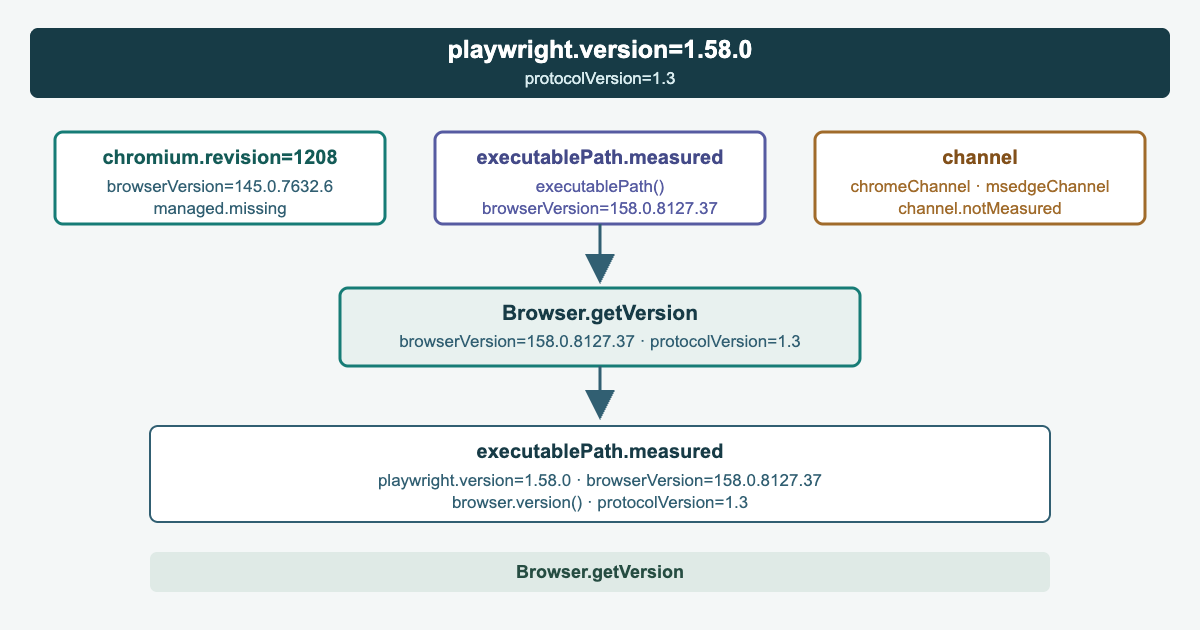
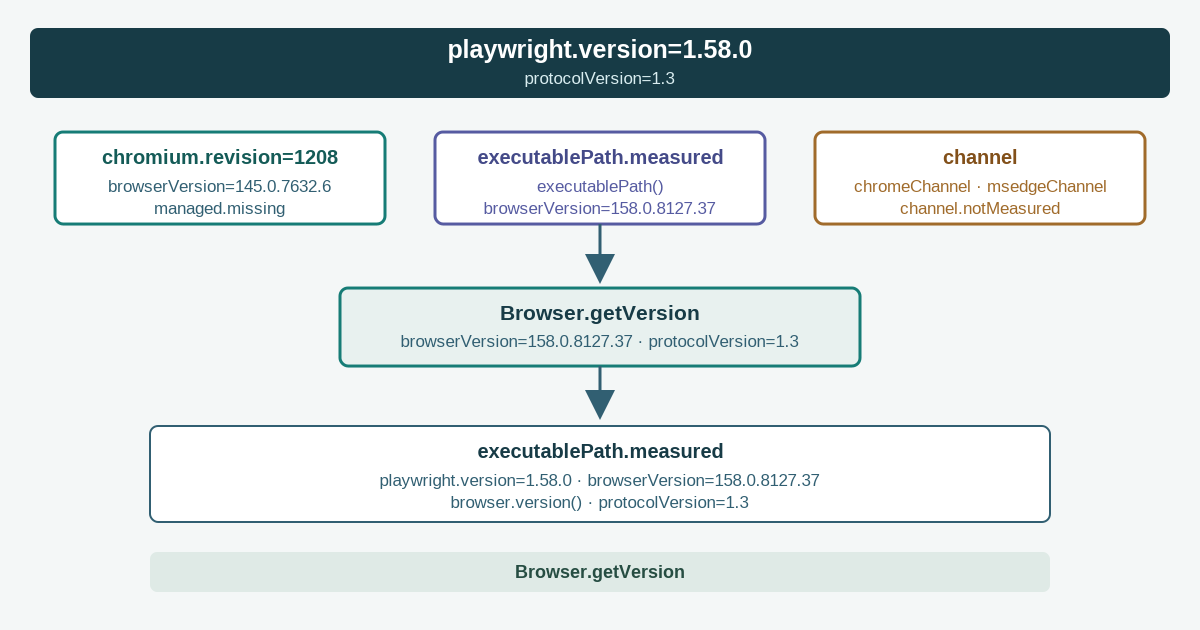
The distinction becomes visible when the package-managed Chromium cache is absent. In the measured run for this page, Playwright 1.58.0 resolved its default Chromium 1208 executable to a path that did not exist. Supplying the installed system Chrome path launched Chrome 158.0.8127.37; Browser.getVersion returned Chrome/158.0.8127.37 and protocol 1.3. The package version and the browser version were different inputs and remained separately observable.
TL;DR
executablePathselects the browser binary. It does not install, replace or upgrade the Playwright package.- Playwright’s managed browser path comes from the package registry. If that path is missing, a launch without a path fails instead of silently using a system Chrome.
channelis a named browser selection, not a second spelling ofexecutablePath; record which one supplied the process.- Keep the requested path, resolved process,
Browser.getVersion, CDP protocol version and Playwright package version in one record.
Contents
- Three ways a browser is selected
- What the package still supplies
- Measured explicit-path launch
- A launch-decision table
- What BotBrowser changes
- Method, failures and limits
- Practical conclusion
Three ways a browser is selected
Playwright separates the client package from the browser executable. The package’s browser registry describes the managed Chromium revision and the executable path for the current platform. The registry for the measured package named Chromium revision 1208, expected browser version 145.0.7632.6, and resolved to:
/Users/olti/Library/Caches/ms-playwright/chromium-1208/chrome-mac-arm64/Google Chrome for Testing.app/Contents/MacOS/Google Chrome for Testing
That path did not exist in this environment. The package metadata was still present, so the registry could name the intended binary while the executable itself was absent. This is one concrete reason to inspect both the package metadata and the filesystem.
An explicit executablePath bypasses the registry’s browser directory for executable selection. The launch still goes through the same Playwright client and its bundled driver. A channel is another named selection input: it asks for a supported installation such as a branded Chrome or Edge channel, rather than taking a path chosen by the script. The three inputs answer different questions:
| Selection input | What it selects | What it does not replace |
|---|---|---|
| Managed browser | Playwright’s downloaded Chromium for its version | A package update or installed Chrome |
executablePath | The exact executable path supplied by the caller | Playwright’s client, driver or protocol |
channel | A named supported browser installation | An arbitrary path or a package upgrade |
The precedence should be recorded explicitly. A test that sets both a channel and an executable path has a configuration question before it has a browser result. Pick one selection input for the owned fixture, record it, and do not infer which one won from the browser’s major version alone.
For the package’s normal installation and browser-update workflow, see Playwright setup. For the difference between an executable change and a release pinning policy, use Chrome for Testing version pinning.
What the package still supplies
The Playwright package contains more than a convenience wrapper around a browser executable. Its JavaScript API, browser registry and bundled driver define how the client starts a process and speaks the automation protocol. The measured package and related files were:
| Package input | Observed value |
|---|---|
playwright/package.json | Version 1.58.0, SHA-256 fac77511a5b7b273... |
playwright-core/browsers.json | Chromium revision 1208, SHA-256 6b6e0538d6e4... |
playwright-core package | Version and installed driver files in the package |
| Browser protocol from CDP | Browser.getVersion returned protocolVersion: 1.3 |
The exact file hashes belong in the evidence record, not in the reader’s decision. The important distinction is that replacing the browser binary does not replace the package that opened the CDP session. A browser may answer a basic protocol command while still differing from the browser revision Playwright expected.
This is why a green browser.version() is not a compatibility proof. The call returns a browser product string after launch. It does not prove that every Playwright action, network event or browser feature matches the bundled revision. Use the returned product and protocol as observations, then test the specific actions the owned workflow depends on.
The same boundary appears in other automation clients. Puppeteer’s launch options also expose executablePath separately from channel, so the choice is not unique to Playwright. The names and package internals differ, but the evidence question is the same: which executable was requested, which process appeared, what did the browser report, and which client version issued the command?
The client also prepares a substantial launch environment before the browser sees a page. In the measured run, Playwright supplied a temporary --user-data-dir, --remote-debugging-pipe, --enable-automation, --headless, --hide-scrollbars, --mute-audio, pointer and hover settings, and other automation switches. Those switches came from the Playwright launch path, not from the Chrome application bundle. Replacing the executable did not remove them.
The temporary user-data directory is especially important to reproduce correctly. Playwright creates a fresh directory for a normal browser launch and removes it when the browser closes. A persistent context uses a directory chosen by the application instead. When an investigation compares browser builds, record which of those launch forms was used, because a fresh temporary profile and an application-owned persistent profile can expose different cookies, extensions and storage state.
The generated command also contained --remote-debugging-pipe. This means the client and browser communicate over a pipe owned by the launching process rather than a public debugging port. The mechanism is part of the client launch environment, not something the browser executable selects on its own. A team that replaces Playwright with a manual launch must reproduce the connection method and any other required switches, or it is testing a different launch configuration. When a launch does use a public debugging port instead, the HTTP and WebSocket endpoints it serves are described in what the remote debugging port exposes.
The client’s browser registry is useful even when its downloaded executable is absent. It records the intended Chromium revision and expected browser version, and it lets a team distinguish “not installed” from “installation is corrupt.” A launch error that names the cache path is an installation fact. A launch that reaches a browser but fails a protocol command is a different fact. Keeping those errors separate prevents a missing download from being misdiagnosed as a custom-browser incompatibility.
The registry path is also not a fallback chain. If the package-managed executable is missing, Playwright does not silently start a system browser just because one exists. The application must choose a supported channel or provide an explicit executable path. This explicitness is useful in production: an image that accidentally relies on a system Chrome can work on one host and fail on another even though the Playwright package version is unchanged.
For repeatable comparisons, record the registry revision, the expected browser version, the resolved managed path, whether that path exists, the requested explicit path and whether the requested path exists. Then record the actual browser product from Browser.getVersion. Those six facts are small enough to review and identify a failed launch.
The application should also decide whether a custom browser is a supported deployment or an experiment. If it is supported, pin the executable, package and platform together and run the owned workflow in the deployment image. If it is an experiment, keep it outside the production release path until the team has tested the protocol commands and page actions it needs.
That split matters when a team compares a manual Chrome launch with a Playwright launch. A manual browser may use the same executable and still differ because it does not receive the same automation arguments or temporary profile. The executable choice answers “which browser product starts?” The client launch path answers “with which automation environment did it start?”
Record the generated launch command if the platform exposes it, or use an owned process snapshot immediately after launch. Do not copy a production command line into a public issue without redacting profile paths and other sensitive values. The reader needs the stable arguments and the selection path, not another team’s temporary directory.
Measured explicit-path launch
The measured launch used the system Chrome path and a new headless context. The client package was [email protected]. The requested executable existed and had SHA-256:
debbf1c4835d5029ad6a62e91bb187fe7bb231f3a6eb29ee45e2e9aec3140707
Playwright launched /Applications/Google Chrome.app/Contents/MacOS/Google Chrome. browser.version() returned:
158.0.8127.37
Browser.getVersion then returned these fields:
{
  "protocolVersion": "1.3",
  "product": "Chrome/158.0.8127.37",
  "revision": "@b8c2be851f62f6a394ec57955d7f31335d7cb6d4",
  "jsVersion": "15.8.62.31"
}
The owned page had the title owned and returned the same Chrome/158.0.8127.37 user agent that CDP reported. That alignment supports one narrow conclusion: the explicit path selected this installed Chrome, and the protocol response described that same product. It does not show that the missing managed Chromium would have produced an identical page.
The probe can be repeated without a third-party page:
(async () => {
  const { chromium } = require('playwright');
  const browser = await chromium.launch({
    executablePath: process.env.CHROME_PATH,
    headless: true,
  });

  const clientVersion = require('playwright/package.json').version;
  const browserVersion = await browser.version();
  const session = await browser.newBrowserCDPSession();
  const protocol = await session.send('Browser.getVersion');
  const page = await browser.newPage();
  await page.setContent('<title>owned</title><p>owned fixture</p>');
  const webdriver = await page.evaluate(() => navigator.webdriver);

  await session.detach();
  console.log({ clientVersion, browserVersion, protocol, webdriver });
  await browser.close();
})().catch(error => {
  console.error(error);
  process.exitCode = 1;
});
Set CHROME_PATH explicitly. Do not use a path that happens to work on one laptop as the team’s default without checking it in the target operating system and deployment. The script records the package version beside the browser result so a later failure can be attributed to the client, the executable or the owned workflow.
A launch-decision table
Use the following table before changing a Playwright launch:
| Question | Evidence to collect | Decision it supports |
|---|---|---|
| Which browser was requested? | executablePath, channel or managed registry path | Identify the intended selection input |
| Did that executable exist? | Path existence, file digest, OS and architecture | Separate a missing install from a launch error |
| Which process actually started? | Process command line or launch log | Verify the path was used |
| What does the browser report? | browser.version() and Browser.getVersion | Record product, revision and protocol |
| Which client issued the command? | playwright/package.json version and package files | Keep client compatibility separate |
| Does the owned workflow still work? | Same fixture action and expected result | Test the behavior that matters, not just startup |
The managed browser row is not a promise that a download exists. The explicit-path row is not a promise that a custom browser is compatible. The channel row is not a promise that a named channel resolves to the version the team expects. Each row needs its own observation.
For a release gate, make the browser choice a fixed input and preserve the failure stage. If the managed path is missing, do not silently fall back to system Chrome. If the explicit path is wrong, stop before collecting page fields. If the browser launches but a protocol command fails, keep the package version and the requested executable beside the error.
What BotBrowser changes
BotBrowser documents launching its browser executable through Playwright and loading explicit profile inputs. That changes the engine and profile supplied to the client. It does not change the Playwright package’s version, its bundled driver, or the protocol contract the package expects.
The boundary is easiest to state as a two-column decision:
| Controlled by the explicit browser/profile | Still controlled by Playwright or the destination |
|---|---|
| Browser executable and its build | Playwright client version and bundled driver |
| Documented profile-backed browser inputs | Protocol compatibility with the client |
| Launch flags and profile path | A destination site’s rules and decision |
| Owned fixture and observable page values | A guarantee that every workflow feature works |
The BotBrowser Playwright setup shows the launch input. The Playwright browser documentation and BrowserType show why the package-managed browser and the client are separate concepts. Neither source says that an arbitrary custom executable is equivalent to the managed revision.
When a team needs a non-default browser, record the selection and run the owned fixture. Do not describe a successful launch as identity consistency, detector avoidance or destination acceptance. Those are different claims with different evidence.
Use Playwright vs. Puppeteer for browser work when the unresolved question is the client API, and browser automation release pinning when the unresolved question is which release should be kept.
Method, failures and limits
The run was executed on a macOS arm64 research host with Node v26.9.0 and [email protected]. The package-managed Chromium revision was 1208, but its resolved executable was absent. The explicit path to the installed Chrome existed. The browser launched headlessly, opened an owned data:text/html page, and answered Browser.getVersion.
The measured browser product was Chrome/158.0.8127.37; the CDP protocol was 1.3; navigator.webdriver was true on the owned page. The result does not establish that the same page would work with every Playwright API. It does not establish that Chrome 158 is the correct browser for another project. It does not establish a site’s response, a fingerprint outcome or a performance result.
The system Chrome binary digest was debbf1c4835d5029ad6a62e91bb187fe7bb231f3a6eb29ee45e2e9aec3140707. The Playwright package metadata digest was fac77511a5b7b273ce56e047781d17723c8bbc164f9557dbd15ec44fd7ddf6fc. Those hashes are tied to this research host and this package installation; a team should calculate its own values rather than copy these as expected production constants.
The package registry also reported a browser version of 145.0.7632.6 for the absent Chromium 1208 download. That is metadata for the browser Playwright intended to install, not evidence that it ran. The measured browser was the explicitly selected Chrome 158 build. Keeping those two facts apart prevents a common mistake: quoting the package’s expected browser version while the actual process was a different executable.
The same package inspection found playwright-core registry and Chromium launcher files with hashes recorded in the source evidence. Those files explain why changing executablePath cannot be described as changing the whole automation stack. A later Playwright upgrade can change those files and their protocol expectations even when the browser path stays fixed. Conversely, a browser update can change the product and protocol behavior without changing the Playwright package version.
That creates two independent update clocks. The Playwright package can move to a new bundled browser revision and driver, while the explicit system browser stays where the operating system put it. Or the system browser can update through its own channel while the package remains pinned. A release note that names only one version cannot describe both clocks.
The safe operational response is not to freeze every browser forever. It is to make the pairing observable and test the workflows that matter after either side changes. A launch probe can catch a missing path quickly. A protocol probe can catch a browser that answers but does not expose an expected command. The owned page fixture then checks the application behavior that depends on both.
Keep the selection rule in code rather than in a person’s memory. If the environment variable is present, launch that path; if it is absent, use the managed browser; if a named channel is required, make that an explicit branch with its own validation. Log the branch and the package version. A future responder can then tell whether a change came from the environment variable, the package registry or an installed browser update.
For the shared team record, redact absolute home paths and temporary profile directories while preserving the operating system, architecture, executable basename and digest. A path that includes a user’s home directory is not needed to reproduce the selection rule. The digest, package version, browser product and protocol are more portable evidence than a developer’s temporary path.
For a deployment record, include the operating system and architecture. A browser executable path is platform-specific, and an arm64 macOS path is not a Linux container path. A copied path can fail before the browser starts, which is an installation or configuration error rather than a Playwright feature failure. Record the path existence check and the file digest before interpreting the launch.
The navigator.webdriver result deserves the same restraint. It is a page-visible field on the owned fixture and was true in this run. It is not a verdict about how a third-party service classifies the session. The useful lesson is that the automation client supplies launch behavior around the selected executable; the browser product alone does not describe the complete environment.
The owned page was deliberately minimal. It contained a title and a paragraph, so a successful load established only that the browser and client could open a page and evaluate a value. It did not exercise a complex application, a long-running page or a service worker. A team that needs those capabilities should extend the fixture rather than treating this launch result as a broad browser compatibility certificate.
The run also did not test the browser channel input. Channel selection depends on a named installation being available and can resolve differently across platforms. The decision table therefore marks channel as an observed documentation concept, not a measured launch. An explicit executablePath result must not be generalized to channel: 'chrome' merely because both can reach a Chrome installation.
The default managed browser was not installed because the run was about selection and evidence, not about changing the machine’s browser cache. That choice preserved the observed missing-path condition and made the explicit path meaningful. A follow-up can install the registry browser, rerun the same probe and compare the two product strings without changing the rest of the article’s method.
The default managed browser was not downloaded during the run. That is a deliberate limit: downloading a new browser would change the package cache and turn a selection question into an installation event. A separate run can test the managed browser after explicitly installing it and recording the resulting registry path.
FAQ
Does executablePath replace Playwright’s browser download?
No. It selects the executable used for that launch. The Playwright package and its bundled driver remain part of the client. A missing managed download still needs to be installed or explicitly bypassed with a documented path.
Why can Playwright report a browser version that differs from its package version?
The package version identifies the client and its bundled driver; the browser version identifies the executable that was launched. They are separate software inputs. Record both and test the actions that depend on protocol compatibility.
Does a custom Chrome build make Playwright compatible with every browser feature?
No. A successful launch and basic protocol response do not prove feature parity. Run the owned workflow against the selected build and keep the client version beside the result.
What is the difference between executablePath and channel?
executablePath selects a specific file path. channel selects a named browser installation supported by the client. Do not set both without a deliberate precedence rule, and do not infer which one won from a version string alone.
What should a Playwright launch record contain?
Record the selection input, executable existence and digest, actual process, browser.version(), Browser.getVersion, Playwright package version, fixture revision and cleanup result. A browser version alone is not enough to reproduce the launch.
For the setup route that chooses an executable and the MCP route that passes it through, continue with Playwright browser setup and Playwright MCP BotBrowser setup.
Sources
- Playwright: Browsers
- Playwright: BrowserType
- Puppeteer: launch options
- BotBrowser: Playwright setup
- Playwright package metadata observed locally
Practical conclusion
Set the browser selection explicitly, then record the package and browser as separate inputs. In the measured run, Playwright 1.58.0’s managed Chromium path was absent, while an explicit executablePath launched Chrome 158.0.8127.37 and Browser.getVersion reported protocol 1.3. Use that evidence to decide whether a custom browser is a deliberate deployment choice, not as proof that the Playwright client or the destination site became equivalent.
This article is part of the guide: Browser Automation Getting Started: A First Run Map
Related Articles
Playwright MCP Setup for a Custom Chromium Build
Getting StartedHeadless Browser for AI Agents: Launch and Tool Boundaries
DeploymentPuppeteer MCP Server Configuration for a Custom Build
Getting StartedBrowser Automation Getting Started: A First Run Map
Getting StartedScraping with Puppeteer: Options and Observable Differences
Getting StartedScraping with Playwright: Browser and Profile Setup
Run the same check in BotBrowser
Load a profile, keep the signals you just read about consistent inside the browser, and confirm the result on your own machine before a rollout.