Computer Use Agent: Browser State and Permission Limits
Compare screenshot computer use with accessibility-based browser control, and separate visible state, permission prompts and application outcomes.
BotBrowser Team
Want the structured docs for Getting Started?
This article lives in the editorial library. For step-by-step setup, reference material, and ongoing updates, jump into the docs section.
A computer use agent can see a button on a screenshot or receive a named control in an accessibility tree, yet neither observation grants permission to use an account, accept terms or transmit information. BotBrowser can make the launched Chromium executable and profile input explicit. It cannot choose the model, approve a browser permission prompt, make a page's content trustworthy, or confirm an application transaction. The useful comparison is therefore not “which agent is smarter,” but which state each control surface can observe and where the application must stop for a user decision.
This page compares screenshot-driven computer use with DOM or accessibility-driven browser automation on one owned profile form. It uses the LLM action-control map for authority boundaries and the browser-use setup guide for launch configuration. The added artifact is a four-channel state record that keeps pixels, semantic controls, permission state and submitted application state separate.
TL;DR
- Anthropic documents computer use as screenshot capture plus mouse and keyboard actions executed by the application; a separate browser toolset reads page controls more directly.
- Playwright MCP documents structured accessibility snapshots with roles, names and references, not a complete browser or desktop observation.
- The Permissions API can report
granted,deniedorprompt, but apromptresult is not user approval. - A visible “Allow” button and a click coordinate are observations. A browser permission decision and an application response are different events.
- The host owns the environment, allowed actions, confirmation policy and cleanup. A model's claim that a step succeeded does not replace those checks.
- BotBrowser documents executable and profile launch inputs; it does not decide browser permissions or application authorization.
Contents
- Two control surfaces see different state
- A screenshot is evidence of pixels, not authority
- Accessibility state is structured, not complete
- One owned fixture can expose four evidence channels
- A permission prompt is a stop condition
- Keep the browser environment and user decision separate
- Practical conclusion
Two control surfaces see different state
The same owned form can appear in a full-screen screenshot, a browser accessibility tree and an application endpoint. Those views were produced by one browser but answer different questions. A screenshot shows visible pixels at capture time. An accessibility tree exposes a selected semantic representation, including roles, names and references. An application endpoint can establish a narrower server-side outcome under its own contract.
Anthropic's computer use tool reference says the tool provides screenshot capabilities and mouse/keyboard control, and the application runs every call in an environment it controls. It also notes that a browser use tool is the closer fit when a task stays inside webpages. OpenAI's computer use guide makes a similar split: screenshot-plus-input computer use is distinct from a browser tool whose driver exposes selected page controls. The application supplies that driver and owns session, permissions and cleanup.
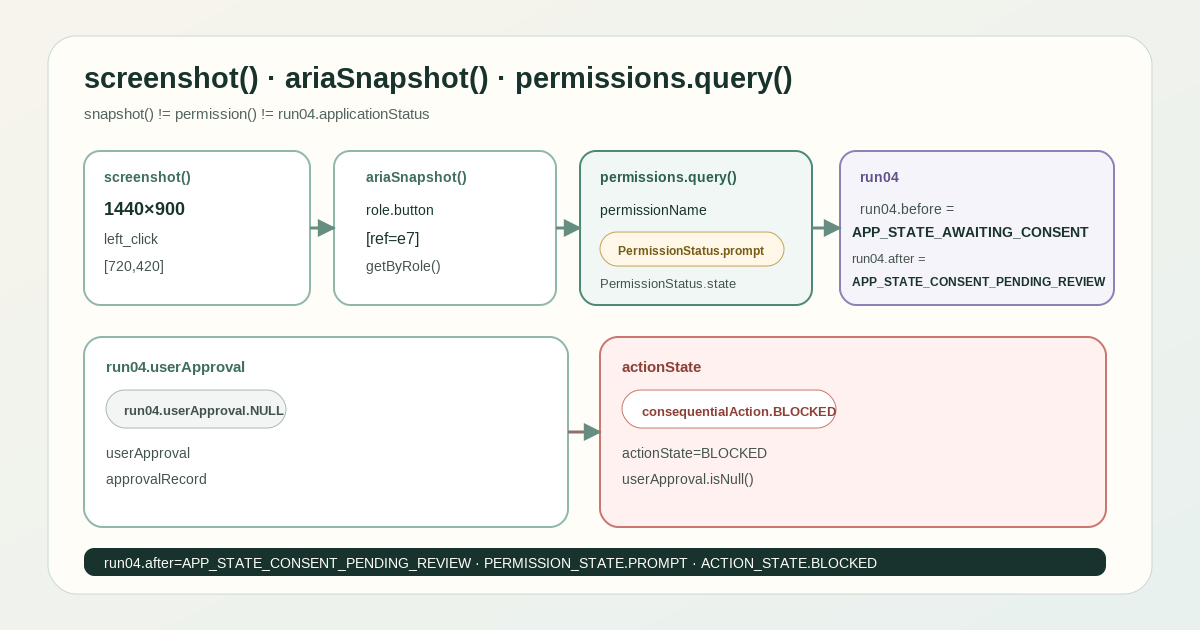
That split is more informative than a vendor comparison. Screenshot control can operate an interface that has no useful DOM contract, but the model must estimate coordinates in the screenshot's pixel space. Semantic control can refer to textbox "Display name" [ref=e5], but it sees the page representation chosen by the tool. Both surfaces are downstream of a browser process, and both stop short of proving account authorization or business completion.
A screenshot is evidence of pixels, not authority
Anthropic documents that every coordinate, start_coordinate and region value is expressed in the pixels of the full-display screenshot returned by the application. If the application scales a screenshot before sending it, it must scale the returned coordinates back to the actual display. That rule is a useful boundary: the model is choosing a point in an image, while the host is responsible for mapping that point to the real environment.
A screenshot can show a button labelled “Allow”, “Buy now” or “Publish”, but the label does not identify the user who requested the action, the account scope or whether the action is reversible. The image may also contain third-party text designed to redirect the model. Anthropic's security section warns that webpage or image content can contain prompt injection and recommends confirmation for meaningful consequences or affirmative consent.
The correct claim from pixel evidence is narrow: a region of the captured display looked a certain way. It does not establish that the button was enabled by the intended account, that pressing it will complete the described transaction, or that a user agreed to a permission request. Those questions belong to the application and its policy layer.
| Evidence from a screenshot | Supported claim | Not established |
|---|---|---|
| A red banner says “Session expired” | Those pixels contained that message | The current server session has expired |
| A consent dialog is visible | The current image contained consent controls | The user accepted the consent text |
| A button labelled “Submit” appears | The label existed in this visual capture | The application accepted a submission |
| A permission prompt is on screen | A prompt-like interface occupied pixels | A permission was granted or denied |
The distinction is especially important when the screenshot is resized. A smaller image can be easier for the model to process, while the resulting coordinate must be mapped back to a larger display. That mapping is part of the host's contract. Recording only the model's left_click action would omit the display size, scale factor and region that made the coordinate meaningful.
Accessibility state is structured, not complete
Playwright MCP documents ordinary page interaction through the accessibility tree rather than pixels. Its accessibility snapshot section shows roles, accessible names, text and references; the model uses a reference such as ref=e5 to operate a control. That structure gives the host a place to constrain tool names and arguments, but it does not reveal every fact about the browser.
An accessibility snapshot is a selected projection of the page. It may omit content that is not exposed to the accessibility tree, hidden visual states, network activity, cookie storage or permission state. It also may not reveal the real native permission dialog if the browser places that UI outside the page tree. The Playwright browser-setup documentation explains executable and profile inputs; it does not turn an accessibility reference into consent.
The comparison below uses the same owned form for both surfaces. The values are illustrative and the model is hypothetical.
| Observation channel | Example record | What it can establish |
|---|---|---|
| Full screenshot | 1440x900, a visible consent card, coordinates [720,420] | The captured display contained a consent-like card |
| Accessibility snapshot | button "Continue" [ref=e7] | The current semantic tree exposed a named control |
| Permissions result | geolocation: prompt | The current context has not granted that permission |
| Application record | form-17 status=validation-error | The owned endpoint rejected the submitted values |
| User decision | approval-01 allow location once | The user made the specific choice recorded by the host |
The first three rows can help the model choose a next read-only action. None can replace the last row when the question is whether the user consented. Even a successful semantic click on “Continue” would only show that an action was dispatched; the permission state or application endpoint would still need a separate check.
The difference in control language also affects what can be asserted after a failed step. A click at [720,420] may miss because the viewport changed. A stale ref=e7 may no longer resolve because the tree changed. A control that appears in the accessibility tree may be disabled in a way the model does not understand. These are different failures with different bounded checks, and neither one proves that the browser refused the action.
One owned fixture can expose four evidence channels
The artifact for this topic is a local fixture plus a small browser-side recorder. It does not call a model or a paid API. The fixture presents a display-name field, a consent control and a status panel, while the recorder captures the semantic controls, the current permission state and an application-defined status. Running it produces evidence about browser state and separates that state from a user's approval.
export async function inspectOwnedForm(page) {
  const snapshot = await page.locator('body').ariaSnapshot();
  const permission = await page.evaluate(async () => {
    try {
      const result = await navigator.permissions.query({ name: 'geolocation' });
      return { supported: true, state: result.state };
    } catch (error) {
      return { supported: false, reason: error.name };
    }
  });

  const before = await page.locator('[data-app-status]').getAttribute('data-app-status');
  await page.getByRole('button', { name: 'Continue' }).click();
  const after = await page.locator('[data-app-status]').getAttribute('data-app-status');

  return {
    viewport: page.viewportSize(),
    snapshot: snapshot.match(/button "Continue"/) ? 'contains Continue' : 'missing Continue',
    permission,
    before,
    after,
    userApproval: null,
  };
}
The script deliberately sets userApproval to null. A page click is not a user's permission decision, and the script does not pretend to have received one. The status pair records an application-owned transition; the accessibility match records a semantic control; the permission field reports the current browser context state. A screenshot can be captured alongside these fields for visual evidence, but its bytes would be a fourth representation rather than a replacement for the other three.
The expected result on a fixture whose Continue control advances to a consent-review panel is permission: { supported: true, state: "prompt" } before any user decision, before: "awaiting-consent" and after: "consent-pending-review". Those values demonstrate that a synthetic click moved the page to a review state without granting the browser permission. They do not establish that a human approved anything.
The recorder also helps avoid a common category error. Suppose a screenshot computer-use model looks at the same page and clicks the pixel location of Continue. If the resulting image shows a new panel, the host has evidence that the visual transition occurred. It still needs a semantic or application check to know whether the transition represented a validation error, a pending consent review or a completed grant. The record should preserve the representation that produced the claim instead of reducing all four channels to “the agent succeeded.”
The Permissions API is useful here as a state query, not as an authorization shortcut. MDN documents that Permissions.query() returns a PermissionStatus whose state can be granted, denied or prompt. The API page describes this as a way to determine whether an API permission has been granted, denied or requires a user decision. A successful query tells the application what state it can currently observe; it does not speak for the user.
Browser permission coverage varies by permission name and browser implementation. A fixture should therefore assert only the state it can query in the tested browser. If the API rejects an unsupported permission name, record supported: false and the error name, not denied. If the page is not in a secure context or the permission is not available to that context, the script should return an explicit unsupported result rather than inventing consent.
The fixture also makes the confirmation boundary testable. Add a host policy that requires a recorded user decision before a consent-bearing action becomes available. The test can click Continue to reach review, then assert that the consequential button remains disabled while userApproval is null. Supplying a test-only approval record enables the button and changes the application status to approved-by-test-operator. The browser permission may still be prompt; the test demonstrates the two facts are separate.
A permission prompt is a stop condition
A native browser permission dialog is not a normal page element. It may appear outside the document tree, it can be controlled by browser policy rather than website code, and the user's choice may persist for a context or origin. The host should therefore treat the appearance of a permission request as a state transition that requires a policy decision, not as an invitation to click the nearest pixel.
OpenAI's computer use safety guidance says screen content is untrusted and cannot grant permission or override the user's instructions. It recommends confirming purchases, data transmission, destructive changes and other hard-to-reverse actions. Anthropic's security guidance similarly recommends limited privileges, restricted domains and human confirmation for meaningful consequences or affirmative consent.
Those recommendations describe host controls, not model guarantees. A classifier or safety prompt can reduce a risk, but it does not establish that the right person agreed. A model can propose left_click on an “Allow” button; the host must decide whether the UI belongs to the expected origin, whether the user requested the permission, what scope it grants and whether the action should be delayed until the user confirms.
| State observed | Safe next action | Evidence still missing |
|---|---|---|
| Screenshot shows a native permission prompt | Stop and identify the origin and requested capability | A user decision for this context |
| Accessibility snapshot shows a consent form | Treat it as review UI, not consent | The user's acceptance of the displayed terms |
Permissions query returns prompt | Keep the consequential action blocked | Permission grant and application result |
Application returns validation-error | Correct the owned field and re-read state | A successful transaction |
Page status says approved | Read the application's documented result | Durable server state outside that response |
Pausing does not mean the entire task is invalid. A read-only path can continue while a consequential branch waits. The host can collect the origin, the visible consent text and the requested permission, then present that bounded decision to the user. If the user chooses “allow once,” record that exact choice and its scope. Do not store an inference such as “the page looked approved” as a substitute for the choice.
Keep the browser environment and user decision separate
BotBrowser's Playwright setup passes an explicit executable and a --bot-profile argument through a browser launch. That gives a deployment a declared browser process and profile input to verify. It does not make the launched environment a user, grant a site permission, or decide that a consent form was accepted.
The separation is practical. A host can check that the intended executable and profile started, then run the owned fixture in a fresh context. It can inspect a screenshot or accessibility snapshot, query a permission state, and read an application status. It can also ask a user for confirmation. Those are independent evidence sources with different owners, and each one can be present or absent without changing the meaning of the others.
For a useful run record, retain the input and the first unsupported claim:
| Record field | Example | Ownership question |
|---|---|---|
| Launch | chrome, --bot-profile=approved.enc, run cu-04 | Did the intended browser process start? |
| Observation | screenshot 1440x900 or button "Continue" [ref=e7] | Which representation reached the model? |
| Permission | geolocation=prompt | What can the current browser context report? |
| Consequential action | enable-location, not-started | Did a host policy allow it? |
| User decision | null or allow-once: geolocation | Who approved this exact action? |
| Application result | agreement-17 pending-review | What does the owned endpoint report? |
Store identifiers and status values instead of complete page text, screenshots containing account information, or profile secrets. The goal is to explain which layer supplied a fact, not to create another copy of the page. If a field is missing, the record can still be useful; the missing field becomes the next bounded check.
The same evidence discipline applies to DOM-driven automation. Accessibility names and references can improve targeting, but a semantic click is still an action proposal that the host admits. A successful locator call shows that the harness could interact with a control; it does not prove that the person using the agent wanted that action or that the application accepted it. Screenshot control is not more trustworthy because it is visual, and semantic control is not automatically authorized because it has a role and name.
FAQ
Does screenshot computer use see the same browser state as DOM automation?
No. Screenshot control sees rendered pixels, while accessibility-driven automation sees a selected semantic tree. Both may omit network state, storage, native browser chrome and permission decisions that live outside their representation.
Is a permissions result of prompt the same as a denied request?
No. prompt means the permission still requires a user decision. It does not establish that the user refused, that the page cannot ask, or that a later click on a consent control is authorized.
Can a computer use agent accept a cookie banner for a user?
Only if the host's policy and the user's instructions authorize that specific choice. Screen content cannot grant permission, and a click on a visible banner is not proof that the user accepted its terms. Consequential consent belongs at an explicit host confirmation boundary.
Does a BotBrowser profile make a permission prompt unnecessary?
No. A profile can make browser and launch inputs explicit, but it does not replace a site's authorization flow, a user's permission choice or an application's consent record.
Sources
- Anthropic computer use tool
- Anthropic computer use security considerations
- OpenAI computer use guide
- OpenAI computer use safety guidance
- Playwright MCP accessibility snapshots
- MDN Permissions API
- MDN Permissions.query()
- BotBrowser Playwright setup
Practical conclusion
Treat a computer use agent as an interface over an environment owned by the host application. Record what a screenshot or accessibility tree showed, what the browser could report about permission state, what the host allowed, which user decision exists and what the application returned. Stop at a native or page-level consent prompt until the responsible user makes a scoped choice. BotBrowser can make the browser launch explicit; it cannot make a screenshot into consent, a permission query into approval or a successful click into an application outcome.
This article is part of the guide: Browser Automation Getting Started: A First Run Map
Related Articles
LLM Browser Automation: What the Model Controls
Getting StartedHeadless Browser for AI Agents: Launch and Tool Boundaries
Getting StartedBrowser-Use Setup with a Controlled Browser
Getting StartedChrome DevTools MCP vs Playwright MCP for Debugging
Getting StartedPlaywright Popup vs Dialog: Page, Prompt or DOM
Getting StartedPlaywright ARIA Snapshot: Review the Diff Before Updating
Run the same check in BotBrowser
Load a profile, keep the signals you just read about consistent inside the browser, and confirm the result on your own machine before a rollout.