Playwright vs. Puppeteer for Scraping: Client API Differences
Compare Playwright and Puppeteer response events, request interception, and context isolation while holding the same Chromium binary and profile constant.
BotBrowser Team
Want the structured docs for Documentation?
This article lives in the editorial library. For step-by-step setup, reference material, and ongoing updates, jump into the docs section.
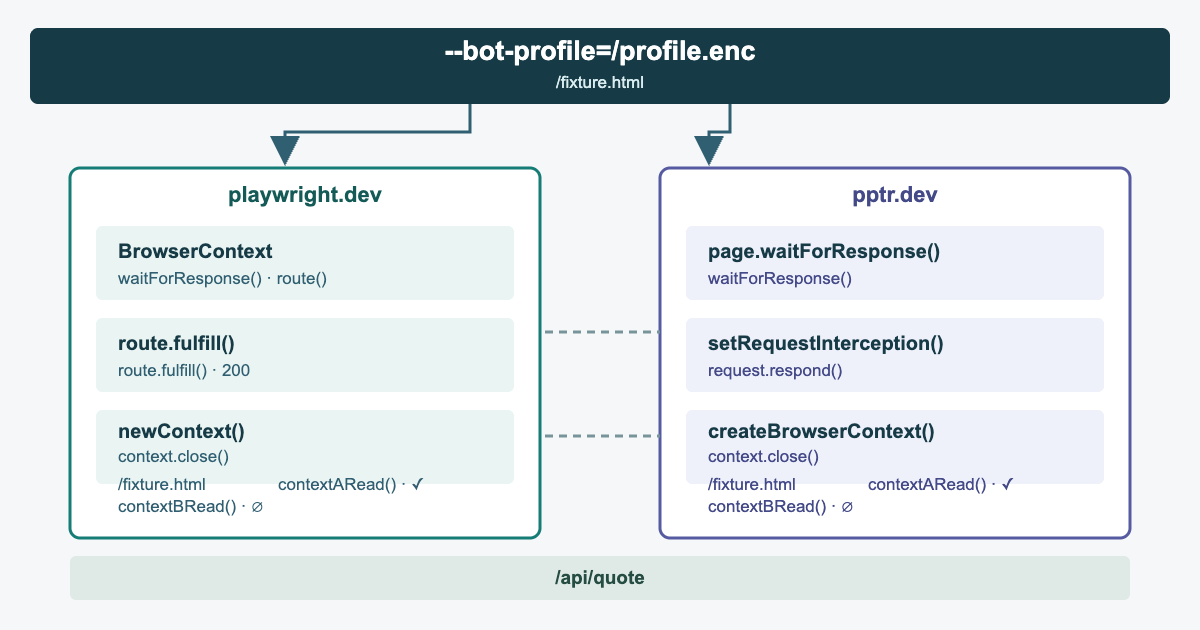
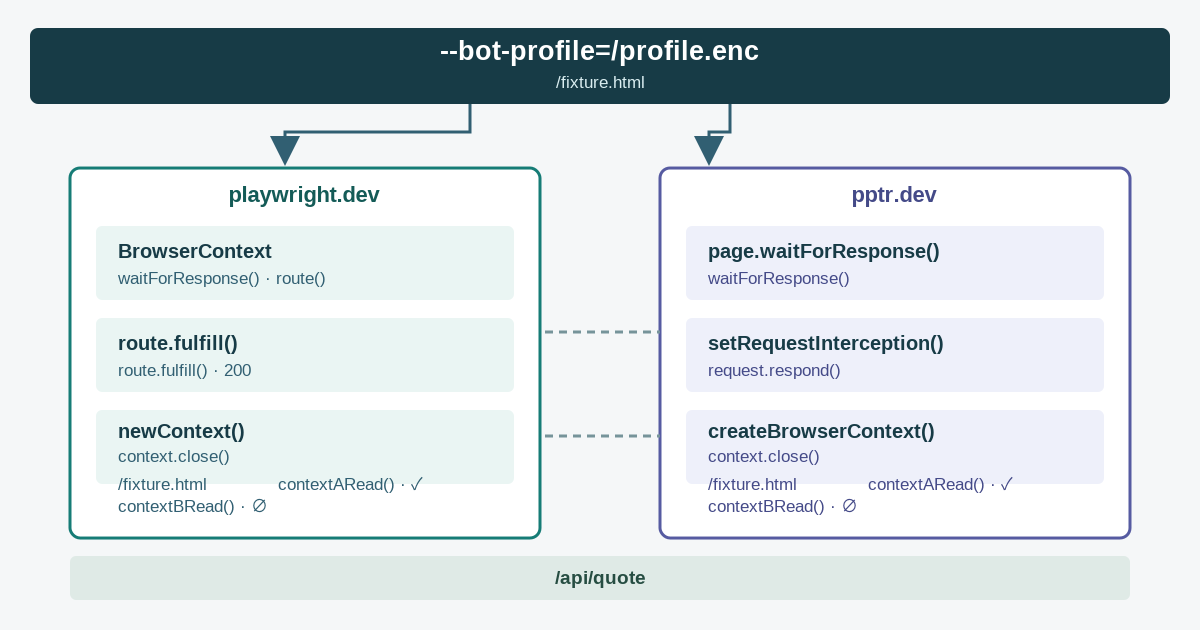
Playwright and Puppeteer are often compared as if choosing one library also changes the browser underneath the page. It does not. Puppeteer is a JavaScript library that drives Chrome or Firefox through CDP or WebDriver BiDi. Playwright provides a comparable automation layer with its own page, network, and browser-context contracts. When both clients launch the same Chromium binary with the same profile, the useful comparison is the client API, not the browser engine. The earlier four-choice Playwright versus Puppeteer decision guide starts before migration with protocol, context, debugging artifact and browser pinning; this page keeps those inputs fixed and compares the scraping APIs that remain.
Keep one owned page and one Chromium/profile configuration fixed. Compare response event exposure, request interception, and per-context isolation, then separate observations that remain equal from client behavior that can still change. The result describes those inputs and client contracts; it does not establish a performance ranking or a site's access decision.
BotBrowser can make the Chromium executable and profile explicit for either client, but it does not choose the automation library, make their APIs equivalent or make a setup less detectable.
TL;DR
- Both clients can expose responses and intercept requests, but their event scope, handler contracts, and cleanup differ.
- Playwright makes
BrowserContexta first-class owner of pages and network routes; Puppeteer commonly composes a browser, page, and optional context explicitly. - With the browser and profile held constant, equal page-visible values are evidence about that fixed engine/profile input, not evidence that switching libraries changed the browser.
- Event timing, object identity, default launch settings, and context options must be controlled separately because they belong to the client layer.
Contents
- Response event exposure
- Request interception
- Per-context isolation
- Build a bounded two-client fixture
- What stays identical when the engine stays fixed
- Method, failures and limits
Response event exposure
Response observation starts with the same basic question in both libraries: which object tells the client that a response arrived, and from what scope can that object be observed?
Puppeteer's documented scraping surface is page-centric. A page can emit response events, and page.waitForResponse waits for a response matching a URL or predicate and returns the matched response. That style fits a flow such as "open this page, wait for the document or API call, then inspect the returned status, headers, and body." The wait must be installed before the navigation or action that can produce the response, or the event may already have passed. Once a Puppeteer client is selected, the Puppeteer scraping setup handles executable, viewport and launch-option configuration around this page-level event.
Playwright exposes response events through its network model as well. A page can listen for responses or wait for one, and a BrowserContext can be the scope for network events and routes. The context scope is useful when several pages belong to one scraping session: the client can observe traffic at the session boundary instead of attaching the same listener to every page. The Playwright network documentation describes both observation and modification as part of this client contract. The authorized Playwright scraping setup shows how that client carries a browser and profile into a bounded collection flow. The Puppeteer Python port boundary handles the separate choice of a maintained Python client and preserves the same response, interception and context stages.
The practical difference is therefore not "one can see responses and the other cannot." It is where the listener lives and which lifecycle owns it:
| Question | Puppeteer | Playwright |
|---|---|---|
| Typical event scope | Page | Page or browser context |
| One-response wait | page.waitForResponse(...) | Page or context wait-for-response APIs |
| Cleanup | Remove page listeners when the page ends | Remove listeners when the page or context ends |
| What the event proves | The client received a matching response | The client received a matching response |
That last row is important. A response event proves what the automation client observed. It does not prove that the remote server treated the session as a browser, a person, or a particular identity. Those are separate questions, and neither library's event API answers them.
Request interception
Interception moves from observing a response to deciding what happens before one is returned. Here the two APIs differ more sharply, even when they ultimately send the same request to the same page.
In Puppeteer, page.setRequestInterception(true) enables a request-level contract. Once a request is intercepted, the handler has to resolve it explicitly by continuing it, supplying a response, aborting it, or completing it from cache. Enabling interception without handling every matched request can leave navigation waiting. The handler is therefore part of the control path, not a passive logger.
Playwright expresses the same general idea through routes. A route handler can continue, fulfill, abort, or fall back according to its own rules, and routing can be installed at page or browser-context scope. Cleanup is expressed by removing the route. This context-level routing is convenient when a scraping run needs one policy across multiple pages, but it also makes the scope of the policy visible: a route registered on a context affects pages that belong to that context, not unrelated contexts in the same browser process.
A small decision table keeps the contracts separate:
| Decision | Puppeteer request interception | Playwright routing |
|---|---|---|
| Enable the policy | Turn on page request interception | Register a page or context route |
| Resolve one request | Continue, respond, abort, or use cache | Continue, fulfill, abort, or fall back |
| Apply across pages | Coordinate page handlers | Register at browser-context scope |
| Remove the policy | Disable interception and remove handlers | Remove the route |
Both approaches act inside the automation client's network layer. They can decide which requests the client continues and what response the page receives, but they do not turn the client into the browser engine. Nor does an intercepted request reveal the complete TLS, HTTP/2, or connection-level behavior of the launched browser. For scraping, this distinction matters when a page's visible result and the network exchange are being investigated as separate evidence.
Per-context isolation
The third API boundary is the container around pages. Playwright defines BrowserContext as a clean-slate environment with its own pages and an explicit close lifecycle. Multiple contexts can exist in one browser process. That design makes context creation and closure part of the normal scraping control flow: create the boundary, attach pages or network policy, collect results, and close the boundary.
Puppeteer's public model is more visibly composed from a browser and its pages. When a run needs a separate cookie and storage boundary, the code creates a browser context explicitly and opens pages from it. The concepts are comparable, but the API shape is not identical: Puppeteer makes the page the usual entry point and adds context when needed, while Playwright's context is already an owner of pages and context-scoped network behavior.
Neither object is a substitute for the browser profile passed to Chromium. A profile configures browser-level inputs before page code runs. A browser context organizes pages, storage, and client-side policy inside that running browser. Closing an ephemeral context can discard its cookies and local storage, but it does not rewrite the binary, engine version, or profile with which the browser process was launched. Two contexts inside the same launch therefore should not be described as two independent browser identities without additional evidence.
For a controlled comparison, keep all of these variables explicit:
- The same Chromium executable and version.
- The same profile or persistent user-data input.
- The same viewport, locale, timezone, proxy, and context options, unless those options are the variable under test.
- The same owned page, request sequence, and server fixture.
- Separate result logs for client events, route decisions, and page-visible output.
That setup lets a reader attribute a difference to the layer that produced it. A different route policy belongs to the client. A different cookie store may belong to context setup. A different value loaded from the browser profile belongs to the profile input. A different Chromium build belongs to the engine. Combining all four into a single "Playwright versus Puppeteer" result makes the cause impossible to recover.
Build a bounded two-client fixture
The comparison becomes testable when the fixture has one response endpoint, one stylesheet and one storage marker. The server should be local and owned by the test team. Its /api/quote route returns a fixed JSON value; /assets/owned.css returns a declared color; a page loads the stylesheet, calls the endpoint and writes the response into a visible element. Neither client should receive a different profile, executable or proxy just because its APIs differ.
Start with a common input record:
browser executable = the same absolute Chromium path
browser profile      = the same profile or persistent data input
fixture origin       = http://127.0.0.1:4173
page                 = /fixture.html
response endpoint    = /api/quote
stylesheet           = /assets/owned.css
Then express the same workflow through each client. The code below is a fixture contract, not captured output. A real run should be saved only when the package versions, browser version and complete request outcomes are retained beside it.
// Playwright shape: A and B are separate contexts in one fixed launch.
const contextA = await browser.newContext();
const contextB = await browser.newContext();
try {
  const pageA = await contextA.newPage();
  const responsePromise = pageA.waitForResponse(response => new URL(response.url()).pathname === '/api/quote');
  await pageA.route('**/assets/owned.css', route =>
    route.fulfill({
      status: 200,
      contentType: 'text/css',
      body: 'body { color: rgb(12, 34, 56); }',
    })
  );
  await pageA.goto(`${origin}/fixture.html`);
  await pageA.getByTestId('load-quote').click();
  const response = await responsePromise;

  await pageA.evaluate(() => localStorage.setItem('owned-context', 'marker'));
  const readA = await contextA.newPage();
  const readB = await contextB.newPage();
  await readA.goto(`${origin}/fixture.html`);
  await readB.goto(`${origin}/fixture.html`);
  const contextARead = await readA.evaluate(() => localStorage.getItem('owned-context'));
  const contextBRead = await readB.evaluate(() => localStorage.getItem('owned-context'));
  return { response: response.status(), contextARead, contextBRead };
} finally {
  await contextA.close();
  await contextB.close();
  await browser.close();
}
// Puppeteer shape: A and B are separate contexts in one fixed launch.
const contextA = await browser.createBrowserContext();
const contextB = await browser.createBrowserContext();
try {
  const pageA = await contextA.newPage();
  await pageA.setRequestInterception(true);
  pageA.on('request', request => {
    if (new URL(request.url()).pathname === '/assets/owned.css') {
      return request.respond({
        status: 200,
        contentType: 'text/css',
        body: 'body { color: rgb(12, 34, 56); }',
      });
    }
    return request.continue();
  });
  const responsePromise = pageA.waitForResponse(response => new URL(response.url()).pathname === '/api/quote');
  await pageA.goto(`${origin}/fixture.html`);
  await pageA.click('[data-testid="load-quote"]');
  const response = await responsePromise;

  await pageA.evaluate(() => localStorage.setItem('owned-context', 'marker'));
  const readA = await contextA.newPage();
  const readB = await contextB.newPage();
  await readA.goto(`${origin}/fixture.html`);
  await readB.goto(`${origin}/fixture.html`);
  const contextARead = await readA.evaluate(() => localStorage.getItem('owned-context'));
  const contextBRead = await readB.evaluate(() => localStorage.getItem('owned-context'));
  return { response: response.status(), contextARead, contextBRead };
} finally {
  await contextA.close();
  await contextB.close();
  await browser.close();
}
The snippets have different calls, but they assert the same events, context reads and cleanup outcomes. The Playwright route handles requests at a page or context boundary, while Puppeteer enables page interception and explicitly resolves requests from its listener. In both cases, navigation and action order matter: a response wait installed after the click can miss a fast response, and an intercepted request that is never continued or fulfilled can stall the page.
The expected result is a set of comparisons, not a winner label:
| Check | Expected contract |
|---|---|
| Response | GET /api/quote returns the fixed JSON value, status 200 |
| Stylesheet | /assets/owned.css receives the declared fulfilled response |
| Page value | The visible quote element contains the same fixture value |
| Context A | A second page in the same context sees the synthetic context marker |
| Context B | A page in a different context does not see that marker |
| Cleanup | Both contexts and the browser close in a finally path |
For the context check, set a cookie or local-storage marker in context A, open a sibling page in A and a page in context B, then compare the two page reads. That demonstrates the client-level boundary. It does not show that the server treats A and B as unrelated people, addresses or browser builds. If the server returns a session identifier that is shared across contexts through an application feature or a shared account, the storage test still passes while the server-side session remains shared.
The fixture should also make failure legible. A response timeout can mean that the listener was registered too late, the URL did not match, or the request never occurred. A stalled navigation can mean that interception was enabled but a matching request was not completed. A missing page value can mean that the page script threw before writing the result, even though the response arrived. These states should be recorded separately so a client defect is not mistaken for a server failure.
For a repeatable comparison, do not substitute separate browser launches with different executables or profiles. Use the exact same binary input for both client lanes and create fresh contexts for each lane. If the client harness defaults to a different viewport or injects a different helper script, align those settings explicitly or record the difference as another variable. A controlled test has one intended independent variable; letting the launch layer and the client layer vary together removes the ability to explain the result.
The result should be a compact record such as response=200, quote=owned-fixture, stylesheet=fulfilled, contextA=marker, contextB=absent, closed=true. These fields demonstrate the declared fixture behavior without collecting page bodies, cookies or account data. They are also closer to decisions a scraping team can act on than an unqualified speed or reliability table.
What stays identical when the engine stays fixed
If the Chromium binary, profile, page, server fixture, and relevant context options truly remain constant, switching the automation client should not change the browser engine's interpretation of the page. Several observations should therefore match:
- Returned response bytes: when the same request reaches the same fixed server and no route changes the response, the response body available to the page has the same source.
- Parsed DOM for deterministic content: the same HTML and deterministic page script should produce the same element structure and text when client timing and injected scripts are controlled.
- Profile-backed page values: values supplied by the same fixed profile should continue to come from that profile rather than from Playwright or Puppeteer.
- Page behavior after identical inputs: the same events, form data, and navigation sequence should exercise the same engine behavior when the client does not alter those inputs.
- Response status and headers from the fixture: the values returned by the same fixed endpoint should agree when no interception policy rewrites them.
Those equal observations are exactly what the fixed-engine setup predicts. They cannot be credited to the library switch. The library is the control channel; the browser and profile are the input being observed.
Other observations can still differ without a change in engine:
- The order and timing of client events can vary with navigation and listener registration.
- Response, request, page, and context objects belong to different client APIs and have different identities and lifecycles.
- Default launch arguments, viewport settings, timeouts, and error behavior can differ unless explicitly aligned.
- Page- and context-scoped interception can produce different coverage if the routes are not configured to the same boundary.
- A client may expose network events without exposing the lower-level transport behavior that produced them.
This is the core comparison. Playwright and Puppeteer expose different response-event, interception, and context contracts over a browser that can remain the same. BotBrowser belongs at the browser/profile input layer: a selected profile can be applied in a controlled browser context, while the automation library remains the client that drives pages. BotBrowser cannot determine how a third-party site scores a session, make a setup anonymous, guarantee access, or replace validation of the exact browser, profile, and client configuration in use.
Method, failures and limits
This comparison was prepared from public documentation and source-reading review. No Playwright or Puppeteer browser was launched, no owned page was collected, and no third-party site or account was accessed for the comparison. The expected equal observations are a constructed fixture contract, not a measured detector result.
The evidence boundary follows from that method. A client event, route decision, or context-close operation is evidence about that client layer. It is not, by itself, evidence about the browser engine, a site's decision, performance, or detection. Holding Chromium and the profile constant is what makes equal page-visible values meaningful; changing the client while leaving those inputs fixed is what prevents the library from taking credit for the browser.
Failure attribution follows the same split. A response timeout means the client observer did not identify the intended response; it does not establish a server rejection. A stalled navigation after interception means a matched request was not completed; it does not establish a page or engine failure. A missing page value means the visible result was not written; it does not replace the response evidence. Record these outcomes separately, preserve the first failure, and close contexts and the browser in a deterministic finally path. A complete fixture record keeps the client event, route decision, page result and cleanup result beside the same browser/profile input.
FAQ
Can both clients observe the same response?
Yes, at the client API boundary. Puppeteer documents a page-level waitForResponse; Playwright exposes response observation and routing through its page and browser-context network model. Whether a specific response is captured depends on listener timing, URL matching, navigation and the selected client scope.
Does intercepted CSS change the browser engine?
No. A fulfilled stylesheet is a client-supplied response for that page resource. It can change the rendered page and the page-visible CSS values, but it does not replace the Chromium build, the profile or the browser's broader rendering and network behavior.
Does a fresh context make a new browser identity?
No. It gives pages a separate browser-managed storage boundary, and Playwright documents multiple contexts inside one browser process. That does not independently create a new public IP, account, executable or profile. Two contexts in one fixed launch are not two browsers.
Which client is faster for scraping?
The public contracts and this fixture do not establish a throughput winner. A speed comparison needs a representative workload, repeated runs, resource controls and a defined latency distribution. Those are different acceptance criteria from the event, interception and context behaviors examined here.
What should be pinned in a client comparison?
Pin the automation package version, resolved Chromium executable and profile input. Record the viewport, locale, proxy, timeouts and context policy when they affect the test. Keep pass, failure and not-tested fields separate, and invalidate the comparison when the browser, profile or fixture changes.
Sources
- Playwright: browser contexts
- Playwright: network events and routing
- Playwright: BrowserContext API
- Puppeteer: what is Puppeteer?
- Puppeteer: troubleshooting
- Puppeteer: page.waitForResponse
- Puppeteer: page.setRequestInterception
- BotBrowser: Playwright integration
- BotBrowser: Puppeteer integration
Practical conclusion
Choose the client for this scraping fixture from the event scope, interception lifecycle and context ownership the application must support. Keep Chromium and the profile fixed, record both clients against the same owned page and treat equal page-visible values as evidence about that fixed input. BotBrowser can make the chosen executable and profile explicit; the team still owns the client code, fixture and acceptance record.
Related Articles
Playwright vs Puppeteer: Four Choices Before You Migrate
ComparisonWebDriver vs CDP: What Each Connection Can Do
ComparisonSelenium Alternatives: What Changes in Practice
Getting StartedPuppeteer Python Alternative: What Changes
ComparisonBrowser-Core vs API-Layer Protection: A Reproducible Test
DeploymentBrowser Automation Signals and Consistency in Playwright
Run the same check in BotBrowser
Load a profile, keep the signals you just read about consistent inside the browser, and confirm the result on your own machine before a rollout.