Playwright Wait for Response After Click: Fix the Race
Fix a Playwright wait for response after clicking Save: register before the click, match the POST, check its HTTP status and verify the resulting UI.
BotBrowser Team
Want the structured docs for Getting Started?
This article lives in the editorial library. For step-by-step setup, reference material, and ongoing updates, jump into the docs section.
A Playwright wait for response can time out after clicking Save even though the page displays a success message. Create the response promise before the click, identify the intended request, then check its status and the resulting UI separately. BotBrowser can run a Playwright-controlled browser with a declared profile; it cannot replay a response event that a test subscribed to too late or decide which application request means Save.
TL;DR
- Call
page.waitForResponse()without awaiting it before triggering the action. Await the saved promise after the click. - Match the request identity first:
/api/saveplusPOSTdistinguishes the write from a precedingGETto the same path. - Assert
response.status()separately. Filtering exclusively for201can turn an actual503response into a timeout. - Check the response body and
role=statusresult independently. A success banner alone does not prove durable storage.
Contents
- The Save sequence has three different signals
- Reproduce a listener that really starts too late
- Register before clicking and assert the POST
- A path-only predicate accepts the wrong first response
- Keep HTTP failures visible
- Diagnose the missing signal
- Practical conclusion
The Save sequence has three different signals
Consider an owned revision editor whose Save handler first reads the current revision and then submits the new value. Both requests use /api/save. The read returns GET /api/save with HTTP 200 and revision 6; the write returns POST /api/save with HTTP 201 and revision 7. Only after reading the write response does the handler set its status element to Saved revision 7.
Those are separate observations. The GET establishes that the initial read received a response. The POST establishes that the write endpoint responded with a particular status and body. The final DOM establishes that the application rendered a particular message. Their order matters because the same path appears twice, and the DOM update happens after both response events.
Playwright's Network documentation shows the response promise being created before the triggering click, with no await on that first line. This is event subscription, not a search through the browser's completed network history. A matching response arriving before subscription cannot satisfy the new wait. Conversely, a response arriving after subscription can match regardless of whether the test previously clicked a button.
The timing diagram separates an early POST listener from a listener created after the final UI assertion. The literals describe the owned fixture's sequence, not measured durations. The early listener ignores the GET; the late listener has no remaining POST to observe.
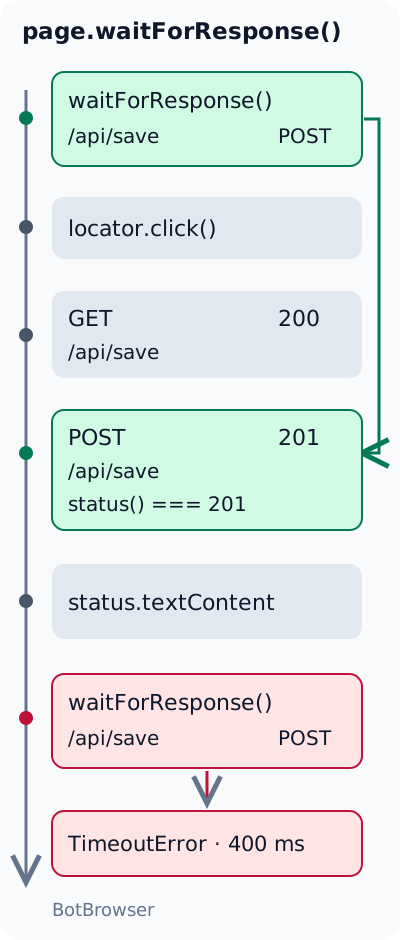
The application needs no request interception to produce this distinction. A small HTTP server and a native fetch() handler are enough. The owned network-mocking guide covers replacing a dependency with controlled responses; here the useful variable is when the test subscribes and which response it accepts. Keeping the handler sequential makes the wrong-first-match case reproducible without relying on network speed.
A real editor may also send analytics, preflight requests or background refreshes. Their existence does not change what a successful save means. Define that meaning from the owned API contract instead of choosing whichever request happens to finish near the click. For the example below, a successful write specifically returns 201, includes { revision: 7 }, and causes the matching status text.
Reproduce a listener that really starts too late
The minimal failure requires a completed response before subscription. Merely putting waitForResponse() on the line after await button.click() does not guarantee that order: the network operation may still be pending when the click resolves. Such code has a race, but an individual run can pass. A deterministic demonstration waits for the final status first, because this owned page renders it only after consuming the POST body.
With Playwright's page and Node's assertion module available, the following deliberately late variant makes that ordering explicit. It assumes a fresh copy of the owned form, one uniquely named Save button, one status element, and no automatic repeat POST. The 400 ms timeout bounds a negative check; it is not a recommended production wait duration.
const assert = require('node:assert/strict');

const savePost = response => new URL(response.url()).pathname === '/api/save' && response.request().method() === 'POST';

await page.getByRole('button', { name: 'Save', exact: true }).click();
await page
  .getByRole('status')
  .filter({ hasText: /^Saved revision 7$/ })
  .waitFor();

await assert.rejects(page.waitForResponse(savePost, { timeout: 400 }), error => error.name === 'TimeoutError');
The negative assertion belongs only in this failure fixture. An application test should fail when its required response is missing, rather than accepting every timeout. The exception name is checked so that a closed page, a malformed predicate or another programming error cannot accidentally count as the intended negative result.
The crucial precondition is the page's handler. It performs await fetch('/api/save'), consumes that JSON, performs the POST, consumes that JSON, and then renders the revision. If another application displays an optimistic success message before the request finishes, waiting for that message would not establish the same order. Inspect the actual handler or correlate its trace before using a UI state as evidence that a response already occurred.
This form has no polling or retries after the update. In an application with background POSTs, a late wait could resolve to a later operation instead of timing out. That would still fail to prove it observed the original save. Give concurrent or repeated writes an application identity when necessary, and reset state between the deliberately failing and repaired variants so one run cannot supply the other's event.
The correct conclusion from this negative case is narrow: a completed response event is not replayed for a newly created waiter. It does not establish that every response wait placed immediately after every click will fail. A slower backend can make the unsafe ordering appear reliable for months; a faster local server can expose the same race without any browser change.
Register before clicking and assert the POST
The repair moves the subscription before the action and retains its promise. For an owned page already loaded at the form URL, this is the copyable standalone-Playwright pattern. It uses Node assertions; a Playwright Test project can instead use its own expect assertions for response values and its web-first assertions for DOM state. If Save itself matches several controls, resolve the locator's strict mode violation before attributing the missing POST to response timing.
const assert = require('node:assert/strict');

const responsePromise = page.waitForResponse(
  response => new URL(response.url()).pathname === '/api/save' && response.request().method() === 'POST'
);

const [, response] = await Promise.all([
  page.getByRole('button', { name: 'Save', exact: true }).click(),
  responsePromise,
]);

assert.equal(response.status(), 201);
assert.deepEqual(await response.json(), { revision: 7 });
await page
  .getByRole('status')
  .filter({ hasText: /^Saved revision 7$/ })
  .waitFor();
assert.equal(await page.getByRole('status').innerText(), 'Saved revision 7');
Calling waitForResponse() creates the subscription immediately. Saving that promise does not block the following click. Promise.all() then observes both operations together, so the click and response wait each retain their failure path. Do not write await page.waitForResponse(...) before triggering the click: that pauses the test before the operation that should produce the response.
The Response API reference defines url(), request(), status() and json(). The predicate uses the response URL's parsed pathname, avoiding accidental substring matches such as /api/save-preview. It checks the originating request's method because both reads and writes share the endpoint. The status assertion then answers a different question: did that specific write return the success code promised by the fixture?
For a page contacting multiple origins with the same path, also compare new URL(response.url()).origin against the expected API origin. Preserve relevant query parameters when they identify the operation; parsing only pathname deliberately ignores them. The example assumes one owned origin and one write per click, so those additional identity rules would add no discrimination here.
If an application can issue multiple POSTs to /api/save concurrently, path plus method is insufficient. An owned record identifier, a request body field or an application-issued operation identifier can distinguish them. Validate the expected field rather than logging entire bodies, which may contain user content. A request's identity can be exact while its server result is unsuccessful; keep those two decisions separate.
The DOM assertion follows body validation because the interface update is independent from response availability. A response wait does not mean the application's promise callback has rendered its result. A short window can therefore exist in which the POST is available to the test while the status still says Saving. Waiting for the specific result handles that transition without sleeping for an arbitrary duration.
Minimal owned server contract
The reproduction can use any loopback HTTP server that serves the following form and returns JSON for the two methods. Configure GET /api/save as 200 with { "revision": 6 }, and POST /api/save as 201 with { "revision": 7 }. The POST accepts { "revision": 7 }; it need not persist anything to demonstrate response selection. Load the form afresh before each test variant.
<form>
  <label>Revision <input name="revision" type="number" value="7" /></label>
  <button type="submit">Save</button>
</form>
<p role="status">Not saved</p>
<script>
  document.querySelector('form').addEventListener('submit', async event => {
    event.preventDefault();
    const status = document.querySelector('[role="status"]');
    status.textContent = 'Saving';
    try {
      const current = await fetch('/api/save');
      if (!current.ok) throw new Error('Read failed');
      await current.json();
      const response = await fetch('/api/save', {
        method: 'POST',
        headers: { 'Content-Type': 'application/json' },
        body: JSON.stringify({
          revision: Number(document.querySelector('input').value),
        }),
      });
      if (!response.ok) throw new Error('Save failed');
      const saved = await response.json();
      status.textContent = 'Saved revision ' + saved.revision;
    } catch {
      status.textContent = 'Save failed';
    }
  });
</script>
Serve the form over HTTP rather than opening it as a local file, since its relative fetch URLs require the server's origin. This handler is original demonstration code, not a production form implementation. It intentionally exposes the read/write ordering; validation, authorization, storage and duplicate-submission handling belong to the real application contract.
On 2026-11-18, the owned loopback fixture ran with Playwright 1.58.0 and stock Chrome 157.0.8103.79 on macOS arm64. All three variants passed their assertions. The deliberately late subscription raised TimeoutError with a configured 400 ms limit. With early subscriptions, the path-only wait selected GET 200, while the method-aware wait selected POST 201 and the UI reached Saved revision 7. In the error variant, the method-aware wait selected POST 503 and the UI reached Save failed. These are local event-selection results, not production persistence or BotBrowser capability measurements.
A path-only predicate accepts the wrong first response
A listener can start at the correct time and still observe the wrong operation. With the sequential Save handler, the following predicate resolves on GET /api/save with 200, because that is the first matching response. Awaiting the promise longer afterward cannot change the selected response into the subsequent POST.
const responsePromise = page.waitForResponse(response => new URL(response.url()).pathname === '/api/save');
const [, response] = await Promise.all([
  page.getByRole('button', { name: 'Save', exact: true }).click(),
  responsePromise,
]);
console.log(response.request().method(), response.status());
In this fixture, GET 200 is a valid response to the read, not an intermittent browser mistake. Testing only response.ok() would accept it, because both 200 and 201 are successful HTTP codes. That assertion would prove success for the selected GET while saying nothing about the subsequent write. The repair is a better request predicate, not a larger timeout.
Likewise, an endpoint substring plus status() === 200 can be actively misleading when the write contract is 201. A predicate should express the operation the test needs, not whichever status seems familiar from browser developer tools. Record path, method and status together when diagnosing a wrong match; a URL alone hides the exact difference demonstrated here.
A redirect can also produce several responses associated with an action. Match the intended API operation and its documented status rather than treating a redirected destination as interchangeable with the write. If the product intentionally changes its API contract, update the identity and outcome assertions together. Do not silently accept every 2xx code unless the contract really permits those alternatives.
Keep HTTP failures visible
For troubleshooting, identify the POST before asserting success. If the server returns 503 for that write, a path-plus-method wait can resolve and assert.equal(response.status(), 201) reports the unexpected code. The request was observed; the application operation did not meet its success contract. A response carrying an HTTP error is different from a response that the listener never received.
This alternative waits only for the success response:
const successPromise = page.waitForResponse(
  response =>
    new URL(response.url()).pathname === '/api/save' &&
    response.request().method() === 'POST' &&
    response.status() === 201
);
That filter can be appropriate when the requirement really is to await a future 201 among several known attempts. It changes the diagnostic result, however. A 503 does not satisfy the predicate; if no qualifying response follows, the promise eventually times out. The timeout then means no response matched all conditions, not necessarily that the POST was absent or the listener started late.
Keep the failing response status available before interpreting its body. An HTML error document can make response.json() fail, concealing the more useful HTTP failure behind a parsing exception. In the main repair, the status assertion runs first. Where additional error details are needed, retain a small sanitized diagnostic rather than dumping arbitrary server pages or authenticated response bodies into test logs.
The page's own fetch handler also checks response.ok, so its failure state is Save failed when the POST returns a non-success code. The test should not wait indefinitely for Saved revision 7 after already observing an unsuccessful write. An error-path test can deliberately assert the error response and failure UI; a happy-path test should fail at the unexpected status.
Transport failures require a different observation: a connection error may produce no HTTP response object to inspect. Playwright exposes request events for that diagnosis. A larger response timeout cannot manufacture an HTTP status for a connection that never received one. Keep HTTP error handling, network failure handling and response-selection timing as separate causes when reading a failing run.
Diagnose the missing signal
Start with the smallest discriminating observation. Confirm whether the waiter was registered before the action, then inspect the response it actually selected. A test that matched GET 200 has a different defect from one that selected POST 503, even if both eventually fail a Save assertion. The following choices apply to this owned form's contract.
| Observation | What it establishes | Next check |
|---|---|---|
| Final UI appears, then a new POST wait times out | This waiter did not observe the completed write | Move subscription before the click |
Path-only wait returns GET 200 | The first matching read was selected | Add request method identity |
POST wait returns 503 | The intended write responded unsuccessfully | Inspect the owned endpoint's failure |
POST returns 201, UI remains Saving | Response success did not establish rendered completion | Inspect body handling and the UI transition |
UI says Saved revision 7 | That DOM state was rendered | Verify the response and any required persistence separately |
Use the Playwright tracing workflow when the failure depends on a real application's timing. Compare the action, network entries and rendered states from the same failing run. A trace can show that a response preceded the test's later actions; a fresh successful rerun does not reconstruct which response an earlier waiter selected. Add narrowly scoped predicate diagnostics when the trace alone cannot establish selection. When a page log is also missing, check console listener registration before navigation and distinguish those events from the Node script's output.
Avoid adding waitForTimeout() between the click and the response wait. It increases the opportunity to miss a fast response while providing no operation identity. Waiting for broad network quietness also answers a different question from observing one named POST. A page can keep unrelated connections active after its Save has completed, or become quiet while its application callback still has work to do.
BotBrowser's Playwright integration documents controlling its browser executable through Playwright and using a profile for the browser environment. That supports a controlled browser comparison after the application test is well defined. It does not repair listener ordering, choose the correct POST, supply server-side persistence or guarantee the endpoint will accept the write. The local HTTP example concerns Playwright event handling, not a BotBrowser capability measurement.
Finally, distinguish acknowledgment from durability. This fixture returns revision 7 without a database, so even a valid 201 plus the final UI cannot prove storage survived a restart or another session. When persistence is the business requirement, add an independent readback appropriate to the owned service after the write. Define its consistency and authorization expectations explicitly rather than reading the same optimistic DOM again.
FAQ
Does click auto-waiting include the Save API response?
Click actionability concerns whether Playwright can perform the action on its target. It does not identify an arbitrary application API response or assert its JSON schema. Register a dedicated response wait for the operation whose result the test needs; keep the visible result assertion alongside it.
Should the predicate use response.ok() instead of an exact status?
ok() accepts statuses from 200 to 299. Use it when that whole range is valid for the operation. For a contract requiring 201, exact equality detects an unexpected 200 or 202 that a broad success check would accept. Neither choice distinguishes the GET from the POST without request identity.
Why can a response wait resolve before the UI changes?
The response event and the application rendering pipeline are different stages. Body reading, application validation and DOM updates can continue after a response becomes observable. response.json() checks the returned data; a dedicated locator assertion checks the eventual status element. Neither substitutes for the other.
Sources
- Playwright: Network
- Playwright: Response API
- Playwright: page.waitForResponse
- Playwright: Request events
- Playwright: Actionability
- BotBrowser: Playwright integration
Practical conclusion
For a Playwright wait for response after clicking Save, register the wait first, match the intended write and check its HTTP result before checking the UI. Try the late and early variants against the owned sequential form: the former deliberately misses a completed event, while the latter retains the POST. Add a separate service readback only when the requirement includes persistence.
This article is part of the guide: Browser Automation Getting Started: A First Run Map
Related Articles
Chrome DevTools MCP vs Playwright MCP for Debugging
Getting StartedSelenium Element Not Interactable: Diagnose the Cause
Getting StartedPlaywright networkidle Timeout: Wait for the UI
Getting StartedPlaywright Strict Mode Violation: Fix Duplicate Matches
Getting StartedScraping with Playwright: Browser and Profile Setup
Getting StartedPlaywright Console Logs Not Showing? Check the Listener
Run the same check in BotBrowser
Load a profile, keep the signals you just read about consistent inside the browser, and confirm the result on your own machine before a rollout.