LLM Browser Automation: What the Model Controls
Map an LLM browser action from snapshot choice through tool admission, browser execution and application outcome, with a failure-attribution table.
BotBrowser Team
Want the structured docs for Getting Started?
This article lives in the editorial library. For step-by-step setup, reference material, and ongoing updates, jump into the docs section.
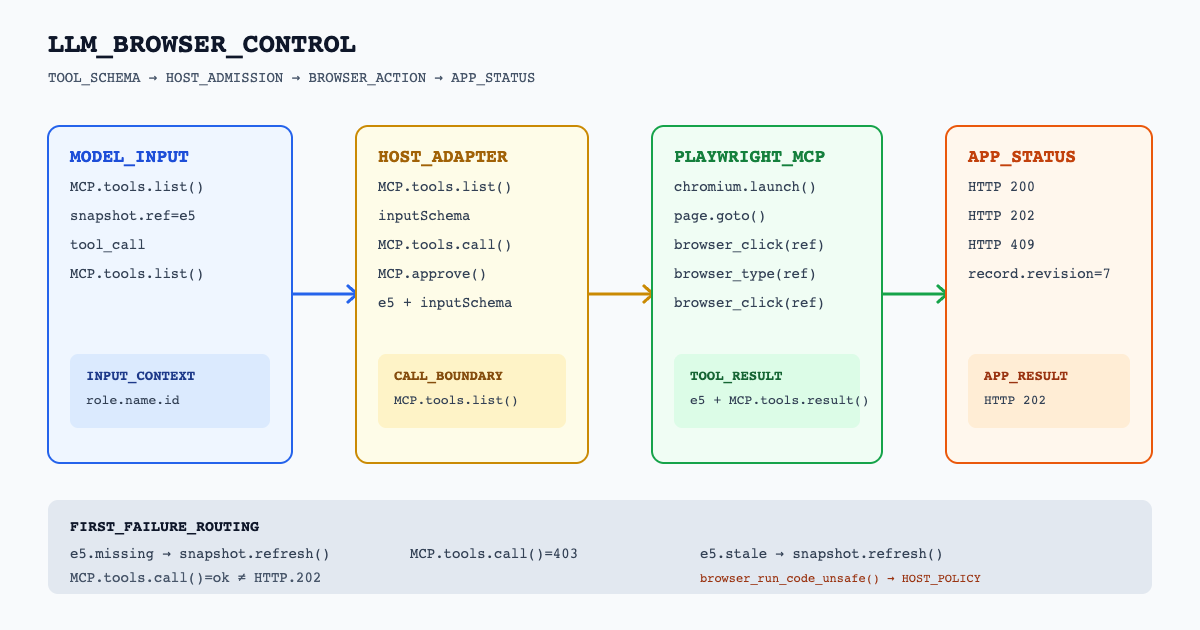
LLM browser automation does not give a language model direct custody of Chromium. In a tool-driven setup, the model interprets the task and selects a call from the tools the host exposes; the host or adapter validates the call and dispatches it; the browser executes the resulting page action; the application decides whether a business operation occurred. BotBrowser documents launch-time executable and profile controls for a compatible browser process. It does not improve the model's judgement, expand the host's tool list, authorize an action, or turn a successful click into an application result.
The boundary becomes concrete in Playwright MCP. Its public documentation says the assistant uses MCP tools to navigate and interact through structured accessibility snapshots. The model reads a role, name and reference such as ref=e5; it does not receive unrestricted Chromium state or directly invoke Playwright APIs. The agent decision-freshness analysis covers what happens when a snapshot becomes stale, and the MCP message-boundary guide covers request and result envelopes. This page asks which layer is entitled to make or confirm each decision in the first place.
TL;DR
- The model owns interpretation and a proposed tool selection only within the observation and schemas it received.
- The host and tool adapter own exposure, argument admission, dispatch, approvals, limits and the return representation.
- Playwright MCP turns a snapshot reference into a browser action; the browser executes against its current page rather than a frozen model context.
- The application owns authorization and the business outcome. A successful tool call is not proof that an account change committed.
- Route a failure to the first layer with missing evidence before changing that layer: model choice, tool admission, browser execution or application status.
- A high-privilege tool such as arbitrary script execution must be an explicit host decision, never an implicit reward for a failed regular action.
Contents
- Four layers, four evidence boundaries
- The host decides what can become an action
- Attribute the first failure, then choose one bounded check
- A safe verification loop on an owned fixture
- Practical conclusion
Four layers, four evidence boundaries
“The agent clicked the button” compresses several different events. A model produced an intention to call a named tool. The host admitted or rejected that call. A browser adapter resolved the target and performed an operation. An application may then have changed state. Each event has a different owner and a different piece of supporting evidence.
| Layer | Decision it can make | Evidence it can supply | Decision it cannot make |
|---|---|---|---|
| Model | Interpret the task and select among exposed tools | The chosen tool name, arguments and explanation relative to supplied context | Which unexposed tools exist, whether a permission is granted, or whether the remote record changed |
| Host and adapter | Expose tools, validate arguments, ask for approval, dispatch and shape the reply | Tool inventory, policy decision, request correlation and returned representation | What the model privately reasoned, arbitrary page internals, or the application's commit |
| Browser | Navigate, resolve admitted targets and execute page input | Current page state, target outcome reported by the automation API and diagnostics the adapter returns | The site's hidden risk model, account authorization or business completion |
| Application | Authorize, accept, reject or complete the operation | Application status, record revision, response body or other documented outcome | Why an unrelated model chose the operation |
The boundaries can be combined in a small script, but combining processes does not merge evidence. A host can run the model, tool adapter and browser in one process and still need to record which component observed which fact. MCP makes the separation visible for many deployments: the model application connects through a protocol to an external server that advertises tools. The protocol introduction describes this as a connection standard to data sources, tools and workflows; it does not say that every connected system becomes equally trusted or that protocol connectivity grants an application permission. The computer use permission comparison applies this boundary to screenshot and accessibility observations, where a visible consent prompt still needs a separate user decision.
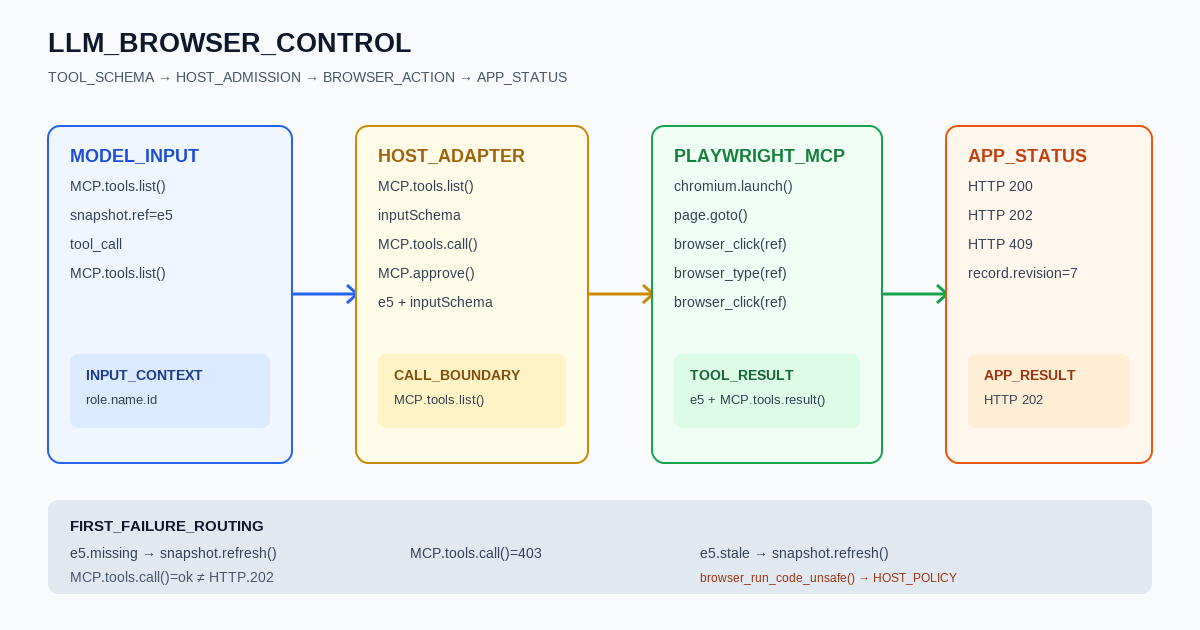
The crucial distinction is authority, not vocabulary. Calling the whole pipeline an “agent” does not mean the model owns every layer. Conversely, rejecting a model's proposed action does not mean the model failed; a correctly interpreted request may still be refused by host policy. Record observed facts by their source rather than awarding the model credit for everything that happened after it proposed a call.
Playwright MCP describes an interaction using the page's accessibility tree. A returned snapshot contains roles, accessible text and model-useable references. The documented example has a textbox [ref=e5] and a checkbox [ref=e10]. The assistant reads that representation and uses a reference to type or check the target. This is materially different from Anthropic's documented coordinate-based computer-use example, where the model looks at a screenshot and estimates cursor movement in pixels.
Both are LLM browser automation, but they expose different control vocabularies. A semantic tool surface gives the host a place to constrain names, arguments and allowed actions. A pixel-and-coordinate surface can still be wrapped in a policy that checks coordinates and actions, but the wrapper has less semantic information by default. Neither form means that the model directly writes Chromium internals. The web scraping AI context analysis owns the broader data-reduction problem; here the question is which reduced view becomes selectable action.
snapshot:
- heading "Owned profile" [level=1]
- textbox "Display name" [ref=e5]
- button "Save" [ref=e7]

model proposal:
tool = browser_type
args = { ref: "e5", text: "Fixture User" }
The sample is illustrative syntax for the decision boundary, not a server tool schema. The useful facts are the observed references and a proposed call that names one. The model did not need to know the page's DOM node, event listeners, browser process or account permissions to make that proposal. It also could not know that e5 still exists unless the host or browser answers the call.
Tool shape is part of policy. A generic browser_run_code_unsafe tool, which Playwright MCP documents as executing arbitrary JavaScript in the server process and being RCE-equivalent, exposes a much larger consequence class than browser_click on a snapshot reference. The model may propose the larger tool when it is visible, but the host is responsible for whether it is advertised, confirmed or excluded. “The model could call it” is therefore not evidence that the deployment should have offered it.
The host decides what can become an action
The host is the policy and translation boundary between a model proposal and a browser operation. It decides which tools appear, what context accompanies them, whether arguments match a schema, whether a human approval is required and how an error or result enters the next model turn. These decisions can be implemented in one application or split across an MCP client and server, but they remain distinct from the model's choice.
Playwright MCP's structure demonstrates the handoff. The client connects to a server; the server exposes browser tools; a tool invocation returns an accessibility snapshot. The model uses a reference from that snapshot for the next request. The protocol is a transport and capability interface, while the server chooses its actual tools and result shapes. No protocol label alone establishes that a browser tab belongs to the intended process, that a tool is safe, or that its result is a completed business operation.
The host also owns a boundary the model should not be able to negotiate for itself: approval for credentials, publication, purchases, deletion, permission changes and irreversible submissions. A confirmation dialog shown before execution is evidence that a policy step exists, but it is only as strong as what the user can see and the implementation actually enforces. The model's explanation may help the user understand a proposed action; it cannot replace the approval record.
Validate a proposal without granting new power
An argument schema can reject malformed shapes. It cannot decide whether a well-shaped destination is permitted. A host needs policy checks alongside schema checks. For an owned fixture, the allowed origin and action class can be narrow. For a real workflow, the host must know the credential scope, the consequence of the action and whether an outside service is appropriate to contact.
| Proposal property | Tool-schema check | Host-policy check | What neither one proves |
|---|---|---|---|
tool name | Is it a known tool? | Is the tool enabled for this task? | That the model's plan is correct |
ref value | Is it a string or accepted format? | Is it bound to the current observation and allowed page? | That the application record is unchanged |
text or destination | Does it match the argument type? | Does the target and data fall within user authorization? | That a submit request will succeed |
browser_run_code_unsafe | Is arbitrary code structurally accepted? | Should an arbitrary-code capability be exposed at all? | That untrusted code is safe |
The distinction becomes practical in a failure report. An “unknown tool” response is a host exposure or model-selection mismatch. A “tool disabled by policy” response is a host policy decision. A tool schema error tells the model its arguments did not fit the interface. None of those proves a browser failure, and changing the page script cannot repair an absent authorization.
Once admitted, the adapter maps the tool call to browser operations. Playwright MCP documents browser navigation, click and typing tools, screenshots, keyboard and mouse input, dialogs and tabs. Its ordinary accessibility-snapshot path lets the model select elements by references rather than coordinates. The browser still performs the operation against its live page, not against the picture of the page embedded in the model prompt.
That distinction matters for attribution. A stale ref=e5 can fail even when the model's description was reasonable. An admitted click can succeed at the browser layer even when the next application screen reports a validation error. A page can navigate while a tool waits, and a dialog or new tab can change which page state the next observation describes. The browser supplies visibility and action evidence; it does not independently confirm that the remote account accepted the change.
Keep the evidence the adapter actually affords. The page URL, the returned snapshot, the tool name and arguments, and the tool's error category are useful. A narrated phrase such as “the click did not work” erases which layer observed the failure. A process-executable check belongs to the launch layer and should not be inferred from an accessibility snapshot. The Playwright MCP setup article handles how to prove the intended executable and profile; this article handles the action-control chain after that process exists.
The browser layer also owns a clear stopping condition. If the tool cannot bind the current reference, read a fresh page observation before selecting another action. If a navigation or dialog appears, identify the active page and state before continuing. Do not respond by enabling arbitrary code execution simply because a semantic tool failed. That escalation changes the threat model and often hides the original attribution question.
The application is the only layer that can establish whether its own operation was authorized and committed. A browser tool may report that a click was dispatched, a page may show “Saved,” or a network request may return 200; those observations support narrower claims than “the record changed.” The application's response body, status endpoint, revision value or documented workflow must supply the business outcome the task actually needs.
This is why “tool success” is a poor terminal state. The host can report that the requested tool completed; the browser can report the immediate page action; the application can report a job queued, a payment declined, a record version rejected or an operation completed. Those outcomes need different recovery. A queued job is not a committed record. A validation error is not an unavailable browser. An uncertain submission after a timeout is not permission to repeat it.
| Observed signal | Supports this claim | Does not support this claim |
|---|---|---|
Tool returns ok | The adapter completed its call path | The application committed the requested change |
| Snapshot contains “Saved” | The current representation contains that text | The record is durable, current or scoped to this user |
Application returns 202 Accepted | The request entered an application-defined asynchronous process | The process finished |
| Application returns the new revision | That endpoint reports a successful state transition under its contract | Every downstream service has consumed the change |
The application also owns a failure result that the model cannot repair. If the host allowed the action but the remote service rejected the request, an identical retry may be wrong. Resolve the application state first. The browser automation agent tool-loop article explains why a stale decision and a fresh locator can coexist; this control map adds that a fresh tool call is still not application confirmation.
Attribute the first failure, then choose one bounded check
An agent failure report should identify the earliest point at which a necessary claim lacked evidence. Start at the task and walk forward. Was there an observation sufficient to choose? Did the model produce a tool argument within the exposed schema? Did the host admit the call? Did the browser resolve and execute it? Did the application return the requested outcome? The first “no” names the layer to repair.
| Symptom | First layer to inspect | Bounded next check | Do not do |
|---|---|---|---|
| Model names a control absent from the snapshot | Model or observation | Read the returned snapshot and the task instruction again | Add a broader tool that bypasses the evidence gap |
| Model selects a valid tool that the host rejects | Host exposure or policy | Inspect the enabled tool list and approval rule | Claim the browser was blocked |
| Snapshot reference no longer resolves | Browser or adapter | Request a fresh observation and compare the page state | Enable unrestricted code execution as a shortcut |
| Tool finishes but the test record is unchanged | Application | Read an application-owned status or revision endpoint | Repeat the write without resolving outcome |
| A permission prompt blocks the path | Host policy or user decision | Stop and ask the responsible operator | Treat model confidence as consent |
| A business result is ambiguous after timeout | Application outcome | Query an idempotent status or hand off the uncertainty | Replay the same consequential action |
The table deliberately avoids giving model failure to every symptom. A model can make a sound choice and still be rejected by policy; an adapter can translate correctly and still interact with a page that changed; an application can decline a well-formed browser submission. Naming the first unsupported layer makes the next check smaller and prevents a browser-profile change from being used as a substitute for a missing authorization or application result.
A safe verification loop on an owned fixture
A minimal owned fixture can exercise the control chain without an account, protected site or consequential write. It should expose a heading, one text input, one submit button and an application status route that records whether a permitted test operation was accepted. The fixture's test record is separate from the browser's visual “Saved” marker.
{
  "observation": "snapshot contains textbox ref=e5 and save button ref=e7",
  "modelProposal": { "tool": "browser_type", "ref": "e5", "text": "Fixture User" },
  "hostDecision": "admit browser_type for owned origin",
  "browserResult": "text entry reported complete",
  "applicationStatus": "fixture revision 7 accepted"
}
These values are an illustrative record, not captured output. They show the expected separation: browserResult does not substitute for applicationStatus. A real run would add the tool version, observation timestamp, origin, fixture revision and the exact status response. Do not store a full browser transcript, credentials or unrelated page content merely to make the record look comprehensive.
The first test should use a non-destructive action on the fixture. If the model's proposal is rejected by the host, inspect the tool inventory before changing the prompt. If the observation no longer matches, reread the fixture rather than enabling arbitrary execution. If the application status disagrees with the page note, identify the contract behind each value instead of treating either summary as final. A fixture pass demonstrates this control layout for the owned page. It does not establish that a third-party service will accept any action.
For a real deployment, add operator approval at the host for consequential operations and keep high-privilege tools disabled unless that exposure has its own review. BotBrowser can make the launched browser's profile configuration explicit, but the same run still needs model context, tool policy, browser action and application evidence to remain separate.
FAQ
Does the LLM directly control Chromium in Playwright MCP?
No. Playwright MCP provides tools that let an LLM request browser operations using structured snapshots. The host and server mediate tool calls, and the browser executes admitted actions against its current page.
Is a model's tool call the same as a user authorization?
No. A model can propose a call within the tools it sees. The host must decide whether that tool is enabled, whether the action needs confirmation and what data may be used. The application separately decides whether the action is allowed and succeeded.
Why distinguish a page “Saved” label from an application result?
A label shows that some text appeared in the current page representation. An application response or status route can establish a narrower but stronger outcome under that application's contract. The two pieces of evidence answer different questions.
Should a failed semantic action be fixed by enabling arbitrary browser code?
No. browser_run_code_unsafe is documented as RCE-equivalent in the Playwright server process. It is a separate high-privilege capability that requires an explicit host decision, not a fallback for a stale reference or a missing tool.
Sources
- Model Context Protocol introduction
- Playwright MCP getting started
- Anthropic: developing a computer use model
- BotBrowser Playwright launch documentation
Practical conclusion
Treat LLM browser automation as a chain of bounded decisions. Let the model interpret the task and choose only from exposed tools. Let the host enforce the tool inventory, schema, approvals and limits. Let the browser execute the admitted page action and return the evidence it actually has. Let the application establish the business outcome. When something fails, repair the first layer whose evidence is missing; do not promote a model choice into browser permission, a browser action into application success, or a failed semantic tool into unrestricted code execution. A controlled BotBrowser process can make the browser boundary explicit, while the host and application boundaries still determine what a model may do and what the result means.
This article is part of the guide: Browser Automation Getting Started: A First Run Map
Related Articles
Headless Browser for AI Agents: Launch and Tool Boundaries
Getting StartedComputer Use Agent: Browser State and Permission Limits
DeploymentBrowser Automation MCP: What the Protocol Carries
Getting StartedChrome DevTools MCP vs Playwright MCP for Debugging
FingerprintWeb Scraping AI: What the Model Does Not See
Getting StartedBrowser-Use Setup with a Controlled Browser
Run the same check in BotBrowser
Load a profile, keep the signals you just read about consistent inside the browser, and confirm the result on your own machine before a rollout.