Playwright Clock: fastForward vs runFor
See why fastForward fires interval timers once while runFor visits every interval, and choose the operation before asserting a countdown or expiry.
BotBrowser Team
Want the structured docs for Getting Started?
This article lives in the editorial library. For step-by-step setup, reference material, and ongoing updates, jump into the docs section.
page.clock.fastForward() and page.clock.runFor() can move a page to the same later timestamp while producing different timer callbacks. In an owned countdown fixture, both advanced five seconds and both fired the expiry timeout once, but fastForward(5000) fired the one-second interval only once while runFor(5000) fired it five times. Choose the clock operation from the callback history the next assertion depends on. BotBrowser can provide a controlled browser environment, but it does not decide whether an elapsed-time countdown or a server-side expiry is the intended application contract.
TL;DR
fastForwardjumps over elapsed time and fires due timers at most once; it is the lid-close model.runForadvances through the interval and visits every due callback; it is the ticked-clock model.- Both operations may fire a final expiry timer, but only
runForpreserved all four intermediate interval counts before that expiry. - Install Clock before navigation or any page timer setup. The API applies to the whole BrowserContext.
- Assert both the page clock and the application result. A browser countdown does not prove that a server session, token or order expired.
Contents
- Choose the timer history before moving time
- Set up the clock before page timers
- Compare five seconds with both operations
- Interpret the callback counts
- Write timer assertions with the right clock
- Separate browser time from expiration
- Practical conclusion
Choose the timer history before moving time
The official Playwright Clock guide describes fastForward as the browser-laptop-lid case: time jumps ahead, and a timer that became due during the jump fires at most once. The Clock API repeats that limit in its fastForward description. runFor, by contrast, advances the fake clock while firing the time-related callbacks, so each interval inside the requested duration gets a turn.
This difference changes what a page can observe. A stock ticker that increments a counter every second produces one increment after fastForward(5000) and five increments after runFor(5000). An expiry timeout scheduled for five seconds can fire in either case because its deadline is reached. If a test claims that four intermediate ticks happened, fastForward is the wrong operation for that assertion.
The choice is not about which method is more modern. It is about the event history the application owns. Use setFixedTime when only Date.now() and new Date() need a stable value while real timers continue. Use install when time itself must be controlled. Then choose fastForward for a jump to a later state and runFor when the callbacks between the two timestamps matter.
Timer history also shapes the DOM result. A countdown may render 4, 3, 2, 1 on the way to expiry. If only the terminal state is asserted, both clock operations may pass. If the workflow logs each tick, sends a keepalive on a cadence or disables a control after a sequence, a skipped interval is a real behavioral difference, not an implementation detail.
The official Playwright Timeouts guide begins with a different question: which budget expired? Clock control does not replace that diagnosis. A fake clock can advance an application's timer while a Playwright action timeout, a test timeout or a hook budget still waits on real wall time. Keep those clocks named separately.
When the terminal message is a bare test timeout, an expectation result or an action call log, the budget owner has a different signature. The Playwright timeout budget lookup shows those four error forms before any timeout is changed.
Set up the clock before page timers
The Clock API is installed for the entire BrowserContext, so all pages and iframes under that context share the controlled time. The official guide warns that install() must occur before any clock-related calls. Do not let the page execute setInterval, register a setTimeout expiry or even read Date.now() through its startup path, then install the clock afterward and expect the first setup to be recoverable.
Install the clock before navigation:
await page.clock.install({ time: '2024-02-02T10:00:00.000Z' });
// Illustrative URL; the fixture uses its own ephemeral loopback port.
await page.goto('http://127.0.0.1:3000/clock-probe', {
  waitUntil: 'load',
});
The example fixture then pauses at the page's current clock before resetting its display. Real page load still has a small amount of progression, so the test does not assume that navigation leaves the page at exactly the installation timestamp. It reads the current page time, calls pauseAt, and only then clears the counters it intends to compare. The installation happened first; the controlled comparison begins second.
Use a single Clock owner for the context. If two tests create their own pages under one BrowserContext, they should not independently install incompatible clocks. The API documentation states the shared-context scope. Separate contexts are appropriate when their time policies differ.
Make the navigation path deterministic. A page that requests the real time from a server can still return a different value than the mocked browser clock. This fixture uses the page clock only and serves an owned local page; it does not make a remote API return a fake timestamp.
Compare five seconds with both operations
The owned probe starts with a five-second setTimeout expiry and a one-second setInterval counter. After installation, navigation and pauseAt, the runner clears both displayed counters and captures a baseline. It then launches the two cases concurrently, each in its own stock Chrome BrowserContext. One browser process hosts both contexts. The shared page implementation is byte-identical; only the operation changes.
The run used Playwright 1.58.0, stock Chrome 157.0.8103.79, macOS arm64 and a 1180 × 750 viewport on 2026-11-19. It requested four workers because the fixture was designed as a browser pool. Only two jobs existed, so the effective pool was two. The total browser-run wall time was 289 milliseconds; this measures the harness, not production timer performance.
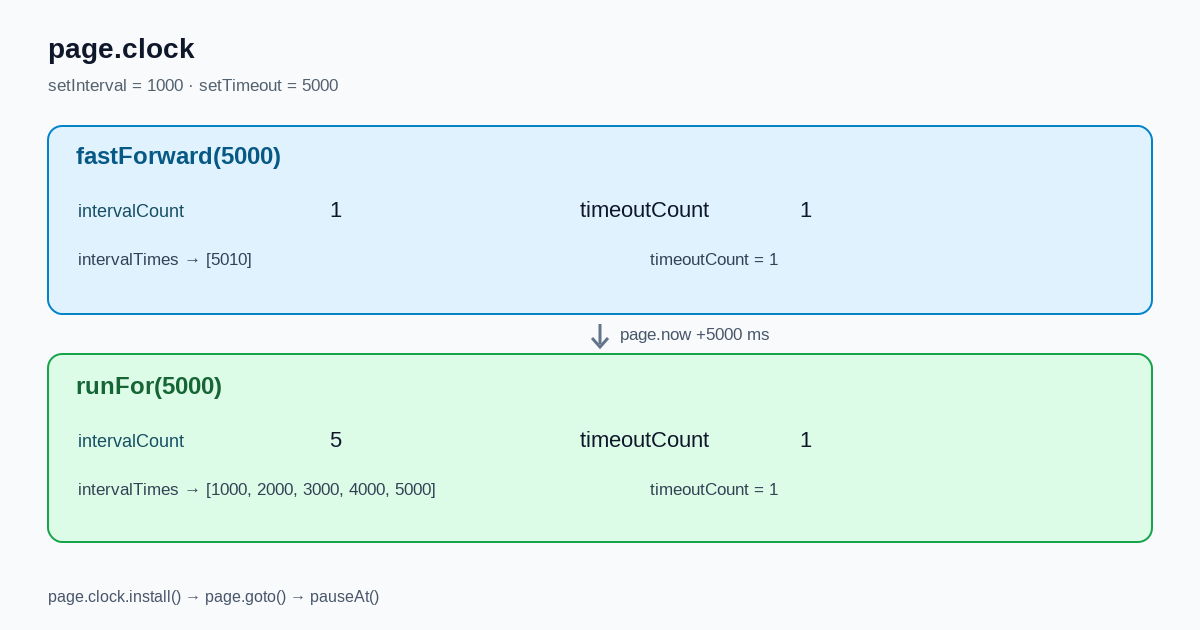
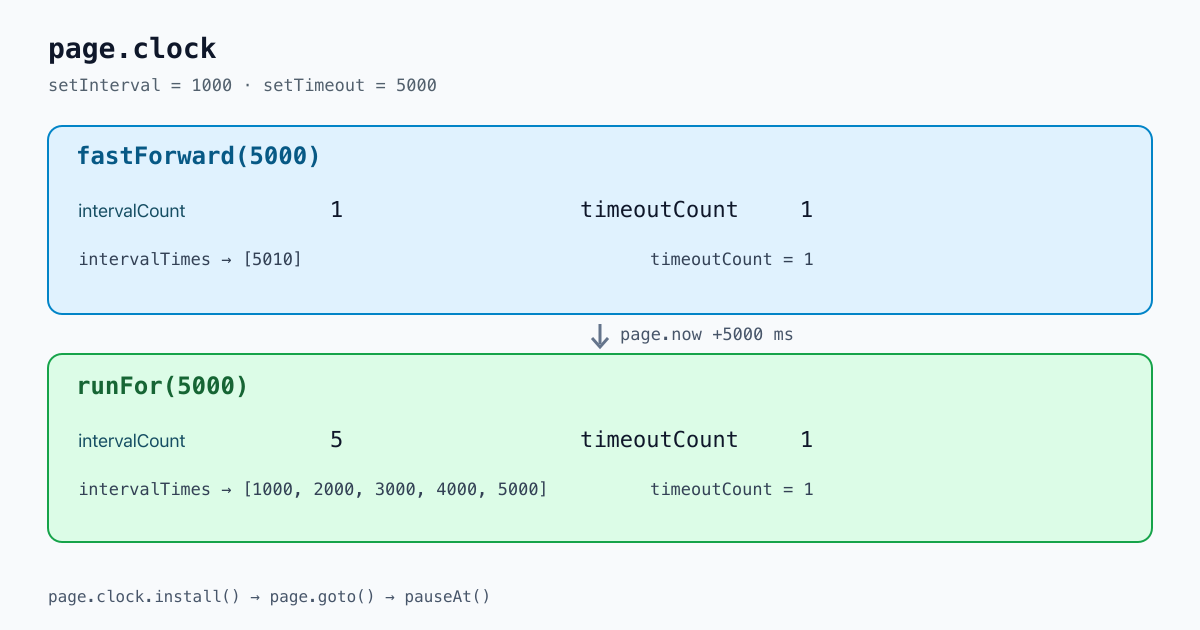
The probe records the page clock before and after each operation. The paused baseline was 1706868000025; both cases ended at 1706868005025, exactly 5000 milliseconds later. Their callback histories differ:
| Observation | fastForward(5000) | runFor(5000) |
|---|---|---|
| Page-clock advance | 5,000 milliseconds | 5,000 milliseconds |
| One-second interval callbacks | 1 | 5 |
| Recorded interval offsets | 5010 ms | 1000, 2000, 3000, 4000, 5000 ms |
| Five-second expiry callbacks | 1 | 1 |
| Final expiry text | expired | expired |
| Scenario result | pass | pass |
The offsets are measured from the page's initial script execution, not from the test process. The fastForward result records the one fired interval at the final time (5010 ms from page start), whereas runFor records each interval deadline. This is the observable difference described by the official “due timers at most once” wording.
Interpret the callback counts
The expiry assertion is necessary but not sufficient. Both cases ended in expired, so a test that checked only the final text would say the two operations were interchangeable. The interval arrays disclose the history that the terminal result hid.
This is a general testing rule, not a property of this fixture. If the application renders a countdown from four through one, sends audit events on each second or has a state machine that must visit each intermediate state, runFor preserves those callbacks. fastForward jumps to the destination and can collapse them into one due event.
Do not infer that every timer fires once under fastForward. The documented limit is “at most once” for due timers; an arbitrary application can have multiple timers, different deadlines and callbacks that schedule more work. The test should compare the exact callbacks its application promises. The safe check is an expected array or count for the known fixture, not a blanket claim about all timers on the page.
The same rule applies to animation frames and idle callbacks. The API's fake implementation covers several time-related functions, but a fixture that depends on rendering, frame cadence or event loop ordering needs its own observation. A timer callback count does not establish that the browser painted the intermediate state. If paint history matters, assert the visible states or use an application-owned trace in addition to clock data.
Timer type is part of the contract. A repeating interval has one callback per due period, a one-shot timeout becomes due once, and an animation loop may be cancelled or replaced after the first rendered frame. A page can also create new work inside a callback: a timeout that schedules another timeout is not one fixed count. The fixture keeps both timer definitions stable so its table describes this probe, not a universal schedule.
The event loop also matters. runFor advances through callbacks, but the callback itself can mutate the DOM, schedule a request or change the page clock's consumers. Read the structured result after the operation and assert the user-visible state after the DOM settles. If the page depends on an external request, let that request complete through its own test contract; do not assume the fake timer made the server result arrive. Microtasks and timers explains why a due timer can still wait behind queued promise work when a real event loop is involved.
Keep the installation boundary in the test name or setup helper. A test called “expires after five minutes” should reveal that the page clock was installed before navigation and that the expiry callback is page-owned. Otherwise a future refactor can move the installation after setup, and a test that still passes for a different reason will no longer prove the timer behavior.
Timer cleanup is another observable. If a component clears its interval on unmount, the advance after unmount should produce no additional ticks and the cleanup should be checked separately. If it leaves a timeout alive, that may be a real application bug even when the browser closes at the end of the test. Record timer cancellation at the same points the app owns them.
Playwright's UI readiness guidance separates network quiet, initialization and a visible business result. Clock control is another dimension: it says which time-dependent callbacks the test asked the page to execute, not whether the network or the server completed the same workflow.
Write timer assertions with the right clock
The following helper makes the callback outcome explicit rather than relying on a sleep. It uses a page-owned reading method so the assertions do not parse display text when structured values are available:
const before = await page.evaluate(() => window.__clockProbe.read());
await page.clock.runFor(5000);
const after = await page.evaluate(() => window.__clockProbe.read());

expect(after.elapsedFromPageStart - before.elapsedFromPageStart).toBe(5000);
expect(after.intervalCount).toBe(5);
expect(after.timeoutCount).toBe(1);
expect(after.expiryText).toBe('expired');
The corresponding fastForward assertion changes only the callback expectation:
const before = await page.evaluate(() => window.__clockProbe.read());
await page.clock.fastForward(5000);
const after = await page.evaluate(() => window.__clockProbe.read());

expect(after.elapsedFromPageStart - before.elapsedFromPageStart).toBe(5000);
expect(after.intervalCount).toBe(1);
expect(after.timeoutCount).toBe(1);
expect(after.expiryText).toBe('expired');
Use a documented string duration when it makes the test more readable, for example fastForward('00:05') or runFor('00:05'), but keep the expected count tied to the same duration. A unit change can silently multiply callbacks when a one-second interval becomes a one-minute interval.
Avoid using waitForTimeout() to let a fake timer run. If the clock is paused or the event loop is not advancing as the application expects, real waiting is not a substitute for an explicit operation. Use runFor when callbacks must occur, fastForward when due work should be collapsed, and an ordinary assertion when the result is already present.
Run the cases in isolated browser contexts when the fixture has a different clock policy. The Clock API belongs to the BrowserContext, so reusing one context between a paused countdown and a real-time navigation can make the second case inherit the first case's fake time. The owned probe launches isolated cases and closes each context before reporting its result.
The application also needs to decide which context owns the clock. Playwright BrowserContext lifecycle and storage explains how a context carries page state and why closing it releases browser resources without revoking a server session. A clock fixture follows the same ownership rule: keep each time policy inside its own context and leave the server's expiry state under the server's control.
Keep the timing observation independent of the measurement machine. The browser's page clock and the test process's wall clock are different origins. The fixture reports both, but it uses page-clock offsets for the timer assertion and treats the small harness duration only as diagnostics. Do not convert a 2-millisecond driver callback into a claim about production latency.
Use a timeout value that the page and the test agree on. A five-second expiry is convenient for a demonstration, but a real product may use minutes, a monotonic timer or a server-owned deadline. The operation name does not make those semantics equivalent. Name the interval, duration, operation and expected callback count in the assertion message so a failure points to the timer contract rather than to an unexplained number.
Consider the page's cancellation semantics. Clearing an interval or timeout before an advance changes the expected callback count. The fixture does not clear its timers during the comparison, so the result cannot be generalized to a page that cancels after the first tick. Record whether each timer remains active at the start of the advance.
Separate browser time from expiration
A fake browser clock answers a browser API question: what did Date.now() and the page's timers do after this operation? It cannot make a remote server's session expire, rotate a token, change a payment deadline or erase a record. A successful expired label is only the local page's reaction to its own callback.
Use a server-owned test clock or an application test endpoint if the acceptance criterion is server expiration. That fixture must return a controlled server time, a result field and a record identifier, and it must be run only against an authorized test environment. The browser assertion then checks the visible result, not the server's internal database state.
When reporting a timer issue, include the page clock timestamp, the operation and duration, the expected callback list, the actual callback list and whether the page had already seen timer setup. This distinguishes “the callback never ran” from “the callback ran once at the destination” and “the server rejected the stale token independently.”
Clock behavior can interact with retention and expiry policies. The session and cookie continuity guide explains why a client-side state survives a process only when the application's storage and server rules allow it. Advancing the browser clock does not rewrite those policies.
BotBrowser boundary. BotBrowser can supply a browser build, profile and controlled automation environment through its Playwright integration, but it does not decide whether an application timer should represent an elapsed interval, a future server expiry or a calendar rule. The local clock fixture cannot be used to infer BotBrowser timing, server persistence or access-control outcomes.
FAQ
Does fastForward fire every interval timer?
No. The official API says it fires due timers at most once during the jump. The owned fixture observed one interval callback after a five-second jump, not five.
Why did both operations show expired?
Both reached the five-second expiry deadline. The final text reflects the endpoint, while the interval array shows whether the intermediate countdown states were visited.
Can I install Clock after the application starts?
No. Install it before navigation or any page code that uses the affected clock functions. The fixture navigates after installation and pauses only after the page has loaded.
Does a fake browser clock expire a session on my server?
No. It controls browser time and page timers. Server-side expiration needs a server-owned clock or test endpoint and a separately verified result.
Which operation should I inspect first in a failing timer test?
Start with the callback history and installation point. If the interval never ran, check whether Clock was installed before page setup; if it ran once at the destination, check whether the test used fastForward; if the expected intermediate states are missing, use runFor and compare the recorded offsets.
Sources
- Playwright: Clock guide
- Playwright: Clock API
- Playwright: BrowserContext
- BotBrowser: Playwright integration
Practical conclusion
Decide which callback history the next assertion needs. Use runFor when each interval must execute, and fastForward when time should jump to a later due state with at most one firing. Assert the page's final state and its callback list, then verify server expiry with a separate server-owned observation.
This article is part of the guide: Browser Automation Getting Started: A First Run Map
Related Articles
Playwright Test Timeout: Which Budget Expired?
FingerprintMicrotasks and Timers: The Order Your Code Actually Runs
Getting StartedPlaywright WebSocket vs HTTP Route
Getting StartedPlaywright Download Event, saveAs and the File Path
Getting StartedTwitter Scraping: X API Windows and Browser Limits
Getting StartedWebDriver BiDi Events for Stable Browser Automation
Run the same check in BotBrowser
Load a profile, keep the signals you just read about consistent inside the browser, and confirm the result on your own machine before a rollout.