Headless Browser for AI Agents: Launch and Tool Boundaries
Compare agent and MCP browser launch ownership, what tools expose, what operators must verify, and how headless differs from runtime limits.
BotBrowser Team
Want the structured docs for Getting Started?
This article lives in the editorial library. For step-by-step setup, reference material, and ongoing updates, jump into the docs section.
BotBrowser provides a Chromium executable that accepts the documented --bot-profile argument, so a compatible launcher can select a profile before an agent attaches. BotBrowser does not provide the agent runtime, MCP server, tool policy, or process evidence for an external launcher, and it cannot guarantee a site's decision. The integration boundary is the browser process: trace who creates it, which component can read its startup arguments, and which limited results reach the agent.
The direct Playwright setup covers executable and profile configuration for a script. The browser-use agent setup covers that framework's own task loop. This page compares the boundaries across frameworks and MCP servers, rather than repeating either installation path. The MCP server side of that boundary, including the launchOptions.executablePath key and the silent fallback to a bundled browser, is documented in Playwright MCP setup for a custom Chromium build, and the flat launch-object variant a Puppeteer server uses is in Puppeteer MCP server configuration.
TL;DR
- The component that creates Chromium owns
executablePath, browser arguments, profile selection, and process lifetime. - An MCP client configures an MCP server; the server may launch a browser or attach to one, depending on its options.
- Playwright MCP documents
--executable-pathfor launch and--cdp-endpointfor connection; these are different ownership paths. - MCP tool results expose what the server returns, such as page snapshots or action output, not arbitrary Chromium internals.
- A page fixture can verify page-visible facts. Only launcher-side process evidence can compare the executable and startup arguments.
- Headless is a presentation mode. Timeouts, allowed tools, action approvals, and task budgets are separate controls.
Contents
- Trace browser process ownership
- Read the MCP tool boundary
- Separate headless mode from agent visibility and runtime bounds
- Practical conclusion
Trace browser process ownership
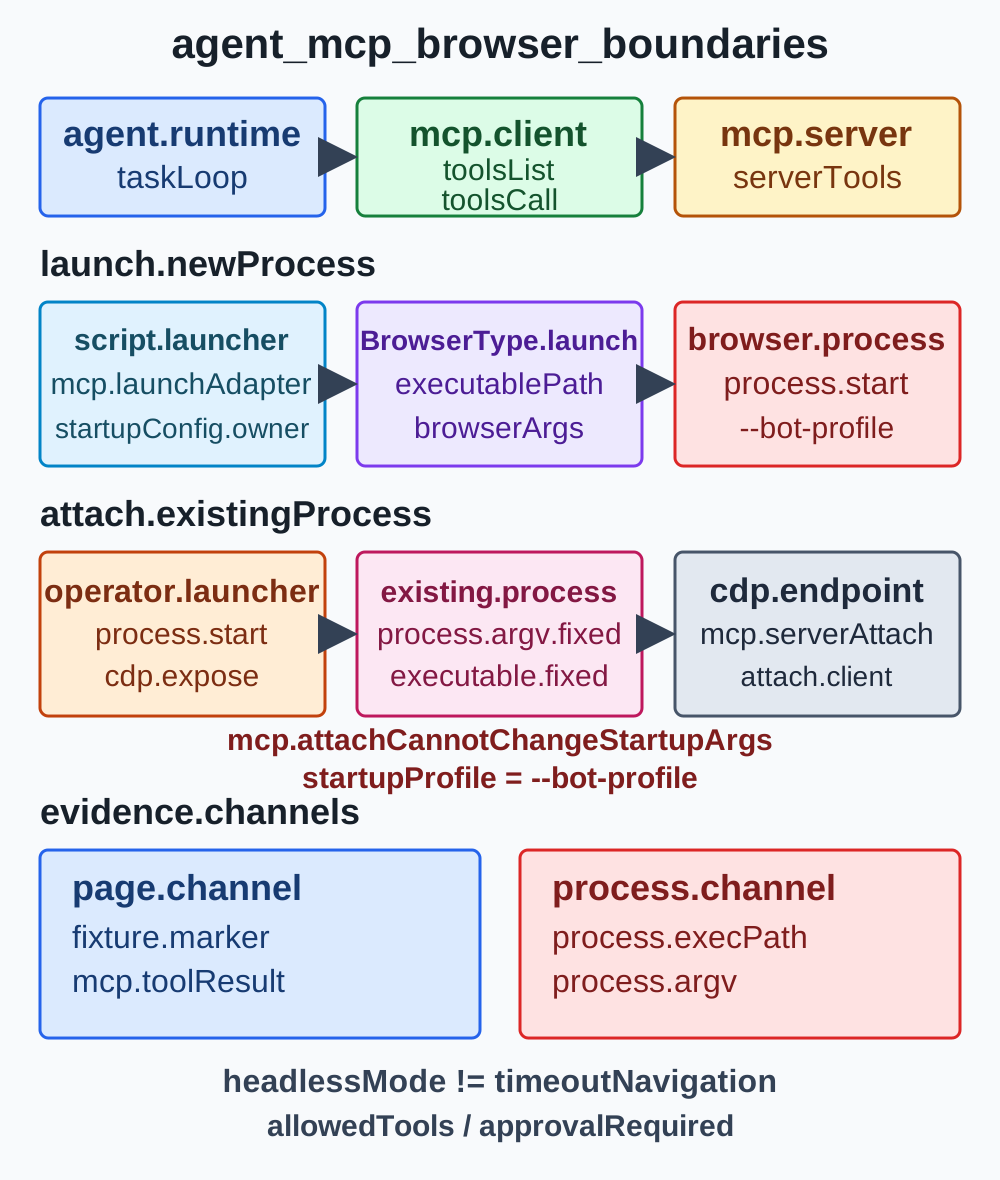
Browser automation has at least four roles: the agent runtime decides what task to attempt; a framework or MCP client chooses which browser tools are available; a server or launcher creates or attaches to Chromium; and the browser process receives startup flags and opens pages. In a small script, several roles may live in one program. An MCP integration deliberately separates the client and server, and an external supervisor can add another boundary. The word “agent” alone does not tell an operator which process is responsible for the browser executable.
The practical question is not “which framework supports BotBrowser?” It is “which component invokes a launch API, and does that invocation forward the required executable and arguments?” Playwright's BrowserType.launch accepts an executablePath and args; its documentation warns that custom browser arguments can break Playwright behavior. A framework wrapper may expose all options, expose only a subset, or select a bundled binary internally. Verify the pinned framework's actual configuration surface before assuming an option passes through.
Launch and attach are different contracts
A launch call creates the operating-system browser process. Its owner chooses an executable, arguments, environment, storage directory, and headless mode before the first page exists. An attach call connects a client to an already-running browser, often through CDP. The attached client can operate within the server or browser capabilities it receives, but it cannot retroactively change which executable started or add a startup profile flag.
The Microsoft Playwright MCP README documents both concepts in its configuration: --executable-path <path> selects a browser executable for launch, while --cdp-endpoint <endpoint> connects to an existing CDP service. Its configuration schema also describes launchOptions as Playwright launch options. Those settings are server configuration, not options that an arbitrary MCP client can append after connecting. The direct Playwright setup shows how a script passes executablePath and --bot-profile; server-specific MCP options must come from that server's pinned documentation. The matrix below compares the boundaries across integrations.
| Integration shape | Who creates Chromium? | Where executable and profile belong | What attachment establishes |
|---|---|---|---|
| Framework calls Playwright launch | Framework or its browser adapter | Framework launch config: executablePath and browser args | The framework returned a browser object; inspect the process separately |
| MCP server starts its browser | MCP server, configured by the MCP client | Server arguments/config, such as --executable-path and supported launch options; profile goes in browser args | The client can invoke the server's advertised tools |
| External supervisor starts browser, client attaches by CDP | Supervisor or service manager | Supervisor command and environment before it exposes CDP | The endpoint accepted a connection; it does not identify the process or its profile |
| Browser extension attaches to a user browser | Browser process already exists | The user or managed browser profile and extension setup | The extension bridge is available; it does not prove a BotBrowser profile was loaded |
The owner can also be a remote browser service. In that case the local agent sees a client SDK, not the operating-system process. The service's own launch record or administrator view is the evidence source for executable and profile; a local tool response cannot replace it. Document that distinction before debugging because otherwise teams tend to search the agent prompt for a setting that only exists in a remote service's deployment configuration.
Put the profile at process startup
BotBrowser's Playwright documentation passes its profile with the --bot-profile browser argument. It belongs to the browser process that starts the BotBrowser executable. A framework can pass it only when its launch adapter forwards browser arguments; an MCP server can pass it only when that server exposes or accepts the corresponding launch configuration. A client connected to an existing endpoint cannot add it after the fact. This is why a profile-related setting in a task prompt or an MCP tool call is not equivalent to startup configuration.
Do not conflate a Chromium user-data directory with a BotBrowser profile. Playwright MCP's --user-data-dir names the browser storage directory; --isolated keeps that browser profile in memory rather than saving it to disk, and omitting the directory creates a temporary directory. These describe persistence behavior for the server's browser context. BotBrowser's encrypted profile argument has a different product meaning. If both are used, keep the values distinct in configuration and in run records; never infer that a temporary storage directory loaded a BotBrowser profile.
The launch boundary is also where version compatibility belongs. Record the framework and browser versions together because a wrapper may update its default browser or its launch adapter independently of the agent prompt. Pin a package release rather than using a moving latest tag in a reproducible deployment. If a newer release changes the configuration schema, verify the documented option and the launched process before reusing prior results. A green tool call from a previous version says nothing about which executable a later wrapper selected.
Keep startup inputs small and reviewable. The launcher should resolve the approved executable and profile identifier, then provide only the required values to the browser process. It should not search an unrestricted profile directory based on model output. Keep secrets and profile contents out of prompts, tool results, traces, and screenshots. A non-sensitive profile label and configuration revision are enough for a handoff record; the encrypted profile itself is not an agent artifact.
Use the configuration table as a forwarding check
When a framework has several configuration layers, map each setting to the process call that consumes it. A client-side JSON block may name an MCP server command, while that server's own config names a browser and an executable. A framework object may contain context options next to launch options. Those are different stages even when they are declared in one file.
| Setting | Consumed by | Establishes | Does not establish |
|---|---|---|---|
MCP command and args | MCP client when it starts the server | Which server command and server flags are requested | Which browser binary the server ultimately launches |
executablePath / --executable-path | Browser launch adapter | Requested path for the child browser process | That the path exists, started successfully, or loaded a profile |
Browser args / --bot-profile | Browser launch adapter | Requested process arguments at startup | That every flag is accepted or that a remote site approves the session |
--cdp-endpoint | MCP server connection layer | The endpoint the server attempts to attach to | Which executable, profile, or owner created that endpoint |
--user-data-dir / --isolated | Playwright MCP storage behavior | Persistent, temporary, or in-memory browser state behavior | BotBrowser profile selection or profile validity |
--headless | Browser presentation launch mode | The requested headless mode | Time limit, allowed actions, consent, or safety policy |
The table is a review aid, not a universal schema. Other agent frameworks may use different property names or may not expose custom launch arguments at all. Follow the server or framework reference for the pinned release. If no supported configuration path forwards a browser argument, stop at that limitation instead of using a page script to imitate a launch-time value.
Read the MCP tool boundary
MCP separates clients from servers through a protocol. The client discovers tools with tools/list, then invokes a named tool with tools/call; the server returns a result using the content types it supports. The protocol's server tools specification describes tools as model-controlled capabilities and advises clients to show users which tools are exposed, indicate when they are invoked, and provide confirmation for operations. A tool annotation is metadata, not a trusted authorization decision by itself.
That protocol boundary matters because “the agent can see the browser” can mean several different things. A server might return accessibility snapshots, locator results, screenshots, console messages, or structured extraction. A host application might also grant shell, filesystem, or network tools, which are separate capabilities. The agent can reason over the content it receives, but the MCP protocol does not grant automatic access to the browser process table, Chromium's private state, profile file contents, proxy credentials, or every signal a page or network stack might expose.
Microsoft Playwright MCP describes accessibility snapshots as its primary interface and provides browser interaction tools. The server's specific output and enabled tools depend on its options; for example, image response behavior and snapshot mode affect what is returned. A text snapshot is not a screenshot, and a screenshot is not a process record. Tool schemas may compress page structure or omit values, so absence from a result is not proof that a browser or page lacks the value. Preserve the method and tool name when recording an observation.
Separate page evidence from process evidence
A controlled fixture is useful for facts that the page can show: a known build marker, the current origin, a visible consent state, or a harmless read-only action's response. It can establish that the tool reached that page and returned the page-visible result. It cannot independently establish which executable opened the page or whether a profile argument was present at process startup. A page can be served by stock Chromium, a remote browser, or a different profile and still render the same marker.
Process evidence answers a different question. The launcher or host operator can compare the child process executable, startup arguments, process ID, and the declared run configuration. With a remote browser, that evidence must come from the remote service or its administrator. A successful tools/call, CDP handshake, or page navigation does not identify the process that answered. Keep process evidence and page observations as separate fields so one cannot be mistaken for the other.
| Evidence channel | Example observation | Supports this conclusion | Cannot support this conclusion alone |
|---|---|---|---|
| Agent-visible tool result | Snapshot contains [data-build] = "owned-fixture-4" | The configured tool returned that page-visible marker | Which executable or profile launched Chromium |
| Browser page observation | location.origin and a consent marker match the fixture contract | The current page exposed those values | Browser-process command line or network route provenance |
| Launcher process record | Executable path matches the configured binary and args include --bot-profile | The operator's process check saw those startup inputs | That a third-party site accepted the session or loaded every setting |
| CDP endpoint response | Browser metadata returned from the declared endpoint | A CDP service answered at that endpoint | That it is the intended process, profile, or deployment owner |
| Application response | Owned staging action returned a documented state code | The application returned that result for this request | A general browser classification or future application outcome |
The profile management guide describes profile selection and file handling; this integration adds the evidence ownership question after a framework or server has been chosen. Keep observations narrow and non-sensitive. A fixture should not require a real account, expose private data, or ask an agent to infer a person's identity. If a run needs a credential or changes state, the application that hosts the agent must provide its own authorization and confirmation boundary. In an MCP tools/call response, the server returns only the result defined by that tool, not arbitrary Chromium internals.
Treat tool results as untrusted input
An MCP client invokes a named tool with tools/call; the server returns that tool's defined result, not independent proof of browser-process state.
Pages can contain adversarial text, stale instructions, or content that asks an agent to use unrelated tools. A browser tool returns page content; it does not turn that content into policy. The MCP server tools specification explicitly says clients should consider annotations untrusted unless they come from trusted servers. Apply the same distinction to page output: a string in a page is data to interpret under the task policy, not authority to change the executable, open a secret file, or approve a transaction.
Restrict the tool set to the workflow. If the task only reads a public fixture, the agent does not need a filesystem tool or an unrestricted shell. If it needs to download an artifact, define the permitted destination and size at the host layer. Browser permissions, allowed origins, and filesystem roots are server controls that should be reviewed in their own documentation. Do not treat a prompt instruction as an access-control boundary.
The operator should see when a tool is invoked and what class of action it represents. Read-only navigation, a form fill, a permission grant, and a final submission do not carry the same consequence. Use an explicit approval step at the host application for credentials, purchases, deletion, publication, permission changes, and irreversible submissions. The approval should describe the destination and visible parameters without copying secrets into the model trace.
Separate headless mode from agent visibility and runtime bounds
In Playwright, BrowserType.launch({ headless: true }) selects presentation; MCP --headless is distinct from --timeout-navigation and --timeout-action runtime controls.
Headless describes how Chromium runs without a visible browser window. Chrome's headless documentation explains that modern headless mode shares the regular Chrome browser implementation; a legacy Headless Shell is a separate mode for specific use cases. Playwright also exposes a headless launch option and browser channels. The mode is not a statement about whether an agent is supervised, what a tool can read, how long a task may run, or what a site will decide.
In particular, headless does not mean invisible. A browser still renders pages and exposes ordinary web APIs to those pages. Some behavior can vary with the browser version, operating system, graphics stack, fonts, launch flags, window state, permissions, and timing. A screenshot or page property is evidence about that particular environment, not a guarantee of equivalence with every headed session. A headless setting cannot promise that a detector will or will not recognize a session.
Bound the agent independently
Set limits at the layer that can enforce them. A browser navigation timeout limits one navigation wait; an action timeout limits an action; an idle timeout can close a server-owned browser after inactivity. None automatically limits the total agent reasoning loop, the number of tool calls, the origins an agent may visit, or whether it can submit a form. Conversely, a task budget or tool-call cap does not make browser execution headless or change Chromium's presentation mode.
| Control | Layer | Bounded behavior | Separate control still needed |
|---|---|---|---|
Playwright headless / MCP --headless | Browser launch | Window presentation mode | Agent duration and tool permissions |
| Navigation timeout | Browser automation API | Wait for a navigation outcome | Total task time and retry policy |
| Action timeout | Browser automation or MCP server | Wait for an individual action | Number of actions and allowed destinations |
| MCP idle timeout | MCP server/browser lifecycle | Close or relaunch a browser after inactivity | Agent loop deadline and approval policy |
| Tool allowlist | Agent host/client | Which named capabilities the model can invoke | Browser origin policy and process ownership |
| Human confirmation | Host application/client UI | Approval for a proposed consequential action | Browser process verification and task deadline |
Microsoft Playwright MCP's README distinguishes --headless from its --timeout-action, --timeout-navigation, --timeout-settle, and --idle-timeout options. It documents --headless as a browser mode and the timeout options as wait or lifecycle controls. Their defaults are version-specific and should be read from the pinned release; do not copy a default into a production claim without checking that release. The --allowed-origins option is also not described as a complete security boundary and does not govern redirects, so it should not be used as a substitute for application policy.
Bounded execution also requires a failure rule. Stop when the launcher process is not the declared one, when the MCP endpoint is unknown, when a fixture's build marker differs, or when an action would cross an approval boundary. A timeout after a remote write is an uncertain result, not evidence that nothing happened. Query a supported idempotent status route or hand the case to an operator; blindly restarting the agent can repeat the mutation.
A minimal verification order
Use an owned fixture with a stable marker, then verify in this order: first, the launcher owner checks the executable and redacted startup arguments; second, the MCP client checks that it is connected to the intended server and enabled tool list; third, the agent reads the fixture marker through the intended tool; fourth, the host enforces the task deadline and any approval callback. Each step answers one question. If a check fails, fix its owning layer instead of asking the model to compensate with a different browser action.
This sequence is deliberately split between operator and agent. The operator can establish which process was launched. The agent can report which page result its tool returned. The host can enforce how long the run lasts and which tools require confirmation. No single status should collapse all three into a vague success, and no one layer should claim facts that only another layer can observe.
FAQ
Does “headless browser for AI agents” mean the agent runs without human oversight?
No. Headless is a browser presentation mode. Human confirmation, permitted tools, and agent deadlines belong to the host or MCP client policy and must be configured separately.
Can a fixture prove that BotBrowser and its profile launched?
No. A fixture proves only the page-visible response it returns to the browser tool. Compare executable and startup arguments through the launcher or the browser service that owns the process.
Does an MCP tool response expose all browser signals?
No. It contains the result returned by that server's implementation. The available tools, snapshots, screenshots, and result fields are bounded by server configuration; browser internals are not automatically part of an MCP result.
Is --user-data-dir the same as a BotBrowser profile?
No. In Playwright MCP, --user-data-dir configures Chromium storage persistence, and --isolated keeps that storage in memory. BotBrowser's --bot-profile is a separate launch input documented by BotBrowser.
Sources
- Microsoft Playwright MCP README at commit 404be8eb89abecff77a55152b6d843d140c78372
- Playwright
BrowserType.launch - Model Context Protocol: Server Tools specification
- Chrome Headless mode
- browser-use repository
- BotBrowser Playwright setup
- BotBrowser CLI flags
- BotBrowser profile management
Practical conclusion
Choose the browser integration by finding the component that creates Chromium. Put executablePath and the BotBrowser profile argument at that launch boundary; treat CDP or extension attachment as connection, not proof of startup configuration. Inspect the MCP tool list and returned results as a bounded view, then pair page-visible fixture facts with operator-side process evidence. Finally, configure headless mode, timeouts, tool permissions, and human confirmation as separate controls. That gives an agent a defined browser surface without claiming hidden operation, internal-signal access, or a guaranteed site outcome.
This article is part of the guide: Browser Automation Getting Started: A First Run Map
Related Articles
Playwright MCP Setup for a Custom Chromium Build
DeploymentPuppeteer MCP Server Configuration for a Custom Build
Getting StartedBrowser-Use Setup with a Controlled Browser
DeploymentStagehand Browser Automation with BotBrowser
Getting StartedPlaywright with Profile-Backed Browser Identity
Getting StartedProxy Launcher in BotBrowser: Profiles, Proxies, and Setup
Run the same check in BotBrowser
Load a profile, keep the signals you just read about consistent inside the browser, and confirm the result on your own machine before a rollout.