Playwright MCP Setup for a Custom Chromium Build
Configure a Playwright MCP server to launch a specific Chromium build with a profile, then prove from inside the session which executable actually started.
BotBrowser Team
Want the structured docs for Deployment?
This article lives in the editorial library. For step-by-step setup, reference material, and ongoing updates, jump into the docs section.
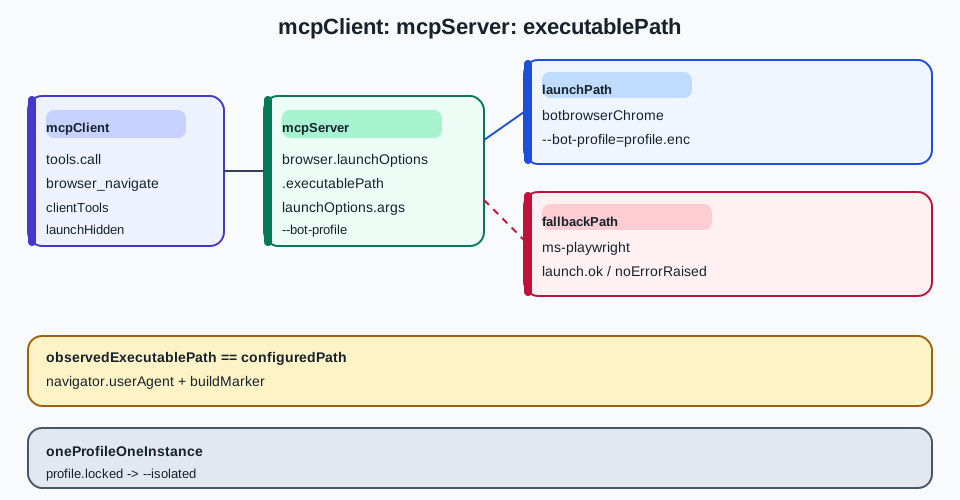
A Playwright MCP server sits between an agent client and a browser, and the browser it starts is decided by configuration that is easy to leave uninspected. When the configuration is right, the agent drives the build and profile the operator selected. When it is wrong, the server starts its own bundled Chromium and reports success, so an agent can complete an entire task against a browser nobody intended to use. The configuration keys that carry a custom executable, the readback that proves which binary started and the failure mode where the profile argument is silently dropped determine whether that server runs the intended build. Playwright MCP is a Microsoft project with its own release cycle, and the configuration below is documented against its published schema. BotBrowser supports executablePath and a profile argument from any Playwright-compatible launcher, and it does not ship an MCP server of its own, so a server that never forwards the option cannot be corrected from the browser side.
TL;DR
- Put the executable in
browser.launchOptions.executablePath, not in a top-level key. The MCP configuration schema nests Playwright'sLaunchOptionsunderbrowser, and an unknown top-level key is ignored rather than rejected. - Two other routes exist and are easier to get wrong: the
--executable-pathCLI flag and thePLAYWRIGHT_MCP_EXECUTABLE_PATHenvironment variable. Pick one route per deployment so a stale value cannot win. - The profile flag belongs in
launchOptions.argsas a separate array element, because Playwright passes each element through as its own argument. - Prove the binary from inside the session: read
navigator.userAgent, the process path the server reports, and a page-level marker the custom build exposes. A server that fell back to its bundled Chromium answers all three differently. - Keep one MCP server instance per profile. A persistent profile is locked to a single browser instance, so two clients sharing a workspace collide instead of isolating.
Contents
- Where the executable path belongs
- Pass the profile without dropping it
- Prove which binary started
- Failure modes and the fallback branch
- Practical conclusion
Where the executable path belongs
The MCP configuration file is a JSON document with a browser object. Inside that object, launchOptions is typed as Playwright's LaunchOptions, which is the same type a direct Playwright script passes to browserType.launch. That is where executablePath lives, and it is the only nesting the server reads.
{
  "browser": {
    "browserName": "chromium",
    "launchOptions": {
      "executablePath": "/opt/botbrowser/chrome",
      "headless": true,
      "args": ["--bot-profile=/etc/botbrowser/profile.enc"]
    },
    "contextOptions": {
      "viewport": { "width": 1280, "height": 800 }
    }
  }
}
Three properties of that block matter more than the rest. browserName stays chromium, because a custom Chromium build still speaks the Chromium protocol and the other values (firefox, webkit) would route to a different driver. headless belongs in launchOptions rather than beside browserName, since the server forwards the whole object to the launch call. args is an array of separate strings, and each element becomes one argument; a single string containing a space does not split.
| Route | Where the value goes | Wins over | Typical mistake |
|---|---|---|---|
| Configuration file | browser.launchOptions.executablePath | Nothing else, unless a flag or env var is also set | Writing executablePath at the top level of the file |
| CLI flag | --executable-path /path/to/chrome | The configuration file | Assuming the flag also sets browserName |
| Environment variable | PLAYWRIGHT_MCP_EXECUTABLE_PATH=/path/to/chrome | The configuration file | A stale value inherited from a shell profile |
The three routes are alternatives, not layers. A deployment that sets the config file and also exports the environment variable has two sources of truth, and whichever the server reads last determines the browser. Pick one and assert the others are unset in the launch environment.
Why an unknown key fails silently
The server validates the shape it knows and ignores what it does not recognise. A configuration that puts executablePath at the top level, or spells it executable_path, or nests it under contextOptions instead of launchOptions, produces a server that starts normally and a browser that is not the intended one. Nothing in the startup log necessarily says so, because from the server's perspective the configuration was valid and the launch succeeded.
That behaviour is why the readback in the next section is not optional. Treating a successful start as evidence of the intended binary is the failure that is easiest to miss, and it fails in the direction that matters: the agent works, the task completes, and the browser was the wrong one.
The context options are separate
contextOptions is a different object and carries BrowserContextOptions, not LaunchOptions. Viewport size, locale, timezone, colour scheme and permissions belong there. Moving executablePath into contextOptions produces an invalid context option that is ignored, and the browser falls back to the bundled build.
The split is worth remembering because the two objects look interchangeable in a flat JSON file. A useful habit is to read the file back before launching and assert that browser.launchOptions.executablePath is a string that exists on disk and is executable, and that browser.contextOptions contains no path-shaped value at all.
Precedence between the three routes
When more than one route sets a path, the result depends on which the server reads last, and that order is not something to guess. The safe pattern is to make the other two impossible: unset PLAYWRIGHT_MCP_EXECUTABLE_PATH in the environment that starts the server, and never pass --executable-path on the command line when the config file already carries the value.
A concrete check costs one command in the launching environment: print the variable and confirm it is empty, then start the server. A shell profile that exports the variable for an unrelated project is a common cause of a server that starts the bundled browser despite a correct config file, because the environment overrides are merged after the configuration file is read, so the inherited value wins.
The same reasoning applies to a wrapper script that assembles the command line. If the wrapper appends --executable-path from a variable that is empty in one environment, the flag can be dropped entirely, leaving the config file as the only source. That is the desirable outcome, and it is worth writing the wrapper so the flag is omitted rather than passed empty.
Pass the profile without dropping it
A profile is not a launch option Playwright knows about. It is a browser argument, so it travels in launchOptions.args as its own array element. A direct Playwright script writes it the same way, which is why the profile is the piece most often lost when a working script is converted into an MCP configuration.
{
  "browser": {
    "browserName": "chromium",
    "launchOptions": {
      "executablePath": "/opt/botbrowser/chrome",
      "args": ["--bot-profile=/etc/botbrowser/profile.enc", "--bot-locale=en-US"]
    }
  }
}
Each argument is one array element with no surrounding shell quoting. "--bot-profile=/etc/botbrowser/profile.enc" and "--bot-profile=/etc/botbrowser/profile.enc --bot-locale=en-US" are not equivalent: the second is a single argument containing a space, and the browser receives it as one malformed flag rather than two.
Where the profile is read from
The profile file has to be readable by the process the server spawns, which is not always the process the operator started. A server launched by a desktop client inherits that client's environment, and a server launched inside a container sees only what was mounted. A path that works in an interactive shell can therefore fail in the MCP launch, and the failure can surface as a browser that starts with defaults rather than as an error.
Resolve the absolute path once, in the same environment that starts the server, and record it beside the configuration. Relative paths are resolved against the server's working directory, which the client chooses and the operator rarely sets deliberately.
One server instance, one profile
A persistent profile can be used by one browser instance at a time. Two MCP clients pointed at the same profile, or a client and a manual browser session sharing the same user data directory, will conflict: one of them either fails to start or attaches to the other's state. The isolation switch changes this by keeping the profile in memory, but it also discards the profile on close, so it is a different mode rather than a fix.
| Intent | Setting | Consequence |
|---|---|---|
| One client, one fixed profile | Persistent profile plus one server instance | The profile is locked to that instance |
| Several clients in parallel | Isolated mode or a distinct user data directory per client | No shared state; the profile does not survive a restart |
| Reuse an already running browser | Connect to an existing endpoint | The server does not launch the configured executable at all |
The third row is the trap in a custom-build deployment. Connecting to an existing endpoint skips the launch path entirely, so the executablePath in the configuration is never consulted. A team that adds a CDP endpoint to speed up startup can silently lose the custom build without changing any launch option.
Profile state and what a restart loses
The difference between a persistent profile and an isolated one is not only storage. A persistent profile carries cookies, local storage and the cached state a site uses to recognise a returning visitor. An isolated profile starts clean every time the browser closes, so a task that depends on a signed-in session has to inject that state explicitly rather than assume it survives.
For a monitoring or testing workload that is the right tradeoff, because a clean start makes two runs comparable. For a workload that must stay signed in, the persistent profile is required, and the single-instance restriction becomes an operational constraint rather than a nuisance. Recording which mode a run used, beside the profile path, prevents a later comparison between an isolated run and a persistent one from being treated as a behavioural difference.
Prove which binary started
The only reliable check runs inside the session the agent is driving. Three readings together distinguish the intended build from the bundled fallback, and each is cheap.
The first is the user agent string. A custom build may report a different Chromium version than the bundled one, or may report a configured user agent that matches no build at all, so this reading corroborates rather than decides. A bundled Playwright Chromium reports the version that shipped with the installed Playwright package, and the comparison is visible from a single navigator.userAgent read.
The second is the executable path the process reports. Where the build exposes it, read it from the page; where it does not, read it from the server's process list on the host that spawned it. Either way the value must equal the path in the configuration, character for character.
The third is a marker the custom build sets that a stock build does not. That can be an extra property on a browser API object, a version string in a product-specific namespace, or a documented capability flag. The marker is the strongest of the three because it cannot be produced by a coincidentally similar version number.
| Reading | Intended build answers | Bundled fallback answers | Where to read it |
|---|---|---|---|
navigator.userAgent | The custom build's Chromium version | The Playwright-bundled version | Any page in the session |
| Process executable path | The configured path | A path under the Playwright cache | Server process list, or a page read where exposed |
| Custom build marker | Present | Absent or default | A page script that reads the specific property |
A readback that checks only the first reading is weak, because a custom build can share a version string with the bundled one. A readback that checks only the third is also weak, because it proves a capability rather than the identity of the process serving the page. Check the path and the marker, and use the user agent as corroboration.
A readback the agent can run itself
The check does not need a separate harness. Ask the client to evaluate a short expression in the session and return the result; the agent can compare it with the configured path without leaving the conversation. What matters is that the comparison is explicit and recorded, not that it is automated.
Record three values per session: the configured path, the observed path, and the marker result. A session with a matching path and a present marker is the intended build. A session with a mismatched path is the fallback, whatever the user agent says.
Reading the path when the build does not expose it
Not every build exposes its own executable path to page script, and a build that does not expose it is not a defect. Where the page cannot answer, read the process list on the host that spawned the server and match the child process of the server. The parent-child relationship is the part worth checking: a machine may run several Chromium processes, and the one that matters is the descendant of the MCP server, not any browser the operator opened by hand.
A page-level marker remains the cheapest positive signal, so it is worth asking the build vendor which property is stable rather than scraping an incidental one. A marker that changes between minor releases is worse than no marker, because it produces a false negative that looks like a fallback.
Failure modes and the fallback branch
The failures cluster into a small set, and each has a distinct signature. Naming them makes the diagnosis a lookup rather than an experiment.
| Symptom | Cause | Confirmation | Fix |
|---|---|---|---|
| Browser starts, wrong version in the user agent | executablePath not read | The file has the key at the top level or under contextOptions | Move it into browser.launchOptions |
| Browser starts, profile settings absent | Profile flag dropped or malformed | args holds one string with a space instead of separate elements | Split into one array element per flag |
| Server exits with a launch error | Configured path missing or not executable | The path does not resolve in the server's environment | Use an absolute path readable by the spawning process |
| Second client cannot start a browser | Persistent profile already locked | Both clients point at the same user data directory | Isolate, or give each client its own directory |
| Custom build ignored after a startup speed-up | An existing endpoint was configured | The configuration still lists an endpoint | Remove the endpoint so the launch path runs |
The first two rows are the ones that produce a working agent against the wrong browser, and they are also the ones a startup log will not report. The remaining three fail loudly enough to be noticed, which makes them the cheaper half of the problem.
What the client can and cannot see
An MCP client sees the tools the server exposes: navigation, snapshot, click, type, and whatever else the server publishes. It does not see the launch configuration, the process it spawned, or the arguments that were passed. That asymmetry is the reason the readback has to be requested through the session rather than assumed from the client side.
It also explains why a client cannot detect the fallback on its own. From the client's perspective the server is working correctly, because it is: the server launched a browser and is serving tools against it. The only party that knows which browser was intended is the operator who wrote the configuration. The wider division of responsibility between an agent loop and the browser process is the subject of headless browser for AI agents, the direct script this configuration has to reproduce is in the Playwright getting-started guide, and the flat executablePath / args / headless launch object a Puppeteer-based server expects is in Puppeteer MCP server configuration.
Recording the result of a verification
A verification that is not written down is a verification that will be repeated. Store the configured path, the observed path, the marker result and the timestamp together, so a later session can compare without re-deriving what "correct" meant at the time. When the configuration changes, the stored record makes the change visible rather than silent.
This is the same discipline a direct Playwright launch needs, and the reason it matters more under an MCP server is that the launch sits one layer further from the person who wrote the options. The client cannot see that layer, so the record is the only durable evidence that the layer was configured as intended.
FAQ
Does Playwright MCP read the executablePath at the top level of the config file?
No. The schema nests Playwright's LaunchOptions under browser.launchOptions, and a top-level key is not part of that shape. The server ignores what it does not recognise, so a misplaced key produces a normal start with the bundled browser rather than a validation error.
Can one MCP server serve several profiles at once?
Not through a single persistent profile. A persistent profile is locked to one browser instance, so parallel clients need isolated mode or separate user data directories. Isolated mode keeps the profile in memory and discards it on close, which is a different tradeoff rather than a way to share one profile.
Is a matching user agent enough to prove the right build started?
No. A custom build can report the same Chromium version as the bundled one, so a version match is corroboration rather than proof. Compare the process executable path with the configured path, and read a marker that only the custom build exposes.
Practical conclusion
Write the executable into browser.launchOptions.executablePath, put each profile and locale flag in its own args element, and choose exactly one of the three routes that can set the path. Then have the agent read back the process path and a build-specific marker before doing any real work.
The next action is one session long: start the server with the configuration, ask the client to return navigator.userAgent and the observed executable path, and compare both with the file. If the path matches, the setup is proven. If it does not, the server is running its bundled Chromium and every result from that session describes a browser you did not choose.
Sources
This article is part of the guide: Browser Deployment and Release: Operations Map
Related Articles
Puppeteer MCP Server Configuration for a Custom Build
Getting StartedHeadless Browser for AI Agents: Launch and Tool Boundaries
DeploymentStagehand Browser Automation with BotBrowser
Getting StartedBrowser-Use Setup with a Controlled Browser
Getting StartedPlaywright with Profile-Backed Browser Identity
Getting StartedBrowser Automation Getting Started: A First Run Map
Run the same check in BotBrowser
Load a profile, keep the signals you just read about consistent inside the browser, and confirm the result on your own machine before a rollout.