Browser Automation MCP: What the Protocol Carries
Separate MCP tool calls, browser state and model context. Read structured results, resource links and error signals without assuming a universal browser API.
BotBrowser Team
Want the structured docs for Deployment?
This article lives in the editorial library. For step-by-step setup, reference material, and ongoing updates, jump into the docs section.
Browser automation MCP connects an AI application to a server's browser tools; it does not stream the entire browser into a model. A tool call names an operation and supplies arguments, while its reply contains the representations the server chose to return. Cookies, open tabs and page memory can remain in the browser even when a reply contains only a short text summary. They are not guaranteed to stay there: a tool that returns sensitive state can carry it across the same protocol. BotBrowser can supply the controlled Chromium process through a compatible launcher, but it does not provide an MCP server or decide which results enter a model's context.
TL;DR
tools/listdescribes available tools;tools/callinvokes one by name. Neither defines a universal browser action vocabulary.- A JSON-RPC request
idcorrelates a reply with a request, not with a tab, account or browser context. - A tool result can carry text, images, audio, resource links, embedded resources and structured JSON. The host decides how that material reaches the model.
- Browser persistence, protocol transmission and model visibility are separate questions. A small reply does not prove a short-lived browser session.
- A protocol error and a result with
isError: trueare different failure channels. Neither alone establishes whether an application mutation happened.
Contents
- The host, client, server and browser are different owners
- Discovery describes a tool, not its browser implementation
- What a call and its result actually carry
- Browser state has a separate lifetime
- Read the error channel before deciding to retry
- Choose a representation and a disclosure boundary
- Practical conclusion
The host, client, server and browser are different owners
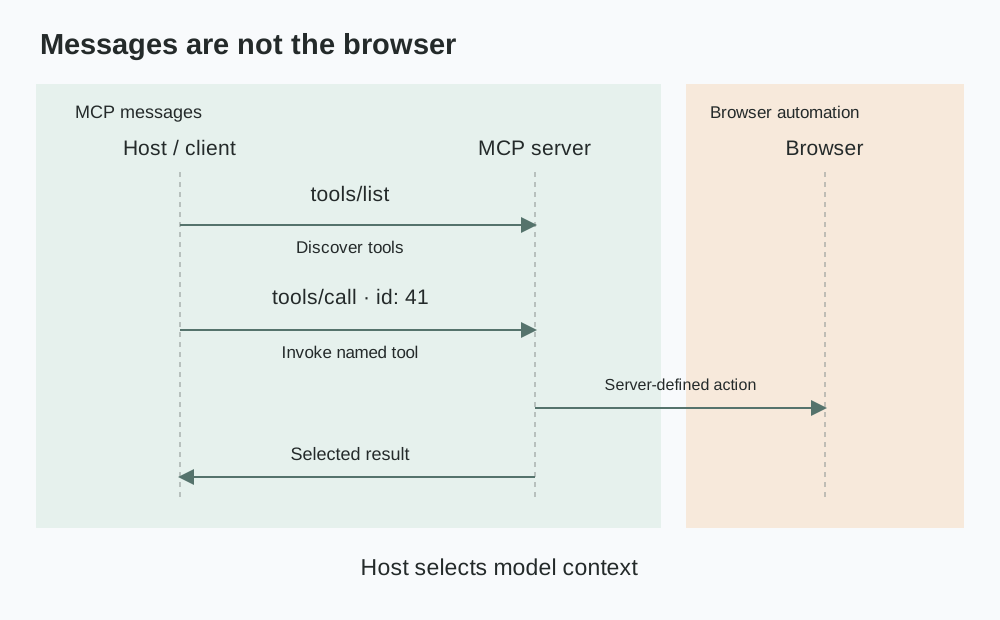
The MCP architecture specification separates the host application from its clients and servers. The host manages the AI integration and context aggregation. A client maintains a connection to one server; that server offers capabilities through the connection. A browser automation server then controls a browser through its own implementation. MCP does not replace the browser's automation interface or describe every command the server sends downstream.
An application can therefore have a valid MCP connection without a correctly configured browser. Successful protocol initialization establishes a connection's negotiated capabilities, not the Chromium executable, profile or page state. The Puppeteer MCP configuration guide covers the separate launch problem. Those settings belong to the server's implementation rather than to the standard tools/call envelope.
The same separation applies in the other direction. A browser may render a page correctly while the host excludes an image result from the model's context. A screenshot returned over the connection is evidence of a tool result, not evidence that a particular model consumed its pixels. To answer the latter question, inspect the host's actual context assembly and supported modalities. The agent launch and ownership discussion distinguishes process evidence from agent-visible results; the additional contract here is the message that crosses between them.
The figure describes ownership, not a packet capture. A real deployment may run the server locally or remotely. Moving it off the laptop changes where the browser and its storage are operated, but does not make the host cease to control its model integration. Likewise, using a local server does not establish that its output stays local once a host sends context to a remote model service.
The useful deployment question is consequently not just where the server runs. It is which actor owns each copy: the browser state directory, the server's result, the host's conversation record and any downstream model request. Those copies can have different retention policies. MCP's host/client/server architecture identifies responsibilities; it does not certify a retention period for every implementation.
Discovery describes a tool, not its browser implementation
The tools specification defines tools/list for discovery. Each tool has a name, an input schema and descriptive information; it may also declare an output schema and annotations. Pagination matters: a first listing can include a cursor rather than the complete catalog. A host that ignores later pages can present an incomplete set of capabilities despite having a healthy server connection.
The inputSchema describes the accepted arguments. It does not prove that the server enforces application authorization, that a page element still exists or that a human approved the action. For example, an illustrative tool named fixture_read_status might accept a public fixture identifier. That name is not an MCP standard, and another server is free to expose a different name and parameter shape for the same underlying browser task.
Descriptions help a model choose among tools, but the text is not an executable guarantee. The tools specification also warns that annotations from untrusted servers must be treated as untrusted. A claim that an action is read-only should therefore be checked against the server's actual implementation and authority, not promoted into a permission grant because it appeared in discovery metadata.
There are three separate compatibility questions:
| Layer | Contract being checked | A successful check does not prove |
|---|---|---|
| Protocol | Client and server understand the negotiated MCP messages | That a particular browser tool exists |
| Tool catalog | Tool name and inputSchema match the caller | That the browser is in the intended session |
| Application | Current target and authorized action match the task | That transport success means task success |
A tool-list change can affect model selection even when the protocol version is unchanged. Renaming a tool, widening its arguments or altering a description changes the available action interface. Keep a versioned catalog with the application integration so a failed invocation can be traced to the actual names and schemas the host discovered. A generic statement that both components support MCP is too coarse to diagnose an argument rejected by a particular server.
Browser tools also need scope that the protocol cannot invent. If the server has multiple tabs, the tool's definition must make its tab-selection behavior understandable. A request id does not fill that gap. A host must not assume that sending two differently numbered requests isolates them into different browser contexts. Session selection belongs in documented tool semantics, server configuration or a separate application contract.
What a call and its result actually carry
A tools/call request supplies name and arguments inside a JSON-RPC envelope. The id lets the client correlate a response, including when other requests are in flight. It is not a browser session identifier and does not itself request a fresh profile. The following is an illustrative exchange for an owned fixture, not captured traffic or the interface of a named browser server.
{
  "jsonrpc": "2.0",
  "id": 41,
  "method": "tools/call",
  "params": {
    "name": "fixture_read_status",
    "arguments": { "fixtureId": "public-status-7" }
  }
}
An illustrative successful reply can include both text and machine-readable content:
{
  "jsonrpc": "2.0",
  "id": 41,
  "result": {
    "content": [{ "type": "text", "text": "The public fixture is ready." }],
    "structuredContent": { "ready": true, "pendingJobs": 0 },
    "isError": false
  }
}
The reply's structuredContent is a server-produced JSON object. It is not the model's structured-output feature and does not establish that an LLM validated the values. If the tool declares an outputSchema, the specification requires the server to produce conforming structured output and recommends client validation. A host can use that validation before accepting pendingJobs as a numeric field. The schema still cannot establish that the underlying observation was current or truthful.
The two representations can also disagree. A text sentence saying that the fixture is ready and a structured field saying ready: false should be treated as a contradictory result, not resolved by choosing the more convenient half. The application needs a declared interpretation rule, or it should reject the inconsistency. Output validation is valuable precisely because the transport can succeed while the returned content is unsuitable for the task.
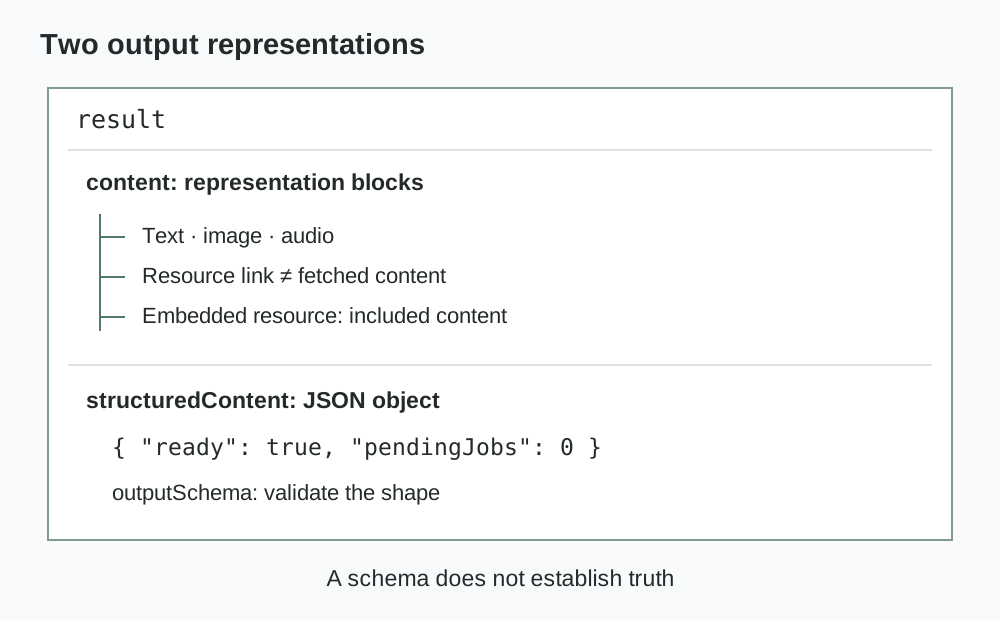
The content array supports more than text. Images and audio have their own content forms; resource links refer to material that is not necessarily included in the reply, while embedded resources carry content in the result itself. The specification notes that resource links returned by tools need not appear in resources/list. A host must not treat absence from that listing as proof that a returned link is invalid, or treat a link's presence as proof that its referenced content has already been fetched.
This distinction is important for privacy accounting. Returning a link, fetching the referenced artifact and sending its contents to a model are separate events. An audit that records only the original tools/call response may miss a later resource fetch. Conversely, a record containing a screenshot URI does not prove that image bytes crossed into the model request. Follow actual resource handling rather than estimating disclosure from a filename.
Browser state has a separate lifetime
The pinned Playwright MCP documentation gives a concrete implementation example without making its behavior universal. It documents persistent profiles that preserve logged-in state and isolated sessions whose storage does not persist after closure. It also documents shared browser-context reuse across connected clients. These choices describe state ownership and lifetime; they are not consequences of a JSON-RPC request number.
A server can return a short accessibility snapshot while its browser retains cookies and local storage. Later calls can observe pages influenced by that retained state even if no tool explicitly returned the storage values. The model may therefore receive account-specific page information without ever receiving the cookie that selected the account. Keeping a credential out of the reply reduces one disclosure path, but does not make the resulting page representation non-personal.
The reverse possibility also matters. A narrowly scoped read-only page tool and a broad evaluation or network-inspection tool can expose different parts of the same session. The pinned documentation lists network-request inspection capable of showing headers and bodies. Whether sensitive material becomes visible depends on enabled capabilities, the actual request and the result handling. It is incorrect to claim that browser secrets categorically never cross MCP because the protocol lacks a field named cookies.
Separate three lifecycle records: the MCP connection, the browser context and the host conversation. Closing a connection is not a general protocol promise that the other two were destroyed. A persistent user-data directory can survive a process restart, and a saved conversation can survive deletion of that directory. The documented server mode and host policy determine the actual relationship.
For an account-bearing workflow, assign a browser context to the authorized task before invoking tools. If a server shares one context across clients, a new client connection alone is not an isolation boundary. This is a configuration and ownership question, not a reason to rewrite page-visible browser values. BotBrowser's Playwright integration documentation covers the explicit executable and profile handoff; it does not promise isolation between MCP clients or deletion of host transcripts.
Read the error channel before deciding to retry
The tools specification distinguishes protocol-level errors from tool-execution errors. An unknown tool or invalid request can be represented by a JSON-RPC error. A tool that executes and encounters a task-level failure can instead return a result carrying isError: true. In the second case, the request still has a result envelope; treating every result as a successful browser action loses the failure information the server supplied.
| Observation | What it establishes | Appropriate application decision |
|---|---|---|
JSON-RPC error | The request failed at the protocol/tool-dispatch level described by that error | Inspect the method, tool catalog and arguments before resubmission |
result.isError: true | The tool reported an execution failure | Read the returned failure detail and the tool's action semantics |
| Valid result with no requested field | The response arrived, but the task's data contract is incomplete | Reject the missing field rather than inventing its value |
| Connection lost after an action began | The caller lacks a conclusive reply | Check authoritative application state before repeating a write |
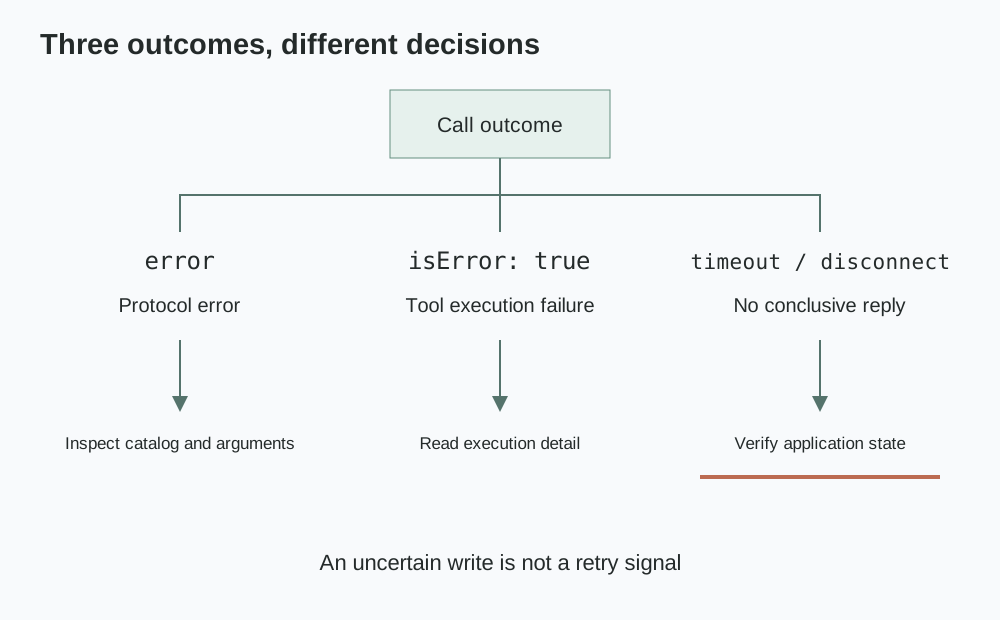
The last row is an application inference, not a special MCP guarantee. A connection can disappear after a button triggered a server-side mutation but before the tool returned. Neither a timeout nor the absence of a reply proves that the mutation did not occur. For an authorized write, use the application's own status or idempotency mechanism when available. If that evidence is unavailable, an operator must resolve the uncertain outcome rather than let the agent guess.
Even an explicit tool error requires context. A tool may read a page, attempt an interaction and fail while collecting its final screenshot. The error can describe the screenshot step without undoing the earlier interaction. The protocol's error channel tells the caller that execution was not clean; only the tool's semantics and application evidence determine which effects remain. An integration that collapses every error to a retryable boolean discards that distinction.
Error handling also shapes disclosure. A failure result can contain page text, console material or diagnostic artifacts that a successful result would omit. Review the failure path's output policy as well as the nominal response. Logging complete errors to a long-lived transcript may create an additional copy of account data, even when the normal tool result is deliberately short.
Choose a representation and a disclosure boundary
The pinned Playwright MCP README describes browser_snapshot accessibility snapshots and browser_take_screenshot screenshots as distinct outputs, with configuration controlling response representation. An accessibility tree is useful for names, roles and control references; a screenshot preserves visual arrangement. Neither is a complete record of browser state. A screenshot can miss content outside the captured region, and an accessibility representation cannot be assumed to preserve the exact visual presentation.
Choose according to the authorized decision. A task reading a public status label may need a small structured value and its observation context, not a whole page image. A layout comparison needs visual evidence rather than a prose claim that the page looked correct. An investigation of one failing request needs the relevant redacted request fields, not every request made by the browser. Data minimization starts in the server's tool output, before a host has a chance to trim it.
The server is not the only control point. The host may select, reformat or summarize returned content before adding it to model context. Record the distinction between the received tool result and the material actually forwarded. A shorter model request does not erase any full artifact already saved by the server or host. Storage and forwarding policies need separate owners.
The pinned implementation documentation explicitly says Playwright MCP is not a security boundary. It also describes secret replacement as a convenience rather than a security feature and file-access restrictions as guardrails rather than a secure sandbox. Those statements rule out interpreting a friendly tool wrapper as an operating-system permission boundary. Use actual process, filesystem and account permissions for the deployment's authority limits.
For a local integration check, an owned fixture can expose one public status label, a deliberately absent field and a harmless resource link. Inspect the raw MCP reply and the host's assembled context separately. A successful check can establish that the selected server returned the intended representation and that the host forwarded the intended subset in that configuration. It cannot certify all enabled tools, unknown error paths or a different host's retention behavior. No such browser or MCP execution is claimed here; the examples and figures are derived from the cited specifications and pinned documentation.
FAQ
Is MCP the same as Chrome DevTools Protocol?
No. MCP exposes capabilities to an AI application's client. A browser server may use a browser automation library or a browser protocol downstream. The MCP envelope does not require a caller to receive every downstream command or browser event.
Does a resource link mean the model received the file?
Not necessarily. A returned link, a subsequent fetch and model-context inclusion are different operations. Check the host's resource handling and actual model request rather than infer delivery from the link alone.
Can two clients safely share one browser context?
Only when the application's task and account policy permits that sharing. Separate MCP connections do not by themselves establish separate storage, tabs or authorization. A documented shared-context option must be evaluated at the browser-state layer.
Does an output schema make page text trustworthy?
No. outputSchema constrains structured content's shape. It cannot make a page's instruction authoritative, establish the freshness of an observation or approve a mutation. Schema validation and trust decisions solve different problems.
Sources
- MCP architecture, revision 2025-06-18
- MCP tools, revision 2025-06-18
- Playwright MCP README pinned to a62ea28698af6d9bc89438bcec50c63377cef957
- BotBrowser Playwright integration
Practical conclusion
Browser automation MCP carries named tool invocations and selected result representations, not a universal copy of a browser. Check the discovered schema, validate the returned structure and distinguish execution failures from uncertain application effects. Before attaching an account-bearing browser, establish which tools can expose its state, which outputs the host forwards and which copies remain after the connection closes.
This article is part of the guide: Browser Deployment and Release: Operations Map
Related Articles
Headless Browser for AI Agents: Launch and Tool Boundaries
DeploymentPlaywright MCP Setup for a Custom Chromium Build
DeploymentPuppeteer MCP Server Configuration for a Custom Build
DeploymentStagehand Browser Automation with BotBrowser
DeploymentService Worker Updates and Client Coherence
Getting StartedWhat Is a Web Crawler? Five Stages of a Crawl
Run the same check in BotBrowser
Load a profile, keep the signals you just read about consistent inside the browser, and confirm the result on your own machine before a rollout.