Web Scraping AI: What the Model Does Not See
See how an AI scraping tool reduces browser facts before a model receives them, and how to verify extracted values without mistaking context for the page.
BotBrowser Team
Want the structured docs for Fingerprint?
This article lives in the editorial library. For step-by-step setup, reference material, and ongoing updates, jump into the docs section.
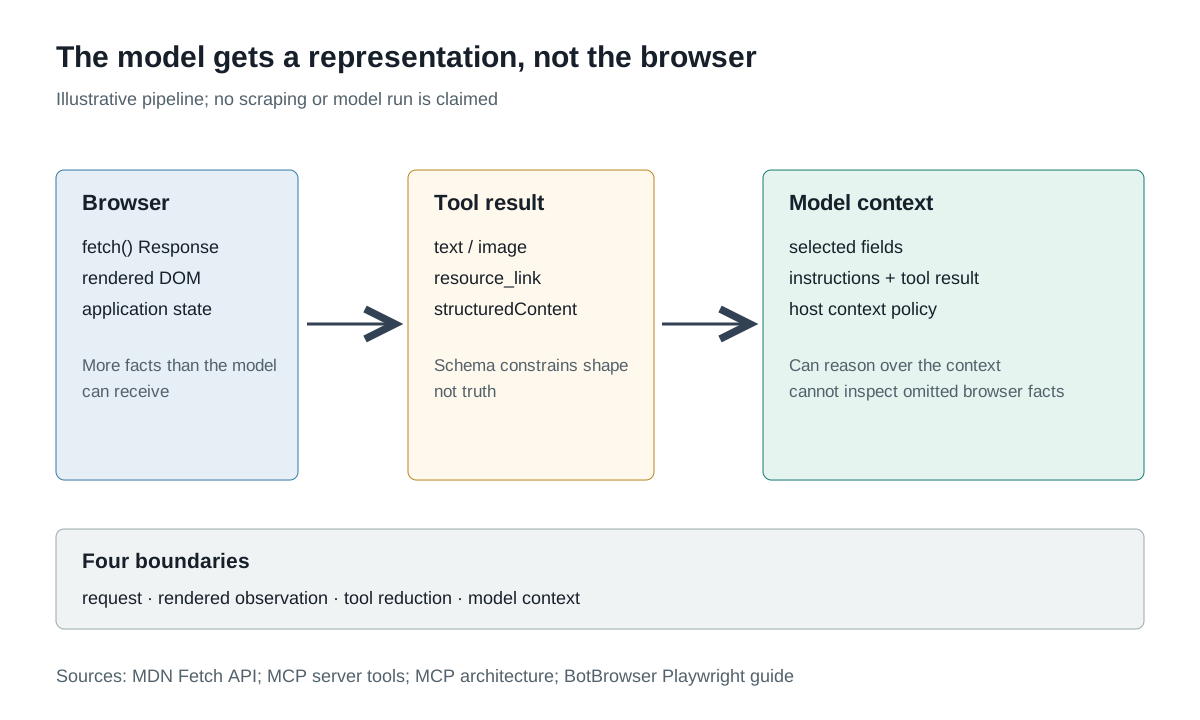
An AI-assisted scraping pipeline can return a tidy list of products while the model never sees the complete browser state that produced it. It may receive an accessibility snapshot, a text extraction, a screenshot, a selected JSON object or a tool message. BotBrowser provides a controlled Chromium process with documented profile and Playwright launch inputs; it does not define which page facts a tool forwards to a model, what the model retains or whether an extracted value is correct. The model's context is a representation of the work, not the work itself.
This boundary differs from choosing a hosted scraping service. The web scraping API evidence guide asks what a service decides on the caller's behalf. The agent decision-freshness analysis asks whether an observation remains valid when an action occurs. This page asks what survives after a browser or tool result enters the model's context, and which claims still require evidence from another layer.
TL;DR
- A browser can execute a request, render a page and expose many facts; a tool result contains only the content its implementation chooses to return.
fetch()returning aResponsemeans headers arrived. It does not mean the HTTP status was successful or that a body was parsed.- MCP tools can return text, images, audio, resource links or embedded resources, with optional structured content and output schemas. A valid schema describes shape, not truth.
- A model context can omit a field, a failed request, a hidden element, a redirect or a discarded row without the model knowing the omission exists.
- Preserve provenance for every consequential field: source URL, retrieval method, browser/tool version, extraction rule, validation result and the evidence that was not returned.
- Verification of an extracted claim may require the raw response, a fresh owned page observation, an application endpoint or an operator decision. The model cannot invent that missing layer.
Contents
The model receives a selected representation
Consider an illustrative product page. The browser receives HTML, runs scripts, requests API data and may render a virtualized list. A tool can then return a text snapshot with five product names, a screenshot of the first viewport or a structured array containing title and price. Those outputs are not interchangeable observations. They differ in what they contain, how they were produced and what a model can infer from them.
The MCP server tools specification describes tools as model-controlled capabilities invoked through tools/call. It lists content types such as text, images, audio, resource links and embedded resources. It also allows structured content in a JSON object and optional schemas for output. The protocol's architecture assigns context aggregation and AI integration to the host. Those statements describe a protocol and ownership model, not a universal rule that a tool returns the entire browser or that a model sees every returned byte.
The table below uses illustrative values only:
| Boundary | Example | What the model can know | What remains outside its context |
|---|---|---|---|
| Browser request | A product page and an API request were made | Only what the tool reports about the result | Full network trace, unrelated requests and raw timing |
| Rendered page | Five visible cards and a hidden template | The representation the tool chooses to include | Offscreen DOM, inaccessible content and application state |
| Tool reduction | [{title, price}] | Exactly the returned fields and metadata | Discarded rows, source nodes and why values were selected |
| Model context | A prompt containing the array | The array and accompanying instructions | Browser process, credentials, cache and remote service internals |
The first row is not made more complete by a successful browser launch. BotBrowser's Playwright guide shows how a launcher passes the executable, profile and proxy inputs; those inputs can make the browser environment explicit. The launch does not prescribe a scraping result schema or place all browser observations into a model prompt.
A response object is not a successful extraction
HTTP is one place where a concise tool result can hide an important distinction. The MDN Fetch API reference states that fetch() returns a promise that resolves to a Response as soon as the server responds with headers, even when the response is an HTTP error status. Code still needs to inspect status, headers and body and decide what the body means.
The retrieval and extraction stages have separate acceptance checks. The crawler versus scraper boundary keeps a retrieved URL from being mistaken for a validated record before that record reaches a model.
An illustrative tool result might say:
{
  "ok": true,
  "items": [{ "title": "Example item", "price": 19.99 }]
}
The object shows that a tool chose ok: true, but not why. It might mean the tool's request completed, its parser found a JSON array, a page rendered without an exception, or a business rule accepted a row. Those are different success boundaries. A schema could validate ok as boolean and items as an array; it cannot decide whether the model's summary of that array is truthful or whether the page displayed more items.
This is why the MCP tools specification distinguishes protocol errors from tool execution errors, and tells clients to validate tool results before passing them to the model. Validation reduces malformed input, not representational loss. The model can reason about the result it receives; it cannot see the raw Response, the complete page or the tool's discarded candidates unless the surrounding application preserves and forwards that evidence.
Reduction removes more than whitespace
Text extraction commonly normalizes whitespace, removes markup and selects a visible content region. Each operation can improve context efficiency, but also changes what can be checked. Suppose a page has a grid of products and a details panel. An accessibility snapshot may retain the visible names but omit a price that appears only in a tooltip. A screenshot may show the price but not the underlying record key. A JSON extraction may return a price but not the currency, inventory status or page revision that made it meaningful.
Reduction is not automatically wrong. The useful question is whether the omitted facts were needed for the reader's intended claim. A price monitoring job may need amount and currency. A change detector may need stable product key and revision. A search index may need canonical URL and visible title. A model asked to summarize a returned array cannot reliably invent fields the extractor never included.
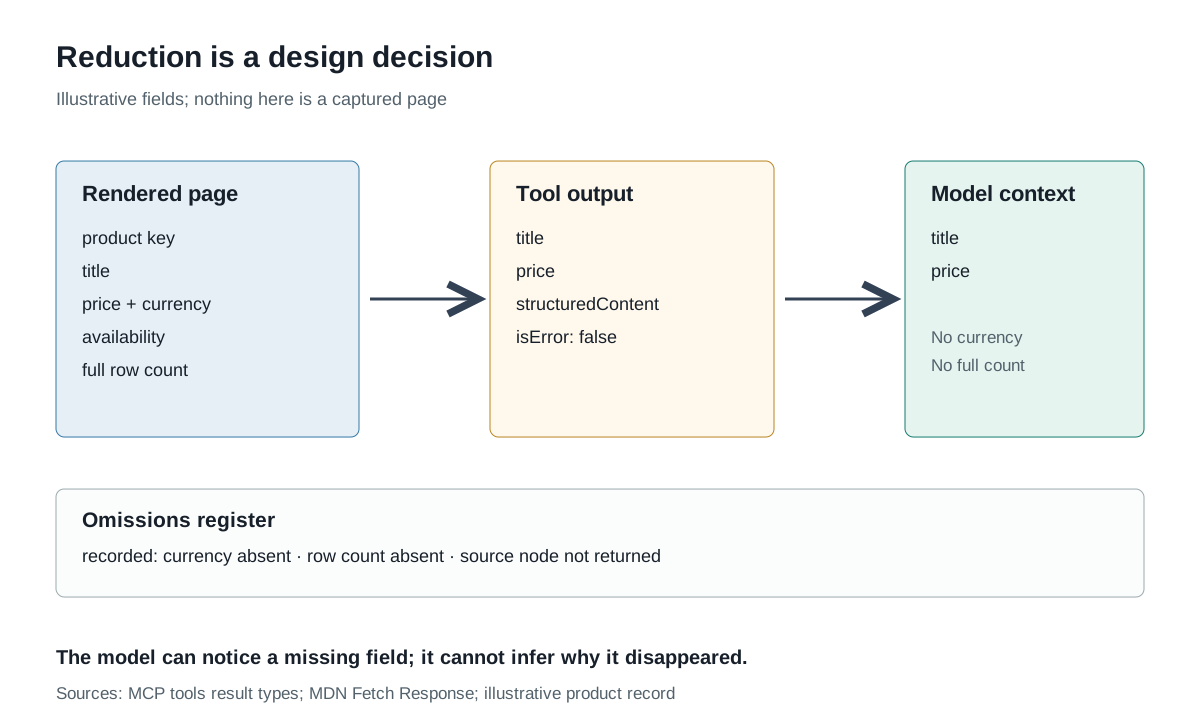
The model context should not be described as a miniature browser. It may contain a text snapshot without network headers, an image without DOM nodes, or a structured record without the source text used to derive it. A result may be internally valid and still be a lossy description of the page. The correct response is not to add every possible field; it is to name the fields that support the decision and preserve the evidence needed to verify them.
A structured field needs an extraction history
A structured result looks authoritative because it has keys and types. Its history is more important than its shape. For the illustrative price: 19.99, record how the extractor obtained that number: a selector or role-based target, a JSON response field, an OCR region, a text pattern or a human-entered value. These methods have different failure modes and verification costs.
| Extraction method | Illustrative origin | Supports this claim | Does not establish |
|---|---|---|---|
| Structured data | An application JSON field | A parser read that field from this response | The product is available or the price applies to the intended region |
| DOM snapshot | A visible text node with nearby currency | The text appeared in that rendered representation | A stable record key or the hidden full catalogue |
| Image or OCR | A screenshot region | Pixels at that region resembled a number | The original value, unrendered markup or all page rows |
| Model extraction | A model parsed an earlier text representation | The model proposed this value from its context | That the proposal matches the source |
The fourth row is intentionally last. An AI model can help extract or classify from a supplied representation, but its own output is not independent proof of that representation. A schema check, a confidence statement or a second model call can be useful tests; none observes the browser unless the tool gives it a new browser observation. The source page, tool version and extraction rule belong beside the result.
The model cannot verify what it was never given
The model can compare fields within its context. It can notice that an array contains no currency field or that a count conflicts with the number of visible entries. It cannot notice a row the tool discarded unless the tool reports a total, a pagination cursor or a validation failure. It cannot infer that an HTTP error response carried a useful diagnostic body if the tool returned only ok: false. It cannot prove a missing field was absent from the browser rather than absent from the representation.
This is a practical limit of any model-driven extraction loop. A model can propose a query for missing evidence, but the host must decide whether the tool is allowed to fetch it and whether the result is authentic. An MCP host coordinates context and server connections; a browser process can navigate and render; neither makes a remote application's answer authoritative for every claim. The web scraping API boundary already separates a returned artifact from a provider's internal decision. The same separation applies after a tool result reaches a model.
Verification therefore needs a named source for each decision-bearing field. For an owned page, that may be a deterministic JSON fixture plus a rendered-text assertion. For a permitted external workflow, it may be a documented application endpoint or an operator-confirmed record. For an image-only source, the limit must remain visible: an OCR result is a derived value, not the original page.
Trace a model summary back to source evidence
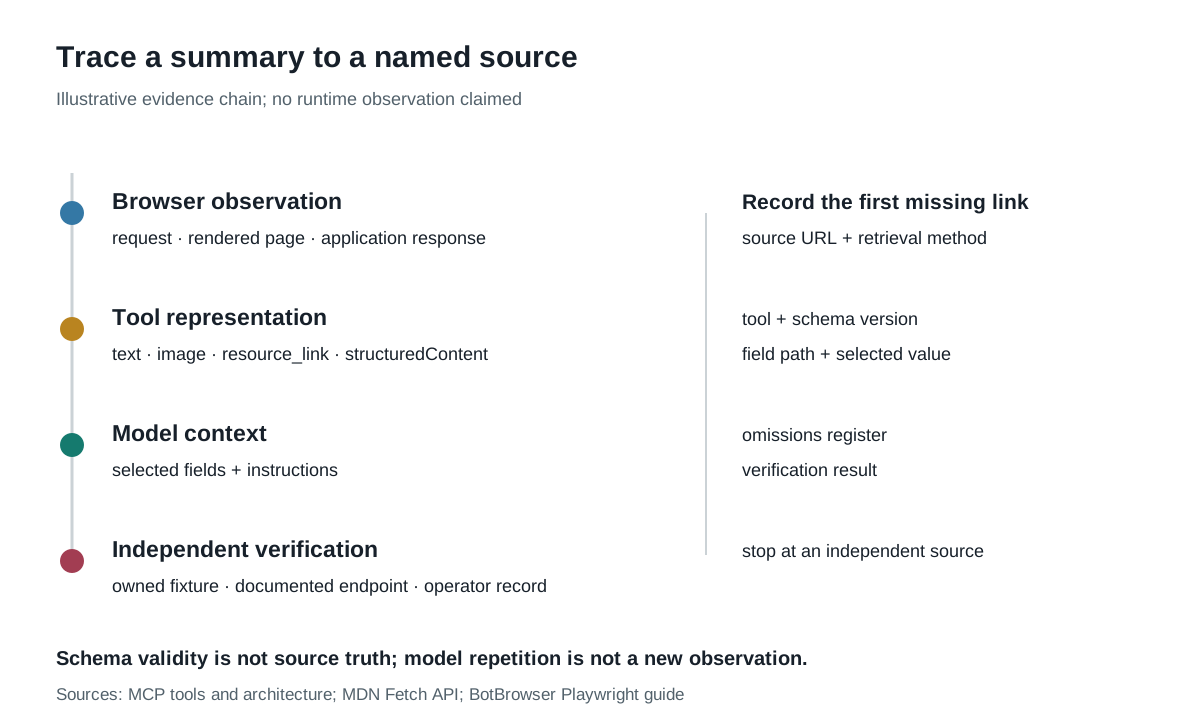
A useful summary should be reversible through a small chain of references. Start with the statement the model produced, identify the fields it cited, locate those fields in the tool result, and then identify the browser or network observation that produced them. If any link is missing, the summary can still be useful as a hypothesis, but it should not be promoted to a verified scrape.
Consider an illustrative statement: “The first page contains five products and the cheapest costs 19.99.” A reader should be able to ask four questions. Which tool call returned the products? Did that call cover all rows or only the first viewport? Which field supplied the price, and did it include a currency? What independent check confirms that the page and the tool agree? A model answer that repeats the number without those references has not answered them.
This chain also exposes an easy category error. A model may quote its own earlier sentence as if that sentence were a source. Repetition can make a result sound stable, yet it adds no new observation. The evidence chain should end at a page response, a browser snapshot with a defined method, a deterministic fixture or an application-owned endpoint. Another model response can be a review step, but it is not the original evidence.
Keep references compact. A tool-result digest, exact URL, retrieval timestamp, field path and fixture revision can be enough for an owned test. Do not store credentials, cookies or complete page text merely to make the chain look complete. The goal is to prove the claimed field, not to retain every byte that happened to pass through the browser.
The reverse check is equally important. If the tool result contains a field the model summary omitted, do not assume the model made an error. The summary may have followed a narrower task, or the field may have been excluded by the host's context policy. Record which representation reached the model and which task instruction selected the field. That distinction keeps the model's decision separate from the tool's output and the browser's evidence.
Finally, state the stopping point. A verified result for one page does not prove the same extraction rule works for another region, locale or account state. A price can be present in a search card and absent from the detail response. A product identifier can be stable while its position changes. Treat a new source state as a new evidence boundary and rerun the appropriate check instead of extending the old summary by inference.
Design a verification path before scaling the model
A compact evidence record can travel with an extracted result without copying the entire page. It should name the artifact, the reduction method and the first unresolved question:
| Record field | Illustrative value | Purpose |
|---|---|---|
| Run and source | run-04, https://example.test/products | Separates the browser session from the claim |
| Retrieval method | browser-json, screenshot-ocr, dom-snapshot | Names how the representation was produced |
| Tool and schema | catalog_extract@2, outputSchema-v3 | Keeps code and contract revisions visible |
| Selected fields | title, price, currency | Shows what the model actually received |
| Omitted evidence | full row count, pagination cursor | Makes absence an explicit fact |
| Verification | owned fixture v7 or application endpoint | Names an independent check |
| First mismatch | price source field absent | Routes the next investigation |
This record is not a universal fingerprint and does not need to include sensitive content. Its purpose is to make the representation boundary visible. A model-generated summary can be useful, but a consumer should be able to trace the summary back to the tool output and from the tool output back to a defined observation. If that chain is missing, the right conclusion is “not independently verified,” not “the page has no such value.”
The verification path also bounds cost and privacy. Sending a full screenshot after every extraction may preserve more detail but can expose unrelated personal content and multiply storage. Returning only the fields needed for a decision may be safer, provided the tool records the reduction and the application has a supported way to verify the result. The aim is sufficient evidence for the claim, not maximal context.
FAQ
Does an AI scraper see the whole web page?
No general answer follows from the label. The model sees the representation a host or tool passes to it. That may be a text snapshot, image, structured object or subset of a browser observation.
Is a successful tool result the same as a successful HTTP response?
No. The Fetch API can resolve to a Response before status checking, and a tool may report a different success condition. Keep protocol, HTTP, parsing and application outcomes distinct.
Does an output schema prove the extracted price is correct?
No. A schema can validate type and shape. Correctness requires a source, extraction history and an appropriate verification method.
Can the model request the missing information itself?
It can propose a tool call if the host enables one. The host controls permissions and the tool decides what it returns; the model still cannot observe arbitrary browser or server internals.
Sources
- MDN Fetch API
- Model Context Protocol server tools specification
- Model Context Protocol architecture
- BotBrowser Playwright setup
Practical conclusion
Treat the model context as a reduced representation produced by a browser or tool, not as a complete browser observation. Preserve the source, retrieval method, tool and schema versions, selected fields, known omissions and verification path. A model can help interpret what it receives; the application must prove the facts that matter. BotBrowser can make the browser process and profile inputs explicit, but it cannot fill missing evidence, make a schema true or guarantee a site outcome.
This article is part of the guide: What Is a Browser Fingerprint? Canvas Fingerprinting
Related Articles
Web Scraping API: What the Response Leaves Out
DeploymentBrowser Automation MCP: What the Protocol Carries
Getting StartedHeadless Browser for AI Agents: Launch and Tool Boundaries
DeploymentBrowser Automation Agent: When Decisions Go Stale
Getting StartedWeb Crawler vs Web Scraper: Outputs and Failure Boundaries
Getting StartedWeb Scraping Browser: Which Kind Do You Need?
Run the same check in BotBrowser
Load a profile, keep the signals you just read about consistent inside the browser, and confirm the result on your own machine before a rollout.