Imperva Bot Protection: What It Declares
Separate Imperva product declarations, browser-visible evidence and edge decisions while accounting for Cloud WAF, gateway and Kubernetes deployment shapes.
BotBrowser Team
Want the structured docs for Fingerprint?
This article lives in the editorial library. For step-by-step setup, reference material, and ongoing updates, jump into the docs section.
Imperva Bot Protection can make a browser question difficult because its public product page describes client interrogation, behavior analysis, connection characteristics and threat intelligence in one detection model. BotBrowser can make declared browser surfaces repeatable for authorized testing, but it cannot establish Imperva's hidden classification inputs, account history or response policy. The first useful step is to separate what Imperva publishes, what an owned page can actually observe and what only the deployed protection layer can decide.
The Imperva Advanced Bot Protection page says its approach combines direct client interrogation, behavioral analysis, machine learning, connection characteristics and threat intelligence feeds. It also says the system uses “over 700 dimensions” and describes a “unique fingerprint.” Those are product declarations. The page does not publish a field-by-field manifest of browser APIs, server variables or customer configuration for every deployment.
TL;DR
- Imperva's product statement names several detection categories and a dimension count. It does not publish a universal collector schema.
- A 700+ dimension claim is not the same as 700 browser properties. It spans vendor language about client, behavior, connection and intelligence inputs.
- The generic Imperva privacy statement describes website and service contexts. It is not proof that every Bot Protection installation collects every listed category.
- Cloud WAF, WAF Gateway and Elastic WAF have different deployment and management shapes. A browser investigation must state which one it concerns.
- A page-visible browser value can support a statement about that owned page. It cannot prove the vendor's verdict, account linkage, retention or access decision.
- BotBrowser can control documented browser surfaces under an authorized profile; it does not alter the remote service's policy or guarantee acceptance.
Contents
- What Imperva publicly declares
- A privacy statement is not a collector schema
- Deployment shape changes the evidence boundary
- What a page can observe, and what it cannot
- Read the evidence by layer
- What BotBrowser can and cannot change
- Practical conclusion
What Imperva publicly declares
Imperva's Advanced Bot Protection description is useful because it distinguishes several families of input. It names direct client interrogation, behavior analysis, machine learning, connection characteristics and threat intelligence. It also describes customizable responses, real-time monitoring and reporting. Each statement belongs to the offered product, not to one observed customer deployment.
The phrase direct client interrogation supports the expectation that a browser-side component may participate. It does not reveal which browser interfaces are called, in which order, under which page conditions or whether a given customer uses every capability. The public page also mentions device fingerprinting in an FAQ answer. That broader product vocabulary is less specific than a source-attributed JavaScript trace.
The product page claims detection across “over 700 dimensions.” The count is an upper-level vendor description. It should not be relabeled as 700 browser APIs, 700 pieces of personal data or 700 fields sent in every request. The page's own categories show why: connection properties, behavior and intelligence feeds are not all browser values, and some may be evaluated only in particular service configurations.
| Public statement | What it supports | What it does not establish |
|---|---|---|
| Direct client interrogation | A browser-side collection layer may exist | Which API or script performs it |
| Behavior analysis | Activity over an interval may matter | The interval, event schema or private decision rule |
| Connection characteristics | Request- and network-level properties may matter | A specific header, route or proxy effect |
| Over 700 dimensions | Imperva describes a broad feature space | 700 browser fields or a fixed request body |
| Unique fingerprint | Imperva describes a correlation model | A stable human identity or public field list |
The declaration table is a reading aid, not a vendor audit. It stops a product statement from becoming a claimed field inventory. For an owned deployment, the next evidence belongs to the actual implementation or an authorized observation of what the page does.
A privacy statement is not a collector schema
Another vendor applies the same split with a different published processing list: the F5 Bot Defense declaration map quotes the four categories F5 names and keeps the customer's own deployment record separate from them.
The Imperva privacy statement lists Device and Usage Data for users of its websites and apps. Examples include IP address, browser type and settings, operating system, pages viewed, content and buttons interacted with, control inputs such as mouse clicks “and other related browser information,” network and traffic data, and region derived from IP address. Those categories are relevant to privacy review. The document's last-updated date is March 10, 2021, so its age makes a current deployment-specific review more important.
Their scope is broader than one Bot Protection sensor. The statement begins by describing interactions with Imperva's websites and mobile applications and other interactions that reference the statement. A visitor to a customer's application is in a service context where the customer and Imperva may have different processing roles and contractual terms. The statement does not claim that every category is collected by every product or every installation.
That distinction prevents two opposite mistakes. A privacy category is not automatically present in a page script, and a page script without a matching category does not prove the edge saw nothing. Request metadata may be visible at a service boundary even when no browser API was invoked. Conversely, a visible browser value is not proof that the service retained it or used it in a particular decision.
For an owned site, record the deployment, the public service configuration and the applicable privacy notice as separate artifacts. A generic “browser data” label is too coarse to answer a field-level question, while a list of every possible product dimension would overstate what one configuration uses. The useful inventory names the purpose, the evidence source and the responsible processing owner for each category.
The browser fingerprinting overview provides a separate taxonomy of request, navigator, rendering and application surfaces. Imperva's public categories can be compared with that taxonomy only as categories. A category match does not prove a browser read, and a missing category does not prove the edge is blind.
The 2021-03-10 date belongs to the privacy statement observed for this review. It is not a Bot Protection release date or evidence that no product documentation has changed since then.
Deployment shape changes the evidence boundary
Imperva's WAF product page presents multiple environments and names three relevant deployment models. Cloud WAF is described as a SaaS service managed through the Imperva Management Console. WAF Gateway is described as locally deployed and managed for applications that cannot move to the cloud and for data-sovereignty requirements. Elastic WAF is described as Kubernetes deployment with SaaS management.
Those shapes do not prove that Bot Protection's full feature set is identical across them. They do establish a safer way to ask about collection. A cloud-managed service may place operational telemetry and response policy in a vendor-managed console. A local gateway may involve a different data path and customer-managed infrastructure. A Kubernetes deployment may place some processing inside a customer environment while retaining a remote management plane. Each boundary needs its own evidence.
“Imperva collects X” is therefore incomplete without a deployment context. Ask which product and configuration receive the request, where the decision is made and which management plane receives logs or policy. The answer may differ by customer even under the same vendor brand.
The deployment distinction also affects what a browser can influence. A page-visible value is created in a document. A connection characteristic belongs to the request or network path. A response can combine those observations with service state and a customer's rule. A modified browser surface cannot retroactively change a request already received, and a changed response does not reveal which layer made the decision.
Use a deployment record before comparing two runs:
product: Cloud WAF | WAF Gateway | Elastic WAF
hosting: managed edge | local gateway | customer Kubernetes
request path: browser -> service -> origin
decision owner: vendor policy | customer rules | shared configuration
evidence: page observation | request record | authorized vendor or origin log
This is a research checklist, not a claim that the product labels map to a single architecture. Its purpose is to stop a browser experiment on one installation from being generalized to all Imperva customers.
What a page can observe, and what it cannot
An owned page can reliably observe what its own code reads and what its own browser environment exposes under a documented test setup. A page-visible canvas output, a navigator value, a media capability or a request initiated by page script can be recorded with its source, time and context. That evidence can answer whether the controlled page saw a value.
It cannot identify the entire input set of a remote vendor. The page does not necessarily see every request the browser sends, and cross-origin boundaries can hide response details. It also cannot see the vendor's historical records, account linkage or scoring model. A page that looks unchanged does not prove that the edge received no signals; a page that changes does not prove that the vendor used the changed value.
The edge-layer explanation and Cloudflare/DataDome response analysis show why response classification needs its own evidence. A challenge page, a block, a login redirect and an application error can all be visible at the browser, while the responsible rule or hidden decision remains outside the document.
The session itself adds another boundary. Browser context lifecycle and storage explains how page state and storage can differ between contexts. A new browser profile can change what the page appears to know about previous activity; it does not delete a vendor's server-side record or turn a new request into an unrelated person.
Browser-visible is not the same as browser-collected
A browser API can be available without the vendor reading it. A page can expose a value without sending it. A request can carry a value that the page script never read. That three-way distinction is a useful safeguard against overclaiming:
| Evidence | Supported statement | Missing evidence |
|---|---|---|
| API available in an owned browser | This browser exposes the surface | The vendor or page used it |
| Page script read with source attribution | This script read the value in that context | The value was transmitted or retained |
| Request observed at an authorized boundary | A request carried something | Meaning, purpose or vendor usage |
| Authorized vendor or origin record | The service recorded a decision or field | Still not the private model's complete inputs |
This is why a V8 event, a request capture and a vendor declaration should not be collapsed into one “collected data” row. Each answers a different question. A missing V8 log is an observation limit; it is not evidence of no collection. A visible browser value is not the vendor's decision record.
The privacy claims and product comparison guidance supplies the same discipline for vendor claims: name the scope, the evidence source and the missing system. Imperva's public description and a local browser trace cannot substitute for the other's missing half.
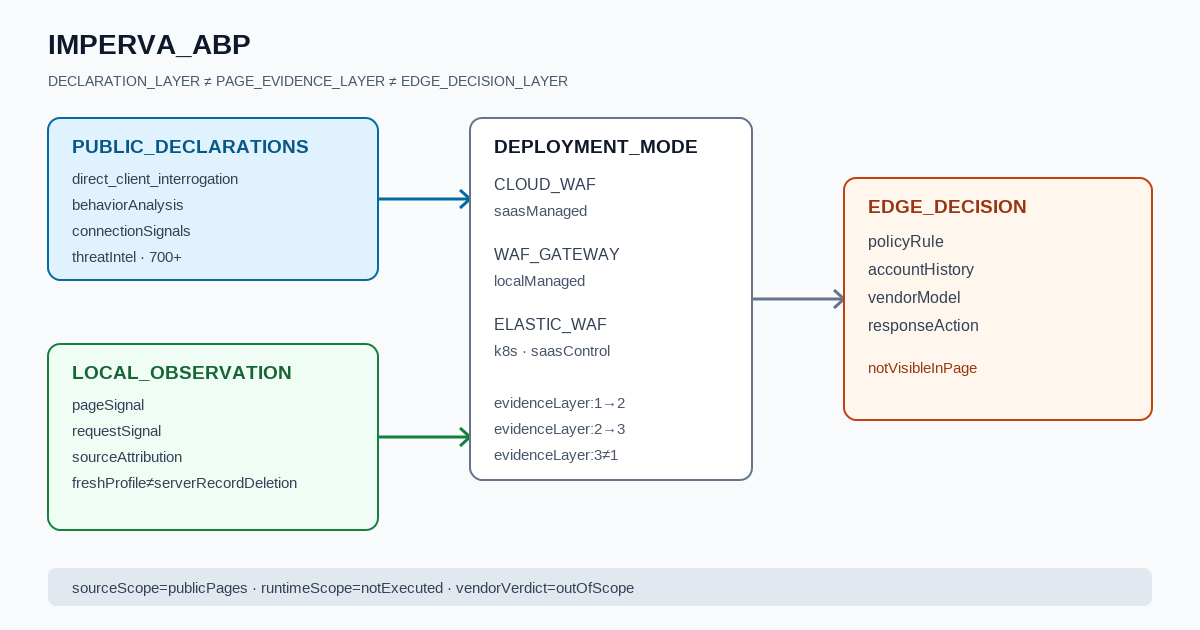
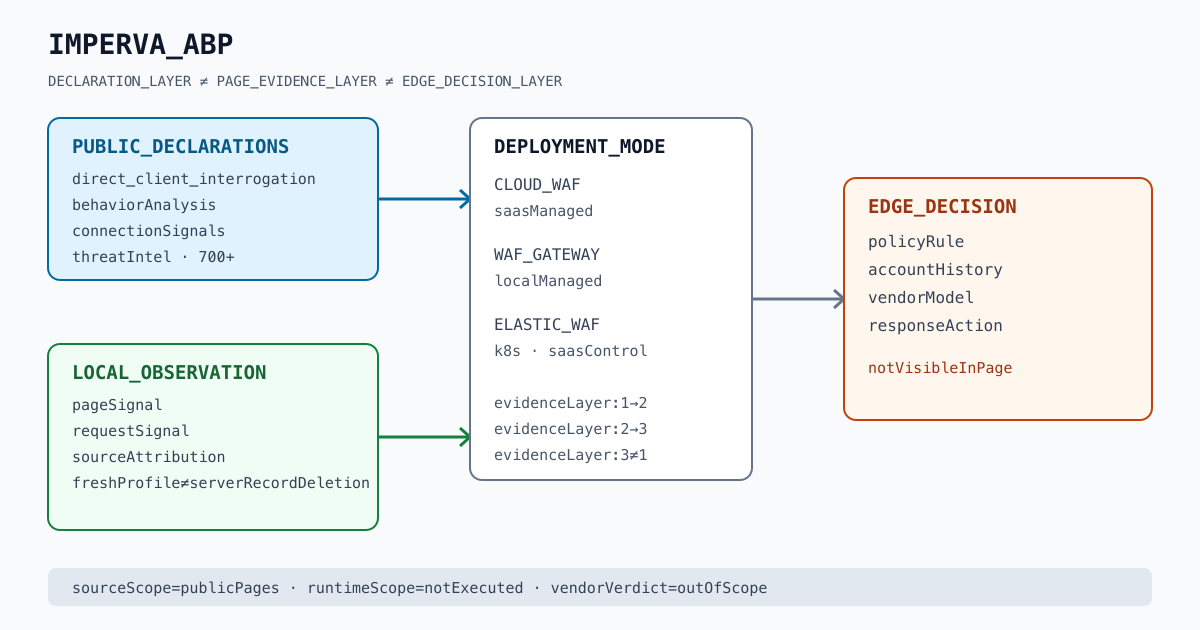
Read the evidence by layer
The useful artifact is not a list of suspicion labels. It is a three-layer record that keeps declarations, page evidence and edge decisions apart.
Layer 1: declaration
Start with the vendor's readable product and privacy pages. Quote the exact category and the date of the page where possible. Record whether the statement is about a product capability, a website privacy context, a mobile application or a customer service. Imperva explicitly mentions browser, device and interaction data in generic privacy language, but that does not establish a field list for Bot Protection.
Layer 2: page and request observation
Use an owned page or an authorized test fixture. Record the browser build, profile, origin, viewport, time and the observation tool. If you observe a browser API, preserve the script source or event attribution. If you observe a request, label its boundary and redact credentials, cookies and signed values. Do not infer the hidden classification from a change in the response.
Layer 3: edge decision
The response action belongs to the deployed application and service configuration. A challenge, block, redirect or ordinary page can be observed, but the decision owner is not necessarily the document. An authorized site operator can correlate a request with its logs or configuration; a visitor cannot reconstruct the same record from the page alone.
The automation detection overview describes the difference between browser and framework signals, and AWS WAF Bot Control shows one concrete edge rule model. The comparison is structural: both examples require the reader to identify which layer holds the evidence. Neither supplies Imperva's private configuration.
The layer record can be applied even when no protected page is available:
declaration: Imperva Advanced Bot Protection page, product categories only
page: owned browser surfaces; no protected-script claim
request: owned fixture request/response metadata with redaction
edge: unavailable unless an authorized operator supplies it
That is an honest result. It tells a security or privacy team what can be verified now and which record needs another owner. It avoids turning a product-level dimension count into a field inventory.
What BotBrowser can and cannot change
BotBrowser's fingerprint documentation describes browser-profile controls for surfaces such as graphics, fonts, navigator properties and timing. A declared profile can make an authorized browser comparison more reproducible because the relevant browser inputs can be recorded and repeated.
That is a boundary around the browser, not a control over Imperva's decision. BotBrowser does not select Imperva's detection model, change its retention, erase its account history, reveal its private policy or guarantee a response. It also does not turn a page observation into an edge record. The engine-versus-patch comparison explains why the implementation layer matters for consistency without claiming a vendor outcome.
For an owned site, a controlled profile can help separate browser-visible differences from network and application differences. Record the profile identity and the result as a comparison, not as a claim about a human identity or trust score. An unchanged page response is still compatible with a changed browser surface if the service uses other inputs, and a changed response is compatible with an ordinary application rule.
FAQ
Does Imperva collect 700+ fields from the browser?
No such field list is established by the public product page. The page describes a broad detection model and “over 700 dimensions”; those dimensions span client, behavior, connection and threat-intelligence categories and are not the same as browser APIs or personal-data fields.
Does the privacy statement list every Bot Protection signal?
No. Its website and service contexts list broad device and usage categories. It does not provide a universal per-product collector schema, and a category is not proof that every deployment collects it.
Do Cloud WAF and WAF Gateway have the same boundary?
They should not be assumed identical. Imperva describes Cloud WAF as SaaS-managed and WAF Gateway as locally deployed and managed. The data path, telemetry and management plane can differ, so record the actual deployment before comparing behavior.
Can a browser profile make an Imperva response predictable?
A profile can make documented browser surfaces repeatable for an authorized fixture. It cannot determine a remote service's classification, account history or policy. Treat the response as a separate edge observation.
Practical conclusion
Read Imperva Bot Protection through three layers. The public product page declares client interrogation, behavior analysis, connection characteristics, intelligence feeds and a broad dimension count. A page or request observation can establish only the specific browser-visible operation or exchange under the tested conditions. The edge decides with information, history and configuration that the page cannot reproduce.
Start with the deployment shape, then record declarations and observations separately. Keep the privacy statement attached to its actual scope. Do not turn a product count into a field inventory, and do not promise that a browser profile controls the vendor result. That separation is useful even when the only available outcome is an explicit evidence gap.
For the Azure product split, compare Azure WAF Bot Protection declarations.
Sources
This article is part of the guide: What Is a Browser Fingerprint? Signals and Layers
Related Articles
F5 Bot Defense: What It Declares and What a Page Sees
FingerprintAzure WAF Bot Protection: What Each Product Declares
FingerprintAkamai Bot Manager: Sensor Data and Privacy
FingerprintKasada Challenge Signals and Privacy Explained
FingerprintAWS WAF Bot Control: What a Client Actually Sees
FingerprintCloudflare Bot Score Evidence and Logs
Run the same check in BotBrowser
Load a profile, keep the signals you just read about consistent inside the browser, and confirm the result on your own machine before a rollout.