Browser Profiles for SEO Monitoring and SERP Tracking
How to keep the browser profile, locale, timezone, route, and session lifetime fixed so a SERP change can be told apart from a changed measurement environment.
Want the structured docs for Deployment?
This article lives in the editorial library. For step-by-step setup, reference material, and ongoing updates, jump into the docs section.
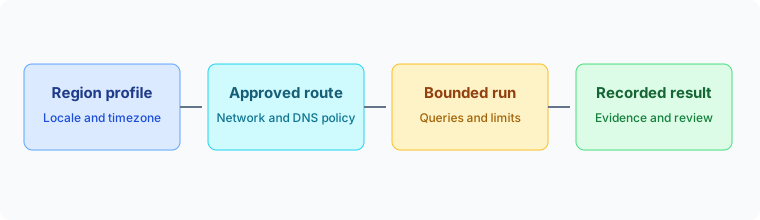
A ranking change in a search report is only meaningful when the browser environment stayed the same between the two measurements. Region, language, device class, stored state, and network route can each change what a search provider returns, so a repeatable SERP measurement fixes those inputs for a comparison window, records them next to every result, and starts a new baseline when one of them changes. The sections below describe how to do that with browser profiles, and where the responsibility of the browser ends and the responsibility of the measurement system begins.
Search monitoring should be limited to authorized research, customer-owned properties, and published search data agreements. A stable browser session improves the repeatability of a measurement; it does not grant permission to collect data or remove a search provider's limits. Everything that follows assumes that the property owner has approved the queries, the regions, and the route for each run.
Why the same query returns different results
The same query can return different pages for reasons that have nothing to do with ranking. A search provider may take into account where a request appears to come from, which languages the client prefers, what kind of device it uses, and whether the visitor carries stored state from earlier visits. A report that compares two runs only means something if those inputs did not move between them.
- Network route: the location a request leaves from is the first thing a provider can associate with a region, so the route must belong to the region you intend to measure.
- Language preference: the
Accept-Languagerequest header lists the languages and locales the client prefers, in order, and MDN describes how a server may use it for content negotiation. The server is free to choose another language, so treat the header as an input to record, not as a guarantee about the response. - Locale and timezone: these decide how dates, numbers, and local times are formatted for pages that read them, so they should agree with the route and the language list.
- Stored state: cookies, consent choices, earlier searches, and a signed-in account can all change a page, and they carry over between runs unless you decide otherwise.
- Device class: desktop and mobile layouts can present different result features, so each class is its own measurement.
A mismatched combination adds a second problem. A route in one country paired with a timezone and a language list from another country is a configuration nobody decided to measure. Nothing guarantees that a search provider reacts to the mismatch in any particular way, but the run becomes harder to describe, and a result you cannot describe is a result you cannot compare later. A practical rule is that every region in the plan is a named combination of route, language list, locale, timezone, and device class, and that the combination is applied as a unit.
These inputs are separate from the thing you actually want to learn. Changes in the search provider itself, such as a new layout, a new result feature, or a ranking update, are the signal. Fixing the browser side of the measurement is how you make sure that signal is not mixed with changes you caused yourself.
Pinning region, language, and route for a comparison window
For each region, assign one browser profile, one locale, one timezone, one language list, and one approved route, and leave them unchanged for the whole comparison window. Do not switch the region of a live context halfway through a run. When the target changes, close the context, release its storage, and create a new assignment, which keeps unrelated sessions from sharing state and makes troubleshooting easier.
The BotBrowser documentation on timezone, locale, and language describes how these values are set. By default they are derived from the route's IP address, which keeps the three settings aligned with each other and with the route. Explicit overrides for timezone, locale, and languages are available with an ENT Tier1 license. When the same setting is given in more than one place, command-line flags win over the profile configuration, and the profile configuration wins over automatic detection. The order applies to each setting separately, so the remaining settings can keep following the route.
chromium-browser \
  --bot-profile="path/to/profile.enc" \
  --proxy-server=socks5://user:pass@de-proxy.example.com:1080 \
  --bot-timezone=Europe/Berlin \
  --bot-locale=de-DE \
  --bot-languages=de-DE,de,en-US,en
The command above is the documented example for a German route with explicit values. Other regions follow the same pattern with their own settings:
- Germany: timezone
Europe/Berlin, localede-DE, languagesde-DE,de,en-US,en. - Japan: timezone
Asia/Tokyo, localeja-JP, languagesja-JP,en-US,en. - Brazil: timezone
America/Sao_Paulo, localept-BR, languagespt-BR,pt,en-US,en.
Three details from the documentation prevent most setup mistakes. Pass the route with --proxy-server in the launch arguments rather than through an automation library's own proxy option, because automatic detection depends on the browser handling the route itself. Write the locale as a BCP 47 tag with a hyphen, such as de-DE, not de_DE. Put the language you want reported first in the language list.
Automatic detection follows the IP address of the route, and a route can geolocate somewhere other than where you expect. Before a comparison window starts, check that the detected region matches the region you approved. If it does not, choose a different route or set the values explicitly, and record which values came from detection and which were set by hand. Otherwise a later change in the route's geolocation will look like a change in the results.
When one browser has to serve several regions at once, the documentation describes per-context geographic settings as an ENT Tier3 feature. Without it, use a separate browser instance for each region so the settings never have to change while a run is in progress.
Stored state, consent pages, and device class
Stored state is the quietest variable in a measurement. Cookies and earlier searches from one region can carry into the next run, and a session that previously searched in one language can influence a later one. Decide for each comparison window which of two models applies. A fresh state for every run measures what a first-time visitor would see. A persistent state per region measures how results change for a returning visitor. Both are valid, but they answer different questions, so do not mix them in one trend.
If you choose persistent state, give each region its own storage, treat that storage as an assigned resource with an owner and a lifecycle, and never share it between regions. The BotBrowser documentation on multi-account isolation explains how separate contexts keep their storage apart, and the same boundary keeps a Japanese session from inheriting the cookies of a German one.
Some regions show a consent dialog before search results. Decide in advance whether the approved job accepts it, declines it, or records it and stops, and write that decision into the run record as the consent state. A consent page is its own outcome. It is neither a ranking result nor a browser failure, and counting it as either one will distort a trend.
Session lifetime belongs to the plan as well. Set a maximum number of queries and a maximum age for each session, record both, and close and recreate the session when either limit is reached. Spacing between queries is a courtesy to the provider and part of staying within its published limits, not a way around them. If a limit is reached, lower the volume or use an agreed data source instead of adding retries.
Search engines can serve different layouts and result features to desktop and mobile clients, so a desktop result and a mobile result can both be correct while answering different questions. Treat each device class as a separate baseline with its own profile, and choose a profile that matches the class you were asked to measure. Before the first scheduled run, load the profile and confirm that the page you receive is the layout you intended, since a profile that loads is not yet proof that the measured page is the right one.
The same applies to the audience. A signed-in result and a signed-out result can both be valid while representing different readers, and a language list that includes a second language is a different policy from one that does not. Give each combination a short name, such as "de-DE desktop signed-out", and keep the name in the run record. This prevents a shared keyword file from quietly mixing local and global questions.
The run record behind a ranking change
Search data becomes useful when another engineer can explain how it was produced. Keep one record for each measurement window. It should name the target property, the query set, the region, the language, the device class, the profile assignment, the route owner, the consent state, the session lifetime, the time the run started, and the version of the result parser. Do not store credentials or private customer data in the record. Store a reference to the approved job definition instead.
{
  "window": "2026-w40-de-desktop",
  "property": "customer-owned-site",
  "query_set": "brand-and-category-v3",
  "region": "DE",
  "languages": "de-DE,de,en-US,en",
  "timezone": "Europe/Berlin",
  "device_class": "desktop",
  "profile_assignment": "profile-de-01",
  "route_owner": "network-team",
  "consent_state": "dismissed-by-job",
  "session_lifetime": "fresh per run",
  "parser_version": "4",
  "started_at": "2026-10-02T09:00:00Z",
  "outcome": "found"
}
The record is deliberately small. Its job is to answer one question when a position moves: what was different about this run? A worked example shows how. Suppose a page that held position three in the German desktop window shows up at position seven this week. Compare the two records first. If the language list, the route owner, the consent state, or the session lifetime differs, the environment changed, so label the new run as the start of a new baseline and do not read the change as a ranking trend. If every field matches, the browser side did not move, and the difference is worth investigating on the provider side, in the query definition, or in the parser.
Separate the browser environment from the interpretation of results. A ranking change may reflect a search provider update, a location change, a language change, a device layout, a signed-in state, or a different result feature. The browser can keep the declared region and profile stable, but the monitoring system still has to record the other variables. If a run is not comparable with earlier ones, label it as a new baseline instead of forcing it into an existing trend.
Result processing belongs to the measurement application. The browser supplies the runtime, the profile, the network policy, and the context boundary. Your application decides how to store result titles, links, result features, timestamps, and review status, and it should keep that schema versioned. When a search provider changes its page layout, the parser can then be reviewed without touching the browser baseline.
The network route needs the same ownership record. A proxy is not merely a connection string. Confirm that the route is authorized for the intended property and region, that DNS and WebRTC policies match the approved deployment, and that route health is recorded separately from search results, so an outage does not look like a ranking change.
The same discipline applies when an API supplies a result feed and the browser is used for an authorized user-facing check or a localization review. Decide which system is the source of truth for each report, and do not combine an API result and a browser result without recording their different collection conditions. Clear provenance makes disagreements useful instead of confusing.
Failure states, queues, and stop conditions
Separate collection failures from empty results. A route that timed out, a profile that failed to load, a consent page, a response from the provider that limits or challenges the request, and a valid page with no matching result are different outcomes, and the dashboard should show the difference.
- Route timeout or connection failure: inspect the route and its owner.
- Profile load failure: inspect the profile package and the browser build.
- Consent page: apply the consent decision recorded for the window.
- Provider limit or challenge: stop, reduce volume, and review the agreement.
- Valid page without a matching result: a real measurement, stored as "not found".
- Valid page with a matching result: a real measurement, stored with its position.
Storing these states separately tells an operator whether to inspect the browser, the route, the query definition, or the target property. Only the last two states describe the search results themselves.
Use a bounded queue for scheduled work. A keyword list that grows without an admission limit eventually turns a measurement service into an uncontrolled load generator. Set a maximum age for queued jobs, cap the number of queries per window, and stop admitting work when the upstream service or the worker pool reports pressure. A delayed measurement with a clear status is more useful than a partial result with no context.
Run a small validation set before a large scheduled job. Confirm that the profile loads, that the region is correct, that the session starts with the expected storage state, and that the result record is written. Then measure a bounded sample and inspect the output. Increase volume only after the sample has a clear owner and an agreed review rule.
Keep a small reference set that runs on every approved browser release. It should contain representative properties and queries that the team is allowed to monitor. Compare the shape of the result record, the number of completed jobs, the region metadata, and the session lifecycle. The purpose is to catch a changed environment before it reaches a larger report. It is not a promise that a search provider will return a fixed page forever.
Define stop conditions before increasing volume. Stop when authorization changes, when the route no longer represents the approved region, when the profile package is outside its support window, or when the worker cannot retain recovery headroom. A bounded pause gives the owner a clear point at which to review the setup.
Use retention rules that match the purpose of the work. Ranking history may need a longer window than raw page captures, so keep only the raw material required for an agreed review, and remove credentials, session storage, and unrelated browsing data from shared locations. A privacy-focused measurement system should minimize what it retains as well as control what the browser exposes during an authorized run.
Review the measurement definition when a campaign changes, not only when a result looks surprising. A new country, a new language, a new device class, or a new property can change the question being answered.
When a team hands a monitoring job to another team, transfer the operating record with it. The receiving team should know who authorized the property, which regions are in scope, which profile family is approved, what queue limit applies, and where failures are reported. At the end of each review, write three short notes: what changed, what stayed comparable, and what action follows. That is enough to explain a report months later without retaining every page capture.
What BotBrowser covers in a regional measurement
BotBrowser can set timezone, locale, and language from the proxy route by default, or accept explicit overrides (ENT Tier1), so each regional monitoring session keeps those browser settings aligned with its approved proxy region. Check that the detected region matches the one you approved before a comparison window starts, because detection follows the proxy IP and can differ from what you expect. This helps you tell a real ranking change apart from a changed measurement environment. BotBrowser cannot authorize collection, control what a search engine ranks or personalizes, guarantee comparable or unchallenged results, or replace your query policy, result parsing, and run record.
The BotBrowser Proof Center provides the public validation path for profile consistency and supported runtime behavior. The cross-platform profile documentation explains how a single profile assignment can be kept consistent across supported hosts. Together they provide the browser-side evidence. Your search monitoring system remains responsible for authorization, query policy, result storage, and business interpretation.
For route setup, see Proxy Configuration. For the three settings used above, see Timezone, Locale, and Language Configuration. For keeping regional sessions apart, see Multi-Account Browser Isolation.
Sources
Related Articles
Take BotBrowser from research to production
The guides cover the model first, then move into cross-platform validation, isolated contexts, and scale-ready browser deployment.