Browser Proxy Authentication and Credential Hygiene
Keep proxy credentials separate from site logins and out of logs and source, encode them correctly in proxy URLs, and read 407 and SOCKS failures safely.
Want the structured docs for Network?
This article lives in the editorial library. For step-by-step setup, reference material, and ongoing updates, jump into the docs section.
Why proxy credentials need separate handling
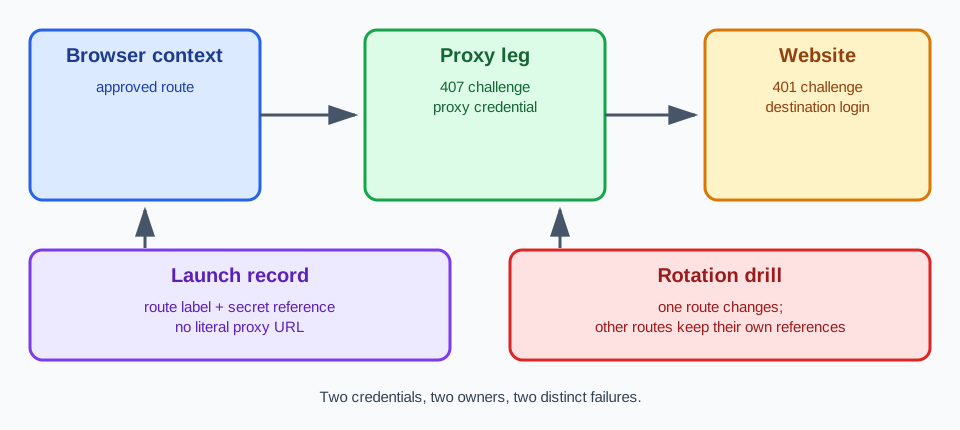
A browser that works through an authenticated proxy carries two unrelated sets of credentials. The proxy credential shows that your organization may use the route. A destination login shows that a person may use an account on a website. They are issued by different parties, they expire on different schedules, and a leak of one calls for a different response than a leak of the other. Treating them as a single "login" is the first mistake in many credential reviews.
The distinction is practical, not only conceptual. A proxy credential usually belongs to a service account or a provider dashboard and is shared by the jobs that use the route. A destination login belongs to a user or a test account and travels inside page traffic. If both sit in one configuration file or one secret, rotating the proxy credential can lock out a test account, and a destination password change can look like a proxy outage. Keep them in separate secrets with separate owners and separate rotation records.
This guidance covers proxies that your organization is authorized to use, under the terms of the provider that issued the credentials. It does not cover finding, guessing, sharing, or reselling credentials, and it does not describe ways around a provider's access controls. If a credential is not yours to use, no handling practice makes the route acceptable.
Protocol names also set expectations. HTTP Basic authentication and the SOCKS5 username and password method are ways to present a user name and a password. Neither one keeps the secret confidential by itself: Basic uses an encoding that anyone can reverse, and the SOCKS5 method sends the values as they are unless something else protects the connection. Confidentiality depends on the transport between the browser and the proxy, on what the provider logs, and on how your own tooling handles the value. Those parts differ between deployments, so a review should name them instead of assuming them.
The places where a credential can leak are more numerous than they first appear. A secret can end up in source control, in a command line visible in a process listing, in a job log that echoes its launch arguments, in an error message that quotes the proxy address, in a screenshot of a terminal, in a support ticket, or in a shared configuration file. Credential hygiene means deciding, for each of these places, whether the secret may appear there, and then checking that it does not.
Route setup is covered in Proxy configuration, and the way browsers use CONNECT tunnels and proxy headers is explained in HTTP proxy semantics and browser requests. The focus here is the credential itself: how it is presented, written, stored, rotated, and kept out of places where it does not belong.
Reading 407, 401, and SOCKS authentication failures
When a proxy requires authentication, it answers a request with status 407 Proxy Authentication Required and a Proxy-Authenticate header that names the scheme it accepts. The client then retries with a Proxy-Authorization header. RFC 9110 defines both header fields and the status, and the MDN pages for Proxy-Authorization and 407 summarize them for web developers. The important point is who owns the challenge: a 407 is issued by a proxy, so it identifies the proxy leg of the route.
A 401 Unauthorized response is the destination's own challenge. It carries a WWW-Authenticate header and is answered with an Authorization header. The two exchanges can occur during one page load, and each uses its own credential. A 407 means the proxy did not accept the proxy credential. A 401 means the proxy accepted the route and the destination did not accept the login. Mixing them up sends the investigation to the wrong owner and the wrong secret.
HTTPS destinations add one more detail. The browser first asks the proxy to open a tunnel with a CONNECT request, and proxy authentication happens on that request. The destination's TLS session and any 401 challenge appear only after the tunnel exists. A proxy authentication failure on an HTTPS page therefore shows up as a failed tunnel setup, often before any page content, and not as a response from the site. Proxy-Authorization is also meant for the proxy that asked for it and does not travel on to the destination.
HTTP Basic is defined in RFC 7617. The client joins the user name and the password with a colon and applies Base64. Base64 is a reversible encoding and gives no secrecy; the RFC states that Basic does not provide confidentiality on its own and should be used over a protected connection. Because the colon is the separator, the user name cannot contain one, while the password may. When a credential contains characters like these, the way they are written in a URL matters.
SOCKS5 uses a different exchange. After the client and the server agree on the username and password method defined in RFC 1929, the client sends the user name and the password, each up to 255 bytes, and the server replies with a status. A zero status means success. Any other value is a failure, and the server closes the connection. The browser does not receive a 407 page, because SOCKS has no HTTP status codes. An authentication failure on a SOCKS5 route shows up as a connection that is refused or closed during setup, so the error text is usually less specific than an HTTP response. The method does not encrypt the values itself.
A bounded report of an authentication failure names the leg and the category and nothing else. For example: "proxy authentication rejected for route R, challenge received, no tunnel opened". It does not include the Proxy-Authorization value, the user name, the full proxy URL, or the provider's response body. Reporting the outcome as an authentication error, and not as a timeout or a generic network fault, keeps the next action correct: check the credential and its expiry, not the DNS setup or the destination.
Repeated retries need a limit. A route that returns 407 after a correct credential was supplied will usually keep doing so, and many quick retries can lock the account or trigger protection on the provider side. Stop after a small number of attempts defined by your own policy, mark the route as failed with an authentication category, and hand it to the owner who can renew or rotate the credential. Do not try other credentials that were not assigned to the route in search of one that works.
Writing credentials into a proxy URL
A proxy URL follows the generic syntax in RFC 3986. Credentials go in the userinfo component, before the host: the scheme, then the user name, a colon, the password, an at sign, the host, and the port. The same RFC marks the user and password form of userinfo as deprecated, because passing authentication information in clear text has proven to be a security risk. That is a reason to handle the string carefully, not a reason to write it differently, since many launch interfaces expect exactly this form.
Several characters have a meaning inside a URL and must be percent-encoded when they appear in a user name or a password. The at sign ends the userinfo, so a literal one in a password would be read as the start of the host. The slash, the question mark, and the number sign end the authority part. The percent sign starts an encoded value, so a literal one must itself be encoded. The colon separates the user name from the password. Encoding a character means replacing it with a percent sign and its two-digit hexadecimal code.
For example, the password p@ss:word is written p%40ss%3Aword in the URL, and the complete value might look like http://svc_user:p%40ss%3Aword@proxy.example.com:8080. The host in that example is a documentation placeholder. Encode the user name and the password separately and only then assemble the URL, because encoding the finished URL would also change its separators. A tested helper from your language's standard library is safer than hand-written replacements, such as encodeURIComponent in JavaScript or urllib.parse.quote with an empty safe set in Python.
Tools parse the userinfo in slightly different ways, so a value that works in one client can fail in another. After encoding, test the exact string in the tool that will use it, and treat a parse error as a configuration problem. Do not weaken the encoding to make a failing string pass. A password that includes a plus sign, a space, or non-ASCII text deserves its own test, because encoders disagree about those characters; a space is written as %20 in a URL, and the plus sign belongs to form encoding.
A wrong encoding produces a misleading failure. If an unencoded at sign splits the userinfo in the wrong place, the tool may send a truncated password to the proxy and receive a 407, or it may try to resolve a host that does not exist and report a network error. In both cases the credential itself was fine. When a failure appears right after a password change, compare the encoded string before you suspect the provider.
Where a provider supports another authentication method, such as accepting requests from an approved source address, you may be able to launch with a URL that has no userinfo. That removes the secret from the command line, but it moves trust to the address and its owner, so record it as a different method with its own owner and review. Some providers do not offer it, and the provider's terms decide whether you may use it.
Keep the literal URL out of places that last. Source files, container images, shell history, and issue comments keep values long after a credential changes. A reference to the secret belongs in those places instead of the value.
Storing, rotating, and redacting credentials
Store each proxy credential in a secret manager or an equivalent store that your organization already controls, and refer to it by name. A launch record then contains a route label, for example "regional-checks-eu", and a secret reference such as the name of the stored entry, and not the literal proxy URL. Anyone reading the record can tell which route was used and who owns it without being able to use it.
Resolve the reference as late as possible. The launcher fetches the value, encodes the user name and the password, builds the URL, starts the browser, and does not keep the value in its own state or logs. Build the URL in the smallest scope you can, and do not write it to a file that outlives the launch. This also keeps the same job definition valid after a rotation, because only the stored value changes.
Be honest about what a command-line argument exposes. A launch argument is visible to other accounts on the same host that can list processes, and it may be captured by monitoring agents, crash reports, or the inspection output of a container runtime. Embedding the credential in the argument therefore does not make it private on that host. Restrict who can sign in to the machine and read its process information, and prefer credentials that are scoped to one route, limited in what they can do, and short-lived where the provider supports it.
Redaction is a separate control, and it has to be tested instead of assumed. Job logs, wrapper scripts, error handlers, and test reports often print the launch arguments when something fails. Mask the userinfo before a line is written, replace the password with a fixed marker, and mask the encoded form as well, because a log can contain either one. After a failed launch, read the actual output files and the process listing, and search them for the user name and the password in both raw and encoded form.
Rotation needs an owner and a plan. Decide how often each credential is replaced, who can replace it, and how the new value reaches the launcher. Replace the stored value, relaunch the contexts that use that route, and confirm that the old value no longer works. A rotation triggered by a suspected leak also needs a review of where the old value was written, since logs and tickets can keep it after the provider revokes it.
Give each route its own credential and its own reference. When one shared credential serves many routes and contexts, a single rotation interrupts those routes at once and a single leak exposes each of them. Separate references let you replace one route's credential while the other routes keep running with theirs. Where the provider ties credentials to a plan or a sub-account, mirror that structure in your own naming.
Provider-side facts stay with the provider. How long a provider keeps request logs, whether it records the user name, whether the connection to the proxy is protected by TLS, and how credentials expire are specific to each provider. Ask for them in writing and record the answers with the route. Do not assume that a secure-looking scheme in a URL means the first leg is encrypted: an HTTPS proxy protects the connection to the proxy, an HTTP proxy does not, and a SOCKS5 route needs its own assessment.
Keep destination logins out of this store. A destination account's password belongs to the account's owner and to the application that signs in, with its own storage and rotation. Putting it beside the proxy credential widens who can read each of them and ties two unrelated rotations together.
Operational review
Treat credential handling as a property you verify after changes, not as a setup step you finish once. Repeat the review after a provider change, a plan change, a credential rotation, a launcher update, a logging change, a browser major update, or the addition of a new route. Record what you checked, the route label, the secret reference, and the result, without copying a secret into the record.
Assign roles in the same way you assign routes. The route owner decides which credential serves which context and approves rotations. The platform owner controls the secret store and the log pipeline. The application owner defines what the user sees when a route is unavailable. A short handoff between these three owners is stronger evidence than a shared document with the credentials pasted into it.
Define the visible outcome of an authentication failure before it occurs. A job can stop with a clear message that the route needs attention, a feature can show an unavailable state, or an approved alternative route can take over when your policy allows it. A direct connection that happens to load the page is not an implicit alternative. It changes the network boundary and the origin of the traffic without a decision, so it should not be the silent result of a failed credential.
BotBrowser supports proxy credentials embedded in the --proxy-server URL for HTTP, HTTPS, SOCKS5, SOCKS5H, and QUIC routes, with percent-encoding for special characters, so an operator can supply an approved route's credentials at launch without page.authenticate(). BotBrowser does not provide secret storage, rotation, or log redaction, and it does not make embedded credentials private from process listings or provider logs; those controls remain with your deployment tooling and the proxy provider.
Per-context routing helps keep references separate. When one browser deployment serves several approved workflows, each context can use its own route and therefore its own credential, as described in Per-context proxy. That setting selects among routes your deployment has already qualified; it does not issue a credential, and it does not change what the provider allows.
When a route fails authentication, the responsible actions are to renew or rotate the credential through its owner, to choose another approved route, or to stop the workflow. Hunting for credentials elsewhere, borrowing another team's, or switching to a different provider account without approval are not among them. The record should show which action was taken and who took it.
Status messages and support replies should use the same vocabulary as the record. "Proxy authentication rejected" is narrower and more useful than "network error", and "destination login required" tells a different owner to act. Precise wording stops an incident from being sent to the wrong team and keeps secrets out of tickets that many people can read.
Run the credential hygiene checks
Apply these checks to each route and record a pass or fail for each one, without copying a secret into the record.
- Trace a failing request to its leg. Pass if a 407 with a Proxy-Authenticate challenge is attributed to the proxy leg, a 401 with a WWW-Authenticate challenge is attributed to the destination, and neither the Proxy-Authorization value nor the Authorization value appears in the record. Fail if the two are merged into one "login failed" category.
- Read the launch record. Pass if it shows a route label and a secret reference. Fail if it contains a literal proxy URL, a user name, or a password.
- Search the job logs, the error output, and the process listing of a normal launch and of a deliberately failed launch for the user name and the password, in raw and percent-encoded form. Pass if the logs and error output contain no match and the process listing is free of a match or readable only by accounts you approved. Fail if the credential appears in a log, in error output, or in a process listing that other accounts can read.
- Launch with a test password that contains reserved characters such as an at sign, a colon, a slash, and a percent sign. Pass if the password is percent-encoded in the URL and the route authenticates. Fail if the connection works only after the encoding is weakened.
- Supply a deliberately wrong or expired credential. Pass if the run stops within your retry limit and reports an authentication error for the named route. Fail if it reports a timeout, a DNS error, or a generic network fault, or if it retries without a limit.
- Rotate the credential of one route. Pass if that route authenticates with the new value, the old value is rejected, and the other routes and contexts keep working with their own references. Fail if rotating one route changes the outcome of another.
- Repeat checks 1 to 6 after a provider change, a plan change, a launcher update, or a browser major update. Keep the last accepted record until the repeat run passes.
Sources
Related Articles
Take BotBrowser from research to production
The guides cover the model first, then move into cross-platform validation, isolated contexts, and scale-ready browser deployment.