Timezone, Locale, and Language in Browser APIs
Separate timezone, locale, language negotiation, and site preferences; configure each field and diagnose regional mismatches.
BotBrowser Team
Prefer the maintained product doc?
This article has a matching page in the docs center. Use the docs for the canonical setup flow, current flags, and long-term reference.
A browser can format a date with one locale, report a different preferred language, send another language preference to a server, and use a timezone unrelated to the proxy. BotBrowser exposes configuration for timezone, locale, and languages, but those settings do not make every website choose the same content or prove a physical location. The practical answer is to configure each field at its owning layer, then inspect the JavaScript values and HTTP response that matter to the workflow.
The useful distinction is between a default and an explicit choice. Intl.DateTimeFormat() without arguments uses the environment's default locale and timezone. Passing an explicit locale or timeZone requests a different result for that formatter call; it does not rewrite navigator.language, the request's Accept-Language header, a website cookie, or the browser's configured timezone. A regional check should therefore name the signal it measures instead of treating the word “locale” as a complete diagnosis.
TL;DR
- A timezone controls how instants are presented as local civil time; an IANA zone is not the same thing as a fixed UTC offset.
- A locale controls formatting conventions such as decimal separators and month names; it does not select a website's language by itself.
navigator.languageandnavigator.languagesdescribe browser language preferences.Accept-Languagecarries a preference to a server, which may negotiate a response or ignore it.- A site can persist a language choice in a cookie or account setting. That remembered choice is distinct from both browser preferences and HTTP negotiation.
- For each BotBrowser field, an explicit CLI value has priority over the selected profile's
configs; absent a concrete value,autoderives the setting from the proxy route.--bot-locationis a separate geolocation control.
Contents
- Watch the video
- Name the signal before changing it
- Defaults and explicit Intl options
- Timezone is not an offset
- Language preferences and HTTP negotiation
- Cookies and application language
- BotBrowser per-field priority
- A decision table for configuration
- Copyable diagnostic query
- Troubleshooting by observed layer
- Limits and safe interpretation
- Practical conclusion
Watch the video
The English-language video compares timezone, locale, language preferences, and the Accept-Language header in a controlled local-page demonstration. It uses declared test values rather than representing a real user, proxy route, or geolocation result.
Name the signal before changing it
“Regional identity” is a convenient summary, not one browser property. A test page, a network request, a server-rendered page, and a site after sign-in can each expose a different decision. When two observations disagree, record where each was read: JavaScript runtime, request headers, response headers, application storage, or a permission-gated API. This prevents a common troubleshooting loop in which a locale flag is changed to fix content selected by a cookie.
The following terms are deliberately narrow:
- Timezone is the rule set used to interpret an instant as local date and clock fields. JavaScript exposes it through methods such as
Intl.DateTimeFormat().resolvedOptions().timeZoneand through date formatting defaults. - Locale is a BCP 47 language-and-region preference used by internationalization APIs for formatting or comparison. Examples include
en-GBandde-DE; it is not a city or coordinate. - Language preferences are an ordered list exposed through
navigator.languages, withnavigator.languagenormally representing the primary preference. They inform content negotiation but do not compel a server to use a particular translation. - Geolocation is a location result returned after a page requests the Geolocation API and the browser context permits it. It is not derived from
Intlformatting and must not be inferred from a timezone string. - Site language is the language an application chooses for its own interface or content. It may depend on the request, a URL, a cookie, an account preference, or server policy.
For example, a page can call new Intl.NumberFormat('fr-FR') while the browser's primary language remains en-US. A server can receive an English Accept-Language preference and return French because the URL is /fr/. After that, the site may persist French in a cookie and continue returning it on later requests. None of these observations alone proves that another layer is misconfigured.
This separation also helps keep geographic claims bounded. A timezone can be shared by many places, and one country can use several timezones. A locale does not encode a precise location. A language preference can reflect a user's working language rather than the proxy country. Treating these values as a strict country-to-country chain creates false alarms and encourages unnecessary overrides.
Defaults and explicit Intl options
The ECMAScript Internationalization API (Intl) offers locale-sensitive formatting. Calling a formatter without locale options asks the runtime to use its default. Providing an explicit locale asks that particular formatter to use the supplied tag. The distinction is visible in code and should be reflected in diagnostics:
const defaultDate = new Intl.DateTimeFormat().format(new Date());
const britishDate = new Intl.DateTimeFormat('en-GB').format(new Date());
const defaultNumber = new Intl.NumberFormat().format(1234567.89);
const frenchNumber = new Intl.NumberFormat('fr-FR').format(1234567.89);
The sample intentionally prints no fixed output. Formatted strings can depend on the locale data shipped with a runtime, the current instant, and the formatter options. A reproducible application check should freeze an input instant and inspect the resolved options as well as the visible string. Even then, the check only describes that runtime and input; it is not a measurement of every browser process or worker.
resolvedOptions() is useful because it reports the settings selected for that formatter instance. For a default formatter, its locale and timeZone describe the runtime defaults that formatter resolved. For a formatter constructed with 'en-GB', the locale result describes that request after locale resolution. It does not report navigator.language, profile configuration, or the language sent in a later HTTP request.
const defaultFormatter = new Intl.DateTimeFormat();
const explicitFormatter = new Intl.DateTimeFormat('en-GB', {
  timeZone: 'Europe/London',
  dateStyle: 'medium',
});

console.log(defaultFormatter.resolvedOptions());
console.log(explicitFormatter.resolvedOptions());
Illustrative shape only; this snippet has not been run here, and exact properties or formatted values should be read from the target runtime. The most important comparison is not whether the output matches an expected screenshot. It is whether the application uses a default formatter or explicitly supplies locales and options. When the application passes its own locale, changing the browser default may not affect that call.
The same rule applies to date formatting in application code. A library may use Intl.DateTimeFormat() with no locale argument, pass a fixed locale, or read a preference from application state before creating the formatter. Search the application code or inspect the call boundary before changing browser configuration. The date-time formatting guide discusses how application-level time-zone policy and portable fallbacks differ from browser defaults.
Locale matching is also not a command to translate arbitrary text. Intl formats supported data, compares strings, or selects a locale from a requested list and available data. It does not translate a page, rewrite a URL, or override a website's product-specific language policy. A site that renders English text while its number formatter uses German conventions can be behaving exactly as its developers configured it.
Timezone is not an offset
An instant is a point on the UTC timeline. A timezone is a named rule set that maps instants to local civil-time fields and an offset. America/New_York can use different offsets at different dates according to the applicable timezone data. A fixed string such as UTC-5 expresses an offset, not the same set of historical and future rules. Therefore, compare the IANA name when the application requirement is about a region's time rules, and compare the offset only when the requirement is about a particular instant.
Date.prototype.getTimezoneOffset() returns a numeric offset for the represented date, expressed in minutes using JavaScript's sign convention. It is not a stable identifier for a region. Two named zones can share an offset at one instant and diverge at another. Avoid interpreting a single offset reading as proof of a particular timezone or as evidence that seasonal transitions will match.
const instant = new Date('2026-01-15T12:00:00Z');
const zone = new Intl.DateTimeFormat().resolvedOptions().timeZone;
const offsetMinutes = instant.getTimezoneOffset();

console.log({ zone, offsetMinutes });
Illustrative query, not a recorded BotBrowser result. The offset is computed for the selected date in the runtime's default zone. To compare two dates, construct dates on both sides of the relevant transition and inspect both; do not assume a particular DST transition date or outcome without checking the target region's current rules. Timezone databases and legal rules can change independently of application code.
Locale and timezone can be configured independently. en-GB formatting with America/New_York time can be an intentional product choice: a London-language user may be viewing a schedule anchored to a New York office. Conversely, a site may need its dates rendered in the event's timezone while the surrounding text uses the browser language. The right relationship comes from the application's meaning, not a universal “same country” requirement.
Date-only values need special care. A string such as 2026-10-18 is often interpreted differently by libraries and APIs than an instant such as 2026-10-18T09:00:00Z. Converting a date-only business value into an instant can shift the displayed calendar day in another timezone. When the requirement is “the meeting starts at this instant,” preserve an instant and format it for a chosen zone. When the requirement is “the office is closed on this local date,” preserve a calendar date and avoid adding a timezone conversion that changes its meaning.
Language preferences and HTTP negotiation
navigator.language and navigator.languages are runtime properties describing preferred languages. The first is the primary language; the second is an ordered preference list when available. The browser may also send an Accept-Language request header, commonly with quality weights. That header is an input to server negotiation, not a guarantee that the response will use the first language or even one of the listed languages.
HTTP servers can use Accept-Language to select a representation, but the result may also depend on URL structure, application defaults, supported translations, authentication state, or explicit product rules. The response's Content-Language header can be useful evidence about the representation, though it does not necessarily describe every string on a complex page. Check the actual request and response associated with the route under investigation.
GET /account/ HTTP/1.1
Accept-Language: fr-CA,fr;q=0.9,en;q=0.8
Illustrative request only; no network request was made for this article. The preference list can help a server choose a French representation when it supports one. The server may instead redirect, use a URL locale, require a user choice, or apply a different policy. The MDN Accept-Language reference describes the request header and its negotiation role.
Do not treat browser language, locale formatting, and HTTP language as synonyms. A de-DE locale can format decimals and dates in German conventions while the language list contains en-US,en. A request can carry an English preference while a page explicitly constructs Intl.NumberFormat('de-DE'). Each value answers a different question: how a formatter formats, what the browser prefers, and what the request offers to the server.
The server's choice can also vary by resource. A document route may negotiate HTML while an API endpoint returns language-neutral JSON. A script or image request may not use the same language selection logic as the page. Compare like with like: method, URL, redirects, request headers, response headers, and authentication state should match before attributing a difference to the browser's language list.
The proxy and geolocation documentation describes proxy-derived regional values and per-setting overrides. A useful web-platform check follows a language preference from browser properties to the outgoing request, then compares it with the representation selected by the server. The network route can inform automatic settings, but it does not eliminate the server's independent negotiation decision.
Cookies and application language
A site can store a language choice in a cookie, local storage, an account profile, or a URL. Once that state exists, the page may keep using the saved choice even when the browser sends a different Accept-Language value. A language selector often represents an explicit application preference, which can reasonably take precedence over automatic negotiation. Clearing browser preferences or changing --bot-languages is not a reliable way to reset a server-side account setting.
For diagnosis, compare a clean session with the existing session only when the workflow permits it. Record whether the route includes a language prefix such as /fr/, whether the response redirects, whether a language cookie is present, and whether the account has a saved locale. Avoid deleting unrelated cookies or storage: that can erase the evidence needed to identify the selection layer and can change authentication or consent state.
Use this sequence when a page stays in the “wrong” language:
- Confirm the requested URL and any locale prefix.
- Inspect the request's
Accept-Languagevalue. - Inspect redirects and the final response's language-related headers.
- Check the site's language selector, cookie, and account preference.
- Compare a permitted clean context with the original context, changing one input at a time.
The sequence is a diagnostic method, not a promise that every site exposes its language decision. An application may render mixed-language content, omit Content-Language, or keep preferences on its server. When evidence is unavailable, report the layer as unknown rather than inferring it from one visible label.
BotBrowser per-field priority
BotBrowser's timezone, locale, and language controls are separate fields. The relevant command-line flags are --bot-timezone, --bot-locale, and --bot-languages. For each field, the documented order for concrete values is CLI flag, then the selected profile's configs, then automatic selection. A value for one field does not require overriding the other fields.
| Field | CLI flag | Profile configs field | Automatic selection | Useful first observation |
|---|---|---|---|---|
| Timezone | --bot-timezone | timezone | auto | Intl.DateTimeFormat().resolvedOptions().timeZone |
| Locale | --bot-locale | locale | auto | Intl.NumberFormat().resolvedOptions().locale |
| Languages | --bot-languages | languages | auto | navigator.language, navigator.languages, request header |
Evaluate priority per field. For example, an explicit --bot-locale=en-GB can coexist with a profile-defined timezone and automatic language selection. The resulting combination may be deliberate, but document why the locale is pinned so a later profile or route change does not appear mysteriously ineffective. Conversely, if a field should follow the route, remove stale explicit values at both launch and profile layers rather than adding another override.
The word auto means “delegate this field to automatic selection”; it is not a locale, timezone, or language tag. The documentation establishes that a concrete CLI value takes priority over profile configuration and describes auto as automatic selection. It does not define the conflict where the CLI explicitly supplies auto while the profile supplies a concrete value. Treat that combination as unresolved until the applicable version's behavior is confirmed; do not infer its winner from the flag's spelling.
Geolocation is a related but distinct control. --bot-location configures a location result for pages that request geolocation under the applicable context permissions. Coordinates do not follow automatically from a timezone, and timezone does not prove coordinates. The proxy/geolocation documentation discusses proxy-IP inputs and lookup boundaries; do not claim city-level or coordinate accuracy unless a source establishes it for the specific configuration. This article makes no claim that a coordinate pair is guaranteed to match an exit IP.
The region-level table in the proxy consistency guide covers how proxy routing and network-facing identity signals can be reviewed together. Here, use that relationship as context rather than a strict equality test: a proxy route can influence auto, while explicit per-field settings and application policy can produce valid exceptions.
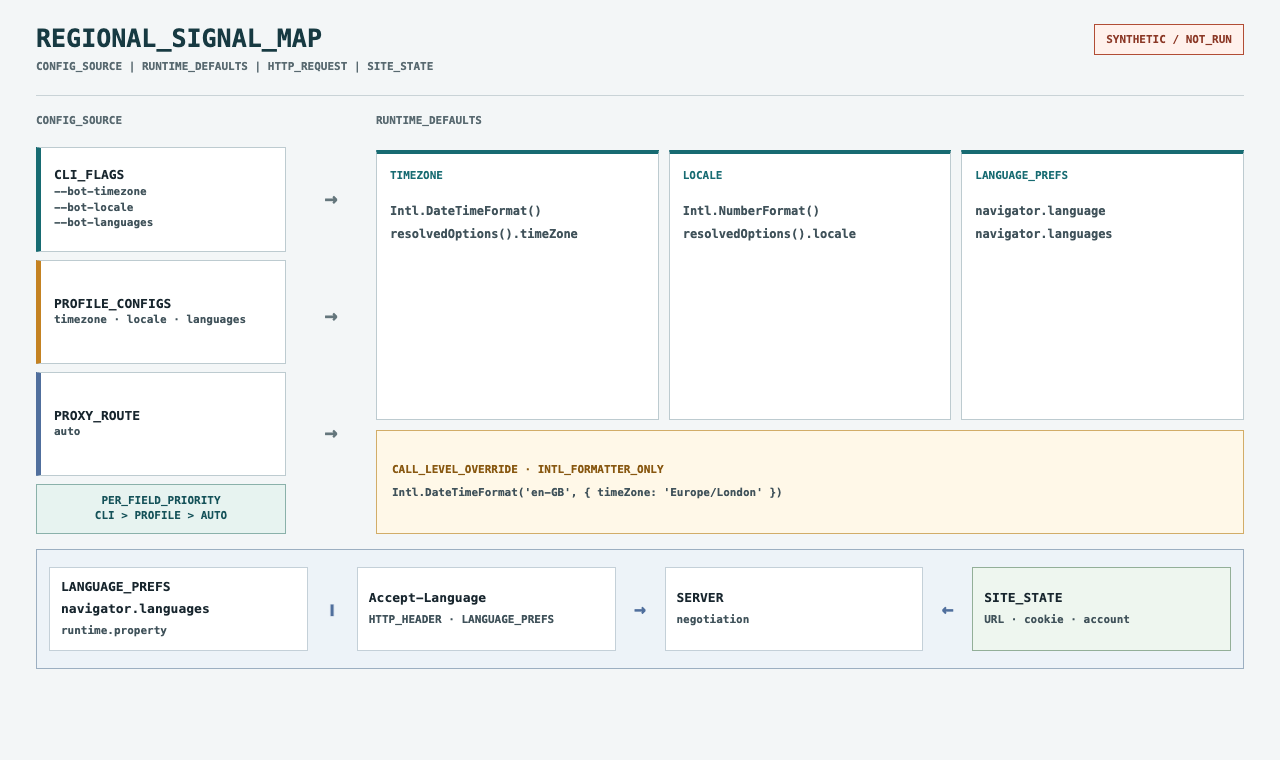
A decision table for configuration
Choose the smallest set of explicit values that satisfies the application requirement. The table below is a decision aid; values are examples, not recommendations for every deployment.
| Requirement | Timezone | Locale | Languages | Follow-up check |
|---|---|---|---|---|
| Let the route own regional defaults | Keep automatic | Keep automatic | Keep automatic | Read the selected values and the route assigned to this context |
| Keep number formatting stable across routes | Keep automatic unless needed | Set --bot-locale or profile locale | Keep automatic unless content language is also fixed | Inspect an explicit and a default Intl.NumberFormat call |
| Keep interface preference stable while routing changes | Keep automatic unless needed | Choose only if formatting must also stay fixed | Set --bot-languages or profile languages | Inspect runtime preferences, request header, and site selection separately |
| Render an event in its venue's civil time | Set the event's IANA zone at the owning layer | Choose independently for surrounding formatting | Choose independently for content negotiation | Format the same instant with an explicit timeZone option |
| Investigate a persistent site-language choice | Do not change without evidence | Do not assume locale selects page text | Compare the browser list with the request | Check URL, redirects, cookies, and account preferences |
If a region changes but the application only requires a fixed language, setting timezone, locale, languages, and coordinates together creates four override paths that must be maintained. Prefer one explicit field when one field is the requirement. If the browser should follow a proxy for all three supported settings, keep them automatic and make the route assignment the controlled input. If different contexts intentionally use different routes, validate each context independently.
Keep a small configuration record with one row per field: chosen value, source layer (CLI, profile, or automatic), owner, and reason. Do not store credentials in that record. This makes priority visible during review and helps distinguish “the profile supplied this value” from “the route selected it.” When an override is no longer required, remove it instead of keeping a duplicate value as insurance.
Copyable diagnostic query
The following browser-side query collects a compact snapshot of the values relevant to the diagnosis. It reads defaults and explicit formatting separately, and it does not fetch a page or expose a geolocation prompt. Run it only in a context you are authorized to inspect. The result shape is illustrative and marked not_run; it is not a recorded observation.
function inspectRegionalDefaults() {
  const defaultDate = new Intl.DateTimeFormat();
  const explicitDate = new Intl.DateTimeFormat('en-GB', {
    timeZone: 'Europe/London',
    dateStyle: 'medium',
  });

  return {
    navigatorLanguage: navigator.language,
    navigatorLanguages: [...navigator.languages],
    defaultDateOptions: defaultDate.resolvedOptions(),
    explicitDateOptions: explicitDate.resolvedOptions(),
    defaultNumberLocale: new Intl.NumberFormat().resolvedOptions().locale,
    explicitNumberLocale: new Intl.NumberFormat('de-DE').resolvedOptions().locale,
    note: 'illustrative query; not_run',
  };
}

console.log(inspectRegionalDefaults());
The explicit formatter values are intentionally different from the defaults. That difference demonstrates call-level options, not a browser configuration error. To inspect Accept-Language, capture a request in the authorized test application or use its network tooling; JavaScript does not provide a general API for reading the browser's outgoing request headers. Do not put proxy credentials or private account data into a public diagnostic artifact.
When comparing server behavior, capture only the minimum relevant metadata: request URL, redirect chain, Accept-Language, response status, and language-related response headers. Keep cookie values redacted. If the site supports a language switch, note the action and whether the resulting preference persists after a fresh context. These details are more useful than a screenshot containing an entire authenticated page.
Troubleshooting by observed layer
| Observation | Likely layer to inspect | Next discriminating check |
|---|---|---|
| Default date format differs, explicit formatter matches | Runtime default or application formatter choice | Compare resolvedOptions() with the formatter's explicit options |
resolvedOptions().timeZone differs from the intended zone | CLI/profile/automatic timezone selection | Check --bot-timezone, profile timezone, then route assignment |
navigator.languages is expected but the server page is not | HTTP negotiation or site state | Inspect the request header, redirect, URL locale, cookie, and account preference |
| Number separators differ while text language is correct | Locale formatting, not language negotiation | Inspect the exact Intl.NumberFormat constructor arguments |
| One context differs from another | Per-context profile, flags, route, or existing application state | Compare the two contexts field-by-field and create a fresh context after changes |
| Coordinates do not match a city inferred from timezone | Geolocation configuration or application permissions | Check whether geolocation was requested and which --bot-location value applies |
Change one owner at a time. If an explicit CLI field is present, changing the profile will not establish that the profile was the effective source. If the field is automatic, changing a language cookie will not establish that the proxy route changed. Write down the current source for each field before changing it, then repeat the same application action in a fresh context so old page state does not obscure the result.
Avoid using one test page as a universal oracle. A minimal page can show runtime defaults but not the exact headers sent by every request. A network capture can show one request but not what an application later stores. A rendered page can reveal the user-visible result but not which source selected it. Combine the smallest observations that answer the workflow question, and leave unrelated signals out of the report.
Limits and safe interpretation
BotBrowser's public documentation describes configuration priority and the browser-facing controls. The behavior of a destination remains its own decision. A server may ignore language preferences, a JavaScript application may pass explicit Intl options, and a site may remember a user choice. A successful read of one page cannot establish that all routes, workers, frames, or future requests use identical values.
Timezone behavior depends on named zone data and the date being formatted. Do not promise that a result is correct across all daylight-saving transitions or all operating-system data versions based on a single current-date check. Use an IANA timezone where regional rules are needed, test representative dates for the actual application, and describe the runtime and date examined. No BotBrowser execution is represented here; these statements describe documented configuration boundaries, not measured compatibility.
Automatic geolocation depends on configured inputs and available lookup behavior; a timezone alone cannot establish latitude or longitude. No city-level coordinate result or match to an IP database is guaranteed, and websites may not request or honor geolocation. Permission state and application handling remain separate conditions.
The browser properties in this article are useful for authorized compatibility testing, privacy research, and application debugging. They are not proof of a person's identity or physical presence. Keep test accounts and routes authorized, avoid collecting more data than the question requires, and report unknown behavior as unknown rather than turning a plausible correlation into a factual claim.
FAQ
Does changing an Intl locale change navigator.language?
No. Supplying a locale to a particular Intl constructor changes that formatter's locale resolution. It does not, by itself, rewrite the browser's language preference properties or the headers on network requests. If the application passes explicit formatter options, inspect those call arguments before changing browser language configuration.
Does Accept-Language force the website to display that language?
No. It is a request preference that a server may use during content negotiation. The application can prefer a locale in the URL, a saved cookie, an account setting, or a product default. Inspect the request and the site's state separately; do not assume the header is the final language decision.
Should timezone and locale always identify the same country?
No. They serve different purposes and can intentionally differ. A user may prefer one locale for formatting while viewing a schedule tied to another region's timezone. Choose values from the application's requirement, then check whether the resulting display and network behavior meet that requirement.
Which value wins when CLI and profile settings differ?
For each supported field, a concrete CLI value takes priority over the selected profile's configs value, followed by automatic selection. Documentation does not define whether an explicit CLI auto overrides a concrete profile value. Resolve timezone, locale, and languages independently; do not assume one flag overrides the whole group.
Is a timezone enough to infer geolocation coordinates?
No. A timezone is a rule set shared by locations, not a coordinate. Geolocation is a separate browser API result that depends on its configuration and permission path. Use the documented location control and inspect the authorized application result if coordinates are part of the requirement.
Sources
- BotBrowser: Timezone, Locale & Language
- BotBrowser: Proxy and Geolocation
- MDN: Intl
- MDN: Intl.DateTimeFormat
- MDN: Accept-Language
- MDN: Date
- ECMA-402: Internationalization API Specification
Practical conclusion
Treat timezone, formatting locale, browser language preferences, HTTP negotiation, and a site's remembered language as separate inputs. First identify the observation that is wrong, then trace that field to its owner: explicit CLI value, profile configuration, automatic proxy-derived selection, application code, or site state. Keep only the overrides the workflow requires, repeat the same authorized check in a fresh context, and describe what was observed without extending it to every worker, date transition, route, or coordinate.
This article is part of the guide: Browser Identity Surfaces: A Practical Consistency Overview
Related Articles
navigator.languages: Pick the Right Locale From Browser Language Hints
PlatformIntl API Locale Data and Portable Browser Formatting
NetworkNetwork-Layer Browser Consistency for Privacy Protection
IdentityPrivacy-Preserving Browser Validation Methods
IdentityBrowser Cookie Management for Multi-Identity Workflows
PlatformDate-Time Formatting and Time-Zone Portability in Web Applications
Take BotBrowser from research to production
The guides cover the model first, then move into cross-platform validation, isolated contexts, and scale-ready browser deployment.