Fingerprint Protection for E-Commerce Price Monitoring
Why retailers can show different prices by region, device, and history, and how isolated per-context identities keep monitored prices comparable.
Want the structured docs for Deployment?
This article lives in the editorial library. For step-by-step setup, reference material, and ongoing updates, jump into the docs section.
Why prices change between monitoring sessions
Price monitoring teams collect public prices from retailers so they can compare markets, follow promotions, and check advertised-price policies over time. A collected number is only useful when you know what it represents. A price seen from a German connection on a desktop browser describes that market and that kind of device. It does not describe every shopper. When the same product page shows a different amount in two runs, the team has to decide whether the market changed, the device class changed, or the monitoring session itself drifted.
Retailers commonly vary what they show for a handful of reasons. Geography is the most visible one: a product can carry a different price, currency, tax treatment, or shipping estimate depending on the country the visit appears to come from. These are common practices, not guaranteed behavior of any named retailer, and each retailer decides for itself which of them it applies. Your job as the operator is not to predict the rules. It is to keep the inputs you control steady, so that a difference you observe can be traced to a cause.
Device class is a second input. Some retailers present different layouts, promotions, or app-only offers to a phone than to a desktop computer, and the operating system or screen size can change what is shown. A monitoring run that mixes a desktop identity in one region with a mobile identity in another produces numbers that cannot be compared, even if every other setting is correct.
Visit history is the third input. Cookies and local storage let a site recognize a returning visitor. Depending on the retailer, a recognized visitor can see a saved cart, a loyalty price, a regional banner chosen on an earlier visit, or a redirect to the country site picked last time. If one monitoring session reuses storage across several retailers or regions, a choice made in one market can leak into the next and quietly shift the collected prices.
Sessions can also be limited or blocked when the signals they send do not agree with each other. A browser that reports a timezone and language from one country while its traffic exits from another is a mismatch that a site can notice, and a site may respond with a challenge, a reduced page, or a block. The contract with the retailer is not yours to rewrite, and this article does not describe ways to defeat any protection vendor. The practical goal is smaller: send signals that agree with each other, keep them stable per monitored market, and accept the result the retailer gives.
Everything below assumes that you monitor public prices in line with each site's terms of service, its robots policy, and the law that applies to you. If a retailer forbids automated collection, the right answer is to ask for a data feed or to skip that site, not to engineer around the rule.
Which signals must stay consistent for each market
Think of a monitored market as a bundle of signals that should move together. When you define the bundle once and reuse it on every run, a price change between two runs means something. When parts of the bundle change between runs, the change in price may only reflect the change in the bundle.
- Region: the exit location of the network route, plus the timezone, locale, and language list that a visitor from that place would normally have.
- Device: the browser profile that sets the operating system, screen, and hardware identity the site sees.
- History: the cookies and storage the session carries, which should be empty at the start of a run or kept per retailer and per region.
- Cadence: how often and in what order pages are requested, which stays under your control and under the retailer's rate limits.
Region is where most drift starts. A route that exits in the Netherlands, a timezone that says New York, and a language list that starts with Japanese describe three different visitors in a single request. A site that compares them can treat the session as unusual, and a site that does not compare them can still localize the page from only one of them, so you will not know which signal produced the price. The fix is to derive the timezone, locale, and languages from the same exit that the traffic uses, and to do it separately for each region you monitor.
Device follows the same rule. Pick the profile for a region on purpose and keep it for that region. If you want to learn whether a retailer shows a different price on a phone, run a second, clearly labeled collection with a mobile profile for the same region and compare the two records, instead of letting the device change by accident between runs.
Language and currency deserve their own line in the plan. A retailer can choose the display language from the language list that the browser sends, and it can choose the currency from the delivery country or from the region of the connection. If the language list says one thing and the exit says another, you may receive a page in one language with prices in another currency, which makes extraction fragile and comparison unfair. Record the expected currency for each market, and treat a price in an unexpected currency as a signal to inspect the route and the geographic settings before you store it.
Stability matters as much as correctness. A monitoring identity that is a good match for one run and a different match on the next gives you two data points that cannot be compared. Keep the profile, route, and geographic settings for each market fixed between runs, and change one of them at a time when you want to test its effect. When you do change one, write the change down.
Proxy choice sits next to these signals but outside your browser configuration. The quality and reputation of an exit address, the provider that supplies it, and how many other customers share it all affect how a retailer treats the traffic. BotBrowser does not choose or vet proxies. Select and test routes with your provider, and treat a route that is repeatedly challenged as a route problem to investigate rather than a browser setting to tweak.
One isolated context for each retailer and region
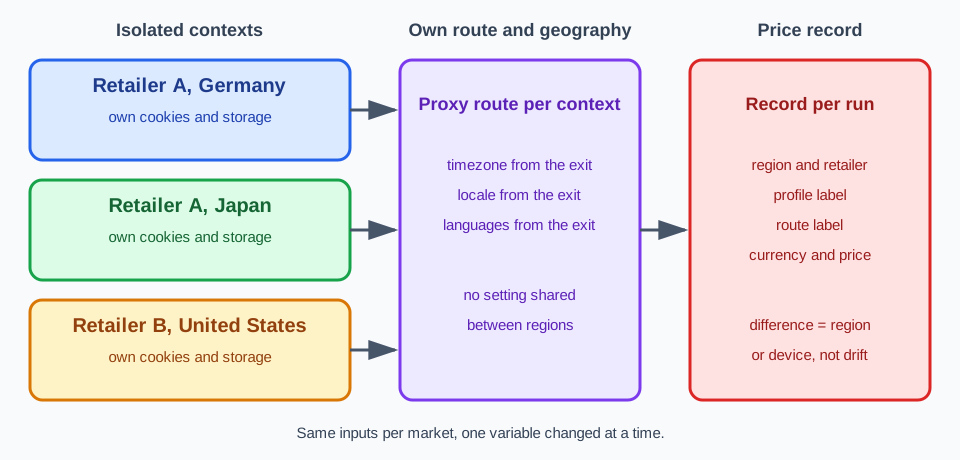
A browser context is a separate, incognito-like session inside one browser. Playwright describes it as an isolated environment with its own cookies and local storage, so a single browser can host many independent sessions that do not see each other's state. For price monitoring, that isolation is the property you want: the context for retailer A in Germany never sees the cookies of retailer B in Japan, and a region choice stored in one context cannot shift the prices collected in another.
Isolation of storage does not by itself isolate the network identity. Two contexts that share a proxy route still exit from the same address, and two contexts that share a profile still present the same device. BotBrowser's per-context proxy support closes that gap. Each context can have its own proxy route, and BotBrowser derives the timezone, locale, and languages for that context independently from the exit of that context's proxy. A context routed through a German exit gets German geographic settings, while another context in the same browser routed through a Japanese exit gets Japanese ones, and neither leaks into the other.
const client = await browser.target().createCDPSession();
const ctx = await browser.createBrowserContext({ proxyServer: region.proxy });
await client.send('BotBrowser.setBrowserContextFlags', {
  browserContextId: ctx._contextId,
  botbrowserFlags: ['--bot-profile=' + region.profile],
});
const page = await ctx.newPage();
await page.goto(region.url);
The order of operations matters. Set the proxy route when you create the context, apply the per-context flags before the first page exists, and wait for the proxy and geographic update to finish before the page navigates. A page that starts early can begin with the launch settings, and then the first price you record belongs to the wrong identity. If you already know the exit address for a route and declare it with --proxy-ip, provide it together with the proxy route during context creation, as the per-context proxy documentation describes.
A context that has no proxy route of its own inherits the launch route and the launch geographic identity. That is convenient for a single-market run, and it is a trap in a multi-market run, because a forgotten route silently reuses another region's identity. Give every monitored region an explicit route and check that the record lists the route label you assigned to each context.
Geographic settings you set explicitly are resolved independently for each context and each setting, and a setting left on automatic keeps following that context's proxy exit. In practice, leave timezone, locale, and languages on automatic when the exit already matches the market, and set one explicitly only when you have a reason, such as a market whose shoppers browse in a language that differs from the exit country's default. Write the explicit value in the record so a later reader knows it was deliberate.
Each context can also load its own profile alongside its own proxy. Use that to keep the device class steady per market, and keep the profile file name in the record. Per-context proxy is a feature of the ENT Tier3 license, so confirm that your license covers it before you design a monitoring layout around it. Without it, run one browser instance for each region instead, which costs more resources but keeps the same separation.
For the surrounding configuration, Per-Context Proxy explains how routes are assigned to contexts, and Timezone, Locale, and Language Configuration explains how the geographic settings are derived and overridden.
Recording a regional price collection
A price without its collection settings is a number you cannot defend. Store, next to every observed price, the settings that produced it. Then a difference between two regions can be attributed to the region or the device, and a difference between two runs of the same region can be attributed to the retailer instead of to drift in your own session.
{
  "region": "de",
  "retailer": "retailer-a",
  "profile": "profile-windows-de",
  "proxyRoute": "route-de-01",
  "timezone": "Europe/Berlin",
  "locale": "de-DE",
  "languages": "de-DE,de,en-US,en",
  "finalUrl": "https://retailer-a.example/de/product/123",
  "collectedAt": "2026-10-02T09:00:00Z",
  "currency": "EUR",
  "observedPrice": "49,90"
}
The record uses labels for the route and the profile instead of the proxy address and the credential. Keep addresses and secrets in your secret store and refer to them by label, so a shared price table never carries a password. Record the currency and the final page address as well: a regional redirect that lands a session on a different country site is one of the most common causes of a surprising number, and it is only visible if you kept the final address.
To use the records, compare like with like and change one variable at a time.
- Collect the same product from one region with the same profile on two runs, and confirm that the records agree. If they do not, investigate the route or the retailer before drawing any regional conclusion.
- Collect the same product from two regions with the same profile, and attribute a difference to the region once the first check is stable.
- Collect the same product from one region with two profiles, and attribute a difference to the device class.
- Repeat each check after a profile update, a route change, or a browser version update, and keep the earlier records for comparison.
Notice what each step controls. In step two, the profile is held constant so that only the region differs, and in step three the route is held constant so that only the device differs. A collection plan that changes both at once cannot attribute the result to either. When a number looks wrong, the record tells you which variable to isolate first.
Read price pages the way a shopper would, from the rendered page, and keep a screenshot with the record when an audit may follow. Some prices load after the first view, and some pages ask the shopper to pick a size, a variant, or a delivery country before a price is shown. Wait for the price element to appear instead of reading the page at the first load event, and record which variant and which delivery country were selected, because a price for one variant is not a price for the product.
Keep the schedule modest and steady. Retailers set their own rate limits, and a collection that sends many requests in a short burst invites the very treatment you are trying to avoid, whatever the browser identity looks like. Start with the lowest frequency that answers your question, spread requests over time, and raise the frequency only if the retailer's published policy allows it. Fast-moving categories and promotional periods may justify more frequent checks, and quiet categories rarely do.
When you scale the layout, scale the records with it. A deployment that monitors several retailers across several regions should have one record per context per run, written by the same code path, so that the table stays uniform. For container-based deployment of the monitoring job itself, see Docker Deployment Guide.
What BotBrowser does and does not do
BotBrowser supports a separate proxy route for each browser context, with timezone, locale, and languages derived independently from each context's proxy exit, so each monitored retailer or region can keep an isolated, geographically consistent identity. For a price-monitoring team, that means the geographic and device signals of one market are not mixed into another, and a price difference in your records can be traced to the region or the device rather than to monitoring-session drift. BotBrowser cannot guarantee that a retailer serves real-shopper prices or allows access, it cannot choose or vet proxy quality and IP reputation, and it does not replace behavior, rate-limit, and terms-of-service compliance.
Consistent identity and isolation improve how comparable your collected prices are. They are not a promise that a retailer will show the same price that a real shopper sees, that your sessions will avoid blocks, or that a CAPTCHA or bot-management service will stay out of the way. If a retailer decides to challenge a session, that decision belongs to the retailer, and a team that treats challenges as an obstacle to defeat will spend its time on the wrong problem. Treat a challenge as information: slow down, check the route, and consider whether the site wants automated access at all.
Proxy quality, IP reputation, request rate, and behavior stay outside what BotBrowser controls. The operator chooses the provider, validates that the exit addresses sit in the intended countries, and decides how many requests each route carries. Test a new route with a few harmless, low-frequency collections before it supports a production schedule, and keep the route label in the record so that a problem can be traced to one provider or one route.
Compliance is a separate step from configuration. Before monitoring a retailer, read its terms of service and robots policy, check the law that applies to your collection and your use of the data, and keep a record of the decision. Where the terms prohibit automated collection, ask for permission or a data feed. A technically consistent identity does not make a prohibited collection permitted, and no configuration in this article changes that.
When you are ready to apply the layout, start with the smallest useful version: one retailer, two regions, one profile, and the record shown above. Confirm that the two region records differ only where the retailer differs, and then add retailers and regions one at a time. For route setup and credential formats, see Proxy Configuration.
Sources
Related Articles
Take BotBrowser from research to production
The guides cover the model first, then move into cross-platform validation, isolated contexts, and scale-ready browser deployment.