Browser Fingerprint Protection for Web Data Collection
Web data workflows need more than proxies and headers. Fingerprint protection keeps canvas, WebGL, fonts, timing, and profile signals consistent during authorized collection.
Want the structured docs for Deployment?
This article lives in the editorial library. For step-by-step setup, reference material, and ongoing updates, jump into the docs section.
Why a proxy and headers do not describe the whole browser
Teams that collect public web data with permission usually start with the same checklist: a proxy for the network route, a sensible User-Agent header, and a browser that can run JavaScript. That checklist solves real problems. It does not describe the browser that the page actually sees. A page receives the full runtime: how text is drawn on a canvas, which graphics capabilities are reported, which fonts are installed, how long common operations take, which languages and time zone the browser claims, and whether those values agree with the network route.
When these values disagree, the result is rarely dramatic. A page may serve a different language than expected, ask for an extra confirmation, return a regional variant that an analyst cannot reproduce, or behave differently between two runs that looked identical in the job log. The cause is often an inconsistent environment rather than a single bad header. A proxy in one country paired with a browser that reports another country's time zone is the most common example, but graphics, fonts, and screen values can disagree in the same way.
Browser fingerprint protection addresses this layer. In the BotBrowser documentation, a profile describes one browser and device environment, and the browser reports that environment consistently across pages, workers, and new contexts. The aim is privacy and repeatability for authorized work. It is not a promise of access to any particular site, and the sections below say plainly where the responsibility moves back to the team running the workflow.
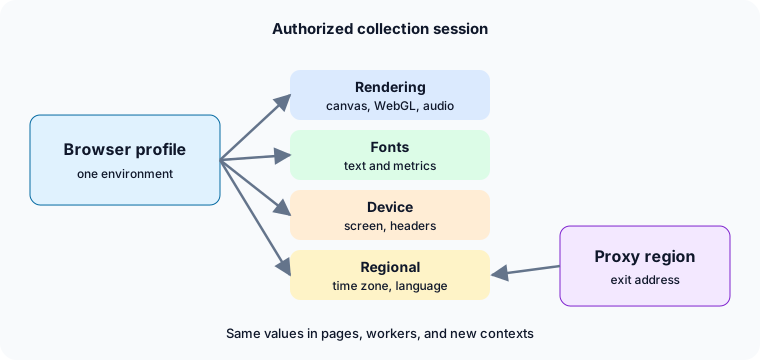
At a glance:
- Rendering, fonts, and timing should agree with the selected browser profile.
- Proxy region, time zone, locale, and language should agree with one another in the same session.
- Partial changes to a few JavaScript properties leave gaps that a complete profile avoids.
- Pacing, challenges, account policy, and site terms stay with the team that owns the workflow.
The signal families a collection browser reports
It helps to name the families of values a page can read, because a consistency review has to cover all of them. None of these needs to be memorized as a list of properties. What matters is that each family describes the same device.
- Canvas rendering. Pages can draw text and shapes and read back how the browser rendered them. The Canvas API is standard, and results vary with the operating system, graphics stack, and fonts.
- WebGL and graphics. The WebGL API exposes graphics capabilities and renderer information. A graphics description that does not fit the claimed operating system is a common source of inconsistency.
- Audio processing. The Web Audio API produces output that differs slightly between platforms and builds.
- Navigator and screen values. Platform, language preferences, device characteristics, and screen dimensions describe the claimed device.
- Fonts. Installed fonts and the way text is measured depend heavily on the operating system. A Linux server that reports a Windows device but renders with a different font set is internally inconsistent.
- Client Hints and headers. Browser brand, platform, and architecture hints sent with requests should match what scripts see in the page.
- Timing and capacity. Performance timing, reported processor count, and memory class describe how capable the device appears to be.
- Regional settings. Time zone, locale, and languages describe where the browser claims to be and which language the person behind it prefers.
The contract for a collection workflow is simple to state: every family should describe the same device in the same place. The difficult part is that most of these values are produced deep inside the browser, so a workflow that changes only the easiest ones ends up with a mixed picture.
Why partial JavaScript changes leave gaps
Many collection setups start with scripts that overwrite a handful of browser properties when a page loads. This is understandable, because it is quick to try and works for the one property being changed. It is also where inconsistency enters.
A script that runs inside the page changes values after the page has begun to exist. Page code and embedded frames can run before the change is applied in some contexts. Dedicated workers, shared workers, and service workers have their own global scope, so a value changed on the main page may differ inside a worker. A new iframe or a fresh browser context starts from the original values again unless the same change is repeated there. Each of these is a gap that the team now has to track.
The second problem is coverage. Changing a User-Agent string does not change how the browser renders a canvas, which fonts it reports, how its audio output behaves, or what its graphics description says. A single overwritten property usually conflicts with others that were left alone. For example, a platform string that names one operating system next to a font list that belongs to another leaves the two families describing different devices.
The third problem is maintenance. Browser releases change internals, and every patch that depends on those internals needs to be rechecked. Headless runs add another layer: differences between headless and headed behavior, such as window sizing, plugin lists, or rendering details, tend to be handled one by one. A team ends up maintaining a growing list of exceptions instead of a single description of the environment.
A profile-based approach reverses the model. Rather than patching individual values, the browser is launched with a profile that defines the complete environment, and the browser reports that environment from the start in pages, workers, and new contexts. The BotBrowser documentation describes this per surface, including worker consistency for navigator values and audio. That is the narrow claim this article relies on: consistency of the reported environment, not a guarantee about how any site reacts.
Proxy region, time zone, locale, and language in one session
Of all the signal families, regional settings are the easiest to review and the easiest to get wrong, so they are worth separate attention.
A proxy determines the network route and the public address that sites see. It does not decide which time zone the browser reports, which locale formats numbers and dates, or which languages are listed in the browser preferences. Those values come from the browser. If they are left at the host machine's defaults, a collection server located in one region will report that region's time zone while the proxy points somewhere else.
By default, BotBrowser derives timezone, locale, and language from the proxy IP, which its documentation calls auto mode. The three values stay aligned with the proxy region and with each other, so a session that exits in Germany reports a German time zone, a matching locale, and a matching language list without further flags. Manual overrides for each value exist as a licensed-tier option. A manual value takes priority for the setting it defines, while settings left on auto continue to follow the proxy.
Three practical details from the documentation are worth remembering:
- Let the browser handle the proxy. Auto detection works when the proxy is set through the browser's own proxy option at launch. Using a framework-level proxy option instead can leave the time zone showing the host machine's value.
- The proxy's location data decides the result. Auto mode follows the location that the proxy IP maps to. If the proxy provider's location data is wrong, or the exit address maps to a different region than expected, the derived values follow that mapping. That is a reason to check, not a reason to guess.
- Give the browser the exit address when you know it. The documentation describes the
--proxy-ipflag (ENT Tier1) for declaring the proxy's public exit IP, which skips per-page IP lookups and makes the result predictable when the exit address is already known.
A minimal launch that relies on auto mode needs only a profile and a proxy:
chromium-browser \
  --bot-profile="path/to/profile.enc" \
  --proxy-server=socks5://user:pass@de-proxy.example.com:1080
For the full set of options and their licensing tiers, read the BotBrowser documentation on timezone, locale, and language, and for background on how the proxy exit is resolved see our proxy configuration guide.
DNS and WebRTC need the same explicit check. Decide on purpose where names are resolved (the --bot-local-dns flag, ENT Tier1, resolves locally, and --bot-local-dns=false lets the proxy resolve names), and confirm that WebRTC does not expose an address outside the proxy route; BotBrowser provides WebRTC protection by default, and a proxy is recommended for full protection. The proxy, DNS, and WebRTC consistency guide walks through that review.
How to verify the alignment before collecting data
Do not assume alignment; confirm it once per proxy route and profile combination before a job runs at volume. The checks below use only what a person can see in a normal browser window, and each has an expected outcome.
- Confirm the proxy region. Use the proxy provider's own tools or a trusted address lookup to record the region the exit address maps to. This is the reference that every other value is compared against.
- Read the time zone the page reports. Open the browser's developer console in the session and evaluate
Intl.DateTimeFormat().resolvedOptions().timeZone, which the MDN reference for resolvedOptions describes. The result should be a time zone that belongs to the proxy region. - Read the language list. The Navigator.languages reference describes the ordered list of preferred languages. Evaluate
navigator.languagesand confirm that the first entry matches the intended region and that the order looks like a normal preference list. - Compare formats. Open a page that shows a date, a number with a decimal separator, and a currency. The formats should match the expected locale.
- Repeat in a fresh context. Open a second context and a worker-backed page, then repeat the first four checks. The values should match the first context, which confirms that the setting did not apply to a single page only.
- Record the result. Save the proxy route label, the profile name, the time zone, and the first language. A short record makes later differences easy to explain.
When a check fails, change one thing at a time. Verify that the proxy is configured at the browser level, check what location the proxy IP maps to, and compare the profile in use against the intended device. Starting over with a new context is usually clearer than editing a context that already holds cookies and storage from the mismatched configuration.
Reviewing rendering, fonts, and device values
The same habit applies outside regional settings, though there are no region-specific correct answers. The question is whether the families agree with each other and with the profile.
A short review table keeps the conversation concrete:
| Area | What to confirm |
|---|---|
| Rendering | Canvas and WebGL behavior fit the operating system and graphics class that the profile describes |
| Fonts | Available fonts and text measurement fit the claimed operating system |
| Device and screen | Platform, screen size, and reported capabilities describe one device |
| Headers and scripts | Client Hints sent with requests agree with values scripts read in the page |
| Timing | Reported processor and memory class fit the profile and the host's real capacity |
| Regional settings | Proxy region, time zone, locale, and language agree in every context |
| Session boundaries | Cookies and storage belong to one profile and one route |
Run the review on one profile per operating system family you intend to use, then reuse the result as a baseline. If a later run produces a different page than the baseline, you can compare configuration instead of guessing.
Two cautions apply. First, a consistent profile does not hide the host's real capacity: a profile that describes a modest laptop but runs on a very large server will still produce timing that reflects the host, so keep expectations modest and the profile realistic. Second, headless and headed runs should be reviewed separately, because a result that holds in one mode does not prove the other.
Sessions, profiles, and variation in collection jobs
A collection job is rarely a single page. It is a series of sessions, and each session should have a clear identity. The BotBrowser documentation describes profiles as complete environments, and licensed tiers add controls such as deterministic noise seeds and separate fingerprints for separate browser contexts.
Two ideas keep this manageable.
One session, one environment. Keep cookies, storage, profile, and proxy route together for the whole life of a session. If the proxy route changes, treat the session as a new one rather than swapping the route under existing cookies. Mixed history is hard to interpret later and is a common source of confusing page behavior.
Variation has a purpose. Different profiles are useful when a workflow needs to represent different device classes or regions that it is authorized to represent. Variation for its own sake only adds to the number of environments to verify. When a team uses a seed to repeat a result, the documentation describes the same seed producing the same output, which is useful for reproducing a problem and for comparing runs. Treat the seed as part of the recorded configuration so that a later run can use the same value.
Each added profile or route adds a verification cost. Start with the smallest set that covers the authorized work, verify it, and grow it only when a documented need appears.
Request pacing, retries, and account policy
Browser consistency is only one input into how a site responds. Others are in the team's hands and no browser setting changes them.
- Request pacing. Spacing requests in a way that respects the site's published limits is part of authorized collection. Add delays between page loads, avoid bursts, and back off when a site returns an error or a rate-limit response.
- Retries. A retry loop that repeats the same request without a pause makes things worse. Use increasing waits and a ceiling on the number of attempts, and stop when the site continues to refuse.
- Interactive challenges. BotBrowser does not solve interactive challenges. If a workflow regularly meets one, the right response is to review whether the collection is authorized, whether an official data feed or API exists, and whether the site's owner can grant access.
- Account policy. Logged-in collection falls under the account terms. A browser profile does not change what an account agreement allows.
- Proxy quality. The proxy provider controls exit address quality, location data, and availability. A well-aligned browser on a poorly located proxy still reports the region that the proxy maps to.
These are not edge cases. They are the main reason that two teams with the same browser configuration can see very different results.
Planning capacity without guessing
Teams often ask how many sessions one machine can run. The honest answer is that it depends on the hardware and on the pages being collected. A text-only page and a page with heavy scripts, video, or large images use very different amounts of memory and processor time. Any figure quoted without a hardware description and page type should be treated as a rough planning estimate at best.
A better method is to measure your own workload. Run a small number of sessions against representative pages, watch memory and processor use, and increase gradually while checking that page loads still complete in a reasonable time. The BotBrowser performance documentation describes several factors that affect throughput, including startup lookups, profile loading, graphics backend selection, and using multiple browser contexts inside one browser instance rather than launching many separate instances. Use that guidance as a starting point and keep your own measurements next to your configuration.
When running in containers, apply the same method: size the container from measurements rather than a published number, and keep profile files on fast local storage. Our Docker deployment guide covers container setup in more detail.
Questions teams ask
Does fingerprint protection guarantee access to a site?
No. It keeps the browser environment consistent. Whether a site accepts the session depends on its own policies, your request pacing, the quality of the proxy, and the terms that apply to the data. A team should plan for refusals and have an official channel to request access where one exists.
Why not simply set a User-Agent and a few properties?
Because those values are only a part of what a page can read. A changed User-Agent next to unchanged rendering, fonts, and regional settings leaves several families telling different stories. A complete profile describes them together, and the browser reports the same environment in pages, workers, and new contexts.
Do I need to set time zone, locale, and language by hand?
Usually not. With a proxy configured at the browser level, auto mode derives all three from the proxy IP. Manual values are useful when the proxy's location data is known to be wrong or when a workflow needs a specific region, and they are a licensed-tier option. Verify the result with the steps above either way.
Can I use my existing Playwright or Puppeteer code?
Generally yes. The documentation describes launching the BotBrowser executable with a profile and a proxy from either framework. Remember to set the proxy through the browser launch arguments rather than the framework's own proxy option so that regional alignment works as documented.
Do I need a different profile for every session?
Not necessarily. Use as few profiles as the authorized work needs, verify each one, and keep the profile, route, and storage together for the life of a session. A new profile is warranted when the workflow must represent a different device class or region.
Is collecting data with fingerprint protection legal?
Legality depends on the jurisdiction, the type of data, the site's terms of service, and laws such as GDPR or CCPA. BotBrowser is a privacy tool, and users are responsible for making sure their collection is authorized and complies with the rules that apply to it.
Where BotBrowser fits
For authorized collection sessions, BotBrowser can derive timezone, locale, and language from the proxy IP by default (auto mode), so they stay aligned with the proxy region and with each other and the session reports one coherent geographic identity. That helps you avoid the common mismatch of a proxy in one country paired with a browser configured for another. BotBrowser cannot guarantee that a target site will accept the session or solve interactive challenges, and it does not control proxy quality or geolocation data, request pacing, account policy, or site terms.
Use the checks above as a pre-flight routine, keep the recorded configuration next to each job, and reserve the heavier changes for cases where a check fails. To start with a profile, download BotBrowser, or contact the enterprise team for planning help with larger deployments.
For related reading, see Cross-Platform Browser Profiles for planning profiles across operating systems.
Sources
Related Articles
Take BotBrowser from research to production
The guides cover the model first, then move into cross-platform validation, isolated contexts, and scale-ready browser deployment.