Enterprise Browser Network Boundaries: Assign Ownership Without Gaps
Map browser, operating-system, proxy, and enterprise network responsibilities so managed browser workflows remain reviewable when policies or routes change.
Want the structured docs for Network?
This article lives in the editorial library. For step-by-step setup, reference material, and ongoing updates, jump into the docs section.
Enterprise browser network boundaries are a governance map, not a promise that one team controls every packet. A durable map names the browser and profile owner, the host and operating-system owner, the proxy and resolver owner, the enterprise network owner, and the destination service owner. It records what each layer can observe or change, where evidence is stored, and when a change requires a new review. This makes a managed workflow easier to operate without exposing private topology or weakening access controls.
For a practical browser-level configuration model, see proxy configuration. The cross-surface browser privacy guide explains why a browser observation and a network observation should be reviewed together.
Why a boundary map matters
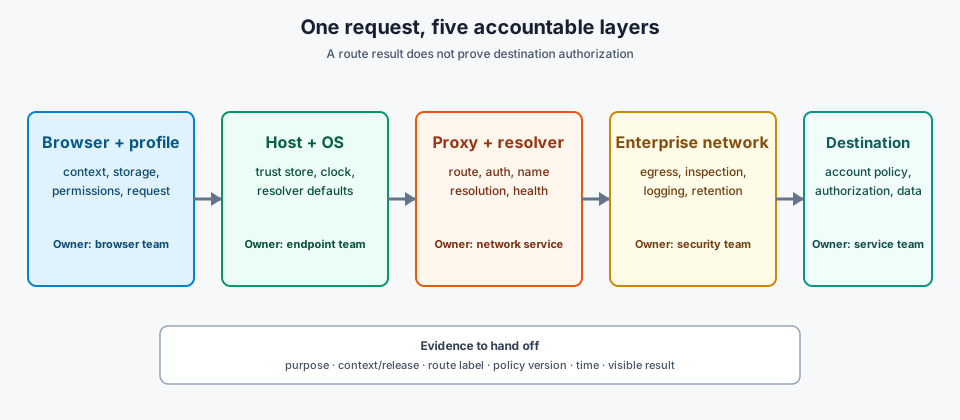
A browser request crosses several administrative boundaries before an application responds. The browser chooses a profile, creates a request, and applies permissions. The host and operating system provide connectivity, local policy, certificates, and scheduling. A proxy or resolver may authenticate, route, or answer a name lookup. An enterprise network can enforce egress, inspection, or retention rules. The destination then applies its own identity, authorization, and data policies.
These layers are related but not interchangeable. A browser setting cannot approve an enterprise firewall rule. A proxy team cannot decide whether an application should retain an account event. A destination cannot be assumed to understand an internal profile label. When ownership is implicit, an incident can bounce between teams while each one reports that its own component is healthy.
Use the map for legitimate operations such as regional quality checks, support sessions, and controlled account workflows. It should describe the intended path and the limits of each team, not provide instructions for defeating a control. The privacy-by-design workflow guide gives a complementary way to limit collection and retention.
Identify the layers and their owners
Start with a short inventory that a support engineer can read without private credentials:
- Browser and profile: owns browser version, profile selection, context lifecycle, permissions, cookies, storage, and browser-level proxy settings. It can report what the context was configured to present, but it cannot change a remote service's policy.
- Host and operating system: owns the machine image, local trust store, device clock, resolver defaults, endpoint security, and job scheduler. It can affect connectivity and local observations even when the browser profile is unchanged.
- Proxy and resolver service: owns route availability, authentication, name-resolution policy, address assignment, and service health. It can report route status and an exit result according to its contract, but it does not own browser storage or destination authorization.
- Enterprise network and security: owns egress controls, segmentation, inspection policy, certificate distribution, logging, and retention rules. It decides which traffic is permitted through the managed boundary.
- Destination service: owns account policy, application authorization, consent, rate limits, and server-side retention. Its response is an external condition from the browser team's perspective.
Record one accountable owner and one operational contact for each layer. A shared service can have a separate technical owner and policy approver; naming both prevents a healthy endpoint from being mistaken for an approved use. Keep route credentials, private addresses, and sensitive account material in the organization's controlled systems rather than in a public runbook.
Document data and decision boundaries
For each handoff, write four things: what data crosses it, who may inspect it, which decision the receiving team can make, and what the team cannot infer. A browser can record a context label, release, visible error, and user-approved outcome. It should not copy credentials or unrelated page content into a support ticket. A proxy can report reachability and route status. That report does not establish that a destination accepted an account action or that the route is suitable for every purpose.
Separate observation from control. A page can show the timezone, locale, or request result available to it; it cannot prove what an enterprise logger retained. A network log can show that traffic reached a gateway; it cannot prove the page rendered correctly. NIST SP 800-207 treats access as a policy decision evaluated at the request boundary, so a successful connection is not equivalent to authorization. RFC 6973 likewise distinguishes collection, use, disclosure, and retention; documenting a boundary should not become permission to collect everything visible at that boundary.
Define the minimum evidence for a repeatable review: workflow purpose, browser and profile release, route label, policy version, timestamp, visible outcome, and owner. Add detailed network or account data only for an approved incident and only for the required retention period. When a case moves between teams, pass the smallest evidence package that lets the next owner test its own boundary.
Use an escalation path that matches the boundary
An escalation path should classify the first observed failure before asking another team to change settings. If the profile has the wrong permission or release, the browser owner handles it. If the route is unavailable or the resolver follows an unexpected policy, the proxy or network owner handles it. If the browser and route are coherent but the destination denies an action, the account or service owner handles it. If a managed policy blocks an approved workflow, the enterprise security owner decides whether the policy or the workflow should change.
Ask for the same bounded facts in every handoff: the context and release, the route label, the time, the exact user-visible result, and the policy version. Do not ask an operator to disable a block to prove that a route works. A failed-closed result is useful evidence when it is recorded with the owner and the expected policy. If a route changes during a session, treat the new route as a new decision and avoid presenting the two segments as one uninterrupted identity.
An escalation record should end with one of three outcomes: configuration correction, policy decision, or external service condition. “Works from another network” is a clue, not an owner assignment. Compare the intended policy with the observed boundary, then attach only the evidence that supports that comparison.
Review policy and topology changes
Revisit the map when a browser build, profile, host image, proxy provider, resolver, certificate policy, enterprise egress rule, account, or destination dependency changes. Review one material change at a time when possible. Confirm that the route is still approved, that the browser context starts with the intended storage and permissions, and that the evidence package still avoids unnecessary personal data.
Use a small change record with the old and new owner, policy version, effective time, expected user impact, rollback decision, and verification result. A browser update may change request behavior without changing the profile. A network policy may change certificate handling without changing the destination. The record should identify which boundary changed and which boundaries were rechecked, rather than claiming that the whole enterprise path was revalidated automatically.
Retire stale assignments. When a route, profile, or workflow ends, close the context, revoke its assignment, and apply the organization's retention policy. Do not leave a former test route attached to a production profile for convenience. A clear lifecycle makes later support evidence easier to interpret and reduces accidental reuse. A boundary map is useful only when an operator can apply it during a real support event, so pair it with a short record for every approved workflow. The record should name the business purpose, profile family, browser release, host image, route label, policy revision, and destination service, and it should say which result is expected and which team owns the next decision. Keep private addresses, credentials, account identifiers, and full request histories out of the shared record; store those details in the access-controlled system used by the team that owns the relevant boundary. Use stable names for profiles, route classes, and policy revisions. A label such as eu-support-readonly-v3 is easier to compare than a copied proxy URL or an operator's shorthand. The label is not an identity claim. It is an index into a controlled inventory, and the inventory should state who can assign it, where it is valid, and when it expires. When a name changes, record the old and new names together so support can follow a case across a release without guessing. A useful record distinguishes expected, observed, and unknown values. For example, the expected route can be eu-support, the observed route can be eu-support-2, and the unknown value can be whether a destination's account policy accepted the action. This format prevents a healthy network response from being reported as a successful application result and gives the next owner a precise question rather than a general request to inspect everything. Keep the record close to the release decision. A profile update, route migration, or certificate change should link to the same verification result that approved the change. If the change is rolled back, preserve the failed result and the reason for the rollback. Later reviewers then see the relationship between the boundary that changed and the user-visible outcome, without needing unrestricted access to network or account logs. A controlled test should answer one ownership question. To test the browser boundary, start the intended release and profile, confirm context permissions and storage state, and capture only the visible result required by the workflow. To test the host boundary, use the approved image, clock policy, trust store, and endpoint controls, then record the image revision and host-check result. To test the route boundary, use the assigned route label and the network team's normal reachability check. To test the destination boundary, use the service's approved account and application checks. Do not combine these questions into a single claim that the whole path is healthy. Keep a known-good comparison for each test using the same destination, account class, browser release, profile family, region, and workload shape. A test from an unrestricted laptop can show that a service is available somewhere, but it does not qualify a managed production path. Likewise, a successful page load does not prove that the proxy used the intended route or that the enterprise logger applied the expected retention rule. Record the smallest observation that distinguishes the hypotheses. A browser owner may need a visible permission state and release identifier, a network owner may need a route result and timestamp, and a service owner may need an application response code or account event reference. Passing the entire page capture or raw network history to every team increases exposure without improving the decision. When more detail is necessary, make the incident approval and retention period explicit before collecting it. Repeat the test after a material change while keeping the prior result available. A new browser release can be compared with the old release on the same host and route. A proxy migration can be compared with the previous route while the browser and profile remain fixed. If several boundaries change together, call that out as a combined change and avoid drawing a single-layer conclusion from the result. Configuration drift is the most ordinary failure. A worker may receive a valid profile but an old route assignment, or a current route but a host image with an expired trust policy. The visible symptom can be identical in both cases. Include the profile, host, route, and policy revisions before another team changes a setting, because replacing all four at once may make the page work while removing the evidence needed to identify the original mismatch. An ownership gap appears when a team can observe a result but no team can authorize the next action. A proxy service can report a reachable destination while the account owner has not approved the workflow. A security team can approve egress while the destination service has a rate limit that rejects the task. Add an explicit policy owner or service owner to the map instead of assigning the issue to the team that produced the most visible log. An inference gap appears when evidence is treated as stronger than it is. A browser-visible locale does not prove the region of a network exit. A gateway log does not prove page rendering. A destination response does not prove that the enterprise route used the intended inspection policy. Write the limit beside each observation so later readers do not turn a useful signal into an unsupported guarantee. Route changes during a session deserve special handling. Close or mark the old segment, record the new route and its effective time, and make the user-visible impact explicit. Do not merge two route segments into one support result merely because the same browser context remained open. A fresh context is often the clearest way to verify that the new assignment starts with the intended storage, permissions, and network policy. Before approving a workflow, confirm that its purpose is documented, each of the five layers has an owner, route and profile labels resolve to current inventory entries, and the retention period is known. Confirm that the visible evidence is enough for the next decision and that private topology or credentials are stored elsewhere. Ask the destination owner which account and authorization result counts as success, the security owner which egress and inspection policy is expected, and the browser owner which profile and release are approved. After a change, compare expected and observed values for every boundary that could have been affected. Record the effective time, user impact, verification result, and rollback decision. If the result is inconclusive, mark it unknown and assign a next owner rather than declaring success. If the workflow is retired, revoke profile and route assignments, close active contexts, and apply the ordinary retention schedule. This checklist is intentionally small. It is a handoff tool, not a replacement for network operations, application authorization, or privacy review. Its value comes from keeping responsibility boundaries visible as the deployment changes. A concise record that is current beats a detailed diagram that no team maintains, and a clear unknown is safer than a confident statement unsupported by the boundary evidence.
Where BotBrowser fits and where it stops
BotBrowser can provide a repeatable browser profile and context workflow, including per-context proxy settings and documented profile-level network and locale behavior, so a team can validate the browser-visible part of its approved boundary before and after a change. The team can compare the same context label, release, route assignment, and user-visible result across controlled runs. BotBrowser cannot approve enterprise access, change firewall or resolver policy, control proxy-provider quality, decide what a destination retains, or replace the organization's authorization and incident process.
Treat BotBrowser evidence as one layer in the ownership map. It can show what the configured browser context did in a defined run; it cannot certify private enterprise topology or guarantee that a destination will accept a request. Keep the policy owner and the destination owner in the review even when the browser check passes.
Public sources
Related Articles
Take BotBrowser from research to production
The guides cover the model first, then move into cross-platform validation, isolated contexts, and scale-ready browser deployment.