Mesa llvmpipe vs SwiftShader for Chromium on Linux
Choose between Mesa llvmpipe via ANGLE GL and SwiftShader for Chromium on Linux: about 49% less CPU in a headed run, equal CPU in headless, and a two-flag setup.
BotBrowser Team
Want the structured docs for Deployment?
This article lives in the editorial library. For step-by-step setup, reference material, and ongoing updates, jump into the docs section.
A Linux server without a GPU still needs a software rasterizer to give Chromium working WebGL. Through ANGLE there are two practical choices: SwiftShader, and Mesa llvmpipe reached through ANGLE's OpenGL backend. In BotBrowser's measurement, a headed session on a virtual display (Xvfb) ran about 25 seconds of Canvas 2D drawing plus a WebGL2 shader. SwiftShader used roughly 999% CPU for that workload and Mesa llvmpipe used roughly 513%. That is about 49% less CPU, with WebGL1, WebGL2 and the WebGPU adapter all still available.
TL;DR
- In the headed Xvfb measurement, SwiftShader used about 999% CPU and Mesa llvmpipe about 513%, roughly 49% less, with WebGL1, WebGL2 and the WebGPU adapter still available.
- In default headless mode the two backends used about 713.5% and 713.3%, so the migration buys capability stability there and not CPU.
- The llvmpipe path is two flags,
--use-angle=gl --bot-gpu-emulation=false, after installinglibgl1-mesa-dri,libglx-mesa0,libegl-mesa0andlibvulkan1. - Bare
--disable-gpumakesrequestAdapter()return null and breaksgetContext('webgl')andgetContext('webgl2'), and it overrides--use-angle=glif both are present. - The lavapipe row at about 153% loses WebGL2 and the WebGPU adapter on Ubuntu 22.04, so its lower CPU number is not comparable.
Contents
- What the measurement shows
- Why SwiftShader costs more here, and how the three backends differ
- Why bare --disable-gpu removes WebGL and WebGPU adapters
- The two-flag llvmpipe configuration
- Rasterizer output differences and seed reproducibility
- Canary rollout for a Linux fleet
What the measurement shows
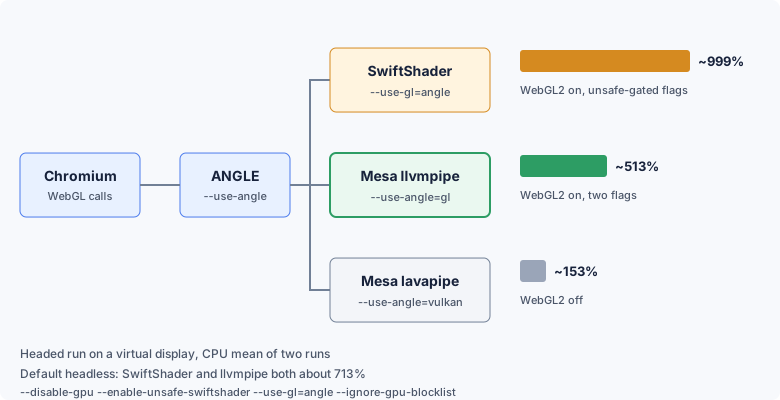
The result has a clear boundary. It comes from one headed virtual-display workload on an Ubuntu 22.04 x86_64 host with a Windows 11 profile, summing ps CPU across all Chromium processes and averaging two runs. It does not describe every workload or every host. In the default headless mode the two backends use nearly the same CPU.
| Mode | Backend | CPU mean | What it means |
|---|---|---|---|
| Headed on Xvfb | SwiftShader | ~999% | Baseline |
| Headed on Xvfb | Mesa llvmpipe | ~513% | About 49% lower than the baseline |
| Headed on Xvfb | Mesa lavapipe | ~153% | WebGL2 disabled, not usable in production |
| Default headless | SwiftShader with the full unsafe-gated flag set | ~713.5% | Baseline |
| Default headless | Mesa llvmpipe | ~713.3% | Roughly equal CPU, memory peak about 100 MB higher |
The lavapipe row is a warning, not a recommendation. Its low CPU number comes from a configuration that loses WebGL2 and the WebGPU adapter, so the saving is not comparable with the other two rows.
Read the table by the mode you run. If any part of your pipeline is headed, such as a virtual display for screenshots, manual checks or the legacy headless path, the CPU gain is real. If you already run the default headless mode, do not expect a CPU saving. The reason to migrate there is stable WebGL, WebGL2 and WebGPU availability without depending on --enable-unsafe-* flags. For what to compare between headless and headed sessions, see Headless and Headed Browser Profile Consistency, which covers recording the supported pair and classifying differences.
The same reading, organized by deployment shape, looks like this:
| Deployment shape | CPU expectation | Reason to migrate |
|---|---|---|
| Headed session on a virtual display | Lower with llvmpipe, in the range measured here | CPU saving and a smaller flag set |
| Legacy headless path or screenshot pipelines that run headed | Lower with llvmpipe, verify on your own workload | CPU saving and forward compatibility |
| Default headless mode | About the same as SwiftShader | Stable WebGL and WebGPU without unsafe flags |
| Deployment frozen for now | No change until you migrate | Plan the move before the next major Chromium upgrade |
Why SwiftShader costs more here, and how the three backends differ
SwiftShader is a CPU rasterizer that implements OpenGL ES and Vulkan in software. Every shader invocation runs on CPU cores, which is what it was built to do. It is self-contained and needs no system Mesa packages, so it is the path many Linux fleets land on by default.
A reading of 999% means roughly ten cores' worth of CPU were busy while the workload ran. Multiply that by the number of instances on a host and the rendering backend becomes a large share of the CPU budget. The measurement shows the difference between the backends, but it does not isolate why one is cheaper than the other, so it makes no claim about their internals.
Mesa documents llvmpipe as a software rasterizer that uses LLVM for runtime code generation and runs multithreaded across CPU cores. On a server with no hardware GPU, Mesa selects it automatically when ANGLE targets the system OpenGL stack.
ANGLE is the layer Chromium uses to translate WebGL calls into a native graphics API, and the --use-angle flag chooses which API it targets. That choice decides which software rasterizer ends up doing the work. Three paths exist:
- SwiftShader via ANGLE is the historical fallback. Recent Chromium keeps it behind
--enable-unsafe-swiftshader, and the word unsafe in that name is the upstream signal that the path is no longer a default. - Mesa llvmpipe via ANGLE GL uses
--use-angle=gl. ANGLE talks to the systemlibGL, and Mesa binds it to llvmpipe when no hardware GPU is present. WebGL1, WebGL2 and WebGPU entry points stay available, and no flag in the setup is labelled unsafe. - Mesa lavapipe via ANGLE Vulkan is the Vulkan software rasterizer. It needs Vulkan extensions that ANGLE expects for WebGL2, and not every Mesa release ships them.
| Backend | Required flags | WebGPU adapter | WebGL1 | WebGL2 | Forward compatible |
|---|---|---|---|---|---|
| Mesa llvmpipe (recommended) | --use-angle=gl --bot-gpu-emulation=false | yes | yes | yes | yes |
| SwiftShader | --disable-gpu --enable-unsafe-swiftshader --use-gl=angle --ignore-gpu-blocklist | yes | yes | yes | deprecated and unsafe-gated |
| Mesa lavapipe, bare metal, Ubuntu 22.04 | --use-angle=vulkan --enable-features=Vulkan,DefaultANGLEVulkan,VulkanFromANGLE | no (null) | yes | no | yes on Ubuntu 24.04 and later |
| Mesa lavapipe, Docker, any distribution | same as above | no (null) | no | no | not viable for production |
Bare --disable-gpu | --disable-gpu alone | no (null) | no | no | usable only with extra flags |
navigator.gpu as a property is present on every row. The WebGPU column tracks whether navigator.gpu.requestAdapter() returns a usable adapter. For how the adapter is exposed and what it reveals, see WebGPU Fingerprinting: The Next Generation of GPU Tracking, which covers adapter details and how to control them.
Lavapipe deserves a closer look because its CPU number is tempting. On Ubuntu 22.04 the packaged Mesa 23.2 does not ship every Vulkan extension ANGLE needs for WebGL2. WebGL1 still works on bare metal, but WebGL2 fails and the WebGPU adapter is null. Inside Docker, Vulkan ICD loading is also fragile, so lavapipe often does not come up at all and WebGL1 stops working too. Ubuntu 24.04 with Mesa 24.2 or later improves the bare-metal case, while container behavior remains unreliable today. Revisit lavapipe when your hosts run a newer Mesa, and until then treat it as not yet a production option on the tested setup.
The upstream projects describe their own roles in plain terms. The ANGLE README presents ANGLE as the layer that translates OpenGL ES calls to other graphics backends such as Vulkan and desktop OpenGL, which is why one --use-angle value is enough to move Chromium between the three rasterizers. The SwiftShader repository describes a CPU-based implementation of the Vulkan graphics API that gives hardware independence. The Mesa documentation describes llvmpipe as part of the Gallium software drivers that Mesa maintains. Together they explain why llvmpipe is a supported software path rather than an escape hatch.
The SwiftShader flag is also a timing question. Chromium has marked the path as unsafe-gated, which suggests it may not stay available, but no removal date is public. Pipelines that rely on it lose WebGL if the flag is ever retired, so moving early turns a forced cutover into a scheduled change.
Why bare --disable-gpu removes WebGL and WebGPU adapters
Many Linux Chromium tutorials suggest --disable-gpu as a one-line fix for server rendering problems. On current Chromium, that flag on its own disables WebGPU adapter discovery and both WebGL contexts. navigator.gpu is still present, but requestAdapter() returns null, and getContext('webgl') and getContext('webgl2') both fail. Canvas 2D keeps working, which is why the problem often goes unnoticed until a page needs WebGL.
Many production deployments avoid that failure because they layer escape-hatch flags on top of --disable-gpu:
--disable-gpu
--enable-unsafe-swiftshader
--enable-unsafe-webgpu
--use-gl=angle
--ignore-gpu-blocklist
Each flag in that stack has a separate job. --enable-unsafe-swiftshader keeps the SwiftShader path available, --enable-unsafe-webgpu keeps the software WebGPU path available, --use-gl=angle forces the ANGLE wiring, and --ignore-gpu-blocklist skips the Chromium GPU blocklist. None of them is needed on the llvmpipe path.
This five-flag stack works in the sense that WebGL1, WebGL2 and the adapter come back. It also pins the deployment to the SwiftShader path and to four flags whose names contain unsafe or ignore. Every Chromium upgrade then carries the question of whether one of those flags has changed behavior.
There is one more trap. --disable-gpu takes priority over --use-angle=gl in headed and headless modes alike. If you add the Mesa flag and leave --disable-gpu in place, llvmpipe never takes effect and the configuration looks as if the migration did nothing.
The cleanest exit is to delete --disable-gpu and the four escape-hatch flags, then replace the whole group with the two flags in the next section. An operator who can name the five-flag stack, the two-flag stack and the reason bare --disable-gpu removes adapter discovery has understood the whole migration.
The two-flag llvmpipe configuration
First install the Mesa userspace packages that let ANGLE reach llvmpipe:
sudo apt-get update
sudo apt-get install -y \
    libgl1-mesa-dri \
    libglx-mesa0 \
    libegl-mesa0 \
    libvulkan1
Then launch with the two flags. For the default headless mode no display is required:
chromium-browser \
    --headless \
    --no-sandbox \
    --user-data-dir="$(mktemp -d)" \
    --bot-profile="path/to/profile.enc" \
    --use-angle=gl \
    --bot-gpu-emulation=false
For a headed session on a virtual display, drop --headless and provide a display:
DISPLAY=:10.0 chromium-browser \
    --no-sandbox \
    --user-data-dir="$(mktemp -d)" \
    --bot-profile="path/to/profile.enc" \
    --use-angle=gl \
    --bot-gpu-emulation=false
--use-angle=gl routes ANGLE through the system OpenGL stack, and Mesa loads llvmpipe when no hardware GPU is present. --bot-gpu-emulation=false tells BotBrowser to let the real GL driver render WebGL output while Canvas 2D noise and the --bot-noise-seed variance layer stay active. The flag is narrow on purpose: it does not switch off the profile or the rest of the fingerprint protection.
--bot-gpu-emulation accepts three values. false is the setting for this migration. true is the default standard mode. priority adds prioritized GPU scheduling for workloads with many concurrent contexts in one browser instance, operates independently of the GL backend choice, and is not needed once false hands GPU work to the real driver.
When you migrate an existing deployment, remove these flags before adding the two new ones. Several conflict with --use-angle=gl, and any one of them can undo the change without an error.
| Flag to remove | Reason |
|---|---|
--disable-gpu | Disables adapter discovery and both WebGL contexts, and wins over --use-angle=gl |
--enable-unsafe-swiftshader | Only needed to keep SwiftShader alive |
--use-gl=swiftshader | Explicit SwiftShader opt-in, superseded by llvmpipe |
--use-gl=angle | Older form replaced by --use-angle=gl and can conflict with it |
--ignore-gpu-blocklist | Not needed, because llvmpipe is not on the blocklist |
--enable-features=Vulkan,DefaultANGLEVulkan,VulkanFromANGLE | Pins the lavapipe path, which disables WebGL2 on Ubuntu 22.04 bare metal |
--use-angle=vulkan | Forces the same lavapipe path |
--disable-vulkan-surface | Only relevant to the Vulkan path |
Inside a container, add the same four Mesa packages to the image and pass the same two flags at launch. Running the container with --shm-size=2g gives Chromium more shared memory and improves stability. Remember that lavapipe is the backend that fails in containers, so a container deployment is one more reason to stay on llvmpipe through ANGLE GL.
Keep --headless, --no-sandbox if you already used it, every --bot-* flag including --bot-profile and --bot-noise-seed, and your network and --user-data-dir settings. For Playwright or Puppeteer launches, the same flags go into the args list:
const browser = await chromium.launch({
  executablePath: 'path/to/botbrowser',
  args: ['--use-angle=gl', '--bot-gpu-emulation=false', '--bot-profile=path/to/profile.enc'],
});
Rasterizer output differences and seed reproducibility
Different software rasterizers produce different pixel output for the same shader. After you switch from SwiftShader to Mesa llvmpipe, the exact bytes from readPixels or toDataURL will differ. That is expected behavior of two different rasterizers, not a sign that the migration failed.
The fields a page reads as identity stay under profile control. User-Agent, platform and the unmasked vendor and renderer strings come from your profile and do not change with the backend. The --bot-noise-seed behavior is also unchanged: the same seed reproduces the same output within the backend you chose, and a different seed produces different, stable output.
Two practical rules follow. Keep reference captures per backend instead of comparing bytes across SwiftShader and llvmpipe. And when you compare before and after a migration, compare runs from the same backend and the same seed, so that a real regression is not hidden by an expected rasterizer difference.
Canary rollout for a Linux fleet
Validate the change on one canary host before touching the rest of the fleet. The sequence below keeps each step observable:
- Install
libgl1-mesa-dri,libglx-mesa0,libegl-mesa0andlibvulkan1on the canary host. - Replace the GPU flag stack with
--use-angle=gl --bot-gpu-emulation=falseon one instance and restart it, because flag changes are read only at launch. - Confirm that WebGL1 and WebGL2 contexts allocate and that
navigator.gpu.requestAdapter()returns a non-null adapter. - Open
chrome://gpuand check that the WebGL, WebGL2 and WebGPU rows report software rendering via ANGLE and OpenGL rather than disabled. The same page shows the active ANGLE and driver string, which confirms llvmpipe is in use. - Sample CPU against a matched SwiftShader baseline in the same headed or headless mode and under the same load.
- Repeat the same-seed and different-seed checks, then roll forward to the rest of the fleet.
The table below maps the symptoms operators meet most often to their usual cause.
| Symptom | Usual cause | Fix |
|---|---|---|
| Adapter null and both WebGL contexts fail | Bare --disable-gpu, or lavapipe inside Docker | Remove --disable-gpu and the Vulkan flags, keep only the two flags |
| WebGL1 works, WebGL2 and adapter null | lavapipe on bare metal with an older Mesa | Remove the Vulkan flags and switch to --use-angle=gl |
libGL error: failed to load driver: swrast | Mesa userspace packages are missing | Install libgl1-mesa-dri, libglx-mesa0 and libegl-mesa0 |
chrome://gpu still shows SwiftShader | A flag forces it back, such as --use-gl=swiftshader | Remove the flag and restart the process |
| CPU did not drop | Default headless mode, where the workload dominates | Expected, the value there is stability and forward compatibility |
| WebGL pixel output changed | Different rasterizer | Expected, rebuild the reference capture for the new backend |
A matched comparison is what makes the CPU number trustworthy. Use the same host, the same profile, the same workload and the same mode for both backends. Run a workload long enough to keep rendering busy, for example about 25 seconds of Canvas 2D drawing together with a WebGL2 shader. Sum CPU across every Chromium process of the instance, repeat the run at least twice, and average the runs so a short burst of host load does not decide the result. A saving measured in one mode says nothing about the other mode, so run the baseline in the mode you ship. For how to review Canvas, WebGL and WebGPU output across backends, see Browser Privacy Validation Across Rendering Backends, which covers a rendering matrix and a controlled test order.
Plan for the case where CPU does not move. In default headless mode, rendering goes to an offscreen buffer whichever backend is active, so the Canvas and WebGL work itself dominates and the two backends cost about the same. The migration still pays off there as capability stability and a smaller flag set that does not depend on unsafe flags.
BotBrowser documents a Linux GPU backend path where --use-angle=gl with --bot-gpu-emulation=false lets Mesa llvmpipe render WebGL while Canvas 2D noise and --bot-noise-seed reproducibility stay active, so you can validate the two-flag migration on a canary host before changing the rest of the fleet. BotBrowser cannot make Mesa llvmpipe faster than the host allows, does not guarantee CPU savings in default headless mode, cannot keep WebGL pixel bytes identical across rasterizers, and does not control the upstream Chromium schedule for deprecating SwiftShader. The --bot-gpu-emulation flag requires ENT Tier 2.
For the base host setup, read the headless server setup guide and the Docker deployment guide. For seed behavior across backends, read noise seed reproducibility. The full flag reference is in the Linux GPU backend deployment guide.
Public sources
- BotBrowser Linux GPU backend selection
- Mesa llvmpipe documentation
- SwiftShader repository
- ANGLE README
Practical conclusion
Remove --disable-gpu and the four escape-hatch flags, install the four Mesa packages, and launch with --use-angle=gl --bot-gpu-emulation=false on one canary host before touching the fleet. Then compare the same 25 second workload in the mode you actually ship, since a headed saving of about 49% says nothing about default headless, and keep the two-session seed check so rasterizer output differences stay visible.
This article is part of the guide: Browser Deployment and Release: Operations Map
Related Articles
Browser Privacy Validation Across Rendering Backends
DeploymentHeadless Browser Setup on Ubuntu Servers
FingerprintWebGPU Fingerprinting: The Next Generation of GPU Tracking
DeploymentStandard or Trimmed Build on Linux x64
DeploymentHeadless vs Headed Browser Signals: A Comparison Method
Fingerprintwebgl_debug_renderer_info: What Your GPU Reveals to Pages
Take BotBrowser from research to production
The guides cover the model first, then move into cross-platform validation, isolated contexts, and scale-ready browser deployment.