Browser Container Resource Limits: A Practical Planning Method
Plan CPU and memory limits for containerized browser workloads without confusing capacity signals with browser identity or privacy guarantees.
BotBrowser Team
Want the structured docs for Deployment?
This article lives in the editorial library. For step-by-step setup, reference material, and ongoing updates, jump into the docs section.
Container limits answer an operational question: how much CPU and memory may this browser workload consume? They do not answer whether a browser is private, whether two sessions belong to different people, or whether a page will behave identically on every host. A useful plan keeps those questions separate.
BotBrowser can repeat an authorized workload in a declared profile, release, route, and platform context and compare visible outcomes under documented budgets. It cannot allocate host capacity, guarantee throughput, weaken browser isolation, or infer private identity from resource behavior.
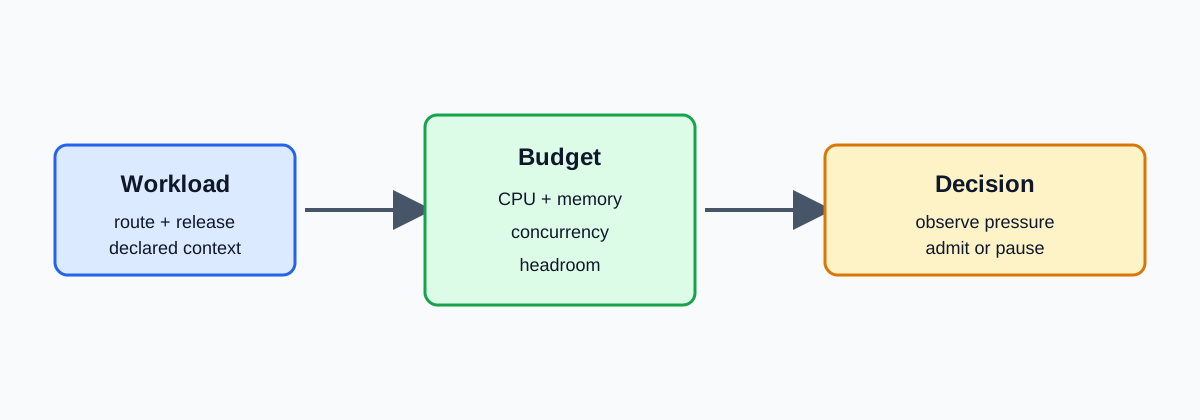
Define the browser workload before choosing limits
Start with a declared workload, not a preferred container size. Record the browser release, profile class, page or owned test route, navigation steps, expected completion, concurrency, storage policy, and whether graphics or media are involved. A text-only page and a graphics-heavy page can have different memory curves even when they use the same image.
Keep the observation bounded. Measure only the fields needed for the operational decision: startup success, page completion, CPU pressure, memory pressure, queue delay, and recovery after a worker closes. A resource observation is not a fingerprinting verdict. Do not retain raw browser dumps when a coarse pass/fail and a declared budget answer the question.
For browser automation, the declared route should also say what counts as completion. A page that paints a shell but never reaches the owned test assertion is not a successful run. Conversely, a slow but complete result may be acceptable when the service has enough queue headroom. Writing this criterion before measuring keeps capacity decisions tied to user-visible behavior rather than to a single process counter. Keep the route synthetic and owned so the record does not require private application traffic.
Use a budget decision table
Choose a starting budget from the workload and concurrency you actually intend to run. The table is a planning aid, not a universal capacity promise.
| Workload signal | First decision | Recheck before increasing concurrency |
|---|---|---|
| Light document, one or two sessions, stable completion | Start with a small bounded CPU and memory request and leave host headroom | Repeat after the browser release or page changes |
| Several concurrent pages, rising queue delay | Hold concurrency and measure the whole container rather than one tab | Check memory slope, CPU throttling, and recovery after close |
| Media or graphics-heavy page, repeated pressure | Lower admission or separate the workload class | Confirm shared memory, graphics policy, and graceful shutdown |
| Memory limit reached before completion | Stop admitting work and preserve the failing workload record | Increase only after reproducing with synthetic data and a new budget |
The choice rule is simple: if the expected result is not complete within the declared budget, reduce admission or change the workload class before raising the limit. A larger limit can hide a leak or an unbounded queue.
Keep a small headroom margin for browser startup, short-lived workers, shared memory, and host services that keep the container alive. The margin is not a magic percentage; justify it with repeated runs at the chosen operating point. When the margin disappears after a browser or image update, treat that as a capacity change and repeat the comparison instead of silently accepting a tighter boundary.
Keep container limits separate from browser signals
Docker and Kubernetes expose resource controls for the container or pod. Browser APIs such as navigator.hardwareConcurrency expose a hint about the environment available to a page; they are not a measurement of the container's remaining capacity. Treat both as context, not identity. A page may see a hint while the scheduler throttles the process, and two containers with the same hint can have different limits.
The privacy boundary matters. If a record stores a stable combination of resource hints, profile labels, route details, and timestamps, it can become linkable even when each field looks harmless. Keep the release, workload class, and budget decision; omit unnecessary raw values and identifiers. Review retention and access with the same care as browser storage.
Monitor pressure and recover deliberately
Monitor the whole browser group: browser processes, shared memory, graphics buffers, network pools, and the container's CPU and memory counters. Per-tab numbers are useful for diagnosis but are not the capacity contract. Record when a worker starts, reaches its expected result, closes, and releases enough pressure for the next bounded batch.
Use graceful actions in a fixed order: stop admitting new work, finish or cancel the owned journey, close the browser context, and record the outcome. If pressure does not recover, preserve the smallest reproducible workload and stop the container rather than repeatedly retrying it. This protects the host and keeps the evidence interpretable.
Apply the boundary to BotBrowser comparisons
When comparing two authorized BotBrowser releases, keep the profile, route, workload, container limits, and concurrency fixed. Compare visible outcomes and declared resource observations, then state the conditions and limitations. A difference supports a release-specific follow-up; it does not prove a kernel cause, universal performance, or a user's identity.
For a practical handoff, record: the workload revision, browser release, profile class, CPU and memory budget, concurrency, observed result, uncertainty, retention decision, and next bounded action. This is enough for another operator to repeat the decision without receiving private test data or a detector recipe. Write the plan in the same order every time. First state the question in one sentence: for example, whether a declared release can complete ten synthetic checkout journeys with a fixed memory limit. Next name the owned route and synthetic data set, then record release, profile class, image, CPU and memory request/limit, shared-memory setting, concurrency, and stop condition. Run a baseline, one representative journey, and a small concurrency increase with identical intervals and completion criteria. Record completion, CPU throttling, memory pressure, queue wait, and recovery after close. A growing baseline can indicate startup work or retained state, not a unique browser identity. Stop at the smallest failing case; it is safer and easier to review than a large uncontrolled log.
When release, image, kernel, graphics mode, profile, route, storage, region, or host class changes, repeat the same synthetic journey instead of carrying the old limit forward. Record the condition that improved or worsened the result and describe uncertainty rather than assigning an unseen implementation cause. Retain the decision, workload revision, coarse measurements, release identifiers, next-action owner, and reason for the action. Omit page text, account data, unnecessary full URLs, stable machine identifiers, and raw values that do not affect admission. Keep request, limit, browser timeout, and queue timeout separate; pause admissions, close safely, and move to a known budget when pressure persists. Separate workload classes, measure queue limits, treat profile changes as new workloads, and make the stop condition visible before each run. This preserves privacy while keeping the capacity comparison repeatable and gives the operator a clear, reversible next operational step.
The practical result is a small, reviewable operating contract. It should tell an operator when to admit a batch, when to pause, and when to investigate without requiring access to account content. A memory limit reached before a visible result is a capacity failure under that contract, even if the host has spare disk space. A completed journey with a queue delay beyond the service target is also a failure of the chosen operating point. Keeping these outcomes explicit prevents teams from turning an attractive average into a promise. Use synthetic inputs and owned routes for the comparison. If a production-like route is necessary, remove account content and replace exact destinations with a route class in the record. Keep the profile label at the minimum level needed to repeat the approved setup, and do not combine it with stable machine identifiers. The goal is to make the resource decision reproducible while collecting as little linkable context as possible for review.
When pressure appears, prefer a reversible action: stop new admissions, let the current journey finish if it is safe, close the context, and retry later under a declared smaller budget. Do not run an automatic retry storm against the same failing workload. A bounded pause protects the host, preserves the first useful observation, and gives the owner a clear next step. If a different budget succeeds, record the changed condition and visible outcome rather than the entire internal trace.
Capacity planning should be revisited after dependency updates, not only after incidents. A browser release can change process sharing, an image can change shared-memory defaults, and a page can add a worker or media asset. Repeating the same small journey after each material change is cheaper than discovering the change through a long-running queue. It also keeps the privacy review current because the retained fields can be reduced when they stop influencing admission.
An operator can make the first budget decision with a short sequence. Describe the journey in terms another team can run: open the owned route, create the declared context, perform the synthetic action, wait for the visible assertion, and close the context. Choose one small concurrency level that leaves obvious host headroom. Start the container with the CPU and memory request and limit written in the record, then observe startup, completion, close, and recovery. If the journey completes and pressure returns to the expected baseline, increase concurrency by a small step. If the queue grows or the browser is throttled, hold the step and inspect the whole group. If memory approaches its limit, stop before the limit becomes an emergency. This sequence produces a useful capacity curve without requiring a large collection of page values.
The curve should answer operational choices rather than produce an impressive number. A service owner needs to know how many journeys can be admitted, how long a queue may wait, and what happens when pressure rises. A platform owner needs to know whether a request or limit change alters scheduling or throttling. A privacy owner needs to know which fields are retained and whether they can be linked across runs. Keep those questions in the same record, but do not merge their conclusions. A resource limit may explain why a journey did not finish; it does not explain who started it. A browser API hint may help an application choose a code path; it does not measure remaining container capacity. A successful visible result may support a release decision; it does not certify a host, a kernel, or a third-party site.
Headroom should be treated as an observed property of a declared setup. Shared memory, browser startup processes, graphics buffers, network pools, log forwarding, and the container runtime all consume resources. A memory request that is sufficient for one warm journey may be insufficient during a cold start. A CPU quota that is harmless for a single page can lengthen several simultaneous navigations enough to trigger an application timeout. Record the phase in which pressure appeared. If the problem occurs only during startup, admission can be shaped around startup batches. If it occurs during steady state, the workload class or limit needs attention. If it occurs after close, recovery is the next measurement. These distinctions are more actionable than a single maximum value.
Use the same release and profile for a comparison unless the purpose is to test that variable. If a profile changes, note whether it changes permissions, extensions, storage, or startup work. If a route changes, describe the new workload class instead of treating the result as a regression. If the host changes, label the host class and repeat the controlled journey. If a proxy or network route changes, keep that condition visible because queue delay and page completion can move without any change to browser code. The result should state what was held constant, what changed, and what remains uncertain. This prevents a change in infrastructure from being reported as a universal browser feature difference.
Admission control is part of privacy protection. An unbounded queue encourages repeated retries, retains more identifiers, and increases the number of sessions that an operator must inspect. A bounded queue can reject work before a container reaches a dangerous limit. The rejection record can contain a workload class, a coarse reason, and a next action; it does not need a full URL, page text, account identifier, or raw browser trace. When a batch is paused, allow safe current work to finish, close contexts deliberately, and verify recovery. When a batch is moved to a smaller or separate class, record the new budget and visible result. Avoid copying the entire incident log into a long-lived comparison archive.
Resource observations can become linkable when repeated. Exact memory values, stable timestamps, profile labels, host names, routes, and release identifiers may form a recognizable combination even when none is a direct identity. Store the coarsest value that still changes the admission decision. A range or pressure category may be enough where an exact byte count is not. Use a route class when the destination is not needed. Keep a profile family rather than a customer label. Set a retention period that matches the decision and remove obsolete records. Restrict access to people who can act on the budget, queue, image, or route. These controls do not promise that a page cannot observe any environment signal; they prevent operations from creating an unnecessary secondary fingerprint database.
When a limit is reached, do not immediately increase it. First preserve the declared workload and confirm that the same result can be reproduced with synthetic data. Check whether the container was killed, the browser reported a page failure, the application timed out, or the queue simply exceeded its service target. Each outcome has a different next action. A killed container may need a smaller admission batch or a different memory request. A page timeout may need a separate browser timeout or an application fallback. A queue breach may need a back-pressure policy. A one-off host event may require a repeat on the same host class. Naming the outcome keeps the repair bounded and avoids changing several limits at once.
For BotBrowser comparisons, keep the product claim narrow. BotBrowser can repeat an authorized browser assertion in the declared profile, release, route, platform, and resource context and compare visible outcomes. That capability helps an operator decide whether a documented deployment behaves differently after a controlled change. It does not allocate Kubernetes requests, choose Docker limits, prove anonymity, infer a person's identity, certify the host kernel, or guarantee a result on an undeclared page. State the limitation beside the observation. A reader can then use the article as a planning method rather than as a promise that one resource number will fit every browser deployment.
Sources
- Docker resource constraints
- Kubernetes resource management for containers
- MDN: Navigator.hardwareConcurrency
- BotBrowser advanced features
Related reading: Docker browser deployment guide and BrowserContext capacity planning.
Related Articles
Take BotBrowser from research to production
The guides cover the model first, then move into cross-platform validation, isolated contexts, and scale-ready browser deployment.