Browser Deployment Logging and Privacy Minimization
Design browser deployment logs that preserve operational evidence while minimizing personal data, fingerprint signals, and unnecessary kernel detail.
BotBrowser Team
Want the structured docs for Deployment?
This article lives in the editorial library. For step-by-step setup, reference material, and ongoing updates, jump into the docs section.
Browser deployment logs should explain whether a declared browser context started, what user-visible outcome followed, and what action is next. They should not become a shadow profile of a person, a fingerprint database, or an unexplained dump of browser internals. BotBrowser can help repeat an authorized deployment and browser assertion in a declared context; it cannot decide a retention policy, prove anonymity, or certify that a third-party site is safe.
Define the deployment question
Start with one operational question: did the browser start with the intended release, profile state, route, and application revision, and did the declared journey reach its expected branch? This is narrower and more useful than collecting every browser property. Write the expected result in user-visible terms, then record the observed result using the same terms.
The W3C WebDriver specification describes a remote-control protocol; it does not require an organization to retain complete sessions or personal data. MDN's browser documentation explains exposed web surfaces, while the application owner decides which observation is necessary for the deployment decision.
Log the smallest useful event
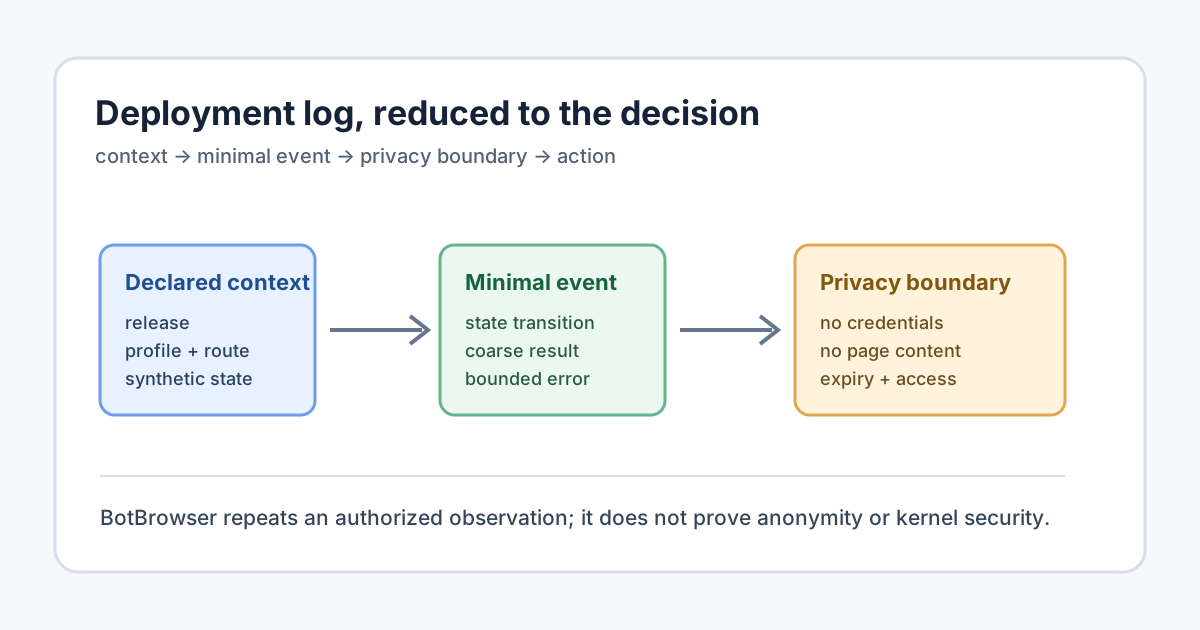
An operational event usually needs a timestamp, an event type, a deployment or run identifier that is not a person's identifier, a declared browser release, platform class, application revision, route class, result, and a bounded error code. Add profile or permission state only when it can change the result. Keep free-form URLs, page text, cookies, authorization headers, request bodies, and screenshots out of the default log.
| Log field | Useful for | Privacy boundary |
|---|---|---|
| Event time and duration | Ordering and latency | Use the smallest time precision that supports diagnosis |
| Run and deployment IDs | Correlating one authorized run | Use random opaque IDs; do not encode account or device identity |
| Browser release and platform class | Repeating a declared setup | Do not treat a release as a person or a security attestation |
| Route class and result | Product action and regression comparison | Prefer a route label over a full URL or query string |
| Error class and bounded message | Triage | Redact tokens, page text, headers, and personal data |
Log a state transition such as launch_started, context_ready, journey_passed, or journey_failed, not a continuous stream of every API call. A failure record should say which declared branch was visible and whether a safe fallback was offered. It should not imply a root cause when the deployment only observed a symptom.
Treat fingerprint signals as sensitive inputs
Browser APIs can expose information about language, display, hardware, storage, network, and rendering. The W3C Fingerprinting Guidance explains why combining such values can increase linkability. MDN's privacy and security guidance likewise recommends considering the information a site can observe.
Do not copy navigator fields, canvas output, font lists, WebGL details, client hints, screen metrics, or timing samples into deployment logs unless a documented test question requires one of them. When a capability matters, record a coarse result such as “feature available” or “fallback shown.” A single value may look harmless; a stable collection across releases, routes, and runs can become a fingerprint.
Avoid turning a deployment identifier into a long-lived browser identity. Rotate identifiers by purpose and retention window. Keep correlation across services opt-in and documented. If a diagnostic needs a screenshot or trace, store a redacted artifact in an access-controlled location and put only its type, owner, expiry, and reference in the operational event.
Keep browser and kernel boundaries clear
The browser exposes web-platform behavior through APIs defined by standards such as the WHATWG HTML Standard and the W3C Permissions specification. The operating system and browser kernel implement lower-level process, display, storage, and networking behavior. A deployment log can report the declared browser build, host class, display mode, and visible result; it cannot infer a complete kernel state from a page-level observation.
This boundary matters for diagnosis. “The permission prompt was not shown in this profile” is an observation. “The kernel blocked the permission” is a hypothesis that needs an independent, controlled comparison. BotBrowser can repeat an authorized run across declared releases, profiles, routes, and platform contexts. It cannot prove why an unobserved branch occurred, reproduce every host condition, or certify kernel security from a browser result.
Minimize retention and access
Set a purpose and expiry for each log class. Keep launch health and aggregate outcome metrics longer than verbose diagnostics. Delete or quarantine raw traces after the review window. Restrict access by operational role, and audit access to artifacts that may contain page content or identifiers. An incident summary can state the visible result and declared context while the detailed trace remains available only to the assigned review team.
Before exporting logs, remove cookies, authorization headers, tokens, query parameters, account identifiers, private hostnames, typed text, and unrelated origins. A stable transformed value can still link events, so transformation is not a substitute for minimization. If a value is not needed to choose the next action, omit it rather than transforming it.
Use a compact record that a reviewer can understand without internal history:
Question: Did the declared deployment reach the expected browser branch?
Context: Browser release, platform class, application revision, route class, profile state.
Observed: Visible result, bounded duration, and run count.
Privacy: Excluded page content, credentials, identifiers, and unrelated origins.
Uncertainty: Conditions not controlled and causes not established.
Action: Ship, use fallback, retry one bounded check, or investigate one hypothesis.
Expiry: Date or event that makes this diagnostic record stale.
For intermittent failures, record numerator, denominator, reset method, and observation window. For a release comparison, hold application, route, data, and profile constant while changing one browser dimension. A comparison identifies a boundary to investigate; it does not establish causality by itself.
A useful deployment record starts before the browser process launches. Define the owner of the check, the approved environment, the synthetic data set, and the decision that the result will support. A release-health check may only need to answer whether a page opened and a control was visible. A permission regression check may need the permission state and visible branch, but it still does not need the account name, full URL, or every request. Writing this scope first prevents a diagnostic event from quietly becoming a general-purpose collection pipeline.
Use stable field names across releases so a reviewer can compare outcomes without learning an implementation detail. A small schema might contain event_time, run_id, release_class, platform_class, application_revision, route_class, profile_state, visible_result, error_class, and expires_at. Keep values coarse where precision does not change an action. A platform class such as desktop or mobile is usually enough for a deployment decision; a complete model string can add linkability without improving triage. When a precise value is required for a short investigation, give it an owner and expiry at creation time.
Treat the run identifier as a correlation handle, not as a user identity. Generate it for one declared purpose, keep it random and opaque, and avoid putting email addresses, customer numbers, hostnames, or timestamps into its structure. A separate diagnostic system may use its own handle, but joining the two systems should be an explicit operation with a documented reason. This makes it possible to answer an operational question while limiting how easily unrelated teams can reconstruct a person or browsing history.
The event lifecycle should be finite and legible. launch_started means the declared attempt was accepted. context_ready means the requested profile and route context was available to the runner. journey_passed means the expected visible assertion was observed. journey_failed means the assertion was not observed or the safe fallback was reached. A separate diagnostic_attached event can point to a redacted artifact without copying it into every log consumer. These states make dashboards useful while keeping raw traces exceptional rather than default.
Error handling deserves the same boundary. Prefer an enumerated class such as navigation_timeout, permission_not_visible, assertion_missing, context_start_error, or runner_unavailable. Add a short bounded message only when a human needs it for the next action. Strip request headers, cookies, authorization material, typed values, and page excerpts before the message leaves the controlled review system. A timeout is a symptom; the event should not label it as a kernel defect, site defect, or user defect until an independent comparison supports that conclusion.
Screenshots, videos, and traces can be valuable for a short review, especially when a visible branch differs between two declared releases. Treat them as separate artifacts with an owner, access list, retention date, and redaction status. The event should contain the artifact type and a reference, not a copy of its content. Reviewers should be able to revoke access and mark the artifact expired. Exporting a dashboard should preserve the coarse result and decision context while leaving the detailed artifact behind the access boundary.
Browser and kernel observations should be reported in separate columns or records. A page can show that a permission prompt appeared, a feature fallback rendered, or a navigation completed. It cannot show the complete process tree, storage medium, display server, network route, or kernel policy. Host telemetry may answer some of those questions, but it must have its own authority, purpose, and retention rules. Joining host data to a browser run is a controlled investigation step, not an automatic consequence of launching a test.
Permissions are another reason to keep claims narrow. A missing prompt can result from an existing grant, a prior denial, an insecure context, a user gesture requirement, a site policy, a browser setting, or an unavailable capability. A deployment event can record the declared permission state and visible branch. It should leave the cause unknown when those alternatives were not separated. BotBrowser can repeat the same authorized journey under controlled declarations, which helps compare branches, but repetition alone does not grant a permission or establish why a site chose one branch.
Retention should follow the decision window. Keep aggregate pass and fail counts for the period needed to identify a release regression. Keep verbose diagnostics only while an assigned reviewer is testing a bounded hypothesis. At expiry, remove the artifact or move it to a documented quarantine where access remains restricted and deletion is scheduled. Record the expiry event in the system that owns the artifact, not only in a dashboard. A retention label without an owner is an aspiration, not an operational control.
Access reviews should ask whether the person needs page content, identifiers, or only the coarse result. A product owner may need the visible branch and release class. A support engineer may need a bounded error code. A privacy reviewer may need the field inventory and retention rule. Granting every role the same trace encourages unnecessary sharing. Log access to exceptional artifacts, and make the review path auditable so a later incident can distinguish a deployment failure from an access failure.
When comparing releases, change one browser dimension at a time and hold the application revision, route class, synthetic data, profile state, and observation window constant. Report the number of attempts, successful visible outcomes, fallback outcomes, and unknown outcomes. Unknown is a valid result when the host or third-party service was not controlled. Do not convert a difference into a universal compatibility claim. The comparison narrows a next investigation; it does not certify every device, origin, profile, or kernel.
Customer-facing documentation should describe an action a reader can take. A deployment owner can choose a minimal event schema, set an expiry, compare one declared release, or escalate a bounded artifact for review. A reader should not be asked to collect a full browser fingerprint to solve an ordinary deployment question. Use BotBrowser for authorized, repeatable visible checks with declared inputs, then combine the result with the application, host, and privacy evidence that the decision requires.
Before a release, review the proposed fields with the people who operate the browser, own the application, and govern privacy. Remove a field when no one can name the next action it changes. Add a field only when its absence blocks a specific decision. Recheck the schema after a route, profile, permission, or third-party integration changes. This keeps deployment logs a small operational instrument instead of an accidental inventory of everyone who used the browser.
Keep the review record useful to the next operator. Name the declared release, profile class, route class, and application revision in the comparison header, then place the minimal event rows below it. Record the decision owner and expiry date beside the result so a later reader can tell whether the evidence is still current. If the outcome is unknown, say why the condition was uncontrolled and identify one bounded follow-up. This preserves enough context to act while avoiding a permanent record of browsing details.
The same discipline applies when a deployment is handed from one team to another. Share the event schema, declared context, visible assertion, and expiry rule; do not export unrelated page content merely because a reviewer asks for everything. A receiving team should reproduce the narrow check with synthetic data and a documented owner. When a broader investigation is justified, open it as a separate record with a new purpose, access list, and deadline. That separation prevents a temporary release comparison from becoming an indefinite archive of user activity.
A useful review also records what was not measured. State whether host telemetry, third-party behavior, identity linkage, and kernel state were outside the check. Mark those questions as unknown instead of filling the gap with a confident explanation. The next operator then knows which evidence exists, which is absent, and which single experiment could reduce uncertainty without collecting a full browser profile.
State what BotBrowser can and cannot do
BotBrowser is useful for repeatable, authorized browser deployment checks with declared releases, profiles, routes, and synthetic data. It can support a comparison and preserve the visible outcome needed by a product owner. It does not decide what a site may retain, turn a browser value into anonymous data, identify a visitor, remove the need for a privacy review, or prove that a browser kernel or third-party service is secure.
Use WebDriver, HTML, Permissions, and MDN privacy guidance for public definitions. Keep deployment logs proportionate to the decision, and write “not tested” for identity inference, universal browser behavior, third-party retention, and security certification.
For release checks, see browser release validation. For isolated automation fixtures, see browser automation test fixtures and isolation.
Sources
- W3C WebDriver
- W3C Fingerprinting Guidance
- W3C Permissions
- WHATWG HTML Standard
- MDN Privacy and security
Recheck the fields, access rules, retention window, standards links, and declared deployment context whenever the product decision changes.
Keep a small change note with the release class, route class, observed branch, and expiry date. The note should identify the decision owner and the next bounded check, while leaving account data and unrelated page content outside the record. This makes a later comparison repeatable without creating a permanent browsing history. It also gives support teams a clear handoff point and keeps routine release evidence separate from exceptional diagnostics.
For a routine release, the operator can review the declared version, platform class, route class, visible assertion, and expiry in one place. Keeping those choices explicit makes the next action obvious: ship the release, use the safe alternative, or repeat one controlled check. The record remains useful because it explains what was measured and what was deliberately left outside the measurement.
Related Articles
Take BotBrowser from research to production
The guides cover the model first, then move into cross-platform validation, isolated contexts, and scale-ready browser deployment.