Chromium 151 BrowserContext Memory Planning
Measure the memory cost of live BrowserContexts in Chromium 151, set admission limits, and validate a temporary startup mitigation.
BotBrowser Team
Want the structured docs for Deployment?
This article lives in the editorial library. For step-by-step setup, reference material, and ongoing updates, jump into the docs section.
The capacity question changed
Many automation services share one browser group across a large number of live BrowserContexts. Each context keeps its own storage and application session, while the group avoids repeating browser startup work. That arrangement can be efficient, but the cost of a context is a property of the browser release as well as the page workload.
Some Chromium 151 builds from 151.0.7922.108 onward have a higher baseline in headless or automation workloads with many live contexts. An active context can be accompanied by an additional browser-UI renderer associated with the browser's own interface. Memory therefore grows with active context count even when the page itself has not changed.
This is a capacity planning concern, not a claim about every Chromium build or every operating system. The same release family can behave differently across maintenance builds, and Linux x64 is only one comparison environment. Treat the figures in this article as example scale, then measure the exact release, host, profile policy, and workload that your service will run.
The practical consequence is simple: an old context budget may be too high after an upgrade. A host that previously had comfortable headroom can reach its operating-system memory limit while the page work still looks ordinary. Admission control, release validation, and a documented temporary mitigation should be considered together.
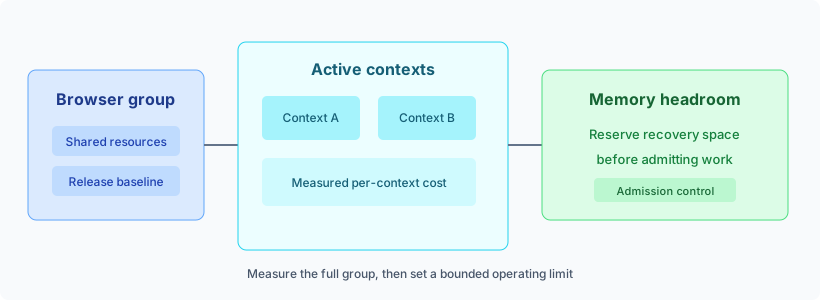
What the comparison tells us
On one Linux x64 comparison host, Chromium 151.0.7922.76 did not show the additional omnibox UI renderer in this workload. The observed cost was about 120 MB per live context. A later comparison at 151.0.7922.138 did show the additional renderer, with an observed cost of about 289 MB per live context. The difference is roughly 169 MB per context in that particular setup.
The additional renderer itself was commonly around 250 to 280 MB in the observed examples. These are not pricing units, guarantees, or portable constants. A context running a media-heavy page, a document renderer, a large application, or several workers can use much more. A quiet page can use less. Shared browser memory also needs to be accounted for separately from the per-context slope.
The useful model is a measured baseline plus a measured slope:
group memory = shared browser memory + (active contexts × context cost) + workload variation
Do not turn that expression into a universal calculator. It is a way to ask the right measurement questions. Is the shared part stable? Does the slope change when contexts are warm? Does the peak occur during creation, page activity, or close? Does the host have enough room for the operating system, supervisor, logs, network services, and a recovery action?
The comparison also explains why an upgrade can look like a sudden capacity regression. If a scheduler still admits the old count, the new per-context cost is multiplied across every active assignment. A small difference at one context can become a large difference across a busy group. This can happen without a page code change and without a permanent allocation that grows forever.
Capacity records should preserve the observation window as well as the measurements. Note whether the host was otherwise quiet, whether the browser group was newly started or already warm, and whether the workload completed normally. A short sample can understate the cost of idle contexts, while a long sample can reveal delayed cleanup and queue accumulation. Keep the accepted baseline close to the deployment configuration so an operator can compare a new host without guessing which assumptions mattered. When a comparison is repeated, retain the earlier result and explain the changed input in one sentence. This makes a gradual shift visible and prevents an isolated successful run from becoming an unsupported operating promise.
A living context is the unit to count
Count contexts that are actually alive, including sessions between actions, idle sessions that remain warm, and sessions in their closing phase until cleanup is complete. Counting requests or tabs is not equivalent. One request can create more than one page, while one long-running context can serve several actions. Include background sessions owned by a scheduler even when no foreground request is waiting. Otherwise an apparent spare slot may already carry a persistent profile, open connections, timers, or application state. The count used by admission should match the count used by the memory chart.
Keep separate budgets for distinct workload classes. A browser group serving short navigation checks may have a different slope from a group serving screenshots, downloads, media, or documents. Use a representative application transaction for each class. Include login only when authorized, and include the real storage, locale, network, and profile policy used by the service.
Measure startup and warm operation separately. Creation may produce a short peak that is hidden by a later steady-state sample. A warm context may keep resources after an action has completed. Closing may release the extra renderer, but the release can be asynchronous, so the scheduler should not immediately reuse the slot until its normal cleanup observation has finished.
The BrowserContext scaling guide describes the broader queue, lifecycle, and isolation decisions. This Chromium 151 behavior adds one more release-specific input to that capacity record. It does not replace workload measurement or make a shared context equivalent to a separate browser instance.
Upgrade checks that produce a useful baseline
Before promoting a Chromium 151 maintenance build, record the browser version, operating system and architecture, host shape, container limits, graphics mode, profile policy, extensions, network class, and workload class. Keep the record concise but reproducible. A memory number without its host and workload has little operational meaning.
Run a staged comparison against the currently approved build. Start with the same host image and the same application transaction. Measure the browser group before contexts are created, during context creation, at steady activity, during idle, and after each context closes. Capture both the group total and the number of live contexts at each observation point.
Look at the slope, not only the final total. A group with a larger shared baseline can still scale better if its incremental context cost is lower. Conversely, a quiet benchmark can hide a high slope if it ends before enough contexts are live. Repeat enough steps to identify the trend, but do not treat a single run as approval.
Test context close explicitly. The confirmed behavior is not a permanent leak: after a context closes, the additional process can be released. That does not make the higher resident cost harmless. A service that keeps contexts alive for hours still carries the cost for hours, and a service that creates contexts faster than it closes them can reach OOM before cleanup catches up.
Observe host available memory, memory pressure, CPU load, creation latency, close latency, queue age, completed work, failures, and restart events. The release decision should consider whether the service remains responsive and recoverable, not just whether a page eventually completes. Record the accepted operating limit and the condition that causes admission to pause.
Use the same release, host, profile, and workload in pre-production and production acceptance. The browser release validation routine gives a useful structure for pairing a browser version with its profile package and rollback record. For identity-separated workloads, also review the per-context fingerprint documentation so a memory mitigation does not accidentally change the approved session boundary.
Make the release state visible to the scheduler. A browser group should carry the candidate build, the profile package family, the startup settings, and the measured memory class as a single assignment. A worker that reports only a major version cannot tell whether its baseline came from the earlier maintenance build or from a later build with the additional renderer. Keeping these facts together also prevents a rolling deployment from silently mixing limits. Groups on the older baseline can use their accepted budget, while groups on the candidate build remain under the candidate budget until observation is complete.
The memory class should describe an operating range rather than a permanent label. Reclassify a group when its host shape, container limit, graphics mode, extension set, or page class changes. A new profile package can alter startup and page behavior even when the browser binary remains unchanged. Similarly, a page redesign can move work from a quiet path to a media or document path. The scheduler does not need to understand why the slope changed; it does need a reliable signal that the old admission rule is no longer applicable.
Keep rollout evidence actionable. If a candidate has a higher slope, record the new limit, the temporary setting tested, the queue response, and the rollback owner. If the slope is unchanged but close latency rises, investigate lifecycle pressure separately. If memory recovers after close but the host still reaches OOM during creation, size the startup burst rather than changing the steady-state limit. These distinctions let operations choose a bounded response and avoid treating every memory event as the same problem.
Size memory headroom before sizing concurrency
Start with the host's usable memory rather than its installed memory. Reserve room for the operating system, supervisor, logging, network services, filesystem cache, crash handling, and the temporary spike caused by creation. Then subtract the shared browser baseline and the measured workload margin. The remainder is the pool available to active contexts.
An operating limit should be below the point where memory pressure begins to affect completion or recovery. Avoid choosing the largest count that survived one run. Production pages change, requests arrive in bursts, and a neighboring process can consume the room that a benchmark happened to use. A limit with recovery headroom is more valuable than a high number that leaves no time to stop admission.
Use a bounded queue when the limit is reached. New work should wait for a known maximum period, receive a capacity response, or be routed to another approved group. Retries need the same control, because an outage can otherwise multiply the number of live contexts while the host is already under pressure. Pace context creation so the entire batch does not create a short-lived peak.
Keep context ownership explicit. The service that creates a context should close it, release its lease, and confirm cleanup before returning capacity. If a close deadline is missed, drain the browser group and replace it according to policy. Do not solve uncertain ownership by increasing the limit.
The performance optimization guide covers broader ways to reduce work, including page lifecycle and resource scheduling. Apply those practices alongside the release comparison. A lighter page workload can reduce variation, but it cannot be used to assume that the browser release has the older context baseline.
The temporary startup mitigation
For the affected headless or automation workload, the temporary startup setting is:
--disable-features=WebUIOmniboxPopup,WebUIOmniboxAimPopup
Pass both feature names together. Disabling only one is not the same mitigation. This setting changes the browser's own address-bar interface. It does not alter page JavaScript, DOM, or CSS. In headless operation there is usually no visible user-facing effect, which is why it can be a practical short-term capacity measure for services that have validated the tradeoff.
The setting is not a permanent capacity guarantee and should not be presented as a BotBrowser-only correction. Chromium rollouts can change the underlying behavior, remove the setting, or ignore it. After starting a browser with the setting, observe actual memory on the target release rather than assuming the setting is still active. Keep the launch configuration versioned and attach its measurement to the release record.
There is a second setting worth distinguishing:
--disable-features=PreloadTopChromeWebUI
In the affected examples, this can lower the memory used by the additional process, but it does not remove that process. It is therefore a partial reduction, not a complete workaround. If the operating limit depends on removing the extra cost, use the two-name omnibox setting only after validating the resulting browser behavior and memory profile.
Treat startup settings as a release input. Compare no setting, the complete temporary setting, and the partial setting on the same host and workload. Record whether the extra process is present, the group total, the per-context slope, page behavior, and close behavior. Do not assume that a setting accepted by one build has the same effect in a later rollout.
The comparison should include a control group with no mitigation. Without that control, a lower total may be attributed to the setting when it actually came from a quieter page or a different warm-up state. Keep the order of the runs documented, allow the host to return to its normal idle range between groups, and repeat a run when a supervisor restart or unrelated service affects the result. These checks do not require page content to be retained. Resource totals, lifecycle times, release metadata, and workload class are enough to decide whether the setting changes capacity for the service.
When a mitigation is the wrong answer
If memory pressure comes from page data, media, workers, downloads, or a genuine lifecycle defect, a browser-UI setting will not fix the root workload. Check the context lifecycle and page class first. Close completed sessions, cap queue age, and stop admitting work when recovery space is being consumed.
Separate browser groups when one class has a much higher slope or when it needs a different release setting. Use a dedicated browser instance or host when the required resource or failure boundary cannot be provided by a shared group. Per-context profiles remain useful for authorized storage and identity separation, but they do not make every resource shared or free.
Do not combine a temporary setting with an unmeasured concurrency increase. The correct sequence is to validate the candidate release, apply the setting if needed, measure the new slope, set a lower or higher limit from evidence, and monitor the first rollout closely. A mitigation that lowers memory can still leave CPU, file, network, or page limits unchanged.
A runbook for the first rollout
Before rollout, pin the candidate version and host class, choose a representative workload, and confirm that the profile package and per-context policy are approved together. Define who can pause admission and who owns rollback. Keep the prior accepted release available until the observation window is complete.
During rollout, use a small deployment group and watch group memory, active context count, available memory, creation latency, close latency, queue age, and completed work. Compare the observed slope with the approved baseline. If memory pressure rises or cleanup falls behind, pause admission first. Drain affected groups within their normal lifecycle rules.
After rollout, verify that closed contexts release their additional process and that the host returns to its expected recovery range. Review several workload classes, not only the lightest path. Keep the mitigation only while it is measurable and necessary, and schedule a new comparison when Chromium changes the rollout.
The pricing page is the appropriate place to review plan capacity and account entitlements. It should not be used as a substitute for host-level measurement: plan limits, browser limits, and operating-system memory limits are separate constraints.
A compact decision record
For each browser release and workload class, keep a short record containing:
- The exact browser build and target platform.
- Host memory available to the browser group and its container limit.
- Profile, storage, route, extension, and graphics policies.
- Shared memory before contexts and measured memory at several live-context counts.
- Creation, steady-state, idle, and close observations.
- The accepted operating limit, recovery margin, and admission action.
- Whether the complete omnibox setting or the partial preload setting was tested.
- Evidence that closed contexts release the additional process.
- The rollback condition and the owner for the next measurement.
This record keeps a release-specific observation from turning into a promise about all Chromium 151 workloads. It also gives operators a clear response when a host approaches OOM: pause admission, allow safe cleanup, drain where needed, and return to a validated limit. Recheck after any browser, host, profile, page, extension, graphics, or network change.
BotBrowser documents Per-Context Fingerprint (ENT Tier3), which can run many BrowserContexts in one browser instance, each with its own profile and per-context settings, while the browser, GPU, and network processes stay shared. That helps teams keep identity separation and validate the per-context memory slope on the exact release in a documented per-context workflow. BotBrowser cannot remove the Chromium 151 browser-UI renderer cost, guarantee a memory figure or operating limit, or size host headroom, and it does not replace measurement on the target release, host, and workload. Renderer processes still scale with page count.
Chromium 151 can therefore be operated safely with BrowserContexts, but the accepted capacity must follow measured memory rather than an inherited context count. The extra browser-UI renderer seen in some builds is a real cost while contexts remain live, its release after context close is a useful recovery property, and the temporary startup setting can help while validated. The durable control is a release-aware budget with enough headroom to keep the service responsive.
Related Articles
Take BotBrowser from research to production
The guides cover the model first, then move into cross-platform validation, isolated contexts, and scale-ready browser deployment.