Anti-Detect Browser: What the Category Changes
Map the anti-detect browser label onto surface families: user agent and client hints, canvas and WebGL output, fonts, locale and timezone, plus host-level signals.
BotBrowser Team
Want the structured docs for Fingerprint?
This article lives in the editorial library. For step-by-step setup, reference material, and ongoing updates, jump into the docs section.
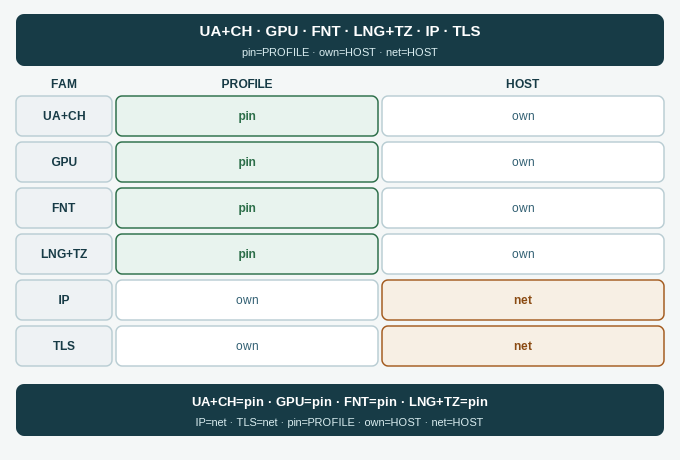
Anti-detect browser is a product category label, not a mechanism. The label bundles a specific set of profile-level changes to browser-side surfaces: the user agent string together with its client hints, the output of canvas and WebGL rendering, the fonts a page can measure, and locale and timezone. It says nothing by itself about the signals that sit outside the browser process, such as the IP address a site observes and the network behavior of the host machine. BotBrowser profiles pin browser-side surfaces (user agent and client hints, canvas and WebGL output, fonts, locale, timezone) from one profile file, so the profile-level half of the category maps onto a single file; BotBrowser does not change your IP address or anything outside the browser process, so the host-level half stays with the network configuration. Reading the category label as one switch hides that split, and most confusion about what an anti-detect browser does traces back to it.
The practical question behind the category is narrow: if a tool carries the anti-detect browser label, which surfaces change and which do not. The BotBrowser launcher guide covers the operational side of that question, how a session starts with a profile, a kernel and a network route. The browser fingerprint generator page covers what one fingerprint is made of once a browser is running. Both stay close to a single product or a single observation; what follows maps the category itself onto surface families and separates the family a profile file changes from the family that stays with the host.
TL;DR
- An anti-detect browser is a category label for a bundle of profile-level changes, not one mechanism. The bundle splits cleanly into browser-side surfaces a profile file can change and host-level signals it cannot.
- User agent and client hints form one profile-level family. A profile pins
navigator.userAgenttogether with theSec-CH-UAheader family andnavigator.userAgentData, because servers read the headers, scripts read the properties, and the two must agree. - Canvas and WebGL output are profile-level. The pixels and renderer strings a page reads through the Canvas API and WebGL come from the rendering path inside the browser process, and a profile drives that path.
- Fonts, locale and timezone are profile-level. Font metrics a page measures,
navigator.languageand theIntltimezone all read as browser-side values that one profile file can pin. - The IP address stays host-level. Routing is chosen by the network configuration, not by the browser-side surfaces a profile pins, and the exit IP a site observes belongs to the proxy or network configuration outside the browser process.
- DNS resolution, TCP behavior and other network signals outside the process also stay host-level, because the browser does not produce them alone and a profile file does not document them.
- BotBrowser profiles pin browser-side surfaces (user agent and client hints, canvas and WebGL output, fonts, locale, timezone) from one profile file; BotBrowser does not change your IP address or anything outside the browser process.
Table of contents
- A category label, not a mechanism
- The profile-level half: surfaces a profile changes
- The host-level half: signals outside the browser process
- A decision table for the control layer
- BotBrowser capability and limitation
- Practical conclusion
- Keep reading
A category label, not a mechanism
Vendor pages around the category sell "one browser that reads as something else", and that sentence compresses six or more separate changes into one noun. A tool sold as an anti-detect browser is usually a build of a mainstream engine, Chromium in most cases, plus a configuration layer that rewrites specific browser-side surfaces before any page runs. The engine renders; the profile configures. Nothing in the label names which surfaces the configuration covers, which is why two products carrying the same label can cover different sets of families and still be described with the same words. Not every tool near this label works through configuration alone: driver-patching approaches modify a different layer, the one a page probes through navigator.webdriver, and undetected-chromedriver: what it patches maps the exact parts that route touches.
The bundle has a second property that a single noun hides: the surfaces it names must stay coherent with each other. A user agent string that claims one platform while navigator.userAgentData reports another brand, or a timezone that disagrees with the locale a page reads through navigator.language, produces observations that a site can compare against each other. That is why the families below are treated as groups rather than isolated toggles: user agent and client hints travel together, locale and timezone travel together, and the rendering surfaces hang off one graphics path. A coherent configuration pins whole families, not loose values. Cross-surface agreement is also what detectors test first, and the cross-surface browser privacy page walks through the pairings sites compare before anything else.
The third property is the split that organizes the rest of the mapping. Every surface in the bundle is produced inside the browser process, which is the same process a profile file can reach. The signals outside that process, led by the IP address, are not reachable from a profile file, because they are produced by the network stack, the proxy configuration and the operating system. A reader who keeps the two halves separate can evaluate any tool in the category with two short questions instead of one vague one: which browser-side families does the profile pin, and who owns the route.
That division also explains why the category name persists even though the implementations differ. Vendors can disagree about canvas policies, font sets or timezone formats and still sell under the same label, because the label names the bundle's goal rather than its mechanism. The mechanism is always the same shape: rewrite browser-side surfaces from a configuration, leave the host and the route to the operator.
The profile-level half: surfaces a profile changes
Four families make up the browser-side half of the bundle. Each one is observable from page script or from request headers, each one is produced inside the browser process, and each one is the kind of value a profile file can pin before a page loads.
User agent and client hints
The user agent string is the oldest surface in the bundle. navigator.userAgent returns it to scripts, and the User-Agent request header carries it to servers. Modern Chromium-based browsers split the same information across client hints: Sec-CH-UA, Sec-CH-UA-Platform and Sec-CH-UA-Mobile are sent by default as low-entropy hints, and a server can request high-entropy hints such as Sec-CH-UA-Model through Accept-CH, as the MDN client hints guide documents. Scripts reach the same values through navigator.userAgentData.
The profile-level consequence is that a tool must pin the whole family at once, not the string alone. A browser whose navigator.userAgent names one version while Sec-CH-UA reports a different major version exposes a disagreement that costs nothing to check on the server side. This is also why client hints changed the category rather than replacing it: they added required surfaces without removing the old one. The MDN Sec-CH-UA reference documents the header format, including the intentionally inconsistent brand entry every Chromium browser sends.
Canvas and WebGL output
Canvas and WebGL are output surfaces. A page draws text or shapes onto a <canvas> element and reads pixels back, or creates a WebGL context and reads renderer and vendor strings through getParameter(). The MDN WebGL documentation describes the API and its dependence on the device's graphics hardware. Because the output is produced by the rendering path inside the browser process, it belongs to the profile-level half: the same input drawing produces a different readback when the rendering configuration differs.
Two cautions keep this family honest. First, canvas and WebGL output still depend on the host's graphics hardware and drivers underneath the browser; a profile drives the browser's rendering path, it does not replace the machine. Second, a single readback is a derived observation, not a complete identity; the browser fingerprint generator page treats the boundary between a declared value and a rendered observation in detail. The category-level point is narrower: these surfaces live inside the browser process, so they sit on the profile side of the split.
Fonts
Fonts enter the bundle through measurement. A page can infer which fonts are installed by rendering text in a candidate font and comparing the metrics against a fallback, and it can read font lists through APIs such as document.fonts where they are exposed. Because font availability is a browser-side view of the system, it is observable from page script and therefore belongs to the profile-level half. A profile can carry its own font set, which pins both the metrics a page measures and the consistency between text rendering and the rest of the configuration.
Font set coherence matters more than font count. A configuration that claims one platform while exposing a font set that platform never ships produces a measurable disagreement, and font metrics are cheap to collect. That is the same coherence rule the user agent family follows: pin the family, not one member of it.
Locale and timezone
navigator.language and navigator.languages report the language preferences, and the Intl object resolves timezone and formatting behavior, as the MDN Intl documentation describes. Both are browser-side values: a Chromium browser resolves them from its own configuration before a page reads them, which is why the timezone and locale pair can be pinned from browser configuration rather than from the operating system.
Locale and timezone belong to one family because sites cross-check them. A page can format a date with Intl.DateTimeFormat, read navigator.language, and compare both against the timezone offset it computes from a Date object. A coherent configuration pins the pair together; a configuration that moves one and leaves the other at the host default produces three readings that disagree. The same rule extends to regional formats such as currency and number separators, which follow the locale.
The host-level half: signals outside the browser process
The second half of the bundle is everything the browser process does not produce. A profile file is a configuration for the browser; the host owns the network stack, the routing table and the hardware, and no browser-side setting rewrites them.
The IP address
The exit IP is the clearest host-level signal. A site sees the source address of the TCP connection, which is determined by the network route the host uses, not by any browser configuration. Every browser-side surface can be pinned to a coherent set and the site will still observe the exit IP of the machine or the proxy in front of it. This is why proxy configuration is a separate operational step, the step that owns switches like --proxy-server: the BotBrowser launcher guide treats the network route as its own decision, checked before launch, because the route lives in the network configuration, outside the browser-side surfaces a profile pins.
The practical rule follows directly. Align the browser-side profile with the route: a session whose profile claims one region while the exit IP resolves to another produces a cross-layer disagreement that is trivial to observe and expensive to explain. The profile half and the host half must be chosen to agree, and the agreement is the operator's responsibility because the two controls live in different places.
Network signals beyond the address
Around the IP sit other signals the browser process does not own. DNS resolution follows the resolver the operating system and network configuration select. TCP connection behavior reflects the host network stack. The TLS ClientHello is initiated by the browser, but its shape depends on the browser build and the platform's networking libraries rather than on profile settings, so it is not a documented profile surface. None of these appear in a profile file's scope, and treating them as profile-covered is the most common overreading of the category label.
The decision rule for this group is the same one applied below in the decision table: if changing the profile file cannot change the value, the value is host-level. Swap in a different profile on the same machine and the DNS resolver, the TCP stack and the exit IP all stay where they were. That observation separates the halves more reliably than any vendor wording.
A decision table for the control layer
The table below compresses the split into one view. Each row is a surface family, with one example signal a reader can actually check, whether a profile-level tool changes it, and where the host-level signal lives for that family.
| Surface family | Example signal | Profile-level tool changes it | Host-level signal that remains |
|---|---|---|---|
| User agent, client hints | navigator.userAgent, Sec-CH-UA | Yes: one profile pins both | None: both travel inside the browser |
| Canvas and WebGL output | 2D readback, getParameter() strings | Yes: profile drives rendering | GPU hardware and drivers under the browser |
| Fonts | Measured font metrics | Yes: profile carries a font set | OS font installation directory |
| Locale, timezone | navigator.language, Intl timezone | Yes: profile pins the pair | System regional settings |
| IP address | Exit IP of the connection | No | Proxy or network route |
| DNS, TCP, TLS framing | Resolver choice, handshake shape | No | Host network stack and browser build |
The selection rule behind the table takes one sentence: a signal is profile-level if a different profile file on the same machine can change it, and host-level if the value stays the same for every profile on that machine. Run the test mentally against each row. Swapping profiles moves the user agent family, the rendering output, the font metrics and the locale pair; it leaves the exit IP, the resolver and the handshake alone. Any signal a vendor claims to change should be placed into one of the two columns by that test before it is trusted.
The table also shows where cross-layer coherence work lives. The profile-level rows are pinned by one file, but the host-level rows are chosen separately, and the two choices must agree with each other: region claims in the profile need a route whose exit IP matches, timezone pins need a route that does not contradict the locale. The browser storage model adds a third axis to keep separate, because cookies and site storage persist across surface changes unless they are managed deliberately.
BotBrowser capability and limitation
BotBrowser profiles pin browser-side surfaces (user agent and client hints, canvas and WebGL output, fonts, locale, timezone) from one profile file, so the profile-level half of the anti-detect browser category can be covered by a single file that stays consistent across launches; the BotBrowser profile configuration reference documents the settings a profile carries, and the fingerprint overview describes the browser-side surfaces in scope. BotBrowser does not change your IP address or anything outside the browser process, so the host-level half of the category, the exit IP and the network signals around it, remains the operator's configuration: the GeoIP documentation describes how route-level region data is handled separately from the profile. Keeping the two halves in their own columns is what lets a team reason about one without mistaking it for the other.
Practical conclusion
An anti-detect browser is a bundle name, and the bundle has two halves with different owners. The profile half covers four browser-side families: user agent with client hints, canvas and WebGL output, fonts, and locale with timezone, all pinned coherently by one profile file in a tool like BotBrowser. The host half covers the IP address and the network signals the browser process does not produce, and those stay with the proxy and the machine no matter which profile loads. The working rule is the swap test: if a different profile file on the same machine would change the value, plan it through the profile; if it would not, plan it through the route and the host. Teams that evaluate tools this way buy for the families a profile actually pins and configure the route as its own decision, instead of expecting one file to cover both columns of the table.
Sources
- MDN client hints guide
- MDN Sec-CH-UA header
- MDN Canvas API
- MDN WebGL API
- MDN Intl
- BotBrowser documentation
- BotBrowser profile configuration reference
- BotBrowser fingerprint overview
- BotBrowser GeoIP database documentation
Keep reading
- BotBrowser launcher guide: the operational side of the split, how a session starts with a profile, a kernel and a checked network route.
- Browser fingerprint generator: what its output means: what one fingerprint is made of, and where a declared value stops being an observation.
- What does an anti-detect browser change?: the definition and acceptance-check view of the same label, with its own pre-purchase verification sequence.
- Browser storage model: cookies, localStorage, IndexedDB: the persistence axis that stays separate from surface pinning.
- Profile management: how profiles are organized, versioned and reused across sessions.
FAQ
Is an anti-detect browser a separate browser engine?
Usually not. Products in the category are typically builds of a mainstream engine, Chromium in most cases, plus a configuration layer that rewrites browser-side surfaces. The engine renders and the profile configures, so the question to ask is which surface families the configuration covers, not which engine it runs on.
Does an anti-detect browser change the IP address?
No. The exit IP belongs to the network route, which the host and the proxy configuration determine outside the browser process. A profile can pin every browser-side family and the site will still observe the exit IP of the route, so the route is planned and checked as its own decision.
Which surfaces does a profile actually pin?
The profile-level families: the user agent string together with the client hints family, canvas and WebGL output, the font set a page can measure, and locale with timezone. BotBrowser profiles pin browser-side surfaces (user agent and client hints, canvas and WebGL output, fonts, locale, timezone) from one profile file, and the host-level signals stay outside that file by design.
Why do client hints matter as much as the user agent string?
Because servers read the Sec-CH-UA header family on every request while scripts read navigator.userAgent and navigator.userAgentData, and the readings must agree. A configuration that pins only the string leaves the header family reporting independently, which creates a cross-surface disagreement that is cheap to check. Modern profiles pin the whole family, not the string alone.
How do I tell whether a signal is profile-level or host-level?
Apply the swap test: would a different profile file on the same machine change the value? If yes, the signal is profile-level and belongs to the browser-side half. If the value stays the same for every profile on that machine, it is host-level and belongs to the route and the network stack, which no profile file documents.
This article is part of the guide: What Is a Browser Fingerprint? Signals and Layers
Related Articles
What Does an Anti-Detect Browser Change?
FingerprintCross-Surface Browser Privacy: Keep One Context Coherent
FingerprintLinux armv81 Browser Signals: Platform Boundaries
FingerprintUndetected Chromedriver: What the Driver Patches
IdentityBrowser Identity Surfaces: A Practical Consistency Overview
FingerprintClient Hints Fingerprinting: HTTP Headers as Identity
Run the same check in BotBrowser
Load a profile, keep the signals you just read about consistent inside the browser, and confirm the result on your own machine before a rollout.