Cookies, localStorage, and IndexedDB: Where State Belongs
Compare cookies, Web Storage, and IndexedDB by scope, network exposure, capacity, and eviction, then choose where each piece of state should live.
Want the structured docs for Identity?
This article lives in the editorial library. For step-by-step setup, reference material, and ongoing updates, jump into the docs section.
What each storage mechanism holds
A page has four common places to keep state, and they differ in who can read the data, when it travels over the network, and how long it lasts. Cookies are small name-value pairs that both the server and the page can set. Web Storage has two parts, localStorage and sessionStorage, and holds string key-value pairs for scripts. IndexedDB is an asynchronous, transactional database for structured data. Choosing among them is a decision about lifecycle and exposure, not a matter of habit.
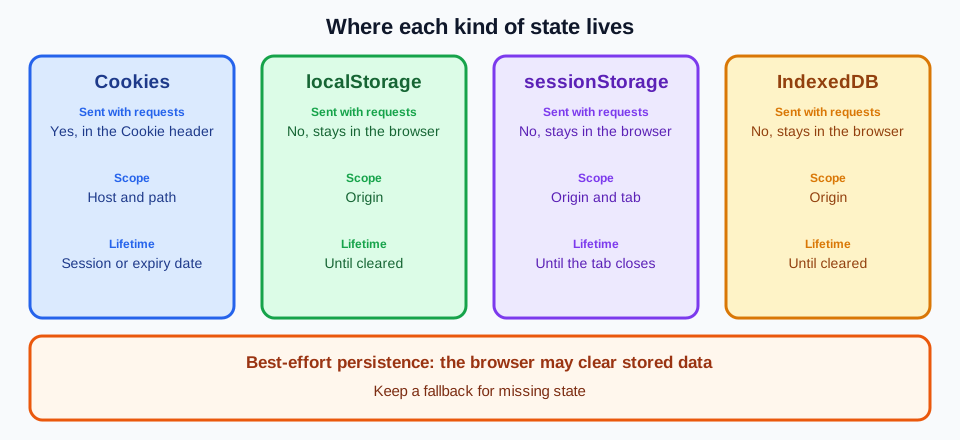
Cookies are defined in RFC 6265. A server sets one with a Set-Cookie response header, or a script sets one through document.cookie, and the browser attaches matching cookies to later requests in a Cookie header. Attributes such as Domain, Path, Secure, and HttpOnly, plus the later SameSite attribute described by MDN, narrow where a cookie is sent and who can read it. A cookie marked HttpOnly cannot be read by page script, which is why it suits a server-issued session identifier. MDN's guide to cookies describes how these attributes behave in current browsers.
Web Storage is specified in the HTML Standard. localStorage and sessionStorage expose the same synchronous interface of getItem, setItem, removeItem, and clear, with string keys and string values. Anything richer, such as an object or a list, must be serialized by the application. Because the calls are synchronous, large reads and writes on the main thread can delay rendering, so Web Storage suits small values.
IndexedDB is specified by the W3C. It stores structured values, including files and blobs, in object stores that can have indexes, and it reads and writes through asynchronous requests inside transactions. A database carries a version number, and a schema change runs inside an upgrade step that the application controls. It is also available in workers, so heavy reads do not have to occupy the main thread. The price is more code and more states to handle than a one-line localStorage call.
Origin storage also covers other stores, such as the Cache API and service worker registrations, which sit beside these mechanisms and are subject to the same quota and eviction rules in browsers that implement the Storage Standard. A cleanup or eviction can therefore remove more than the stores compared here, and a reviewer should not assume that a value in one store outlives the others.
Scope and network exposure
Scope is where the mechanisms differ most. Web Storage and IndexedDB are scoped to an origin, the combination of scheme, host, and port, so https://example.com and https://example.com:8443 hold separate data. Cookies are scoped to a host and path instead, and the cookie specification does not separate them by port; the Secure attribute is the only scheme-related control. SameSite adds a separate notion of site, a registrable domain, which governs whether a cookie accompanies cross-site requests. Keep origin and site distinct when you reason about which code can see a value.
Network exposure follows from this. Of the four mechanisms, only cookies are attached automatically to HTTP requests, so each matching request carries them whether or not the server needs the value. That is useful for a session identifier the server must read on each request, and costly for anything large, because the bytes travel with each request to that host. localStorage, sessionStorage, and IndexedDB never leave the browser unless application code reads a value and sends it. The difference also decides which side can act: a server can read a cookie without running any script, but it cannot see Web Storage or IndexedDB at all.
Script exposure is the mirror image. Any script that runs in an origin can read that origin's localStorage, sessionStorage, and IndexedDB, including third-party scripts the page includes and any script injected through a cross-site scripting flaw. A cookie marked HttpOnly is withheld from scripts, so it is the safer home for a credential. A bearer token kept in localStorage is readable by the same code that renders the page. Record this as a design trade-off; it is not a reason to avoid Web Storage for ordinary preferences.
Cookie size deserves its own note. Because cookies travel with requests, a growing set of cookies makes each request larger, and browsers enforce their own limits on the size and number of cookies per host. RFC 6265 asks user agents to support only modest minimums, so a cookie should carry an identifier or a short flag and leave larger data to a server record or to client-side storage.
Embedded and third-party contexts add another layer. Browsers increasingly partition storage and cookies by the top-level site, so an embedded frame may see a different bucket than the same origin sees as a top-level page. The details vary by browser and release. The post on browser storage partitioning and privacy explains how to test this. When a feature relies on state inside an embedded frame, test it in that embedded position and do not assume the top-level result carries over.
Lifetime, capacity, and eviction
Lifetime has two ends: the point where state stops being available by design, and the point where the browser removes it. Session cookies, those without Expires or Max-Age, last until the browser session ends, a boundary the browser defines, and some browsers restore sessions and keep them across restarts. Persistent cookies last until their expiry date, or until the user or the browser removes them. localStorage and IndexedDB have no expiry of their own and remain until script, the user, or the browser clears them. sessionStorage lasts as long as its top-level browsing context, roughly a tab, and survives reloads but not a closed tab.
Closing things shows the difference clearly. Closing a tab ends that tab's sessionStorage but leaves a session cookie, localStorage, and IndexedDB in place. Closing the whole browser typically ends session cookies, though session restore can bring them back, and it leaves localStorage and IndexedDB. A second tab opened independently on the same origin shares cookies, localStorage, and IndexedDB, but it gets its own sessionStorage (a window opened by script starts with a copy). A storage event also notifies other same-origin documents when localStorage changes, which is how tabs can stay in step.
Capacity differs as well. Cookies are limited to small values and a limited count per host. Web Storage commonly allows a few megabytes per origin, and IndexedDB allows much more, bounded by a quota the browser derives from the total size of the disk. These numbers are browser-dependent, and MDN's page on storage quotas and eviction criteria says so plainly. An application should read its limits at run time and handle a quota error, not hard-code an assumption from one browser.
The Storage Standard adds the most important rule for design: persistence is best-effort by default. Each origin has a storage bucket, and under the Storage Standard the browser may clear a best-effort bucket when it needs space, removing the data for the origin as a unit and without a promise to ask first. An application can call navigator.storage.persist() to request persistent storage, and the browser decides whether to grant it under a browser-specific policy that may involve a user prompt. navigator.storage.estimate() reports approximate usage and quota, and navigator.storage.persisted() reports whether the bucket is persistent. Treat all three as hints, not as guarantees.
Eviction is not the only way state disappears. Users clear site data, privacy modes discard storage when the window closes, a site can send a Clear-Site-Data response header to ask the browser to clear cookies or storage for its own origin, and a browser upgrade or profile change can reset what a profile holds. Policy also changes across releases, so a behavior seen once is not a promise. The specifications and MDN describe these behaviors as browser-dependent, and nothing here promises identical quotas, expiry, or eviction across browsers, releases, or privacy modes.
Stored data also outlives the code that wrote it. When a release changes the shape of a stored value, old entries must be read, migrated, or discarded, and an IndexedDB schema change needs a version bump and an upgrade step. A version field inside localStorage values serves the same purpose. A team that skips this step discovers it the first time a returning browser loads data written by an older release.
Because persistence is best-effort, the application should treat browser storage as a cache of state it can rebuild, unless the data is the only copy and the user has been told so. When a value is missing, the application should fall back to a documented default, fetch the state again from the server, or ask the user to sign in or re-enter a draft. Wrap reads and writes in error handling, because a write can throw a quota error and some contexts deny storage entirely, and make sure the first-run path works with an empty store.
Choosing a mechanism for each piece of state
Start from the state, not from the API. For a session identifier that the server must read on each request, use a cookie with Secure, HttpOnly, and an appropriate SameSite value, plus a lifetime the server can enforce and revoke. Two trade-offs drive that choice: network exposure and script exposure. Automatic delivery and protection from script reads outweigh the size limit, because an identifier is tiny.
For a small preference such as a theme, a language, or a dismissed notice, localStorage is usually enough. The value is a short string, only client code needs it, and losing it costs the user one click. If the server must render the first response with that preference, a cookie is the better home because the server can see it; otherwise avoid putting preferences into each request. Use sessionStorage when the value should end with the tab, such as a half-finished form step that should not appear in another tab.
For structured offline data, such as a queue of unsent edits, cached records, or files, use IndexedDB. It handles larger volumes, indexes, and transactions, and it works from workers. Its price is the best-effort rule: an application that stores the only copy of an unsent edit there is relying on a bucket the browser may evict. Mark such data as pending in the interface, sync it to the server when possible, and request persistent storage only when the data justifies it.
A mixed design is normal and often correct. A product might keep an HttpOnly session cookie, a theme preference in localStorage, and an offline queue in IndexedDB, each chosen for its lifecycle. What the design should avoid is duplicating the same value in several places without a rule for which copy wins, since copies drift apart when one is evicted or cleared and another is not. Name a single owner for each piece of state and treat the other copies as derived.
A missing value deserves careful reading. A missing cookie or an empty localStorage tells an application only that this browser did not keep or never received that value. It says nothing reliable about who the user is, whether the visit is a first visit, or what kind of client is running, so it should not become an identity or trust judgment. Use it to decide what to show or rebuild, and keep decisions about people with authentication. This comparison is for designing and reviewing your own application's storage; reading, copying, or replacing another site's stored state is outside its scope.
Reviewing storage in a multi-context workflow
Teams that run the same journey in several browser contexts need to know what each context starts with. Browser contexts keep separate cookies and storage, so one context's state does not appear in another, and that keeps accounts apart. The post on multi-account browser isolation covers this isolation model in more depth, and the checks below rely on it.
For a reviewer, the useful question is what state exists at the start and what the journey does when it is absent. Cookies are the one layer a team can describe as a repeatable starting state at launch, as explained in browser cookie management for multi-identity workflows. localStorage and IndexedDB normally start empty in a fresh context and fill as the application runs, so a test that depends on them should create that state through the application's own flows and record how it did so.
BotBrowser documents loading cookies at launch with the --bot-cookies flag (PRO tier), including per-context import through botbrowserFlags, and documents that each BrowserContext has its own storage, cookies, and session state, so a team can repeat a documented cookie starting state and keep identities separated. BotBrowser does not document pre-loading localStorage or IndexedDB, does not change browser storage specifications, quota, or eviction rules, and cannot guarantee that a target site keeps or accepts any stored state. The cookie management documentation and the multi-account isolation documentation describe the supported behavior.
Record the outcome of a review in plain terms. A useful record names the mechanism, its scope, the expected expiry or eviction behavior, and what the application does when the state is absent, without storing user content or secret values. The record can be repeated after a browser major update, a change to the storage code, or a change to cookie attributes, and compared with the last accepted result. A failure should name the boundary that broke, for example a cookie that was not sent or a bucket that was cleared, and an owner for the next action.
Cookie attribute changes deserve a repeat run of their own, because browsers adjust defaults for SameSite and third-party handling over time. Compare the journey before and after the change, and keep the last accepted configuration until the new one passes.
Run the storage review checks
Apply these checks to each piece of state a journey keeps, and record a pass or fail for each one.
- For each of cookies, localStorage, sessionStorage, and IndexedDB that the journey uses, the record states whether it is sent with HTTP requests. Pass if the browser's network panel shows the Cookie header on matching requests and shows no Web Storage or IndexedDB value in any request. Fail if a value assumed to stay on the client appears in a request.
- The record names the scope of each item, origin for Web Storage and IndexedDB and host and path for cookies. Open the same page on a second origin, such as another port or subdomain, and confirm that localStorage and IndexedDB values are not visible there. Fail if the record says only "site" without naming the boundary that applies.
- Close the tab and reopen the page, then restart the browser, and record which of a session cookie, a persistent cookie, a localStorage value, a sessionStorage value, and an IndexedDB record remain after each step. Note the browser release, because session restore and policy differ. Pass if the observed survivors match the record's lifetime column for that browser release; fail on any mismatch.
- For a session identifier, a small preference, and a piece of structured offline data, the record names the chosen mechanism and the lifecycle trade-off behind the choice. Fail if a session identifier sits in script-readable storage without a recorded reason.
- Clear one item through the browser's site data controls and reload the page. Pass if the application shows its documented fallback, a default, a fresh fetch, or a sign-in prompt, with no unhandled error. Fail if the page breaks, or if code treats the missing value as information about who the user is.
- Record the answers of navigator.storage.persisted() and navigator.storage.estimate() as observations. Pass if the application still works when persisted() is false and the stored data has been removed. Fail if the application assumes persistent storage was granted.
- Repeat the checks after a browser major update, a change to storage code, or a change to cookie attributes. Keep the last accepted record until the repeat run passes.
Sources
Related Articles
Take BotBrowser from research to production
The guides cover the model first, then move into cross-platform validation, isolated contexts, and scale-ready browser deployment.