Undetected Chromedriver: What the Driver Patches
Map what the patched chromedriver binary changes, what the Python wrapper adds at launch, and which surfaces the stock Chrome build and the host still decide.
BotBrowser Team
Want the structured docs for Fingerprint?
This article lives in the editorial library. For step-by-step setup, reference material, and ongoing updates, jump into the docs section.
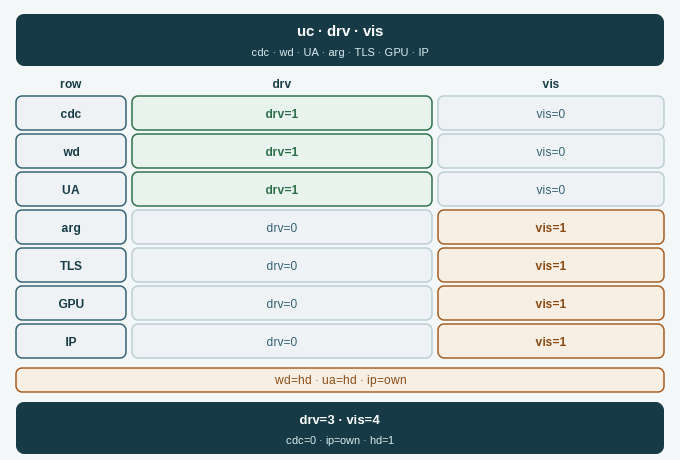
Installing undetected-chromedriver changes fewer things than most readers expect, and the things it does change are not the ones that usually matter to a page that renders and reads browser values. The package is a Python wrapper around Selenium plus a patcher that rewrites the chromedriver executable itself, so the honest prediction before the first run is: the driver-side traces move, the network and rendering surfaces do not. The driver-side traces are real: a stock chromedriver injects an internal script block whose variables carry the cdc_ prefix into every page, and that block is what the patcher rewrites. Everything else stays where the stock Chrome build left it. BotBrowser works at the browser layer, so profile-defined surfaces such as user agent, canvas and WebGL output, fonts, locale and timezone ship inside the browser binary instead of being patched in at runtime by a driver wrapper; BotBrowser does not ship a Python driver and does not patch external tooling such as chromedriver.
The record below keeps every claim attached to a checkable source: the project README on GitHub, and the package's own published source, whose patcher module shows the exact binary rewrite and whose Chrome subclass shows the exact launch composition. The point is prediction. A reader who understands which layer each surface belongs to can say, before launching anything, which readings will move under undetected-chromedriver, which ones will stay at their stock values, and which ones depend on the mode the session starts in. The surfaces that matter most to a rendering-sensitive workload (canvas bytes, the WebGL renderer string, the TLS handshake a server records, the exit address) all sit in the second group, and no amount of driver patching moves them.
TL;DR
- The patcher downloads a matching chromedriver binary automatically and rewrites the injected-script block inside it, so the driver stops planting its
cdc_-prefixed variables in pages. A page-side enumeration ofwindowproperties finds none of them after the patch. - Release 3.4.0 changed the mechanism: instead of removing or renaming the variables in the binary, the patcher keeps them and prevents the injection from happening at all. The patched executable is saved under the package's own name instead of a random suffix.
- The wrapper composes launch configuration on top of Selenium: a debugging host and port so the package can talk CDP, a
user-data-dirprofile (temporary unless one is given), and alangargument derived from the system locale oren-US. The README notes thatno_sandboxdefaults to true. - On the headless path only, the package uses CDP to report
navigator.webdriveras false and to strip theHeadlesstoken from the user agent string with a network-level override. The README still marks headless as unsupported work in progress. navigator.webdriverin a headed session is not covered by either source: chromedriver sets it to true through the browser's automation mode, and the package documents no headed-path change, so the honest default is to measure it in the configuration being run.- TLS and HTTP fingerprints, canvas and WebGL output, and the exit IP address are untouched. The README states directly that the package does not hide the IP address and warns about datacenter exits.
- BotBrowser provides profile-defined surfaces inside the browser binary instead of patching them in at runtime by a driver wrapper; BotBrowser does not ship a Python driver and does not patch external tooling, so a chromedriver-based workflow keeps its own driver layer.
Table of contents
- What the patcher changes in the driver binary
- What the wrapper adds at launch
- The headless path: the webdriver flag and the UA token
- The detection surface map
- BotBrowser capability and limitation
- Practical conclusion
- Keep reading
The custom user agent page treats the UA surface on its own, and the Selenium headless guide covers how Selenium composes headless Chrome through arguments. Both matter here, because the package sits on top of that same argument mechanism and only touches the UA surface in one of the two modes.
What the patcher changes in the driver binary
A stock chromedriver carries an embedded script that it injects into every page it drives. The script's variables use generated names with the cdc_ prefix, and those names land on window, where any page script can enumerate them. That injection is a driver behavior: it happens after the page environment exists, from code the driver ships, so it belongs to the driver layer and nowhere else. The patcher module in undetected-chromedriver works on exactly that artifact. It downloads the chromedriver build that matches the installed Chrome major (the version_main argument names it explicitly, and a mismatch fails at session creation), then rewrites the downloaded executable in place.
The rewrite itself is a byte-level replacement. The module reads the driver binary, searches for the injected-code block with a pattern in the shape {window.cdc...;}, and replaces the matched bytes in place with a space-padded console.log call carrying the package's own name. A companion check confirms whether a given executable was already rewritten by looking for the marker string the patch writes. Release 3.4.0 reframed the approach: the notes describe keeping the variables and preventing the injection from happening in the first place, which is what the byte replacement achieves, because the code block that would have declared the variables is replaced in the binary before the driver ever runs. The patched file is saved under the package's own name rather than a random suffix, which the release notes credit with cleaning up a directory full of randomly named driver copies.
The verification is direct and needs nothing beyond the package itself:
import undetected_chromedriver as uc

driver = uc.Chrome()
found = driver.execute_script(
    "return Object.keys(window).filter(k => k.startsWith('cdc'))"
)
# found is an empty list on a patched driver
A reader who wants the binary-level view can run the same check twice: download the stock chromedriver for the same major version, keep it beside the patched one, and search both files for the window.cdc shape. The stock binary contains it; the patched one does not. Two boundaries matter. First, the patch applies to the driver executable, not to the Chrome browser binary; the browser build on disk is whatever the host installed. Second, the patch is a point edit against a specific driver layout, so a driver release that restructures its embedded script can land between the package's pattern and the bytes; the package re-downloads and re-patches on demand, but a reader verifying a specific session should confirm the driver that session actually started with. The distinction between patching a driver binary and patching automation-library code is the subject of the Rebrowser patch-scope comparison, where the patched artifact is a Node-side library and the launch arguments change with it; here the patched artifact is the driver executable and the library is Selenium's own.
What the wrapper adds at launch
The uc.Chrome() constructor subclasses Selenium's Chrome driver and then composes extra startup configuration before the session opens. Three additions are visible in the package's source. The driver is started with a debugging host and port so the package can open a CDP connection alongside the WebDriver session, which is what powers the headless-path behaviors in the next section and the CDP event listeners the package exposes. A user-data-dir is always supplied: either the directory the caller named, or a temporary folder the package creates and (by default) deletes when the driver shuts down. A lang argument is composed from the caller's value, or from the system locale, or from en-US as the last resort, so the browser's language setting is never left at whatever Chrome would have guessed.
The README adds two defaults worth knowing before a first run. use_subprocess defaults to true, meaning the browser process is started in a subprocess rather than in-process. no_sandbox defaults to true as well, and the notes connect that default to avoiding the warning bar that Chrome shows for an insecure command line. Both defaults are launch configuration, not page-visible patches: they change how the browser is started, and their observable effects (a listening debugging port on the loopback interface, a writable profile directory, the configured language) belong to the host and the session, not to the page's picture of the browser.
Version alignment is the other operational fact. The package resolves the driver automatically, but the driver major must match the browser major, and a mismatch surfaces as a session-creation error naming the versions. The version_main argument pins it explicitly, which matters on hosts where Chrome auto-updates between runs. The package also exposes an install mode (uc.install()) that monkey-patches the Selenium classes, so a codebase that constructs selenium.webdriver.Chrome directly picks up the patched driver without importing the wrapper class. The same composition logic applies to other Chromium-family browsers, which the README supports with the caveat that the caller needs to know what they are doing and do some tweaking. How the underlying argument mechanism works, which options change what a page reads, and where the headless mode itself is selected, are covered in the Selenium headless guide; this package adds its items through the same options object rather than through a separate mechanism.
The headless path: the webdriver flag and the UA token
Two page-visible surfaces move, and both move only when the session runs headless. The property that Selenium users meet first is navigator.webdriver, which MDN documents as the flag a browser sets when it is controlled by automation. In a stock session, chromedriver starts Chrome in automation mode and the browser reports true; that is spec behavior, not a leak. The package's source handles it in its headless configuration routine: when headless is requested, the first page load triggers a CDP call that registers a script on every new document, and that script wraps navigator in a proxy whose webdriver read answers false. The same routine composes a network-level user agent override built from the session's own UA string with the Headless token removed.
The README's own position on headless is worth keeping next to those two facts. The project notes describe headless as work in progress and ask readers not to raise issues about it; a later note records that the headless path received its own patches while remaining officially unsupported. The practical reading is: the headless behaviors above are real and source-visible, and the project does not treat headless as a supported configuration. A reader who needs headless should expect the two overrides to apply and should still measure the session they actually run, because the override registers on document creation and a reading taken before it registers can still answer with the browser's own value.
The verification is a two-line comparison across modes:
# headed run
driver.execute_script("return navigator.webdriver")  # True
# headless run
driver.execute_script("return navigator.webdriver")  # False
The UA check reads navigator.userAgent in both modes and looks for the HeadlessChrome token: present in a stock headless session, absent once the override registers. The custom user agent page treats that surface in isolation; the point to keep here is the ownership. The token comes from the browser build, and the package edits it with a network-level override at runtime, which is a different mechanism from the browser binary carrying a different string. A headed session needs no such override because a headed stock build already reports Chrome.
The detection surface map
A reader needs a rule before a table, so here it is. A surface counts as patched by the driver only when the project's README or the package's own published source documents a change to that surface. Everything else counts as stays visible, which means the surface keeps producing whatever the stock Chrome build, the launch arguments and the host produce, with the package neither adding to nor subtracting from it. The rule is deliberately strict: it classifies documented behavior, not community claims about outcomes at third-party sites, which this record does not test.
| Surface | Patched by the driver? | How to verify it yourself |
|---|---|---|
Driver-injected cdc_ variables | Yes: binary rewrite | Enumerate window property names from the page console and search for the prefix |
navigator.webdriver | Headless path only | Read the property from the page console in one headed run and one headless run |
HeadlessChrome UA token | Headless path only | Read navigator.userAgent in a headless session before and after the first load |
| Chrome launch arguments | No: configuration only | Read the configured language in the page; check the debugging port from the host |
| TLS / HTTP fingerprint | No documented change | Terminate a handshake on an owned local server and record the negotiated parameters |
| Canvas / WebGL output | No documented change | Draw a fixed canvas in the same Chrome build with and without the patched driver |
| Exit IP address | No documented change | Read the exit address from an owned observer under both drivers |
Three rows deserve a sentence each. The cdc_ row is the package's core: the injection that every stock chromedriver performs is gone from the patched binary, and the page-side enumeration is the fastest way to see it. The two headless rows are real but conditional; both overrides register on document creation in headless mode, and neither source describes a headed-path change, which is why the verification column always names the mode. The launch-argument row is the one readers most often misread: arguments are inputs to the browser, not values a page reads directly, and their visible side effects (language, window metrics, an open debugging port on the loopback interface) remain exactly where the host put them.
The network surface sits below everything the package touches. A TLS handshake is negotiated by the browser's network stack from the build's own client implementation and the host's crypto libraries; the driver drives the browser, it does not participate in the handshake, and neither the README nor the package source documents any change to it. The same reasoning covers the HTTP version and header order a server records. A workload that depends on the wire-level picture of the session inherits it from the Chrome build and the host, with or without the patch.
The rendering surface sits beside the driver layer, not under it. Canvas bytes and the WebGL renderer string are produced by the Chrome build's graphics stack on the host's GPU or software path. The patch changes driver bytes and launch options; it does not recompile the browser. A reader can confirm this in one owned comparison: draw a fixed canvas scene in a session driven by the stock driver and in one driven by the patched driver, same Chrome build, same host, and read the pixel data both times. The documented claim stops there: identical inputs, and no documented mechanism by which the driver layer would alter them.
The address surface is the one the README handles itself. The project states that the package does not hide the IP address, and it warns that a session run from a datacenter has a large chance of failing regardless of anything the patch does. The exit address is decided by the network route, not by the browser, which is why a proxy decision belongs to a different layer entirely and why the README's warning is about networks rather than patches. The ownership question across all three surfaces (who decides the value, who can change it, what evidence proves the change) is the subject of the browser-layer alternative comparison, which separates page script, driver package and browser core into different owners with different update cycles.
BotBrowser capability and limitation
BotBrowser works at the browser layer, so the profile-defined surfaces (user agent, canvas and WebGL output, fonts, locale, timezone) ship inside the browser binary instead of being patched in at runtime by a driver wrapper; a rendering-sensitive workload gets those values from the same binary that renders the page. BotBrowser does not ship a Python driver and does not patch external tooling such as chromedriver, so a team running Selenium keeps its own driver layer, and the driver-side traces described in this record remain the driver's business. The BotBrowser documentation covers what a profile pins; it does not document chromedriver compatibility, and a claim about any driver integration belongs to that integration's own evidence.
Practical conclusion
Predict per layer before running. The patch moves the driver-side traces: the injected cdc_ variables are gone from pages, and on the headless path the webdriver flag reads false and the UA token loses Headless. The wrapper's launch additions (debugging port, profile directory, language, the two defaults) are configuration with host-side effects, not page-visible changes. The rendering, network and address surfaces keep their stock values: canvas and WebGL output come from the Chrome build, the TLS handshake comes from the network stack, and the exit IP comes from the route, with the README's own statement closing the last one. The workable habit is the same in both directions: name the surface, name its owner, and run the one-line verification from the table instead of assuming that a patched driver means a patched browser.
Sources
Keep reading
- Rebrowser patches versus the browser layer: the Node-side counterpart, where the patched artifact is the automation library and the launch arguments change with it.
- Headless browser Selenium: Chrome options and what differs: how the mode is selected, and what a page reads differently under it.
- Custom user agent: what it changes: the single UA surface in isolation, without a driver patch in the way.
FAQ
Does undetected-chromedriver change canvas or WebGL output?
No documented mechanism reaches them. The patch rewrites the driver executable and the wrapper composes launch options; canvas bytes and the WebGL renderer string are produced by the Chrome build's graphics stack on the host. A reader can verify with one owned comparison: fixed canvas scene, same Chrome build, stock driver beside the patched driver.
Does it hide the IP address?
No. The README states directly that the package does not hide the IP address and warns about datacenter exits. The exit address is decided by the network route, which is a different layer from anything the driver or the patch touches.
Is navigator.webdriver false in a headed session?
The sources here do not say so. chromedriver starts Chrome in automation mode and the browser reports true through the documented property; the package's source implements its false-reading override on the headless path only. The two-line comparison in the body is the check that settles it for the configuration being run.
Why does session creation fail with a version error?
The driver major must match the browser major, and a mismatch fails at session creation. The package resolves the driver automatically, and the version_main argument pins the major explicitly, which matters on hosts where Chrome updates between runs.
Can the patched driver run headless?
The headless path exists and carries its own overrides for the webdriver flag and the UA token, but the README marks headless as unsupported work in progress and a later note keeps that status even after describing the headless patches. Expect the overrides to apply, and measure the session that actually runs.
This article is part of the guide: What Is a Browser Fingerprint? Signals and Layers
Related Articles
Undetected Chromedriver: Browser-Layer Alternatives
FingerprintUndetected Browser: What a Detector Actually Reads
FingerprintAnti-Detect Browser: What the Category Changes
Getting StartedHeadless Browser Selenium: Chrome Options and What Differs
FingerprintBrowser Patch Plugins: What They Change and Cannot Reach
FingerprintRebrowser Patches: What Changes After a Proxy Works?
Run the same check in BotBrowser
Load a profile, keep the signals you just read about consistent inside the browser, and confirm the result on your own machine before a rollout.