Client Hints Fingerprinting: HTTP Headers as Identity
Client Hints headers such as sec-ch-ua describe browser brand, version, and platform on every request. Learn where mismatches arise and how to compare headers with JavaScript.
Want the structured docs for Fingerprint?
This article lives in the editorial library. For step-by-step setup, reference material, and ongoing updates, jump into the docs section.
Every request a Chromium-based browser sends can carry a short, structured description of the browser that sent it. These descriptions are called Client Hints, and three of them are sent by default: Sec-CH-UA, Sec-CH-UA-Mobile, and Sec-CH-UA-Platform. They arrive as request headers before any page script runs, so a server can read the browser brand, the major version, the device class, and the operating system family from the very first navigation.
Client Hints were introduced to replace the long, free-form User-Agent string with something narrower and easier to control. In practice they also created a second place where a browser describes itself. When the headers say one thing, navigator.userAgentData says another, and the User-Agent string says a third, the disagreement is itself a signal that a fingerprint review will notice. The sections below cover what each layer reports, where disagreements come from, how to compare the layers for one session, and what BotBrowser documents and does not document for this topic.
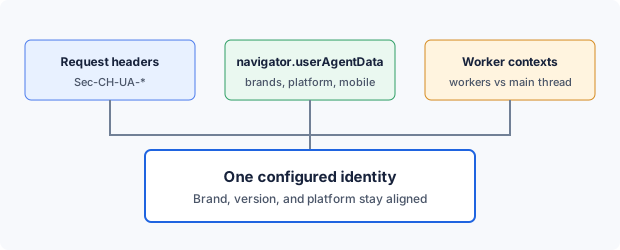
What a browser sends before any script runs
Client Hints fall into two groups. Low-entropy hints are sent by default. Sec-CH-UA lists the browser brands with their major versions, Sec-CH-UA-Mobile says whether the browser is asking for the mobile experience, and Sec-CH-UA-Platform names the operating system family. Because these three describe a large share of all browsers in a similar way, the specification treats them as low risk and lets the browser send them without being asked.
High-entropy hints are the detailed ones: the full version list, the platform version, the CPU architecture, the bitness, the device model, and whether a 32-bit browser runs on a 64-bit system. A server receives them only after it opts in with an Accept-CH response header that names the hints it wants, and the browser then includes them on later requests to that origin. A server that needs a hint on the very first request can also use Critical-CH, which asks the browser to retry the request with the hint attached. Third-party frames receive a hint only when the embedding page delegates it with a Permissions-Policy header.
JavaScript has its own route to the same data. navigator.userAgentData exposes the brands, the mobile flag, and the platform immediately, and getHighEntropyValues() returns the detailed values as a promise when a page asks for specific names. The two routes are meant to describe one browser, which is why a comparison between them is the most direct consistency check available.
A default request from a desktop Chrome-family browser carries headers shaped like the lines below. The exact GREASE entry and its position change between Chrome releases, so the values show the shape of the data and are not something to copy.
Sec-CH-UA: "Chromium";v="136", "Google Chrome";v="136", "Not.A/Brand";v="99"
Sec-CH-UA-Mobile: ?0
Sec-CH-UA-Platform: "Windows"
The User-Agent header still exists. Chrome reduced the amount of detail in it, which moved precise version and platform information to Client Hints. A server therefore holds two descriptions of one browser and can check whether they agree. For a closer comparison of the string and the structured hints, see Custom User Agent.
The brand list also contains a GREASE entry, a deliberately odd brand such as Not.A/Brand whose text, version, and position change over time. Its purpose is to stop servers from hard-coding a fixed list. For anyone configuring a browser identity, GREASE is a reminder that the brand list follows a version-dependent rule, and that a hand-written list can look wrong even when every individual brand name is real.
Where mismatches come from
A browser identity has several surfaces, and each one is read by a different part of a page or a server. A mismatch appears when two surfaces describe different browsers. The most common sources are these:
- A User-Agent string that names one browser version while
Sec-CH-UAlists another major version. - A platform in
Sec-CH-UA-Platformthat differs from the platform innavigator.userAgentData, or a mobile flag that contradicts the platform. - A brand list in the headers that differs from the brands returned in JavaScript, for example Edge in one and plain Chrome in the other.
- A worker that reports a different identity from the main thread because an override was applied to pages only.
- Overrides applied by two different tools, such as a profile plus a framework-level or CDP-level User-Agent change, where each tool covers a different subset of surfaces.
- A configuration that was correct when it was written but now trails the Chrome release that produced the browser binary.
The header-side items can be read on the server without running page script: the default headers arrive with the first request, and a server that asks for high-entropy hints receives them in the next request cycle and can compare them with the User-Agent. The navigator.userAgentData and worker comparisons need script. From a privacy angle, Client Hints add to the set of values that, combined with other signals, narrow a browser down. The EFF's Cover Your Tracks shows how combinations of ordinary values become distinctive, and Client Hints are one more ingredient in that combination. A consistent set of values is also easier to review than a patchwork, because every difference you see is a real question and not noise.
Consider a team that loads a profile describing a Windows desktop and then, through a testing framework, sets a User-Agent string for a different operating system. The framework covers the string and maybe some metadata, the profile covers its own surfaces, and neither tool knows about the other. The result is a session where the headers and the script-visible values describe two different machines. The fix is not a better override. The fix is to choose one source for each value and remove the other.
Execution contexts matter as much as request types. A dedicated worker, a shared worker, and a service worker each have their own global scope, and the NavigatorUAData interface is exposed in worker scopes as well as in windows. A page can therefore read brand and platform values inside a worker and compare them with its own. An override that only patches the page leaves that comparison open.
Platform-related values deserve special attention because they are linked to each other. The platform name, the platform version, the architecture, the bitness, and the mobile flag all describe one device. A platform version that is normal for one operating system looks wrong next to the name of another, and a mobile flag set to true next to a desktop architecture raises an immediate question. When you change one of these values, review all of them together.
Comparing headers and JavaScript values for one session
The goal of a comparison is narrow: confirm that one session reports one identity everywhere you can read it. You do not need a third-party scoring page for that. A page and a server that you control are enough, and they let you request high-entropy hints on purpose.
- Serve a test page over HTTPS from a server you control, and record the request headers it receives for the first navigation.
- Add an
Accept-CHresponse header that lists the high-entropy hints you want to compare, such asSec-CH-UA-Full-Version-List,Sec-CH-UA-Platform-Version, andSec-CH-UA-Arch, then load the page a second time so the browser includes them. - In the page, read
navigator.userAgentDataand callgetHighEntropyValues()for the same names, and record the results next to the headers. - Repeat the JavaScript reads from a dedicated worker and, if your site uses one, from a service worker, and note any difference from the main thread.
- Compare brand names, major versions, platform, platform version, architecture, bitness, model, and the mobile flag, then add the User-Agent string, and write down each difference with the request or context that produced it.
Public pages can supplement this. The EFF's Cover Your Tracks shows how your browser looks to a typical tracker, which is useful as a second opinion about overall distinctiveness. Such pages are less suited to a header-by-header comparison, because they do not tell you which request produced which value. Keep your own test page for that and treat public tools as context. See Verify Browser Fingerprint for a broader checking routine.
Record the results in a simple grid with one row per value and one column per surface: request header, main thread, worker, and User-Agent string. A row where the columns differ is a finding. A row where they agree is evidence for that value only, and it says nothing about how a particular website will treat the session.
When you find a difference, work backwards from the surface that is wrong. Ask which tool or flag is responsible for that surface, check whether a second tool also writes to it, and remove the duplicate source. Then rerun the whole comparison, not just the row that failed, because a change to one value can expose a mismatch in a neighbor.
Keeping one Client Hints source with BotBrowser
BotBrowser documents that configuring identity flags, including --bot-browser-brand and the User-Agent and platform flags, generates matching Client Hints brands, GREASE tokens, high-entropy values, and Client Hints HTTP headers that line up with navigator.userAgentData across the main thread, Workers, and HTTP requests. For the comparison described above, that means you can check headers and JavaScript values from one session against a single configured identity instead of reconciling several sources by hand. BotBrowser cannot control how a website classifies Client Hints or other fingerprint signals, cannot guarantee any detection or access outcome, and cannot reconcile CDP or framework-level User-Agent overrides applied outside BotBrowser. Custom User-Agent and full userAgentData control require the documented ENT Tier3 license.
The documented route is short. Load a profile, and add identity flags only when you need a different brand or platform from the one in the profile. Flags go in the launch arguments, not in a framework option. From those inputs BotBrowser generates the dependent values, so you do not write a brand list or a GREASE entry yourself.
chromium-browser \
  --bot-profile="path/to/profile.enc" \
  --bot-browser-brand=edge \
  --bot-ua-full-version=142.0.7444.60 \
  --bot-brand-full-version=142.0.3595.65
The documented brand values are chrome, edge, brave, opera, chromium, and webview. Each brand follows its own version cadence, so the Edge and Opera full versions differ from the Chromium version even when the major number is shared. Use --bot-ua-full-version for the Chromium version and --bot-brand-full-version for the brand-specific version, and keep both on the same major version. Brand switching is documented under the ENT Tier2 license, while the WebView brand and custom User-Agent control are documented under ENT Tier3.
Treat the profile and the identity flags as the single source. If you also set a User-Agent through CDP or a framework option, that override is applied outside BotBrowser, and BotBrowser does not reconcile it with the generated Client Hints. Pick one source for each value. When you pass --user-agent, use the documented placeholders such as {ua-full-version} so the string follows the same flags as the hints.
After each Chrome release, check that --bot-ua-full-version still has the same Chromium major version as your BotBrowser binary. When the binary moves to a new major version, use a profile and flags that target that version. The documented symptom of a mismatch is Client Hints that disagree with the binary, and a stale version is an inconsistency between the configuration and the browser that runs it.
Common questions about Client Hints
Are Client Hints sent when JavaScript is disabled?
The default low-entropy hints are request headers, so they do not depend on page script. High-entropy hints depend on the server opting in through Accept-CH. The JavaScript interface, naturally, needs script to run. This split is why a header review and a script review answer different questions, and why both belong in a consistency check.
Can a server receive a high-entropy hint that it never requested?
Not through request headers. The browser attaches them only after an opt-in. A script that runs on the page can still call getHighEntropyValues() and forward the result by itself, which is a separate path with its own controls. When you review a site's behavior, look at both paths.
Can a testing framework set Client Hints?
Testing frameworks and the DevTools protocol can override the User-Agent string and, in some cases, related metadata. What an override covers depends on the tool, and overrides from different tools can disagree with each other. Check every surface with the comparison above. BotBrowser does not reconcile overrides applied outside BotBrowser, so keep identity values in one place.
What is the difference between Sec-CH-UA and Sec-CH-UA-Full-Version-List?
Sec-CH-UA carries the brands with major versions and is sent by default. Sec-CH-UA-Full-Version-List carries the full version string for each brand and is a high-entropy hint that needs an opt-in. In JavaScript the same split appears as brands for the major versions and fullVersionList for the detailed ones. Both should name the same brands and the same major versions.
Does matching Client Hints decide how a site treats a session?
No. Client Hints are one fingerprinting signal among many. Consistency removes one kind of mismatch, but websites combine many other inputs, and BotBrowser cannot guarantee a classification, a tracking result, or an access outcome. Treat a clean comparison as a quality check on your own configuration and nothing more.
Which BotBrowser flags affect Client Hints?
The documented identity flags are --user-agent, --bot-platform, --bot-platform-version, --bot-model, --bot-architecture, --bot-bitness, and --bot-mobile, together with the supporting flags --bot-browser-brand, --bot-ua-full-version, and --bot-brand-full-version. The --user-agent flag supports placeholders that read from the other flags, so the string and the hints draw from the same values.
Checklist before you rely on a configuration
A short list keeps the review repeatable. Run it whenever you change a profile, a brand, a platform flag, or the browser binary.
- Each value has one source: the profile, an identity flag, or nothing else.
- Brands, platform, and the mobile flag agree between request headers, the main thread, and workers.
- High-entropy values requested through
Accept-CHmatch the results ofgetHighEntropyValues(). - The User-Agent string and the Client Hints name the same Chromium major version.
- The major version in
--bot-ua-full-versionmatches the BotBrowser binary after every release. - The license tier covers the flags in use.
For related reading, Navigator Properties Fingerprinting covers the script-visible navigator values that sit next to navigator.userAgentData, and What Is Browser Fingerprinting gives the wider background on how signals combine.
Public sources
Related Articles
Take BotBrowser from research to production
The guides cover the model first, then move into cross-platform validation, isolated contexts, and scale-ready browser deployment.