Browser Fingerprint Generator: What Its Output Means
See what a browser fingerprint generator emits, why declared values differ from live navigator and canvas observations, and how to diagnose the first mismatch.
BotBrowser Team
Want the structured docs for Fingerprint?
This article lives in the editorial library. For step-by-step setup, reference material, and ongoing updates, jump into the docs section.
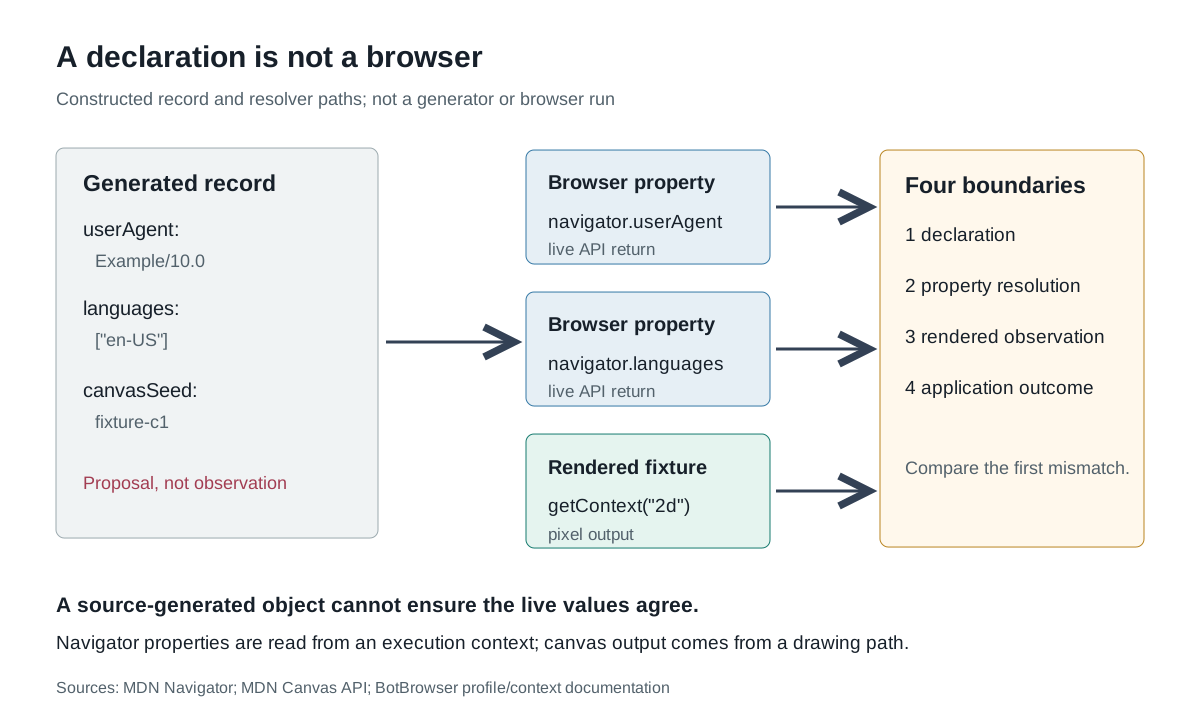
A browser fingerprint generator produces a proposed bundle of browser-visible values. It may write a user agent, platform version, language list, screen size and rendering choices into a file or object. That bundle is not a browser. BotBrowser documents profile-backed and context-scoped identity settings with specific modes and a sealing lifecycle; it does not make a generator's declarations prove that a live JavaScript observation, rendered pixels or a remote application will agree. The useful question is not merely “what was generated?” but “which output did we actually observe, through which browser path?”
This distinction matters because a fingerprint is often discussed as though it were one value. The browser fingerprinting overview explains why many observable surfaces contribute evidence. Noise-seed reproducibility explains why a repeatable variation can make runs comparable. This page starts one step earlier: what comes out of a generator, what a browser resolves after loading it, and where a declared value stops being an observation.
TL;DR
- A generator usually emits a declared record: keys, values and sometimes constraints or seed inputs. The exact schema depends on the producer and is not standardized.
- A live browser resolves properties such as
navigator.userAgent,navigator.languagesandnavigator.hardwareConcurrencyin its own execution context. Read-only describes mutability, not proof of coherence. - Canvas output is produced by a drawing and read-back path. It can reveal renderer, font and graphics effects that are not spelled out in a user-agent string.
- “Generated,” “resolved,” “rendered” and “classified by an application” describe four different evidence boundaries.
- A mismatch is a clue to the first unsupported layer: declaration, property resolution, derived observation or application logic. It is not automatically a detector verdict.
- A controlled browser profile can make selected browser variables explicit; it does not promise uniqueness, detector avoidance or site acceptance.
Contents
- A generator emits a declaration
- A browser resolves properties in an execution context
- Canvas turns drawing choices into an observation
- Declaration and observation fail at different boundaries
- Classify a mismatch with a small evidence record
- What a profile can pin and what remains outside it
- Practical conclusion
A generator emits a declaration
“Browser fingerprint generator” is a product label, not a machine-readable schema. One tool may show an online test form, another may write a Python dictionary, and another may build an encrypted browser profile. A generated result can include a user-agent string, a platform label, screen dimensions, timezone, locale and a seed used by rendering features. Those fields are outputs of the generator. They are not yet outputs of the browser that will later execute a page.
Consider an explicitly constructed declaration below. The values are illustrative, not copied from a real generator or measured from a browser:
{
  "userAgent": "Example/10.0 (Illustrative-OS 1.0)",
  "platform": "Example-OS",
  "languages": ["en-US"],
  "screen": { "width": 1440, "height": 900 },
  "canvasSeed": "fixture-c1"
}
The object answers “what did the producer propose?” It does not answer “what did navigator.userAgent return?” The MDN Navigator reference presents Navigator as the state and identity interface exposed to scripts, with read-only properties covering user agent, languages, hardware concurrency, device memory, platform, and automation state. Each property is a browser interface with its own availability and behavior. A declaration file has no mechanism by itself that keeps these distinct properties in a coherent relationship.
A generated set may therefore be valuable even when it is incomplete. It can define an intended browser family, region or device shape for a controlled test. It can serve as a configuration input whose application must be verified. Its existence does not show that every listed value is exposed, that unlisted values are absent, or that different observations share one identity. A generator can emit a set of properties; it cannot emit the relationship between all properties.
A browser resolves properties in an execution context
The live browser is the first interpreter of a profile or configuration. It reads its own preference, profile and startup inputs, then exposes values to scripts. The word “read-only” on a Navigator property describes the JavaScript API: a page usually cannot assign a new navigator.userAgent value. It says nothing about whether the intended user-agent string is internally compatible with the reported platform, the languages exposed by another property or the dimensions of the current page.
The comparison design below labels each layer without claiming that any observation was executed:
| Layer | Constructed output | What it establishes | What it cannot establish by itself |
|---|---|---|---|
| Generator record | platform: Example-OS, languages: [en-US] | The producer proposed these values | That the browser exposed them |
| Navigator read | navigator.platform, navigator.languages | The page read those APIs from this execution context | Why they have those values, or whether other surfaces agree |
| Rendered observation | Pixels or a hash derived from a drawing | The renderer produced a particular result from this test | That the result is a stable device identity |
| Application outcome | A response from an application's own logic | That response's documented result | A universal detector score or future outcome |
The table’s value is its separation, not its field count. The browser may return the proposed string while a related property comes from a different source. That is not evidence that JavaScript lacks access to the value; it is evidence that the generator output and browser resolution are different layers. The distinction is especially important when a tool displays a formatted “fingerprint” result. A formatter may rename or collapse properties, and a displayed summary is not necessarily a raw return value.
Use an owned fixture to compare one declared property at a time. Record the property path, returned type and a minimal value; do not dump secrets, cookies or unrelated page content. If a property is supported only in a secure context or changes frequently, the browser reference is the authority for its availability. A mismatch in navigator.userAgent and navigator.userAgentData needs its own explanation; neither one can repair the other by inference.
Canvas turns drawing choices into an observation
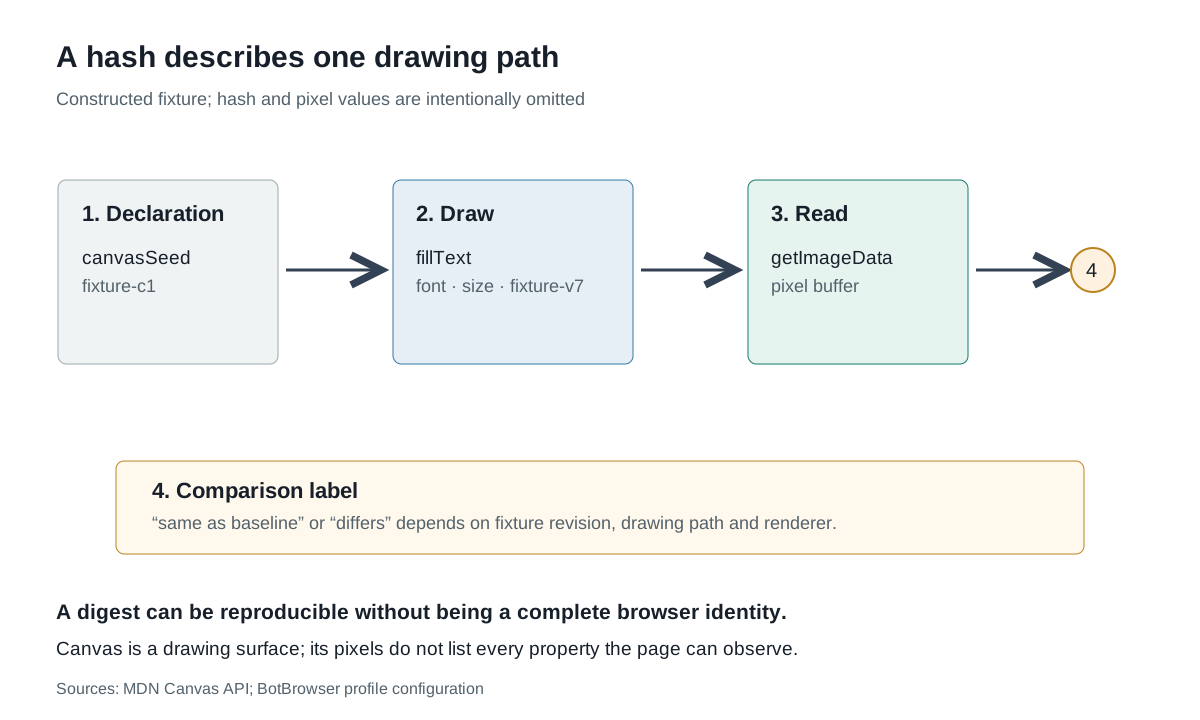
Canvas is an output API, not a label that can be copied directly from a generator. The Canvas API documentation describes drawing graphics through <canvas>, getContext() and rendering interfaces. A test can draw text or shapes, request image data and derive a hash. The observation is a consequence of the drawing recipe and the renderer executing it.
That makes a canvas result useful as a derived observation and limited as a declaration. A generator might produce a canvasSeed to influence variation. The browser still has to apply that seed along the code path that renders the fixture. If the profile is not loaded, a feature is disabled or a different renderer handles the pixels, a same-looking declaration can yield a different observation. Conversely, two runs with different declarations can coincidentally produce the same test bytes if the test does not exercise the difference.
Illustrative canvas paths are clearer when the intermediate steps stay visible:
| Step | Illustrative observation | Boundary |
|---|---|---|
| Input | canvasSeed: fixture-c1 | Generator declaration |
| Draw | fillText with a chosen font and canvas size | Test fixture plus executing renderer |
| Read | A pixel buffer or digest of its bytes | Derived observation |
| Interpret | same as baseline or differs from baseline | Comparison rule |
The final label is not an automatic browser property. A digest can be stable for this fixture and still not establish that the browser is unique. A changed digest can result from a changed test, a different graphics path or a real application of the seed. It is necessary to record fixture revision and output method before interpreting the change. The raw pixel hash is evidence about one rendering path; it is not a fingerprint of every browser state.
Canvas also has permission and privacy boundaries. The API can process video, draw graphics and expose pixel data in ways that may be controlled by the application and browser. This page uses a neutral owned fixture only. It does not instruct a page to inspect or work around another site's test. The privacy question is whether a collection path reads or retains more pixels than the comparison requires.
Declaration and observation fail at different boundaries
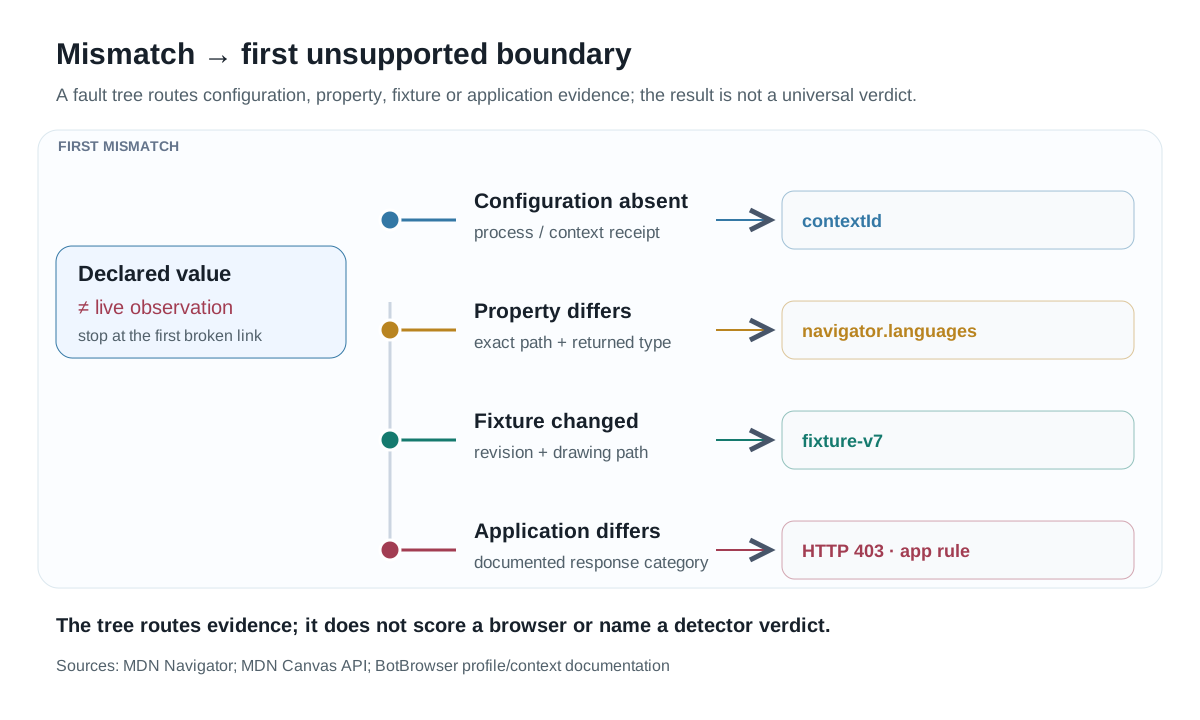
A generated record, a navigator property and a canvas digest can each be internally valid and still not agree. Diagnose the first unsupported boundary rather than naming the final difference a detector result. The following categories keep attribution possible:
| Earliest unsupported boundary | Representative evidence | Next check |
|---|---|---|
| Configuration was not selected | Process or context receipt lacks the intended profile/context identifier | Verify launch and context membership |
| Field was not applied | Declared en-US, live navigator.language returns another supported value | Check the actual property path and documented setting mode |
| Derived test changed | Same declaration, different fixture revision or renderer | Restore fixture identity before comparing |
| Observations are coherent individually but not together | Each API works, while fields conflict at the defined semantic level | Apply a documented compatibility rule or narrow the claim |
| Application result differs | Page reads match, response category is different | Treat the application response as its own layer |
The first row demonstrates why a generated value set is not a browser. Knowing that a JSON file contains Example-OS does not establish that a BrowserContext loaded the profile containing it. BotBrowser's per-context fingerprint documentation explains the separation between browser and context configuration and why identity settings have a lifecycle. The profile configuration reference documents that settings may resolve to auto, real, profile or explicit values depending on the control. The resolved mode is part of the evidence.
The second row is a field-level mismatch. It does not prove a “bad fingerprint” in general. It shows that the declared record and that particular API output disagree. The browser reference may explain that a property is read-only, obscure or absent; it cannot decide whether the application should treat the pair as acceptable. Keep the property name exact, because similar names such as language, languages and userAgentData are separate interfaces.
The fourth row needs special restraint. A compatibility rule that relates user agent, platform, language, screen and rendering can be useful for an owned test, but it is not an official universal browser fingerprint score. If the rule is local, say so. If an external service returns a status, distinguish that service's documented result from your local comparison. A generated set is not automatically “consistent” just because the file is complete.
Classify a mismatch with a small evidence record
Each comparison should preserve enough context to tell which artifact changed. A practical record can stay small and avoid copying a full browser inventory:
| Field | Example | Reason |
|---|---|---|
| Run and context identifier | run-fixture-04, ctx-a | Separates environment from a page observation |
| Declared record reference | declaration-v2#/languages | Identifies the proposed value and revision |
| Property path | navigator.languages | Keeps API names exact |
| Returned type and selected value | array<string>, ["en-US"] | Supports a narrow comparison |
| Fixture revision | canvas-v7 | Prevents test drift being called renderer drift |
| Observation hash | A digest of the defined fixture output | Reproducible without exposing unrelated pixels |
| First mismatch | languages: declared [en-US], observed [en-US,en] | Routes the next check |
The example values are constructed, not observed. Their purpose is to show that “mismatch” needs a field path and a boundary. If an application keeps a human-readable screenshot instead, do not pretend it is equivalent to a typed API return. Screenshots can establish that a text label was visible at that capture; they do not parse every DOM or graphics value. Likewise, a generator's preview image can show how a result was presented without proving which runtime produced the underlying data.
Record whether the browser context or profile was intended, actually selected, and sealed. BotBrowser's per-context fingerprint documentation documents that contexts accept identity configuration before the first renderer and reject later identity-bearing changes. That lifecycle makes a pair such as contextId and observationId more useful than a timestamp alone. It does not mean the application's later data or a remote site's judgment is frozen.
The record should also identify what was not read. Do not claim that a browser has no value simply because a summary omitted it. Navigator offers many properties, some in secure contexts and some with limited browser support. The article's selected comparison is intentionally narrow; an absence from one report is not evidence of global absence.
What a profile can pin and what remains outside it
BotBrowser's profile configuration reference describes settings for locale, timezone, screen/window and canvas noise, with modes such as auto, real, profile and explicit choices. This gives an operator a browser-side place to keep selected inputs explicit. The per-context guide extends that model to BrowserContexts and explains when identity-bearing changes are sealed. These capabilities improve the auditability of a controlled browser run.
The profile cannot make every generated field true by definition. It can accept supported configuration, resolve a documented mode and expose a browser-observed value. The page code, execution context, graphics implementation and application logic still participate in what is returned. The profile also cannot guarantee a unique fingerprint: finite values can collide, and a generator's combination is not proof of uniqueness. It cannot promise a site outcome or make a site's own data-collection practices disappear.
Use profiles for the question they can answer: which browser-side configuration did we intentionally select for this task, and can we reproduce it? Then ask separately whether the live property paths and fixture outputs match the declaration. If your application needs an atomically applied identity, verify it through the supported browser lifecycle and an owned observation rather than assuming the declaration is a lock.
FAQ
Is a generated browser fingerprint the same as what a website sees?
No. A generated record is a declaration. A website sees whatever the live browser exposes to its page and network paths, which may include properties or derived observations absent from the generated summary.
Does a canvas hash uniquely identify a browser?
No. It is a derived observation from a fixture, renderer and comparison method. A hash can be useful for reproducibility while remaining non-unique and sensitive to test changes.
Why do two generated values look consistent but a page returns a mismatch?
Possible causes include configuration not selected, a mode resolving differently, a property-specific availability rule, a changed fixture or an application rule. Diagnose the earliest mismatch rather than assuming a single global defect.
Can a BotBrowser profile ensure every generated value is observed?
No. Supported profile settings can make selected inputs explicit, but the browser, execution context and application still determine what is observed. The profile does not guarantee uniqueness or a site decision.
Sources
- MDN Navigator interface
- MDN Canvas API
- BotBrowser profile configuration
- BotBrowser per-context fingerprint lifecycle
Practical conclusion
Treat a browser fingerprint generator as a producer of declared inputs, not as proof of a complete live browser. Resolve named properties in the actual context, render a versioned fixture when a derived observation is needed, and record the first unsupported boundary. A controlled profile can keep selected browser inputs explicit and auditable; it cannot turn a generated value set into a universal identity, a detector verdict or a promise about a destination's response.
This article is part of the guide: What Is a Browser Fingerprint? Canvas Fingerprinting
Related Articles
Noise Seed Reproducibility for Repeatable Fingerprint Runs
FingerprintCreepJS Canvas Seed Cycle: How Many Rounds Stay Distinct
FingerprintCanvas Fingerprinting: How to Check It and What Helps
FingerprintDeterministic Mode: Reproducible Browser Fingerprints
FingerprintCanvas Fingerprint Test: Empty Exports and Errors
FingerprintCreepJS Android WebView Detection: Signal Limits
Run the same check in BotBrowser
Load a profile, keep the signals you just read about consistent inside the browser, and confirm the result on your own machine before a rollout.