Linux armv81 Browser Signals: Platform Boundaries
Interpret Linux armv81, User-Agent Client Hints and WebGL together without treating a browser surface as hardware identity.
BotBrowser Team
Want the structured docs for Fingerprint?
This article lives in the editorial library. For step-by-step setup, reference material, and ongoing updates, jump into the docs section.
When a page reports Linux armv81, the useful question is not “which phone is this?” It is which browser-visible fields produced that text, which optional fields were unavailable, and whether the remaining capability values are coherent. The Android emulation documentation explains why BotBrowser can expose this platform family; it does not turn the string into a device identifier. A careful record keeps the legacy platform string, reduced User-Agent, User-Agent Client Hints, and WebGL observations in separate columns.
TL;DR
navigator.platformis a legacy, page-visible string.Linux armv81can describe a reported platform family, not a physical ARM chip or a person.- User-Agent Reduction changes which operating-system details are in the default header. High-entropy Client Hints are optional, permission-shaped values, not guaranteed fields.
- WebGL capability and renderer observations can corroborate a browser surface, but a missing extension or renderer is not proof of a different host.
- Preserve
unknown,not requested,not exposed, and an actual value as different states. Do not convert missing hints into a negative assertion. - A consistency record is more defensible than a single “ARM” label: it shows what was observed, in which context, and which comparison was impossible.
Contents
- The platform string is one field
- Reduced User-Agent and Client Hints
- WebGL as corroborating capability
- A consistency record with unknown states
- Failure cases and interpretation limits
- Diagnosing a platform mismatch without guessing
- BotBrowser documentation boundary
- Practical conclusion
The platform string is one field
The Navigator.platform definition describes a string exposed to web content. It is useful for compatibility branches that still depend on a broad platform family, but the API does not promise a CPU model, kernel build, board revision, emulator state, or user identity. The string is therefore an observation about the browser surface, not a reverse lookup key.
The /docs/platform/android-emulation/ page gives a concrete BotBrowser example in which navigator.platform can report Linux armv81. That example answers a configuration question: what a page may see when the selected emulation surface is active. It does not state that every Android profile, Chromium release, WebView host, or page context must return the same spelling. A support record should keep the exact string and the browser release beside it.
| Field | What a page can record | What the field does not establish |
|---|---|---|
navigator.platform | The returned platform string, such as Linux armv81 | A physical CPU, kernel, device model, or person |
navigator.userAgent | The reduced or legacy UA text actually returned | The complete host operating system |
navigator.userAgentData | Low-entropy brand/mobile/platform values when exposed | That high-entropy hints were granted or requested |
| WebGL capability | Context creation, extensions, and selected parameters | A unique GPU or a detector verdict |
The practical consequence is simple: never use platform.includes('arm') as an authentication or identity condition. It is also a weak compatibility test when used alone. A page can use it to choose a conservative code path, then feature-detect the API it actually needs. If a reported string changes between profiles, the correct next question is which configured surface changed, not which person “became” a different device.
Reduced User-Agent and Client Hints
User-Agent Reduction reduces operating-system and device detail in the default User-Agent string. The reduction is deliberate: a page should not assume that a missing minor version or model token is evidence of a different operating system. The NavigatorUAData API exposes a smaller low-entropy set directly and offers getHighEntropyValues() for optional values such as architecture, model, platform version, or full version list when the browser permits the request.
These are separate states, not synonyms:
| Observation | Safe interpretation | Unsafe substitution |
|---|---|---|
userAgentData is absent | The inspected context did not expose that interface | “The browser is not Chromium” |
platform is present in low entropy data | The browser supplied a broad platform token | A complete OS or CPU report |
architecture is returned after a request | That request returned an architecture token in this context | A proof of the physical chip |
getHighEntropyValues() rejects | The optional request was unavailable or rejected | “The architecture is not ARM” |
mobile is true | The browser reported its mobile hint | A specific handset or viewport |
The distinction matters for comparisons. A missing high-entropy value can result from browser policy, permissions, a request that was never made, an embedded context, or a browser that does not implement the interface. A record that writes architecture: false when the request was never attempted turns an unknown into a claim. A collector should store both the request state and the returned value. The User-Agent reduction guide covers header migration, while the WebGL renderer boundary guide keeps graphics capability separate from device identity.
async function readPlatformSurface() {
  const result = {
    platformString: typeof navigator.platform === 'string' ? navigator.platform : 'not-exposed',
    userAgent: typeof navigator.userAgent === 'string' ? navigator.userAgent : 'not-exposed',
    uaData: 'not-exposed',
    highEntropy: 'not-requested',
  };
  if (!navigator.userAgentData) return result;
  result.uaData = {
    mobile: navigator.userAgentData.mobile,
    platform: navigator.userAgentData.platform,
    brands: navigator.userAgentData.brands.map(({ brand, version }) => ({ brand, version })),
  };
  try {
    result.highEntropy = await navigator.userAgentData.getHighEntropyValues([
      'architecture',
      'model',
      'platformVersion',
      'fullVersionList',
    ]);
  } catch {
    result.highEntropy = 'request-failed';
  }
  return result;
}
This helper is a recording example, not a guarantee that every browser returns all four high-entropy keys. It intentionally does not infer “ARM” from a missing value. It also keeps the brands array and the full-version result separate because a reduced default UA and an optional hint answer different questions. A page should retain the request outcome when it needs to explain why two otherwise similar records differ.
WebGL as corroborating capability
The WebGLRenderingContext API exposes methods and parameters for a graphics context. Context creation can fail, an extension can be unavailable, and a parameter can return a value that depends on the browser's graphics path. Those outcomes are useful capability evidence, but none of them is a portable ARM detector. They are not interchangeable with the platform string.
| WebGL observation | What it supports | What it cannot prove |
|---|---|---|
| Context creation succeeds | The page obtained the requested WebGL context | A particular GPU or physical device |
getExtension() returns null | That extension was unavailable in this context | That the host lacks the feature everywhere |
| A renderer parameter is returned | The context exposed that parameter | A unique hardware identity |
| Context creation fails | This page could not create the requested context | Why it failed without additional diagnostics |
The useful comparison is cross-field coherence. If a profile reports a Linux ARM platform but the application requires a WebGL extension that is absent, the actionable result is “the selected feature set is incompatible with this workload.” It is not “the platform string is fake.” The missing extension could reflect a context preference, a GPU backend, a browser policy, or a feature level. The record should name the context attributes and the exact API call before assigning a cause.
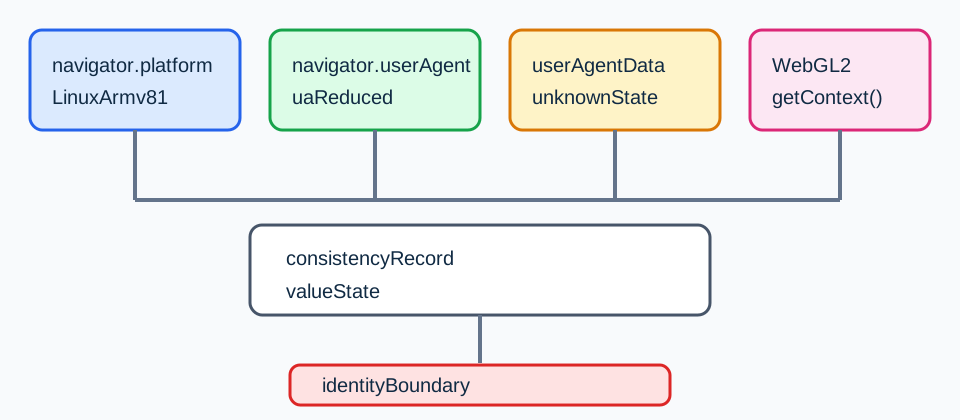
The same rule applies to renderer strings. A renderer may be a broad implementation label, a software backend, or an unavailable value. It should not be concatenated with a platform string and hashed into a claimed device identity. If a service needs to choose a rendering fallback, use the returned capability and test the operation that the service will actually perform.
A consistency record with unknown states
The following record is deliberately boring. It is designed to answer a support question such as “why did this page choose its ARM fallback?” without exporting unrelated identifiers. Values are examples of field names, not a claim about a live run.
| Record key | Example value | State rule |
|---|---|---|
context | Window / secure | Record the context that performed the read |
platformString | Linux armv81 | Preserve the exact returned string |
uaData.architecture | unknown | Use unknown when not requested or unavailable |
webgl.context | webgl2 | Record the requested context type |
webgl.extension | available / absent | Name the exact extension |
The key is not the specific vocabulary; it is the distinction between a value, an unavailable interface, an unrequested optional value, and a deliberately uncollected field. A dashboard may collapse these states for a reader, but the underlying record should keep them separate so a later investigation can tell “not returned” from “returned false.”
Two records can therefore be compared in a bounded way. First compare the context and browser release. Then compare the platform string and low-entropy UA data. Only after recording the request outcome should you compare high-entropy hints. Finally compare the WebGL operation and extension, not an unexplained renderer hash. A difference at one layer is a troubleshooting lead; it is not a verdict that the entire browser identity changed.
Failure cases and interpretation limits
A page reports Linux armv81, but an architecture hint is absent. This is compatible with User-Agent Reduction or an unrequested high-entropy value. Preserve architecture: unknown, inspect whether the request ran, and do not rewrite the platform string.
The platform string is Linux armv81, but a WebGL2 context fails. The page has a graphics capability problem in that context. Check the requested context, feature policy, and browser error path. Do not use the failure to infer a non-ARM host.
Two contexts return different platform strings. Compare profile, browser release, embedding mode, and request context before comparing users or machines. A WebView and a top-level Window can have different exposure rules.
A high-entropy request returns a model token. Treat it as a browser-supplied hint with its own permission and freshness conditions. It is not a signed attestation of a physical handset, and it should not be joined to an account as a permanent identity key without a separate lawful purpose.
A renderer string conflicts with a platform token. Keep both observations and record the exact WebGL call. The conflict may be an implementation/backend difference or an incomplete record. A single contradiction is not a universal detector result.
These cases also explain why a page cannot honestly promise that one reported combination will receive a particular external verdict. Browser-visible signals are measurements with context and failure modes. The safe conclusion is about the observed surface and the next compatibility check.
Diagnosing a platform mismatch without guessing
An incident report becomes easier to review when every row has an observation method and a stopping rule. Start with a fresh top-level Window and record whether the page is secure. Next capture navigator.platform and the unmodified navigator.userAgent as separate strings. Do not normalize them before saving the original values; normalization can hide the exact token that caused a compatibility branch. Then record whether navigator.userAgentData exists, which low-entropy keys were returned, and whether the high-entropy request was attempted. A rejected promise and an absent interface should remain visibly different in the report.
The WebGL step should be equally narrow. Record the requested context (webgl or webgl2), the success or failure of getContext(), and only the extension or parameter that explains the application decision. A video editor may need a texture format while a map renderer needs a floating-point extension. Asking for every renderer parameter turns a compatibility report into an unnecessary inventory. If a call throws, retain the exception class and the call name, then stop that branch; do not replace the failure with a guessed fallback value.
This order prevents a common false comparison. A profile may expose Linux armv81 while a WebGL2 request fails because the page requested an unsupported context or because a policy prevented the context. The two observations are not contradictory until a source says they must be correlated. The correct next experiment is to repeat the same context request with the same profile and browser release, not to switch the platform label or infer a different handset. If the result changes, record the changed input and the exact operation that changed.
| Diagnostic step | Evidence to retain | Stop condition |
|---|---|---|
| Secure Window check | isSecureContext and top-level/embedded context | Do not request gated hints in an invalid context |
| Platform read | Exact navigator.platform string | Do not map it to a device model |
| UA-CH availability | Interface presence, requested keys, promise outcome | Keep unavailable keys unknown |
| WebGL check | Context type, success, named extension or parameter | Do not expand into a renderer inventory |
| Comparison | Same release, profile and page fixture | Do not compare records with different inputs |
The table is a troubleshooting artifact, not a detector recipe. It makes a negative result useful: “high-entropy hint was not requested” records which request to repeat, whereas architecture=false falsely suggests that the browser actively reported a non-ARM architecture. A dated record also makes a later browser update explainable without turning the old result into a permanent identity key.
BotBrowser documentation boundary
The Android emulation reference documents how the product presents an Android-family browser surface and why navigator.platform may show Linux armv81. That is the relevant product boundary for this article. The reference does not promise that every high-entropy Client Hint is returned, that a WebGL backend matches a physical Android device, or that another site's detector will assign a particular label.
The article therefore separates product configuration from page observation. A profile setting is evidence about selected configuration. A navigator.platform read is evidence about what this page received. A WebGL call is evidence about one graphics context. Combining those facts can support a compatibility diagnosis, but it cannot create a guarantee about a third-party score, pass rate, identity, or anonymity. No field in the record should be described as a proof of a person or physical device.
FAQ
Does Linux armv81 prove Android?
No. It is a platform string exposed to the page. It can be consistent with an Android-family emulation surface, but the string alone does not establish the host operating system, kernel, device model, or physical hardware.
Should a missing architecture hint be treated as x86?
No. Missing, unrequested, rejected, and returned values are different states. Record the request outcome and keep the architecture unknown when the browser did not provide it.
Can WebGL identify an ARM device?
No. WebGL can show capability and parameter values for one context. Those values can help choose a fallback or investigate a mismatch, but they do not provide a unique hardware identity.
Can this record identify a person or device?
No. It preserves page-visible values and their availability so a compatibility issue can be reproduced without turning a platform family into a person, device, or detector verdict.
Sources
For broader context, compare the platform surface review map and navigator property signal guide.
Practical conclusion
Treat Linux armv81 as one browser-visible field. Preserve the exact platform string, record reduced UA and Client Hints with their request states, and use WebGL only for the capability question the application actually has. Keep unknown values unknown. This record is enough to explain a compatibility branch without turning a reported platform family into hardware identity, a person, or a detector verdict.
This article is part of the guide: What Is a Browser Fingerprint?
Related Articles
WEBGL_debug_renderer_info: Privacy and Renderer Boundaries
IdentityBrowser Identity Surfaces: A Practical Consistency Overview
FingerprintClient Hints Fingerprinting: HTTP Headers as Identity
FingerprintCreepJS Android WebView Detection: Signal Limits
PlatformUser-Agent Reduction and a Practical Client Hints Migration
FingerprintWebGL Renderer Missing: Privacy or Context State?
Run the same check in BotBrowser
Load a profile, keep the signals you just read about consistent inside the browser, and confirm the result on your own machine before a rollout.