Active Window Emulation and Page Visibility State
Compare focus, blur, visibilityState, and document.hidden across headless and headful BotBrowser sessions without treating active state as human presence.
BotBrowser Team
Want the structured docs for Fingerprint?
This article lives in the editorial library. For step-by-step setup, reference material, and ongoing updates, jump into the docs section.
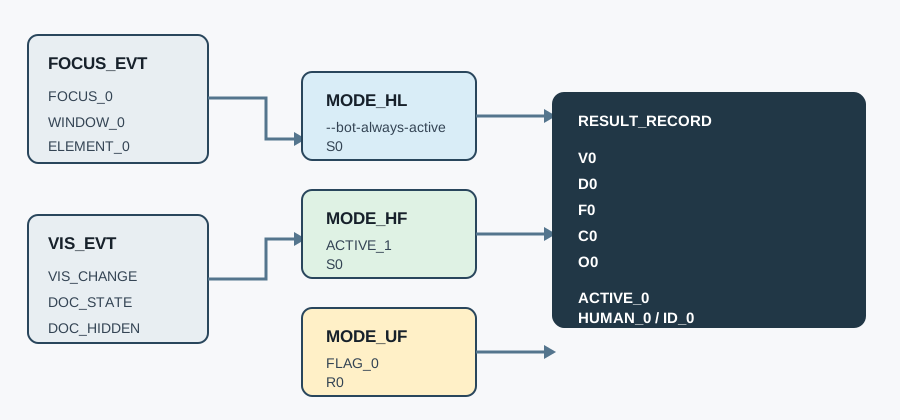
BotBrowser can keep a declared browser context reporting an active window state, including document.visibilityState === "visible" and document.hidden === false when --bot-always-active is enabled. That capability is narrower than a foreground desktop window, a human operator, an identity signal, or a guarantee that a physical display is in front of someone. The active window documentation covers the flag and its default; this article adds a semantic comparison of focus events and Page Visibility, a headless/headful fixture, and a privacy-minimized evidence record. For a broader fingerprinting boundary, see browser fingerprinting basics.
TL;DR
focusandblurdescribe window or element focus transitions;visibilitychange,document.visibilityState, anddocument.hiddendescribe whether a document is visible to the user agent.--bot-always-activekeeps protected active-window patterns in BotBrowser PRO and above (default enabled), but active does not mean human, unique, trusted, or guaranteed foreground.- Compare headless and headful runs with the same profile, page, and fixture. Record
visibilityState,hidden, focus-event counts, flag state, and a bounded outcome, not page content or account identifiers. - A normal browser may report
hiddenfor an unfocused tab, a minimized window, a covered window, or a backgrounded document. The exact event sequence is browser- and platform-mediated. - If the flag is unavailable or deliberately disabled, let the page observe the ordinary browser result and use a product fallback. Do not synthesize a fake human-activity claim.
Contents
- Focus is not Page Visibility
- What active-window emulation changes
- Build a three-mode comparison fixture
- Read visibilityState and document.hidden
- Use the flag and its fallback deliberately
- Minimize evidence and privacy claims
- Troubleshoot the first divergent field
- Practical conclusion
Focus is not Page Visibility
The W3C Page Visibility 2 specification defines the document visibility model and the visibilitychange event. The model answers whether a document is visible in the browser's presentation context; it does not answer whether a person is watching, whether the top-level operating-system window has keyboard focus, or whether a monitor is powered on. MDN's Page Visibility API guide likewise describes visibility as a lifecycle signal that can change when a tab is backgrounded, a window is minimized, or a document is otherwise not visible.
focus and blur belong to a different layer. Window focus indicates which browsing context receives focus, while element focus indicates which control receives keyboard input. A focused document can still be obscured by another window, and a visible document can contain no focused element. A blur event can be emitted when focus moves to another window without proving that the document became hidden. Conversely, a document may become hidden while focus-related events are absent or ordered differently on a particular platform. Treat each event as an observation, not as a substitute for the other API.
For display context comparisons, pair this fixture with device pixel ratio policy and screen and viewport properties; those pages cover geometry, while this page covers lifecycle state.
The practical rule is to listen to visibilitychange for work that should pause or resume with document visibility, and to use focus events only for interactions that genuinely depend on keyboard or window focus. Do not infer identity from either. A site that labels every blur as “the user left” will misclassify a tab switch, a developer-tools window, a remote desktop transition, or an accessibility workflow. A site that labels every visible document as “the user is present” will make the opposite error.
Use a small state record to keep the layers separate:
| Signal | Browser meaning | Not proven |
|---|---|---|
focus / blur | A window or focused element changed focus | Human attention, identity, or physical foreground |
visibilitychange | The document visibility state changed | Monitor power, user intent, or reading |
document.visibilityState | Current document state such as visible or hidden | A universal platform state across browsers |
document.hidden | Boolean convenience view of document visibility | Human presence or trust |
This separation adds the semantic test boundary missing from the BotBrowser active-window docs: configuration is documented there, while each observable receives an explicit meaning and a bounded test here.
What active-window emulation changes
With --bot-always-active enabled, BotBrowser maintains protected active-window behavior even if the host window is unfocused. The active-window documentation states that the flag is enabled by default for PRO and above, works in headless and headful modes, and keeps document.hidden false in its examples. That is a controlled browser behavior for an authorized profile, not a report about a person or a desktop session.
The flag can affect the values and event patterns exposed to page JavaScript. A page may see document.visibilityState remain visible, document.hidden remain false, and a visibility transition fail to occur when a host window loses focus. Focus APIs and events are still browser-managed and can have their own timing. A fixture should therefore record the values it actually reads instead of asserting that every focus event disappears.
The emulation also has a product boundary. It does not make an unsupported browser API appear in a third-party browser, repair an application's state machine, or guarantee that the operating system paints a foreground window. It cannot prove that a real operator is present, that a profile belongs to a particular person, or that a server should accept the session. Those conclusions require authorization and application-level evidence outside Page Visibility.
The Document.visibilityState reference is useful when choosing assertions. The property is a snapshot; visibilitychange is the notification that the snapshot changed. Read the property inside the event handler and include the event count in diagnostics. A stale cached value can make a page appear inconsistent even when the browser behaved correctly.
Build a three-mode comparison fixture
A useful fixture has one same-origin page, one synthetic identifier, and three declared modes: headless with active emulation, headful with active emulation, and a headful tab intentionally unfocused with the flag disabled. Keep browser version, operating system, profile revision, and page revision fixed between runs. The fixture should not navigate to a real account, collect typed text, or call a detector service.
The following page script records only bounded browser observations. It counts events rather than storing timestamps or event details, and it exposes a button so the test harness can sample a second snapshot after a controlled transition.
const result = {
  fixtureId: 'visibility-boundary-01',
  flag: 'unknown',
  visibilityState: document.visibilityState,
  hidden: document.hidden,
  focusEvents: 0,
  blurEvents: 0,
  visibilityChanges: 0,
  outcome: 'initial',
};

window.addEventListener(
  'focus',
  () => {
    result.focusEvents += 1;
  },
  { passive: true }
);
window.addEventListener(
  'blur',
  () => {
    result.blurEvents += 1;
  },
  { passive: true }
);
document.addEventListener('visibilitychange', () => {
  result.visibilityChanges += 1;
  result.visibilityState = document.visibilityState;
  result.hidden = document.hidden;
});

window.sampleVisibility = flag => ({
  ...result,
  flag,
  visibilityState: document.visibilityState,
  hidden: document.hidden,
  outcome: 'sampled',
});
Use a table with explicit expected semantics, not a detector score:
| Mode | Flag | Host action | Expected record shape |
|---|---|---|---|
| Headless | enabled | No desktop window | visible, false, bounded events |
| Headful | enabled | Unfocus host window | visible, false, bounded events |
| Headful | disabled | Switch to another tab | hidden or visible according to browser context |
The last row is intentionally qualified. The Page Visibility specification defines the state model, but the browser and operating system decide when a document is considered visible. A covered, minimized, picture-in-picture, embedded, or backgrounded context can have different behavior. The fixture should report the observed value and leave the expected branch explicit in the test metadata.
BotBrowser supports active-window emulation fixture replay and comparison, but BotBrowser cannot prove a physical display, a human, or a remote website's detector decision. The evidence is about the declared profile and browser build. For lifecycle comparisons, pair this fixture with long-running browser context resilience so lease and recovery evidence stays separate from visibility semantics.
Read visibilityState and document.hidden
document.visibilityState is the most descriptive page-level value. In common implementations, visible means the document is considered visible and hidden means it is not. The MDN property reference lists the possible states for the current browser and explains that the property is read-only. document.hidden is a boolean convenience form: it is true when the document is hidden and false otherwise.
Do not use a cached value from page load to decide whether to resume work. Read the property in the visibilitychange handler, then update application state. A handler can be called after a route transition, a browser suspension, or a tab switch. Make cleanup idempotent and ensure a hidden-to-visible transition cannot resurrect a task that the user already ended.
let taskActive = false;

function readVisibility() {
  return {
    state: document.visibilityState,
    hidden: document.hidden,
  };
}

document.addEventListener('visibilitychange', () => {
  const current = readVisibility();
  if (current.hidden) pauseOwnedTask();
  else if (taskActive) resumeOwnedTask();
});
The code demonstrates ownership, not a universal pause policy. An analytics buffer may flush on visibility changes, while a media player may follow a user preference, and a security-sensitive editor may keep local work available in either state. Avoid using document.hidden as a silent kill switch for essential data saving. If the application needs a browser-specific policy, record the policy name alongside the outcome.
Focus events need their own listeners and cleanup. A focused control can move within a document without any visibility change. A window can lose focus while the document remains visible in a multi-window layout. Record focusEvents and blurEvents as bounded counters, then inspect the first transition that differs. Do not merge them into visibilityChanges just to simplify analytics.
Headless, headful, and an unfocused tab
Headless and headful are execution modes, not human-presence states. A headless page has no ordinary desktop window to focus, yet it can expose a visible document state to page JavaScript. A headful window can be minimized, covered, or switched away from. An unfocused tab can remain visible in some layouts or become hidden when the browser changes its presentation context. These cases are why a fixture needs both mode and observed state fields.
Run the matrix with a synthetic page revision and the same profile. For headless, launch with --bot-always-active and capture the initial and post-navigation samples. For headful, repeat with the host window focused and unfocused. For the control case, use --bot-always-active=false, switch tabs, and capture the browser result. If the operating system cannot provide a deterministic unfocus action in a CI runner, mark the action as unavailable instead of inventing a hidden result.
The useful comparison is not “which mode looks most human.” It is “which browser signal changed, under which declared condition, and did the application respond safely?” A result such as visibilityState: "visible" with zero visibilityChanges says the fixture saw a stable visible state. It does not say that an operator was watching. A result such as hidden: true after a tab switch says the browser reported a hidden document. It does not say why the switch happened or who performed it.
The Page Visibility API guide also cautions that visibility affects background work and timers. Do not turn a timing difference into an identity classifier. If a page throttles work when hidden, test the application outcome and cleanup path, not an assumed number of milliseconds. Browser scheduling, power policy, and profile configuration can all change timing without changing the visibility contract.
Use the flag and its fallback deliberately
The flag is a configuration choice, not an application API. In a PRO profile it is enabled by default, but a test can pass --bot-always-active=false to exercise ordinary browser behavior. Verify the effective launch arguments and license tier before interpreting results. A lower tier or an unsupported build may ignore the flag; the correct evidence is the actual capability and outcome record, not a hoped-for value.
When emulation is unavailable, keep the page useful. Feature-detect the APIs you need, respect the browser's visibility result, and make pause, resume, save, and retry behavior explicit. Do not replace a missing visibilitychange event with a timer that claims a foreground state. A fallback can say “background lifecycle observed” or “visibility support unavailable” while preserving the user workflow.
For a production fixture, record flagRequested, flagEffective, and fallback separately. flagRequested: true means the launcher asked for emulation; flagEffective: false means the browser or entitlement did not provide it; fallback: ordinary-visibility means the application continued under normal browser semantics. This prevents a configuration typo from being misread as a detector finding.
The advanced features reference describes the flag's protected patterns and default. Keep that documentation link close to operational runbooks, but keep customer-facing conclusions scoped: active state is a consistency feature for an authorized browser context, not a promise of foreground rendering or identity continuity.
Minimize evidence and privacy claims
A visibility fixture can answer whether a browser exposed a value and whether the page handled an event. It should not become a presence tracker. Store a short record such as this one:
{
  "fixtureId": "visibility-boundary-01",
  "browserMode": "headful",
  "flagEffective": true,
  "visibilityState": "visible",
  "hidden": false,
  "focusEvents": 1,
  "blurEvents": 1,
  "visibilityChanges": 0,
  "outcome": "stable-visible"
}
Keep browserVersion, os, profileRevision, fixtureRevision, and testedOn in the test harness metadata when support needs reproducibility. Do not add account IDs, URLs with private paths, DOM text, keystrokes, screenshots of user data, or a cross-site identifier. Delete raw traces after the review window and retain only the bounded outcome needed for a release decision.
The privacy boundary is explicit: active is not human, active is not identity, and active is not guaranteed foreground. A bot can be active; a person can be away; a visible document can be behind another window; a profile can be shared or reassigned. Neither Page Visibility nor active-window emulation proves authorization, account ownership, trust, or consent. Those claims belong to authentication, access control, and documented application policy.
Use privacy-minimized evidence in support tickets. A reviewer needs the first divergent field, mode, flag outcome, and browser build. They rarely need a full event trace. Redaction also prevents a visibility experiment from leaking the page's business workflow. The BotBrowser responsible-use guidance should govern authorized testing and retention decisions.
Troubleshoot the first divergent field
Start with configuration. If flagEffective is false, verify the PRO entitlement, exact argument spelling, profile loading, and browser build before inspecting page code. If the flag is effective but visibilityState differs, compare mode, host action, and the browser context that owns the document. A headful unfocus action that failed is not evidence of a hidden document.
Next inspect event ordering. If visibilityChanges is zero but blurEvents is one, the window lost focus without a document visibility transition. If visibilityChanges is one, read the state inside the handler and compare it with the final snapshot. If the final state is visible after a hidden transition, check whether the task was ended while hidden and whether the handler correctly ignored a stale resume.
When a page reports a detector result, separate it from the fixture. A third-party script can combine many signals, and a pass or fail label does not prove why it changed. Reproduce the bounded fixture first, then review the detector's documented behavior with the site owner. Never send account data or production credentials to make a visibility test appear more realistic.
The handoff should contain fixtureId, browserMode, effective flag, first changed field, expected branch, observed branch, and next action. If the branch is unknown because the runner could not unfocus a window, say action-unavailable and rerun on a supported display. BotBrowser can validate the browser-side state machine; it cannot manufacture a desktop event that the runner did not provide.
Public sources
- W3C Page Visibility 2
- MDN: Page Visibility API
- MDN: Document.visibilityState
- BotBrowser: Active Window Emulation
- BotBrowser: Advanced Features, active-window emulation
- BotBrowser: Responsible Use
Practical conclusion
Treat active-window emulation as a bounded consistency control. Use visibilitychange, document.visibilityState, and document.hidden for document lifecycle decisions, and keep focus and blur in their own interaction layer. Compare headless, headful, and unfocused-tab fixtures with the same declared profile, record only coarse outcomes, and exercise --bot-always-active=false as the ordinary-visibility control. The result can show what one browser context exposed; it cannot prove a human, an identity, consent, or guaranteed foreground. Keep the fallback useful, the evidence minimal, and the first divergent field easy to reproduce.
This article is part of the guide: What Is a Browser Fingerprint?
Related Articles
Device Pixel Ratio Policy with --bot-dpr
FingerprintScreen and Viewport Properties for Responsive Design
FingerprintScreen and Window Fingerprinting: Display Tracking
FingerprintSafe External URL Handling for Browser Profiles
FingerprintBrowser Privacy Basics for Everyday Use
FingerprintText Measurement Fingerprinting: Sub-Pixel Tracking
Take BotBrowser from research to production
The guides cover the model first, then move into cross-platform validation, isolated contexts, and scale-ready browser deployment.